
Syncios Location Changer Review: Does It Deliver on Its Claims?
Many users have heard about occasional crashes or errors and want to see a full app review before trying out Syncios Location Changer. If you're looking to verify reliability, usability, and cost-effectiveness before investing time or money, this article provides a detailed Syncios Location Changer review.
From installation and setup to teleporting and simulating GPS movement, we'll explore its strengths, weaknesses, how it works, and more.
- Part 1: Syncios Location Changer: Overview & Key Features
- Part 2: Syncios Location Changer: Security & Pricing
- Part 3: Syncios Location Changer: How to Use
- Part 4: Syncios Location Changer: Strengths & Shortcomings
- Part 5: FAQs about Syncios Location Changer
- Part 6: What Could Better than Syncios Location Changer
Part 1: Syncios Location Changer: Overview & Key Features
Brief Overview:
This desktop tool lets you fake or spoof the GPS location on your iPhone or Android device without jailbreaking or rooting. You can teleport your GPS anywhere in the world or simulate movement along custom routes for apps like AR games, social media, or dating apps.
It works by connecting your phone to a Windows or Mac computer and overriding the device's real location. The program also lets you save favorite locations and adjust movement speed for more realistic tracking. Overall, it provides a simple way to control your virtual location for privacy, gaming, or region-restricted content.
Main Features:
|
Core Characteristics
|
Further Explanation
|
|
Simulate GPS Movement |
Customize routes and adjust movement speed for realistic location simulation. |
|
360°Joystick Control |
Precise control over direction and movement for lifelike GPS behavior. |
|
Compatibility |
Works with most location-based apps like Pokémon GO, Tinder, Snapchat, Life360. |
|
Exclusive Safety Tools |
Features like Cooldown Time, Historical Records, and Favorites for safe and fast use. (What's the Pokemon GO cooldown chat?) |
|
No Jailbreak/Root Needed |
Fully functional without modifying iOS or Android system restrictions. |
|
System Support |
Compatible with iOS 26 and Android 15, according to its offical website. |
|
Teleport Mode |
Instantly set your GPS location anywhere in the world with one click. |
|
Favorite Locations |
Save frequently used locations for quick access in future sessions. |
Part 2: Syncios Location Changer: Security & Pricing
Security Features of Syncios Location Changer:
- No jailbreak or root required - works without modifying your device's system, reducing security risks.
- Conceals real GPS location to protect privacy from unauthorized access.
- Official download with clean files - typically safe, without malware/spyware.
- Secure purchase process - payments are SSL-secured with encryption.
- Free updates and technical support to maintain security and fix issues.
Pricing Options for Syncios Location Changer:
- 1-Month Subscription: ~$24.95/month for 1 device/1 PC (auto-renewable).
- 1-Year License: ~$29.95/year (often discounted, auto-renewable).
- Lifetime License: ~$39.95 one-time payment for permanent use.
- Free trial available to test basic features before buying.
- Occasional discounts/sales (up to ~66% off) are offered.
Part 3: Syncios Location Changer: How to Use
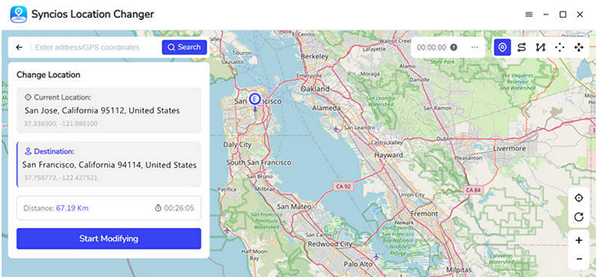
To change your device's GPS location using Syncios Location Changer, first register the software, connect your phone, and select Teleport Mode. Then, choose a destination on the map and click "Start Modifying" to instantly spoof your location in any app.
Detailed Steps:
- Launch Syncios Location Changer on your computer and click Menu > Register.
- Enter your registration email and license code to activate the software.
- Unlock your phone and connect it via USB, then tap Trust if prompted. (What if your phone is locked?)
- Click Next to prepare your device for location changes.
- Select Teleport Mode in the upper-right corner.
- Click on the map or use the search bar to choose your desired location.
- Review the coordinates, address, and distance, then click Start Modifying.
- Open any app to confirm that your device's GPS location has been successfully changed.
Part 4: Syncios Location Changer: Strengths & Shortcomings
Syncios Location Changer offers powerful features like GPS teleportation, simulated movement, and compatibility with many location-based apps, making it a versatile tool for privacy, gaming, and social apps. However, it can be occasionally unstable, requires a computer to use, and some advanced features are only available in the paid version. Here's the specific info:
|
Strengths
|
Shortcomings
|
|
No jailbreak or root required. |
Requires a computer to use. |
|
Works with many location-based apps (games, social, dating). |
Some advanced features may need a paid license. |
|
Teleport GPS to anywhere instantly. |
Not guaranteed to work with all apps due to anti-spoofing protections. |
|
Simulate movement with custom routes and speed. |
Can be confusing for beginners. |
|
360 degree joystick control for realistic movement. |
Occasionally unstable, causing unexpected crashes or errors. |
|
Privacy protection by hiding real location. |
Subscription pricing may be high for casual users. |
Part 5: FAQs about Syncios Location Changer
Q1: Can I save favorite locations and routes for repeated use?
Yes. The tool allows you to save frequently used locations and historical routes, making it easy to quickly switch to favorite spots or repeat movements without setting them up again each time.
Q2: Do I need a constant internet connection to use it?
A connection is needed to install the software, register, and sync GPS changes, but the movement simulation and location teleportation itself do not heavily rely on continuous internet once configured.
Q3: Can it be used on multiple devices?
Yes, but licenses are generally tied to a specific number of devices or computers. For multiple phones, you may need to purchase additional licenses depending on the plan.
Part 6: What Could Better than Syncios Location Changer
So, what's the best alternative to Syncios Location Changer? Virtual Location Tool offers features to let you change or spoof your device's GPS location more precisely. Many users find it more affordable while still delivering stable performance and reliable results across apps and games.
Its combination of lower pricing and effective location spoofing makes it a strong choice for users seeking a budget-friendly yet capable GPS changer.cts in a table:
Here's a comparison table showing why Virtual Location Tool might be considered better than Syncios Location Changer:
|
Comparison
|
Virtual Location Tool
|
Syncios Location Changer
|
|
Pricing
|
Generally more affordable with flexible plans. |
Slightly higher cost for similar features. |
|
Stability & Performance
|
Often more stable with fewer reported crashes. |
Occasional instability reported during complex use. |
|
User Friendliness
|
Intuitive interface that's easy for beginners. |
May be slightly more complex for new users. |
|
Feature Set
|
Smooth teleportation, simulated movement, and frequent updates. |
Strong feature set but sometimes limited by app anti-spoofing. |
|
Compatibility
|
Broad support with regular updates for latest OS versions. |
Good compatibility but updates may lag for some devices. |
|
Support & Updates
|
Responsive support and frequent improvements. |
Support available but updates may not be as frequent. |
How to Use?
- Download and install the Virtual Location Tool on your computer.
- Open the program and click "Get Started" on the main interface.
- Connect your Android or iPhone (models 7 through 17 Pro Max) to the computer using a USB cable.
- Wait a few seconds for the software to detect your device.
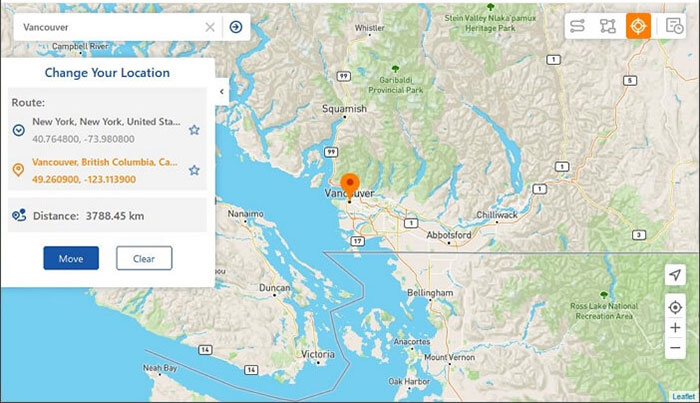
- Select "Teleport Mode" in the upper-right corner.
- Enter your desired location in the search bar or input GPS coordinates for a precise address.
- The map pointer will move to the chosen location.
- Click "Move" to use this location on your phone.


Conclusion
After testing the tool, it's clear that Syncios Location Changer is like a digital compass with a few wobbly needles - mostly pointing you where you want, but sometimes spinning unexpectedly. While it delivers impressive teleportation and movement simulation, its occasional instability reminds us that no tool is perfect.
In the end, whether it becomes your GPS sidekick or a brief experiment depends on how much patience and curiosity you bring to the map. After all, even glitches can lead to unexpected adventures.
Related Articles:
Syncios iOS Data Recovery Review: Recover Lost iOS Files with Ease
Syncios Review - A Complete Review of Syncios Data Transfer & Manager
Syncios WhatsApp Transfer Review: Does This App Perform Well?
5 Means to Share Location on Android Devices with Friends/Family
