
Special Trade Pokemon GO: Latest Guide with Helpful Information
TL;DR:
To truly expand your special trade network beyond the physical distance limit of 100 meters, Virtual Location Tool offers the most reliable method by safely teleporting your GPS location without walking.
This strategy effectively removes the daily barrier of needing nearby trade partners, letting you connect with friends across cities or continents while managing the high Stardust costs through optimized friend grinding. Remember that Virtual Location Tool gives you the freedom to choose your partner, but the final goodbye still rests with you.
"So I get the concept that you get one special trade per day, but I hardly ever see it when I trade with my friends. Can someone explain Special trades to me?" -- from Reddit
This passage focuses on special trade Pokemon GO - a game mechanic that forces players to understand the strict rules around exchanging rare creatures. Many search for this topic to complete their Pokédex with rare Pokémon or to learn how to manage the high costs of Stardust. The following sections break down why the one-per-day limit exists, how friendship levels lower the expense, and more.
- Part 1: What Is Special Trade Pokemon GO
- Part 2: How Many Special Trades Can You Do Per Day in Pokémon GO
- Part 3: How Do Special Trades Work in Pokemon GO
- Part 4: How Much Does a Special Trade Cost in Pokémon GO
- Part 5: How to Reduce Stardust Costs via the Friend System
- Part 6: How to Perform a Special Trade in Pokémon GO
- Part 7: How to Expand Special Trade Network without Risks [Fast]
- FAQs about Special Trade Pokemon GO
Part 1: What Is Special Trade Pokemon GO
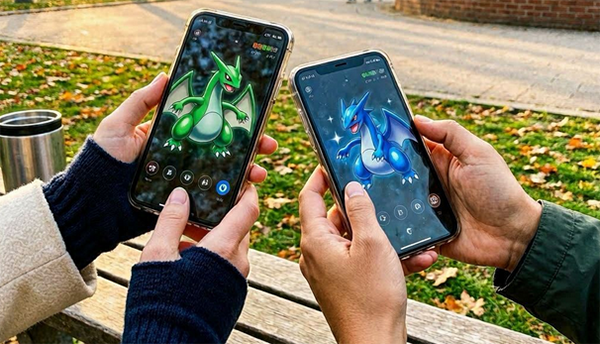
In Pokémon GO, a Special Trade refers to the exchange of rare Pokémon such as Shiny, Legendary, Pokémon not yet registered in your Pokédex, or those wearing special costumes. These trades cost significantly more Stardust than normal trades, and under normal circumstances, each player is limited to just one Special Trade per day.
However, special events or Community Days may temporarily increase this daily limit, and raising your Friendship level with another player can greatly reduce the Stardust cost required.
You Might Need: How to Get Jirachi/385 in Pokémon GO? Full Analysis 2026
Part 2: How Many Special Trades Can You Do Per Day in Pokémon GO
In Pokémon GO, you can normally do 1 Special Trade per day, and the limit resets at midnight local time. Special Trades include Shinies, Legendaries, Ultra Beasts, and unregistered Pokémon.
During certain events, Niantic increases this limit:
- Trade Days (2026): +1 extra Special Trade per day with bonus Stardust discounts.
- Community Days: up to 3 Special Trades during the event window.
- Pokémon GO Wild Area 2026: up to 6 Special Trades per day for ticket holders.
These boosts are temporary, and the normal 1-per-day limit returns after the event ends.
Part 3: How Do Special Trades Work in Pokemon GO
Special Trades are trades that involve rare or restricted Pokémon and follow extra rules compared to normal trades. A trade becomes a Special Trade when it includes Pokémon such as:
- Shiny Pokémon.
- Legendary or Ultra Beast Pokémon.
- Pokémon not yet registered in your Pokédex (including certain forms or costume variants).
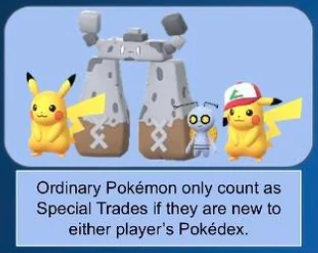
How Special Trades work
- They use the same trading system as normal trades (you still need to be near your friend and spend Stardust).
- They usually have a higher Stardust cost, especially if the friendship level is low.
- You can normally do only 1 Special Trade per day, unless an event increases the limit.
- The Pokémon you receive has re-rolled IVs, meaning its stats change after the trade.
- Both players must confirm the trade before it completes.
Once you complete a Special Trade, you cannot do another one until the daily reset (or until event bonuses allow extra trades).
Further Exploration: Pokémon GO AR Not Working? 10 Quick Fixes & Helpful FAQs
Part 4: How Much Does a Special Trade Cost in Pokémon GO
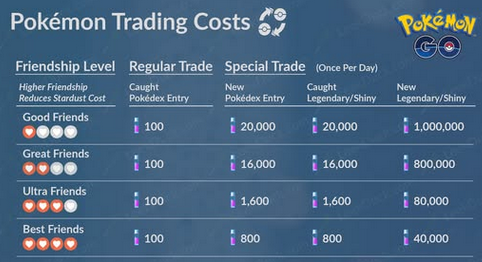
The cost of a Special Trade depends mainly on your Friendship Level and whether the Pokémon is registered in your Pokédex or not. Special Trades can range from very cheap to extremely expensive, depending on friendship level and Pokédex status.
Special Trade Stardust Cost
- Best Friends: 800 (registered)/40,000 (unregistered or Legendary/Shiny)
- Ultra Friends: 1,600/80,000
- Great Friends: 16,000/800,000
- Good Friends: 20,000/1,000,000
For a more visual explanation, check out the image below:
Key Takeaway
- The cheapest Special Trade is 800 Stardust (Best Friends, registered Pokémon).
- The most expensive is 1,000,000 Stardust (Good Friends, unregistered Legendary/Shiny).
Part 5: How to Reduce Stardust Costs via the Friend System
Trading in Pokémon GO can quickly become expensive, especially when Special Trades involve rare Pokémon like Legendaries or Shinies. Fortunately, the game's Friendship system plays a major role in reducing Stardust costs if you use it consistently.
Ways to reduce Stardust costs via the Friend system
- Increasing your Friendship Level is the most effective method, because each stage - Good Friend, Great Friend, Ultra Friend, and Best Friend-gradually lowers the Stardust required for Special Trades, with the biggest savings appearing at higher levels.
- Interacting with friends daily by sending and opening Gifts, participating in raids together, or battling in Gym and Trainer Battles helps steadily raise your Friendship Level over time, which directly reduces future trade costs.
- Reaching Best Friend status is especially valuable because it gives the maximum Stardust discount, making even rare Special Trades significantly more affordable compared to lower friendship tiers.
Part 6: How to Perform a Special Trade in Pokémon GO
Performing a Special Trade in Pokémon GO is straightforward once you meet the basic requirements like being near your friend and selecting eligible Pokémon. The steps below explain how to start a trade, choose a Special Trade Pokémon, and confirm the exchange.
- First, make sure you and your friend are at least within 100 meters of each other and both are Trainer Level 10 or higher, since trading only works locally and requires basic eligibility. (Pokemon GO fails to detect location error 12?)
- Open your Friend List, tap the friend you want to trade with, then select the Trade option to start the trading session once you are nearby.
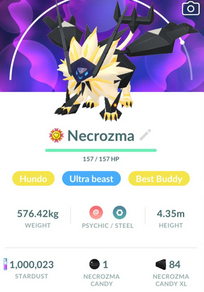
- Choose the Pokémon you want to trade; if it is a Shiny, Legendary, Ultra Beast, or not registered in the Pokédex, the game will automatically label it as a Special Trade.
- Check the Stardust cost, confirm the trade, and both players must accept before the exchange is completed.
Part 7: How to Expand Special Trade Network without Risks [Fast]
Virtual Location Tool is a GPS location changer that allows you to instantly teleport your phone's GPS to any location globally with a single click. This ability, combined with support for managing up to ten devices simultaneously, can help businesses expand their network of operations by virtually testing location-based services or unlocking region-specific business opportunities.
Crucially, this tool employs advanced anti-detection mechanisms designed to ensure that this virtual expansion is performed safely and securely, without compromising your account security.
|
Virtual Location Tool - Features
|
Main Details
|
|
One-click Location Change (PoGo & MHN) |
Instantly change GPS location in original Pokémon GO and Monster Hunter Now with just one click-no modified or cracked apps required. |
|
360° Joystick Movement |
Provides smooth virtual walking with realistic route simulation and speed control for natural in-game movement. |
|
Bluetooth Safe Mode |
Uses Bluetooth connection to help reduce Error 12 issues and lower soft-ban risk for a safer gameplay experience. |
|
Advanced Game Tools |
Includes PoKo Assistant features such as auto-raid, auto-Grunts battles, enhanced throws, Virtual GO Plus, and raid mapping (including Dynamax raids). |
|
Multi-Device Support & Cloud Sync |
Allows connection across multiple devices with cloud storage for syncing location settings and gameplay data. |
|
LBS App Location Spoofing |
Works with apps like Snapchat, Life360, Tinder, and others, with a free trial available for new users. |
|
Compatibility |
Supports the latest iOS 26.4 and Android 16, ensuring compatibility with updated devices and systems. |
Free and Secure Download:


How to expand Pokemon GO special trade network without risks using Virtual Location Tool?
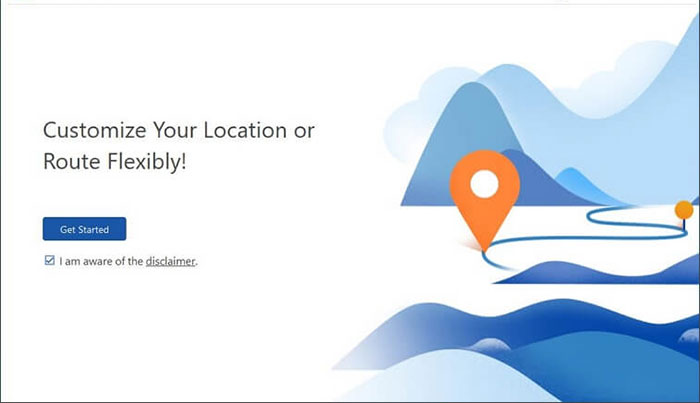
Step 1 - Install and Launch: Download and install the location/network changer on your computer, then launch the application and click "Get Started."
Step 2 - Connect and Select Mode: Connect your Android or iOS device to the computer using a USB cable, and once recognized, select "Teleport Mode."
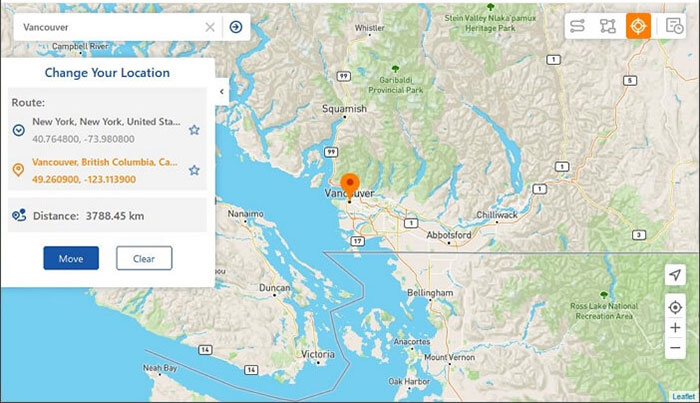
Step 3 - Set Location and Confirm: Enter your desired location or coordinates in the search bar, click "Move," and wait for the "Completed" message to confirm your device's location has been updated. You can now do Special Trade quickly without walking.
FAQs about Special Trade Pokemon GO
Q1. What is 1 Extra Special Trade in Pokémon GO?
It refers to a temporary bonus that allows players to perform one additional Special Trade beyond the normal daily limit, usually during specific events or Community Days.
Q2. Can I trade any Pokémon as a Special Trade?
No, only certain Pokémon like Shinies, Legendaries, Ultra Beasts, or unregistered Pokémon count as Special Trades.
Q3. Does friendship level affect Special Trade cost?
Yes, higher friendship levels significantly reduce Stardust costs, with Best Friends paying the least.
Q4. Can I do Special Trades from far away?
No, trading requires both players to be within close physical distance (usually around 100 meters).
Q5. Do Special Trades change Pokémon stats?
Yes, IVs (stats) are re-rolled after the trade, meaning the Pokémon's stats will change.
Q6. Can I undo a Special Trade?
No, once a trade is confirmed, it cannot be reversed.
Q7. Are Special Trades guaranteed to be lucky?
No, but they can become Lucky Trades if both players are Lucky Friends or under Lucky Trade conditions.
In the End
There you have it! A special trade is not a test run. Once a Pokémon is traded, it cannot be traded back, making each decision permanent. What leaves your storage never returns. Before you tap that final button, ask yourself: is this trade worth a goodbye you cannot undo?
Related Articles:
Pokemon Go Routes Not Working? Causes & 11 Workable Methods
How to Download & Play Android Games on PC in 7 Ways [Fluent]
15 Most Effective Ways to Hatch Eggs in Pokemon GO without Walking
3 Tested Methods to Back Up Android Game Data to Computer/PC
