Aiseesoft iOS Data Backup and Restore Review: Is It Worth It?
Many iPhone users turn to desktop tools like Aiseesoft iOS Data Backup and Restore when iTunes or iCloud feels limited for managing backups and restoring important data. Before choosing any paid solution, it is common to check whether the software is truly effective for iPhone backup and restore before spending money.
This Aiseesoft iOS Data Backup and Restore review will look at its overall performance and also introduce a greater alternative for users who need more flexibility in daily iPhone data management.
- Part 1: Aiseesoft iOS Data Backup and Restore - Quick Overview
- Part 2: How to Use Aiseesoft iOS Data Backup and Restore
- Part 3: Aiseesoft iOS Data Backup and Restore - Pricing & Ratings
- Part 4: Why Choose or Not Choose Aiseesoft iOS Data Backup and Restore
- Part 5: Best Replacement for Aiseesoft iOS Data Backup and Restore
- FAQs about Aiseesoft iOS Data Backup and Restore
Part 1: Aiseesoft iOS Data Backup and Restore - Quick Overview
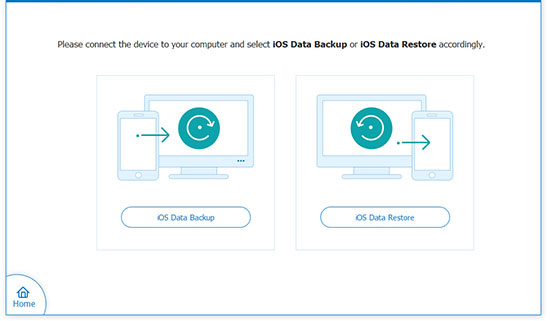
Aiseesoft iOS Data Backup and Restore is a desktop tool that helps users back up and restore data from iPhones, iPads, and iPods without relying completely on iTunes or iCloud. It supports files such as contacts, messages, photos, WhatsApp chats, call logs, notes, and Safari data, while also offering encrypted backups and selective restoration options.
According to reviews from Techjockey and other software review sites, the program is appreciated for its simple interface, fast backup speed, and ability to preview backup content before restoring. Some reviewers also mention limitations, including restricted features in the trial version and fewer advanced functions compared to certain competing iOS management tools.
|
Main Feature |
Core Details
|
|
Selective Backup |
Lets users choose specific data types instead of backing up the entire device |
|
One-Click Backup |
Quickly saves iPhone or iPad data to a Windows PC or Mac |
|
Selective Restore |
Restores only chosen files instead of overwriting all device data |
|
Preview Before Restore |
Allows previewing contacts, messages, photos, and other files before recovery |
|
Encrypted Backup |
Offers password protection for private or sensitive data |
|
WhatsApp & App Data Support |
Supports Contacts, SMS, media, WhatsApp, LINE, Kik, Messenger, app attachments, etc. |
|
No Data Overwrite |
New backups can coexist with older backups instead of replacing them |
|
Wide Device Compatibility |
Works with many iPhone, iPad, and iPod models and recent iOS versions |
|
Restore to Computer or Device |
Files can be restored directly to an iPhone/iPad or exported to a computer |
|
User-Friendly Interface |
Features simple navigation suitable for non-technical users |
Part 2: How to Use Aiseesoft iOS Data Backup and Restore
Managing iPhone data safely often requires a reliable backup solution to prevent accidental loss of important files like photos, messages, and contacts. Aiseesoft iOS Data Backup and Restore offers a straightforward way to back up and restore iOS data, and the steps below explain how to use it effectively.
- First, download and install the tool on your Windows or Mac computer.
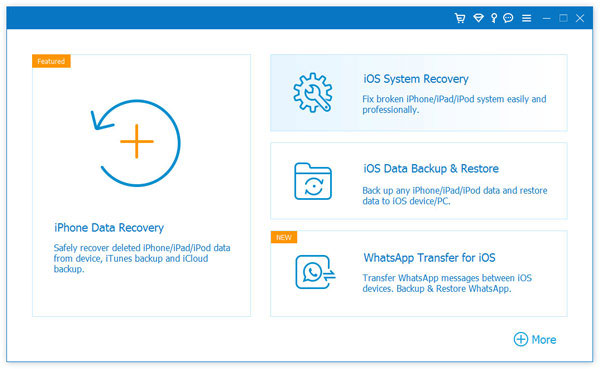
- Launch it and connect your iPhone, iPad, or iPod using a USB cable.
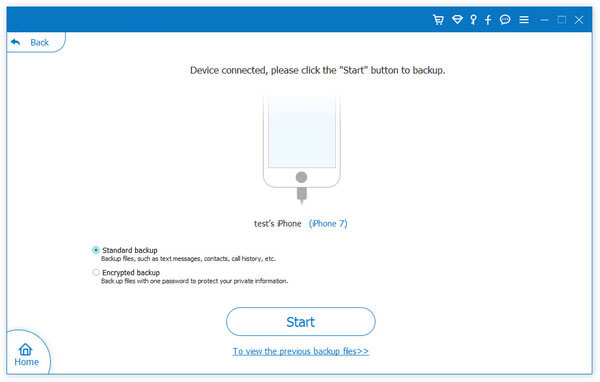
- Choose "iOS Data Backup & Restore" from the main interface, then select either Standard Backup or Encrypted Backup depending on your security needs and start.
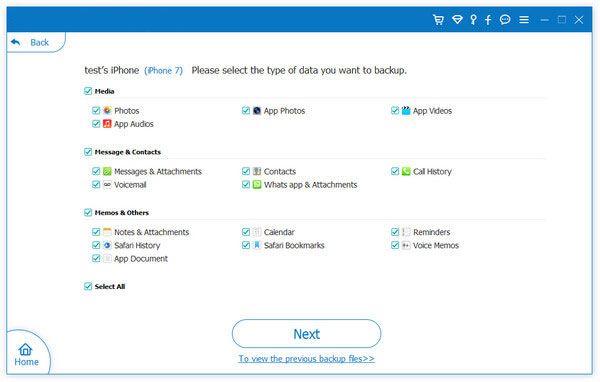
- Next, select the types of data you want to back up, such as contacts, messages, photos, WhatsApp, or notes, and click "Next" to start the backup process.
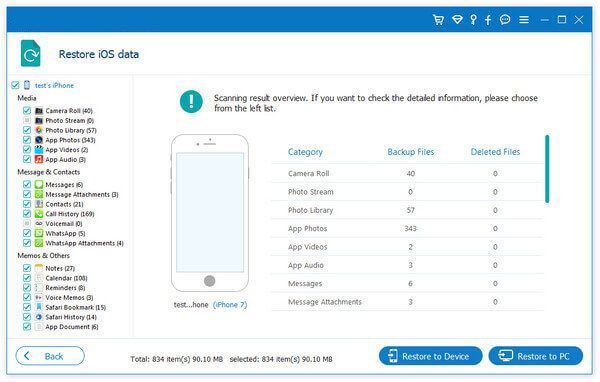
- To restore data, open the restore mode, choose a backup file from the list, preview the contents, then select items and click "Restore to Device" or "Restore to PC."


Part 3: Aiseesoft iOS Data Backup and Restore - Pricing & Ratings
Aiseesoft iOS Data Backup and Restore - Pricing:
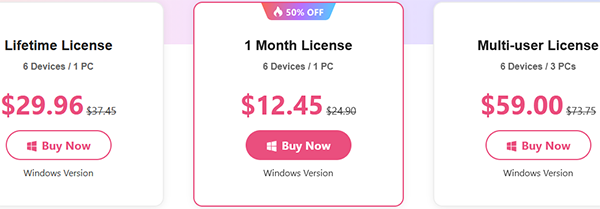
On the official Aiseesoft purchase page, the product is available in different license plans for Windows and Mac users. Current official pricing examples include:
- 1-Month License: around $12.45 (discounted price).
- Lifetime License: around $29.96 for 1 PC.
- Business License: around $59.00 for multiple PCs/devices.
Aiseesoft also provides a 30-day money-back guarantee for eligible purchases.
Aiseesoft iOS Data Backup and Restore - Ratings:
Techjockey rating: 4.4/5 based on user ratings. Aiseesoft official site: 89 user reviews displayed on the product page. Users commonly praise:
- Simple and beginner-friendly interface.
- Selective backup and restore.
- Backup preview before restoration.
- Ability to avoid overwriting old backups.
Some users mention drawbacks such as: Limited functions in the free trial.
Part 4: Why Choose or Not Choose Aiseesoft iOS Data Backup and Restore
Why Choose Aiseesoft iOS Data Backup and Restore?
- Selective backup and restore options.
- Supports photos, messages, WhatsApp, contacts, and more.
- Encrypted backups for privacy.
- Keeps multiple backups without overwriting.
- Beginner-friendly interface.
- Works offline on Windows and Mac.
- Fast backup and stable device detection.
Why Not Choose It?
- Free trial has limited features.
- Fewer advanced tools than some competitors.
- Backup selection is category-based, not file-based.
- Lacks advanced device management features.
Part 5: Best Replacement for Aiseesoft iOS Data Backup and Restore
A useful alternative to Aiseesoft iOS Data Backup and Restore for non-social app backup needs is a safer and more lightweight iOS management solution that focuses on core data like contacts, messages, photos, and videos. In this space, MobiKin Assistant for iOS (Windows/Mac) is a practical tool because it enables fast backup and transfer of essential iPhone data without relying on iTunes or cloud services.
It provides a simple way to manage and export device content to a computer, making it ideal for users who want straightforward backup functionality without dealing with social app data complexity.
Overall, this solution provides a fast and flexible way to selectively back up and restore iPhone data directly to your computer without data loss or complications. With selective file handling and full compatibility across different iPhone and iPad models - including the latest devices - it offers a simple and reliable alternative to iTunes for everyday data management.
Back Up iPhone Content with MobiKin Assistant for iOS:
- Launch the installed software on your computer and connect your iPhone to the computer using a USB cable.
- Once the connection is established successfully, the software will automatically detect and identify your iPhone.
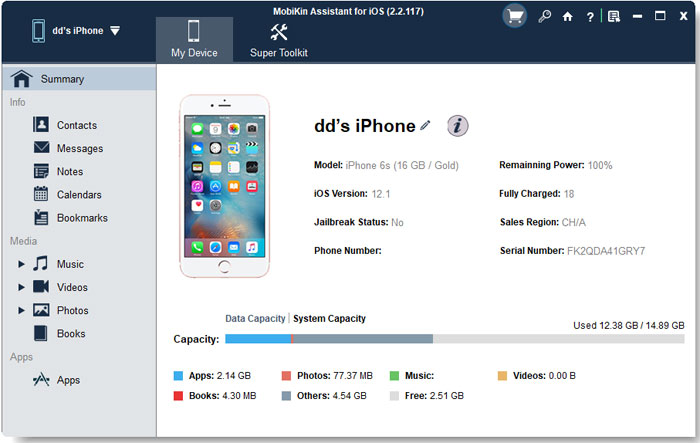
- After this process, you will see the following interface.
- Click on the "Super Toolkit" tab located in the top menu to proceed to the next window.
- Here, you will find an option labeled "iTunes Backup & Restore," which allows you to back up iPhone data to iTunes and restore data from iTunes to your iPhone.
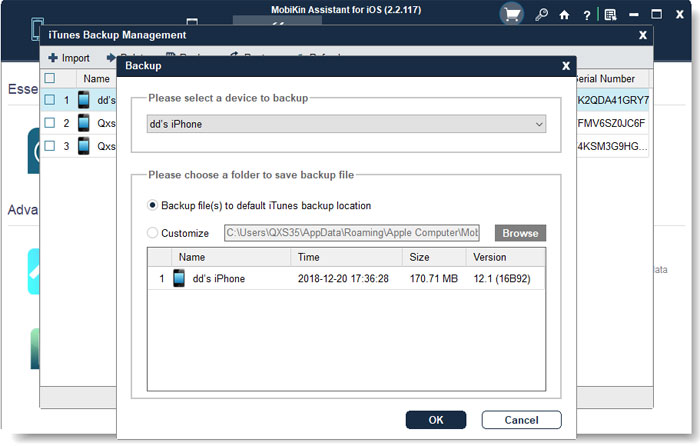
- Select "Backup" from the top menu, and all manageable iOS devices will be displayed.
- Choose your iPhone and select the option to "Backup file(s) to default iTunes backup location."
- Finally, you can click on "OK" to initiate the backup of your iPhone data to iTunes.
Restore iPhone Content with MobiKin Assistant for iOS:
- Open the program and connect your iPhone to the computer using a USB cable. Additionally, wait until the tool recognizes your iPhone.
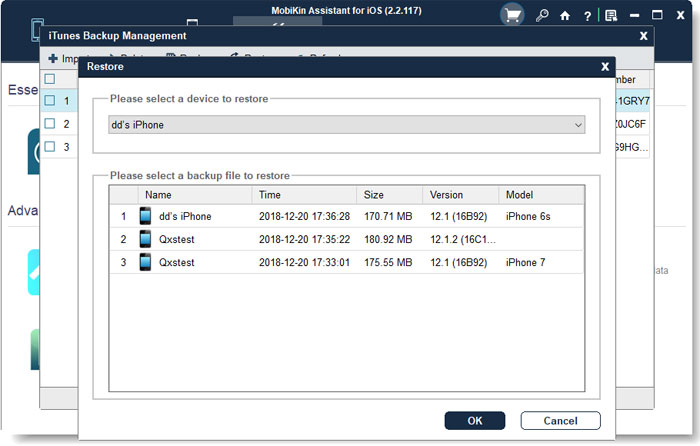
- Navigate to the top menu of the program interface and select "Super Toolkit" > "iTunes Backup & Restore" > "Restore."
- All backup records will be scanned and displayed, from which you should select the backup file you wish to restore and click on "OK" to recover the data from the backup file to your iPhone.
Video Guide:
FAQs about Aiseesoft iOS Data Backup and Restore
Q1. Does it require an internet connection?
No, an internet connection is not required for backup or restore. The process works directly through a USB cable between your iOS device and computer.
Q2. Is it compatible with all iOS devices?
It supports most iPhone, iPad, and iPod models running commonly used iOS versions. However, compatibility may vary slightly depending on the device model and iOS update.
Q3. Can I use it to back up a disabled or broken iPhone?
It may work if the device can still be detected by a computer and trusted via USB. However, if the iPhone is completely unresponsive, backup is usually not possible.
Q4. How long does a backup usually take?
Backup time depends on the amount of data stored on the device. Smaller backups may take a few minutes, while large media-heavy devices may take longer.
Q5. Can I store backups on an external drive?
Yes, after creating a backup on your computer, you can manually move or copy the backup folder to an external drive for extra storage safety.
Q6. What should I do if the device is not detected?
Make sure you are using an original USB cable, have installed the latest iTunes drivers, and trust the computer on your iPhone. Restarting both the device and software may also help.
Q7. What is the most desirable iDevice tool for non-social app backup?
For users who mainly want to back up non-social app data on iPhone, such as contacts, messages, photos, videos, notes, and other personal files, a lightweight and efficient management tool is often more suitable than full chat-focused recovery software.
In this case, MobiKin Assistant for iOS could be the best option because it allows quick data transfer, backup, and management without being centered on social app data like WhatsApp or Messenger. It offers a clean, straightforward way to organize and export iDevice content to a computer while avoiding unnecessary complexity.
Related Articles:
Aiseesoft FoneLab iPhone Data Recovery Review: Recover Lost iPhone Data Easily
6 Aiseesoft FoneLab Android Data Recovery Alternatives [Rewarding]
Aiseesoft MobieSync Review: Overall Performance & Alternative
9 Best iPhone Repair Software to Fix Various iPhone Software Issues