
Compare Fake GPS vs. Lexa Fake GPS Location [Based on Facts]
When comparing Fake GPS vs. Lexa Fake GPS Location, many are trying to decide which app better fits their location-spoofing needs and device conditions before committing to one. It's common to be concerned about ratings, user base, file size, and long-term accuracy, stability, and more, especially as Android systems and app detection methods continue to evolve.
This article on Fake GPS vs. Lexa Fake GPS Location takes a closer look at these factors to help readers make a more informed choice.
- Part 1: Fake GPS vs. Lexa Fake GPS Location: Overview & Deployment
- Part 2: Fake GPS vs. Lexa Fake GPS Location: Pricing & Ratings
- Part 3: Fake GPS vs. Lexa Fake GPS Location: Customer Support & Reviews
- Part 4: Fake GPS vs. Lexa Fake GPS Location: More Features
- Part 5: Fake GPS vs. Lexa Fake GPS Location: Which Is Better
- Part 6: Fake GPS vs. Lexa Fake GPS Location: Best Alternative
Part 1: Fake GPS vs. Lexa Fake GPS Location: Overview & Deployment
The Fake GPS app is a location-spoofing tool that allows users to set a virtual GPS location on their Android devices. It works by enabling mock locations in Developer Options, letting apps believe the device is somewhere else. The app is commonly used for testing, gaming, or privacy purposes, but some location-based apps may detect and block it.
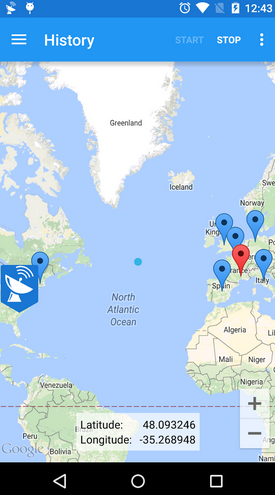
Fake GPS App - Deployment:
- Android smartphones and tablets.
- Requires Android 4.0 or higher.
- Works with most apps needing GPS data.
- Not available for iOS.
The Lexa Fake GPS Location app is an Android tool that lets users simulate a different GPS location on their device. By enabling mock locations in Developer Options, it allows apps to register the chosen location instead of the real one. The app also offers features like speed simulation and saving favorite locations, making it more versatile for gaming, testing, or privacy purposes.
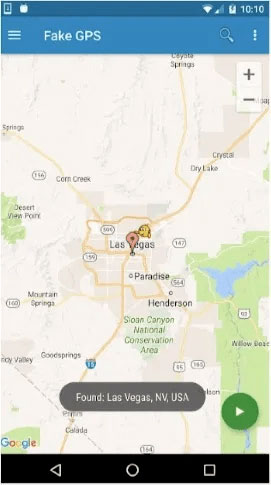
Lexa Fake GPS Location App - Deployment:
- Android smartphones and tablets.
- Requires Android 4.1 or higher.
- Compatible with apps that use GPS, with fewer detection issues.
- Not available for iOS.
You May Also Need: Fake GPS 360 vs. PoGoskill GPS Location Changer: Full Review
Part 2: Fake GPS vs. Lexa Fake GPS Location: Pricing & Ratings
Fake GPS is a free and highly rated GPS spoofing tool for Android, with an average rating of around 4.6-4.7★. It allows users to select locations on a map and works with most apps, making it simple and accessible. However, some apps may detect the spoofed location, which can limit their use in certain cases.
Lexa Fake GPS Location is also free but has a slightly lower rating of about 4.3★ and fewer total reviews. It offers additional features like speed simulation and saving favorite locations, which improve compatibility with apps that rely heavily on GPS. While it may not be as popular as Fake GPS, it provides a more versatile experience for users who need advanced spoofing options.
Part 3: Fake GPS vs. Lexa Fake GPS Location: Customer Support & Reviews
Fake GPS has a stronger user rating with frequent positive feedback, but customers often note a lack of formal support and delayed or absent responses from the developer.
Lexa Fake GPS Location also lacks robust official support and receives more mixed user reviews about its effectiveness and update frequency compared with Fake GPS. (based on review trends and app update patterns)
Here's the concrete comparison:
|
App
|
Customer Support
|
User Reviews & Feedback
|
|
Fake GPS
|
Limited or no direct developer support; some users report not receiving responses to emails. |
Generally positive, praised for reliability and ease of use, though some note issues like outdated instructions, imprecise map control, and occasional problems after updates. |
|
Lexa Fake GPS Location
|
Minimal official support for a free app; users rely mostly on community help. |
Mixed reviews: some users like basic location spoofing features, while others report limited effectiveness and usability concerns due to a lack of updates or developer responses. |
Part 4: Fake GPS vs. Lexa Fake GPS Location: More Features
The table below highlights the key statistics and features of Fake GPS and Lexa Fake GPS Location, showing their user base, ratings, update history, and version. It also summarizes their core capabilities, including GPS spoofing, app compatibility, and extra tools like joystick control, speed simulation, and favorites saving:
|
App
|
Stats & Ratings
|
Key Features
|
|
Fake GPS
|
Users: 19,761,165. Avg rating: 4.62★. Ratings: 95,477. Last updated: 2025-08-05. Version: 5.6.2. |
Basic GPS spoofing with map selection. Joystick and command-style controls. Works with most apps once mock location is enabled. Developer-friendly and good for testing/debugging. Relatively larger app size. |
|
Lexa Fake GPS Location
|
Users: 55,804,150. Avg rating: 4.66★. Ratings: 623,630. Last updated: 2022-08-17. Version: 2.1.2. |
GPS spoofing with favorites saving. Speed simulation and Tasker support. Broad app compatibility and lighter app size. Automation-friendly features. Known for ease of use with minimal setup. |
Part 5: Fake GPS vs. Lexa Fake GPS Location: Which Is Better
When comparing Fake GPS and Lexa Fake GPS Location, both apps effectively spoof your Android device's GPS and serve most basic location-changing needs. Fake GPS is more recent and offers developer-friendly controls and a solid user rating, while Lexa Fake GPS Location boasts a larger user base and convenient features like saved favorites and speed simulation.
For users seeking simplicity and broad compatibility, Lexa tends to be a better everyday choice, whereas those needing extra control and testing tools may prefer Fake GPS. Ultimately, the best app depends on whether you value ease of use or advanced spoofing options.
Part 6: Fake GPS vs. Lexa Fake GPS Location: Best Alternative
For users looking for a more complete GPS spoofing solution, Virtual Location Tool offers precise location changing for both Android and iOS devices. Unlike simpler apps, it provides smooth map control, route simulation, and customizable movement speed, addressing the limitations of Fake GPS and Lexa Fake GPS Location.
Its professional interface and reliable performance make it ideal for gamers, testers, or anyone needing advanced spoofing features.
What Can Vitual Location Tool Do for You?
> Instantly change your GPS location to anywhere in the world with a single click.
> Simulate realistic movement using customized routes and adjustable speeds.
> No rooting or jailbreaking is required to modify the device location.
> Built-in joystick mode allows precise, real-time GPS movement control.
> Save favorite locations and routes for quick reuse.
> Includes a cooldown timer to reduce the risk of soft bans in location-based games.
> Compatible with most location-based apps, such as social platforms, navigation tools, and AR games.
> Supports multi-spot movement to simulate traveling between several locations naturally.
> Offers historical location records for easy route recreation and planning.
> Works on both Android and iOS devices, with Windows and Mac desktop support.
Best alternative to Fake GPS and Lexa Fake GPS Location free download:


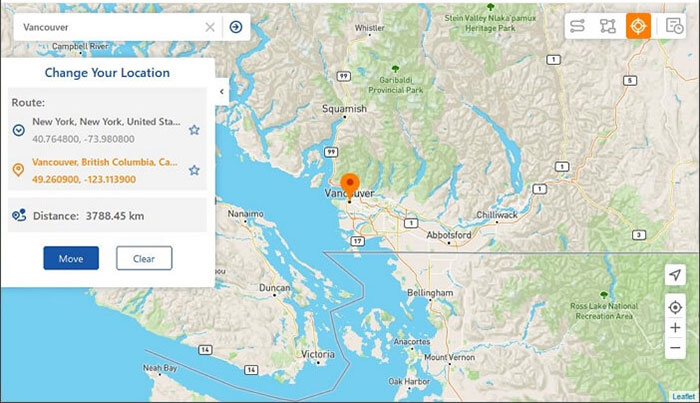
After the download, install the location changer on your computer, then launch it and click "Get Started." Next, connect your Android or iPhone using a USB cable, choose Teleport Mode, and enter the desired location or coordinates. Finally, click "Move", and once the "Completed" message appears, your device's location will update instantly. (Want to change iPhone location without a VPN?)
Final Thoughts
In the end, both Fake GPS and Lexa Fake GPS Location serve basic spoofing purposes, but their limitations often become clear with advanced apps or frequent system updates. That's why many users turn to a more comprehensive solution that offers higher stability, broader compatibility, and finer control over virtual movement.
By combining precision, reliability, and richer features in one tool, Virtual Location Tool could be a smarter alternative for those who want consistent results without the common drawbacks found in basic GPS spoofing apps.
Related Articles:
Why Is My Location Wrong on My iPhone? 10 Ways to Fix It
[100% Success] How to Stop Sharing Location Without Them Knowing
5 Means to Share Location on Android Devices with Friends/Family
Where Are Apps Stored on Android? [Answers & 3 Ways to Find Them]
