
Apeaksoft iPhone Eraser Review: Does It Deliver Consistent Results?
When users look up an Apeaksoft iPhone Eraser review, they are usually trying to confirm how well the tool performs in real situations before trusting it with sensitive data. Key points of interest often include its ability to permanently erase iPhone data without recovery risk, as well as whether there are any drawbacks like cost, detection issues, or support concerns.
This article provides an unbiased Apeaksoft iPhone Eraser review, helping readers understand both its strengths and limitations in a clear and practical way.
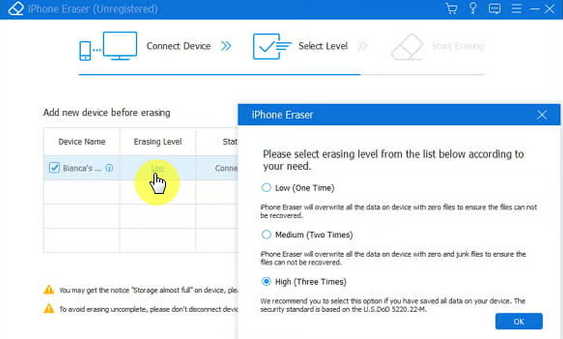
- Part 1: Apeaksoft iPhone Eraser - Overview
- Part 2: Apeaksoft iPhone Eraser - Main Features
- Part 3: Apeaksoft iPhone Eraser - Pricing & Ratings
- Part 4: Apeaksoft iPhone Eraser - Safety & Customer Support
- Part 5: Apeaksoft iPhone Eraser - User Review
- Part 6: Apeaksoft iPhone Eraser - Pros & Cons
- Part 7: Apeaksoft iPhone Eraser - FAQs
- Part 8: Best Apeaksoft iPhone Eraser Replacement - MobiKin Eraser for iOS
Part 1: Apeaksoft iPhone Eraser - Overview
This desktop program helps permanently erase data from iPhone, iPad, and iPod devices to protect personal information before selling, recycling, or giving the device to others. It can remove contacts, messages, photos, apps, and other content with several wiping levels that prevent the deleted data from being recovered.
The software also provides storage-cleaning features, allowing users to delete junk files, large files, and unnecessary apps to free up space on an iOS device.
Part 2: Apeaksoft iPhone Eraser - Main Features
The software provides several tools to securely erase data and optimize storage on iOS devices. The table below highlights the main features that help users permanently remove information and manage device space more efficiently.
|
Main Feature
|
Description
|
|
Permanent Data Erasing |
Wipes all data and settings from iPhone, iPad, or iPod permanently. |
|
Three Security Levels |
Offers Low, Medium, and High levels for different data-wiping security. |
|
Free Up Storage Space |
Removes unnecessary files to increase available device storage. |
|
Junk File Cleanup |
Deletes cache, temporary files, logs, and other junk data. |
|
App Uninstallation |
Finds and removes unwanted apps to free up space. |
|
Photo Management |
Compresses, exports, or deletes photos to optimize storage. |
|
Delete Large Files |
Detects large files and allows quick removal. |
|
Multiple Device Support |
Erases data from several iOS devices at once. |
Part 3: Apeaksoft iPhone Eraser - Pricing & Ratings
Pricing
- 1-Month License: about $14.95 with access to full features for one month and support for up to 6 iOS devices on one computer.
- Lifetime License: around $39.96 for a one-time purchase with lifetime updates and support.
- Multi-User License: approximately $69.96 for multiple computers in a business environment.
- Bundle Options: packages with other Apeaksoft tools are also available at higher combined prices.
Ratings
- MacUpdate: 0.0/5 rating due to no user reviews submitted yet.
- User Feedback: Some reviewers describe it as effective for securely wiping iPhone data and protecting privacy.
- Software Type: Shareware application with both subscription and one-time purchase options.
- General Perception: Typically used when selling or giving away an iOS device to ensure data cannot be recovered.
Part 4: Apeaksoft iPhone Eraser - Safety & Customer Support
Understanding the safety measures and support services of a tool is important before using it to erase sensitive data. The table below outlines the key aspects of data security and customer support offered by Apeaksoft iPhone Eraser.
|
Aspect
|
Key Details
|
|
Data Security |
Uses overwriting technology to permanently erase contacts, messages, photos, accounts, and other files from iPhone, iPad, or iPod so the data cannot be recovered. |
|
Privacy Protection |
Clears all device content and settings to prevent personal information from being tracked after selling or giving away the device. |
|
Secure Operation |
Provides multiple erasing levels that overwrite data several times to ensure thorough destruction. |
|
Customer Support Options |
Offers support channels such as online assistance, business-hours help, and 24/7 live representative services. |
|
Technical Assistance |
Users can contact the support team through official email or support resources if device detection or software issues occur. |
Part 5: Apeaksoft iPhone Eraser - User Review
User experiences with Apeaksoft iPhone Eraser vary across different review platforms, reflecting both its strengths in secure data wiping and some concerns about overall value. The table below summarizes key feedback from G2, Trustpilot, and video reviews to give a clearer picture of real user opinions.
|
Platform - Rating
|
User Feedback
|
|
G2 Reviewer - Marketing Manager 4/5 |
Said the software is easy to use and helps quickly delete all content from an iPhone before selling it. |
|
G2 Reviewer - Capabilities Analyst 4/5 |
Praised the secure erasing levels and ability to wipe devices efficiently, though similar tools may offer comparable functions. |
|
G2 Reviewer - Operations Specialist 4.5/5 |
Noted it is useful for securely erasing customer devices, especially for phone buyback companies handling many phones. |
|
G2 Reviewer - Motion Graphic Designer 4.5/5 |
Appreciated the three erase levels and effective storage cleanup for iOS devices. |
|
Trustpilot UsersMixed (TrustScore about 3/5) |
Some users praise helpful support and working software, while others complain about refund issues or software not meeting expectations. |
Part 6: Apeaksoft iPhone Eraser - Pros & Cons
Pros
- Securely wipes all iPhone/iPad/iPod data permanently to protect privacy before selling or recycling.
- Offers multiple erasing levels (Low, Medium, High) with different overwrite strengths for stronger data protection.
- Helps free up storage by removing junk files, large files, and unused apps to improve device performance.
- Simple interface and quick operation process that makes it easy for non-technical users.
Cons
- Full functionality requires a paid license; the free version is limited.
- No guarantee for recovering accidentally deleted data, so users must back up beforehand.
- Requires a computer connection and iTunes/Finder setup, which may be inconvenient for some users.
- Effectiveness depends on proper device recognition, which may occasionally cause connection issues.
Part 7: Apeaksoft iPhone Eraser - FAQs
Q1: Can deleted data be recovered after using it?
No. The software overwrites device data using different security levels, making recovery extremely difficult or impossible.
Q2: What erasing levels are available?
It provides Low, Medium, and High erasing modes, which apply different numbers of overwrite passes for stronger data removal.
Q3: Which devices and systems are supported?
It supports most iOS devices, including iPhone, iPad, and iPod running iOS 5 and later versions.
Q4: Does it require a computer to work?
Yes, it must be installed on a Windows or Mac computer and connected to the iOS device via USB.
Q5: What should I do if my device is not detected?
Users are advised to update iTunes, change the USB cable or port, and reconnect the device to ensure proper recognition.
Part 8: Best Apeaksoft iPhone Eraser Replacement - MobiKin Eraser for iOS
MobiKin Eraser for iOS (Windows/Mac) is designed to permanently erase almost all content from iPhone and iPad, including personal files, system data, and app information, ensuring nothing can be recovered. It also provides strong privacy protection with multi-level overwriting and deep cleaning features that go beyond a standard factory reset.
With its broad data coverage and system optimization capabilities, it serves as a reliable alternative to Apeaksoft iPhone Eraser for users who need more comprehensive device erasure.
Core Features of MobiKin Eraser for iOS:
- Complete Data Erasure: Permanently wipes most iOS data like contacts, messages, photos, apps, and settings so nothing can be recovered.
- Deep Privacy Protection: Overwrites existing and deleted data to prevent recovery by any tool.
- Erase Private & App Data: Deletes sensitive info such as Safari history, notes, passwords, and social app data.
- Three Erasing Levels: Provides Low, Medium, and High security modes for different wiping strength needs.
- System & Junk Optimization: Removes junk files, caches, and unused apps to free up storage and improve performance.
- One-Click Full Device Wipe: Quickly erases the entire device for resale, donation, or recycling.
- Strong Alternative Advantage: Covers more data types and offers deeper cleanup than Apeaksoft iPhone Eraser.


How to use the best Apeaksoft iPhone eraser alternative?
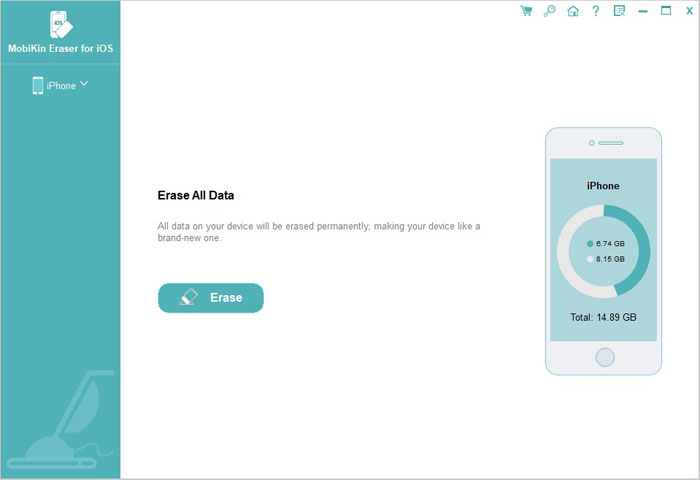
- To begin with, open the Eraser for iOS application that you have installed on your computer and connect your iPhone to the computer using a USB cable.
- After that, click on the "Erase" button that is displayed in the program interface.
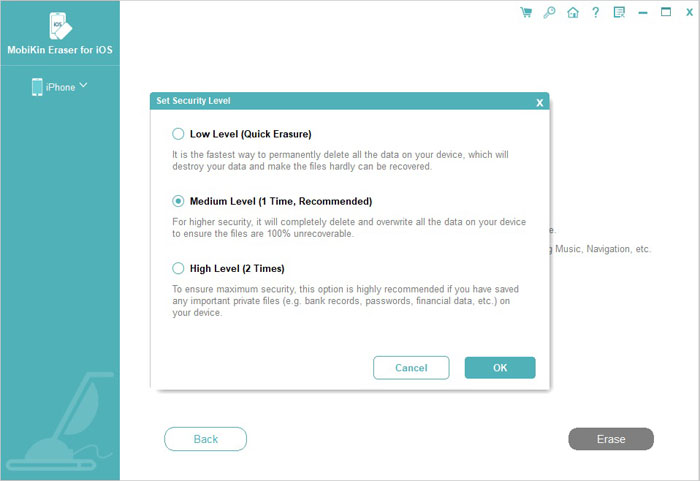
- The application offers three distinct security levels: Low, Medium, and High.
- Simply choose an erasing level that suits your specific needs and then press "OK" to confirm your selection.
- Enter "delete" in the empty box to validate your commands and then click on the "Erase" button to initiate the process of erasing your iPhone data.
- Ensure that your iPhone remains connected until the erasing process is completely finished.
Closing Thoughts
Apeaksoft iPhone Eraser can be useful for basic iOS data wiping, but its limitations in cost structure, device recognition, and support experience may affect some users' expectations. For those who need a more complete and reliable solution, MobiKin Eraser for iOS offers deeper data coverage, stronger privacy wiping, and broader system cleaning ability, making it a more practical choice when long-term data security matters most.
Related Articles:
[2026] How to Back up iPhone to External Hard Drive without iTunes?
Apeaksoft Android Data Recovery Review: Is It Advisable? [Fixed]
Apeaksoft iPhone Data Recovery Review: Is Apeaksoft Worth Buying?
Apeaksoft Phone Mirror Review: Does It Justify the Cost? [Full Analysis]
