
Apeaksoft Phone Mirror Review: Does It Justify the Cost? [Full Analysis]
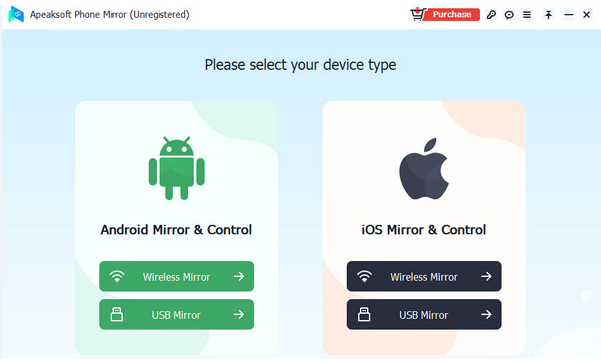
For anyone considering a reliable screen-mirroring solution, searching for an Apeaksoft Phone Mirror review can provide valuable insight. Users often want honest feedback on screen quality, stability, ease of setup, and feature usefulness before committing to a purchase. This review delves into the software's performance with real devices, highlights its strengths and limitations, and helps you determine if it is truly beneficial.
You May Also Like: Top 7 Best Apeaksoft Phone Mirror Alternatives & Competitors
- Section 1: Apeaksoft Phone Mirror: Overview
- Section 2: Apeaksoft Phone Mirror: Pricing & Customer Support
- Section 3: Apeaksoft Phone Mirror: Ratings & Vendor Details
- Section 4: Apeaksoft Phone Mirror: FAQs
- Section 5: Apeaksoft Phone Mirror: Safety & Disadvantages
- Section 6: Apeaksoft Phone Mirror: What Could Be Better
Section 1: Apeaksoft Phone Mirror: Overview
With Apeaksoft Phone Mirror, you can project your phone's screen onto a computer, making it easier to view apps, videos, and games on a larger display. It ensures smooth streaming with minimal delay, preserving the clarity and responsiveness of your device. Beyond mirroring, it also lets you capture screenshots, record the screen, and control your phone directly from the PC.
|
Feature
|
Main Details
|
|
Screen Mirroring |
Mirror iOS or Android screens to a computer in real time. |
|
High-Quality Streaming |
Streams videos, games, and apps smoothly with minimal lag. |
|
Screen Recording |
Record the mirrored screen directly on your computer. |
|
Screenshot Capture |
Take screenshots of your phone screen while mirroring. |
|
Device Control |
Control your phone from the computer using a mouse and keyboard. |
|
Multi-Device Support |
Compatible with both iOS and Android devices. |
|
Flexible Display Settings |
Adjust resolution, orientation, and screen size for optimal viewing. |
|
Route Simulation with Pause/Resume |
Allows pausing and resuming routes for more realistic movement. |
Section 2: Apeaksoft Phone Mirror: Pricing & Customer Support
Here's a quick overview of the pricing options for Apeaksoft Phone Mirror, designed to suit different usage needs. The table below breaks down the available licenses, their costs, and what each package includes.
|
License Type
|
Price (USD)
|
Duration & Includes
|
|
1 Quarter License
|
$24.96 |
3 months access to all features, free updates & support, 7-day refund guarantee |
|
1 Year License
|
$39.96 |
1 year access to full features, free updates & support, 30-day refund guarantee |
Customer Support:
- Email Support - Assistance via email for technical or usage questions.
- Official FAQ & Knowledge Base - Guides and articles addressing common setup, licensing, and troubleshooting issues.
- 24/7 Technical Assistance - Around-the-clock support to help resolve problems as they occur.
You Might Also Like: AirDroid Personal vs. Apeaksoft Phone Mirror: Which Is Smoother
Section 3: Apeaksoft Phone Mirror: Ratings & Vendor Details
To help you understand the credibility and background of Apeaksoft Phone Mirror, here's a summary of its ratings and vendor details. The table below highlights the developer, platform compatibility, user feedback, and the latest version information.
|
Aspects
|
Details
|
|
Vendor/Developer |
Apeaksoft Studio, a software company developing multimedia and utility tools |
|
Software Category |
Screen mirroring/Audio & multimedia software |
|
User Ratings (UpdateStar) |
Not yet rated by users on UpdateStar (no average score available) |
|
User Feedback (General) |
Positive impressions noted in broader Apeaksoft reviews for responsiveness and support (not specific to Phone Mirror) |
|
Platform |
Windows (primary); mirroring supports iOS/Android devices |
|
Latest Known Version |
Version 1.1.10 |
Section 4: Apeaksoft Phone Mirror: FAQs
Q1. Do I need a cable, or can I mirror wirelessly?
You can use either USB cables or wireless Wi-Fi connections, depending on your preference and device compatibility. Wired connections provide a more stable and lag-free experience, while wireless mirroring gives you more freedom of movement. The software guides you step-by-step to set up the connection, making it user-friendly even for beginners.
Q2. Is screen recording available while mirroring?
Absolutely. You can record your phone's screen in real time while mirroring, capturing everything from gameplay to video calls. The recording preserves the original quality, and you can save it directly to your computer in various formats for sharing or archiving.
Q3. Can I take screenshots of my phone screen during mirroring?
Yes, Apeaksoft Phone Mirror includes a screenshot feature that allows you to capture still images of your mirrored screen anytime. This is helpful for tutorials, saving important information, or sharing visual content without having to touch your phone.
Q4. Does it work with video calls and games?
Yes, it's designed to handle real-time activities such as video calls, streaming videos, or mobile games with minimal lag. The software maintains smooth playback and accurate responsiveness, making it reliable for both professional and entertainment purposes.
Q5. What should I do if the mirroring fails to connect?
First, check your USB cable or Wi-Fi network to ensure a stable connection. Restart both your phone and computer, and make sure all required permissions (like device access or screen recording) are granted. Updating your device's OS and the software itself can also help resolve compatibility issues. If problems persist, customer support is available to guide you step-by-step.
Section 5: Apeaksoft Phone Mirror: Safety & Disadvantages
Safety Considerations:
- Data access permissions - The app requires permission to access your device screen and media to mirror and record, so review prompts carefully before allowing.
- Secure connections - When using wireless mirroring, ensure you're on a trusted Wi-Fi network to avoid potential unauthorized access.
- Official source download - Always download the software from the official website or authorized distributors to avoid bundled malware or tampered installers.
- Privacy awareness - Be mindful that anything on your phone screen (including sensitive information) can be displayed and recorded during mirroring.
Disadvantages:
- Limited free trial features - The trial version may restrict certain capabilities or add watermarks, preventing full evaluation without purchase.
- Performance varies by device - Older phones or weak Wi-Fi networks can result in lag, lower quality, or connection drops.
- Occasional compatibility quirks - Some features may behave differently across device brands or OS versions, requiring extra setup.
- Computer-dependent - You need a PC or Mac with sufficient performance; it's not a standalone mobile app.
- No offline wireless mirroring - Wireless mirroring requires an active network; without it, you cannot mirror your device.
Section 6: Apeaksoft Phone Mirror: What Could Be Better
For users seeking a versatile screen-mirroring solution, Screen Mirror offers a compelling alternative to Apeaksoft Phone Mirror. It allows seamless projection of both Android and iOS screens onto a computer, preserving clarity and responsiveness for games, apps, and media.
The software also enables full control from the PC, including typing, tapping, and navigation, which enhances productivity and convenience. With built-in recording and screenshot tools, users can capture content effortlessly, making it ideal for tutorials, presentations, or entertainment purposes.
What Makes Screen Mirror Outstanding?
- Keyboard mapping - Customize controls for mobile games on PC.
- Live streaming - Broadcast your screen to YouTube, Twitch, or Zoom.
- Flexible connection - Use QR code, AirPlay, USB, or Wi-Fi.
- High-quality mirroring - 1080P at 60-FPS with synced audio.
- Annotation tools - Draw or mark directly on the screen.
- File transfer - Move photos, documents, etc., quickly.
- Stable connection - Lag-free performance even on low-end PCs.
- Versatile use - Ideal for gaming, presentations, education, and streaming.
How to use the best Apeaksoft Phone Mirror alternative? (Let's assume that you are using an Android phone)
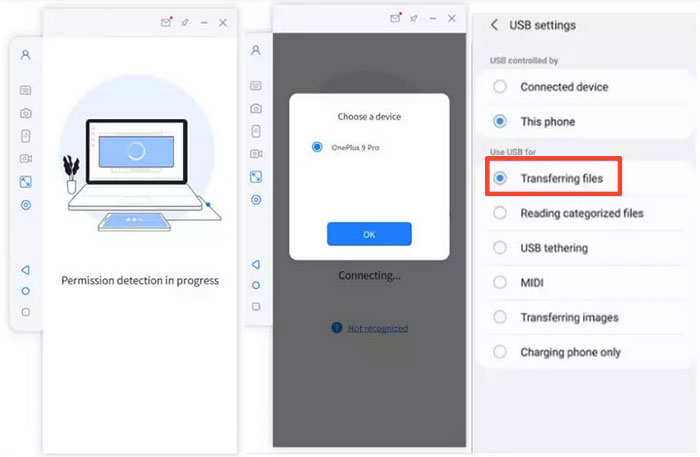
- Install Screen Mirror on your computer and open the program.
- Plug your Android device into the PC via USB and select it.
- Choose "Transfer files" to establish the connection.
- Enable USB Debugging - On your phone, go to Settings > About phone > Software information.
- Tap Build number seven times to unlock Developer options.
- Return to Settings and enable USB debugging.
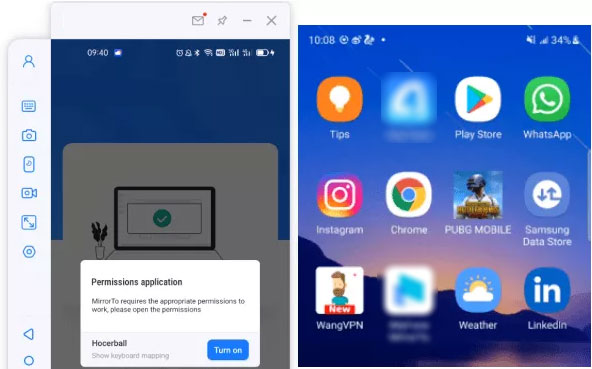
- Allow the program to request necessary permissions and display over other apps.
- Tap "Turn on" to install Screen Mirror on your Android device.
- Once setup is complete, your Android screen will be mirrored on the PC, allowing full control of the device directly from your computer.


Round Off
Although Apeaksoft Phone Mirror handles basic mirroring well, Screen Mirror takes it further with greater flexibility and richer features. It delivers smooth gameplay with keyboard mapping, crisp 1080P/60-FPS streaming, live broadcasting, annotation capabilities, and faster file transfers.
With enhanced control, reliable performance, and wider applications for gaming, teaching, and presentations, the program clearly outshines its counterpart.
Related Articles:
Apeaksoft iPhone Data Recovery Review: Is Apeaksoft Worth Buying?
Apeaksoft Android Data Recovery Review: Is It Advisable? [Fixed]
How to Access PC/Computer Files from Android Phone Remotely? [5 Great Options]
Screen Mirroring Samsung: 7 Ways to Mirror Samsung to 3 Platforms
