Is Browser and Documents Manager Worth It? Review and Better Alternative
If you're looking for a simple way to manage files or download content on your iPhone, you may have come across Browser and Documents Manager. While it offers basic features for browsing and file storage, many users start to wonder whether it's powerful enough for their daily needs. Issues like limited file control, difficulty transferring data, or lack of reliable backup options often lead people to search for better solutions. So, is it really worth using?
In this article, we'll review its features, explore its drawbacks, and introduce a more efficient alternative for protecting and managing your iPhone data.
Part 1: What is Browser and Documents Manager?
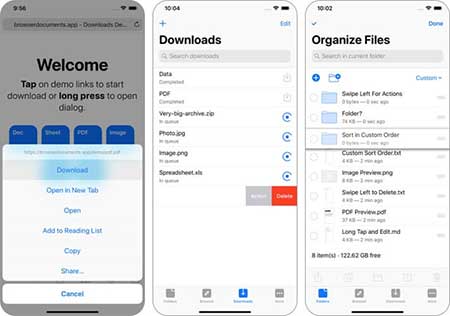
Browser and Documents Manager is an iOS app designed to help users browse the web and manage files in one place. It combines a built-in browser with a basic file manager, allowing you to download, store, and view different types of files such as PDFs, videos, images, and documents directly on your iPhone.
With this app, users can save online content for offline access, organize files into folders, and open common file formats without needing additional apps. It is especially useful for those who frequently download media or documents from the internet.
However, while it covers basic needs, it mainly focuses on local file handling and lacks advanced features like full-device data management, deep backup options, or seamless data transfer to a computer. (How to Transfer Files from iPhone to PC Wirelessly?)
Part 2: Browser and Documents Manager Review
Browser and Documents Manager works well for basic tasks like downloading and viewing files on your iPhone. It combines a browser and a file manager in one app, which makes it convenient for users who just want a simple tool to handle everyday needs. However, while it's easy to use, it also has some clear limitations.
Pros:
- The interface is simple, so most users can get started quickly.
- Lets you browse, download, and manage files in one place.
- You can open videos, PDFs, images, and documents.
- You can view downloaded files anytime without internet.
Cons:
- Ads can interrupt your experience.
- The app may crash or lag sometimes.
- Some files may fail to download properly.
- It cannot manage important data like contacts or messages.
- No strong backup or data protection features.
Overall Verdict
Overall, Browser and Documents Manager is fine for simple use. But if you want better control of your iPhone data, safer backups, or easier file transfer to a computer, you may need a more powerful alternative.
Part 3: Best Alternative to Browser and Documents Manager
If you feel that Browser and Documents Manager is too limited for your needs, especially when it comes to data transfer, backup, or full device management, then it's time to look for a more powerful solution. Instead of relying only on an iPhone app, using a desktop tool can give you much better control over your data. MobiKin Assistant for iOS is a professional iOS manager that allows you to transfer, manage, and back up your iPhone data easily and safely.
Main Features of Assistant for iOS:
- Transfer photos, videos, contacts, messages, and more between iPhone and computer without data loss.
- Back up your entire iPhone to a computer and restore it anytime without using iTunes.
- Add, delete, edit, and organize files like contacts, photos, and notes directly from your computer.
- View and select specific files before exporting or backing up.
- Works with photos, SMS, music, videos, calendars, bookmarks, and more.


How to Transfer and Manage iPhone Data with Assistant for iOS:
Step 1: Download and install Assistant for iOS on your computer. Open the program and connect your iPhone using a USB cable. Unlock your device and tap "Trust" when prompted. Once connected, the software will display the main interface.
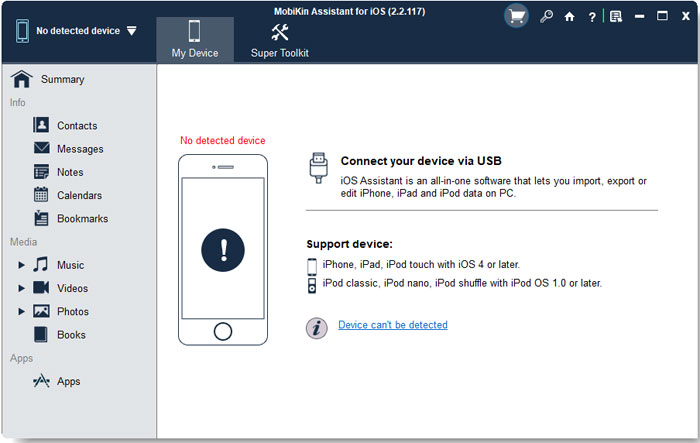
Step 2: To manage your data, go to the left panel where all file types are neatly categorized (such as Photos, Contacts, Messages, etc.). Click on the category you want to access.
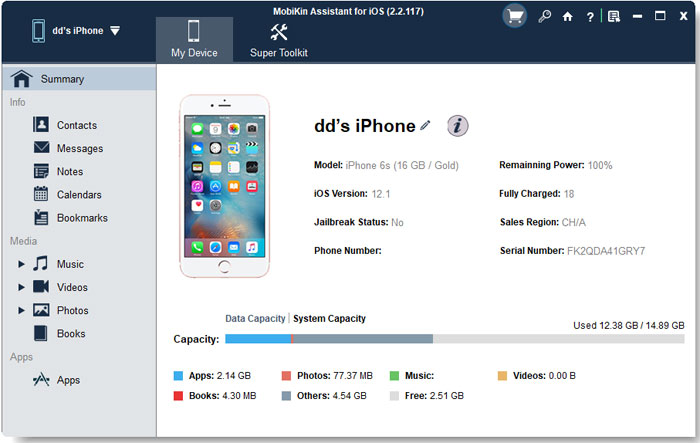
Step 3: After selecting a category, use the top menu to choose what you want to do. You can Import, Export, Edit, or Delete files as needed.
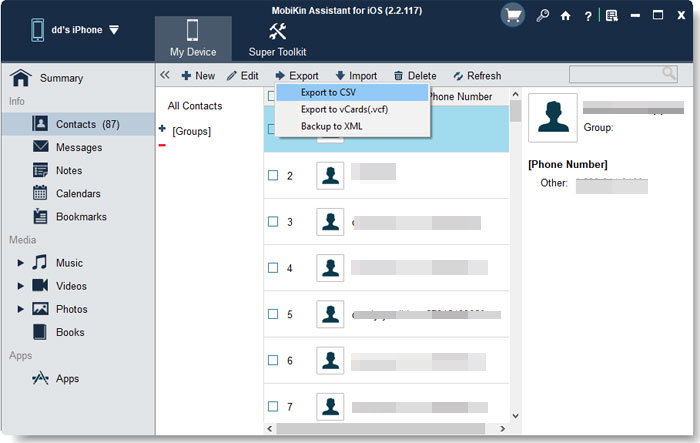
Step 4: If you want to back up or restore your data, switch to the "Super Toolkit" section and select "iTunes Backup & Restore" to proceed.
Video Guide:
FAQs about Browser and Documents Manager
Q1. Is Browser and Documents Manager safe to use?
Browser and Documents Manager is generally safe for basic file browsing and downloading. However, since it includes a built-in browser, users should be careful when visiting unknown websites or downloading files from untrusted sources. In addition, the app may display ads or request certain permissions, so it's important to review what access you grant. For sensitive data, it's still better to use more secure and professional tools.
Q2. Is Browser and Documents Manager free?
Yes, Browser and Documents Manager is free to download and use. However, like many free apps, it usually relies on ads to support its features. Some versions may also offer in-app purchases to remove ads or unlock additional functions. While the free version is enough for basic use, the ads may affect the overall user experience.
Q3. Can I download videos with Browser and Documents Manager?
Yes, the app allows you to download videos through its built-in browser. When you visit a supported website, you may see a download option for available media files. However, not all websites allow video downloads due to restrictions or copyright protection. In some cases, downloads may fail or not be detected properly. (How to Transfer Videos from iPhone to Computer?)
Q4. Can I transfer files from the app to my computer?
Transferring files from Browser and Documents Manager to a computer is not very straightforward. The app mainly stores files locally, and it offers limited export or sharing options. You may need to rely on additional methods like cloud services or third-party tools to move files to your computer. For frequent or large transfers, this can be inconvenient.
Q5. Does it support all file types?
The app supports many common file formats, such as PDFs, videos, music files, and images. However, it may not work well with less common or specialized file types. In some cases, certain files may not open correctly or may require other apps to view them. This limitation can be frustrating if you deal with a wide variety of file formats.
Words in the End
In summary, Browser and Documents Manager is a handy tool for simple tasks like browsing, downloading, and viewing files on your iPhone. It works well for basic needs, but its limitations in data management, file transfer, and backup make it less suitable for users who want more control over their devices.
If you are looking for a more powerful and reliable solution, especially for managing and protecting important data, using a professional tool like MobiKin Assistant for iOS is a smarter choice. It helps you easily transfer, organize, and back up your iPhone data, giving you greater flexibility and peace of mind.
Related Articles:
4 Ways to Transfer Data to iPhone after Setup with iCloud
Top 6 Ways to Transfer Data from iPhone to Laptop