MagFone iOS System Recovery Review: Features, Pricing, Pros & Cons
TL;DR:
MagFone iOS System Recovery helps fix common iPhone system problems through simple repair modes, firmware downloads, and guided recovery steps.
- Learn MagFone's key features, including Standard Repair, Advanced Repair, recovery mode support, and fixes for issues like Apple logo loops and failed updates.
- Use MagFone by connecting your device, selecting "iOS System Recovery", choosing a repair mode, downloading firmware, and clicking "Repair".
- Check its pros and cons, including its easy interface, iTunes alternative workflow, paid features, and limits on hardware problems.
- Try iOS System Recovery as an alternative with recovery tools, multiple repair options, and a simple step-by-step process.
If your iPhone is stuck on the Apple logo, keeps restarting, or fails during an iOS update, a system repair tool may help you fix the problem without complicated steps. MagFone iOS System Recovery is designed to repair common iPhone and iPad software issues through a guided process. In this review, we will explore its key features, how to use it, its pros and cons, and an alternative solution to help you decide whether it is the right tool for your device.
Part 1: Key Features of MagFone iOS System Recovery
MagFone iOS System Recovery is designed to help fix common iPhone and iPad system problems without complicated operations. Whether your device is stuck on the Apple logo, keeps restarting, freezes unexpectedly, or fails during an iOS update, it provides several repair options to get your device back to normal. Here are the key features worth knowing.
- Fix Common iOS System Issues: MagFone can repair various iOS system errors, including iPhone stuck in recovery mode, black screen, boot loop, frozen devices, and update failures. It provides a simple way to troubleshoot software-related problems without manually searching for complex solutions.
- Repair iOS Issues without Data Loss: With its Standard Repair mode, MagFone attempts to fix system problems while keeping your existing data intact. This can be useful when you want to solve an iOS error but do not want to restore your device and lose important files.
- Support Standard and Advanced Repair Modes: MagFone offers different repair options for different situations. Standard Repair is suitable for common system issues, while Advanced Repair is designed for more serious problems that require deeper system fixes.
- Enter and Exit Recovery Mode Easily: Instead of relying on button combinations or iTunes/Finder, MagFone allows you to enter or exit recovery mode with a few clicks. This is helpful when your iPhone gets stuck in recovery mode or you need a quick way to troubleshoot the device.
- Work with Various iPhone and iPad Models: MagFone supports a wide range of iOS devices and versions, making it suitable for many iPhone, iPad, and iPod touch users. Its straightforward interface also makes the repair process easier for beginners.
Part 2: How to Use MagFone iOS System Recovery?
Using MagFone iOS System Recovery is quite simple, even if you have little experience with iPhone repair tools. The software guides you through each step, from connecting your device to downloading the required firmware and starting the repair process.
- Download and install MagFone iOS System Recovery on your computer, then launch the program.
- Connect your iPhone or iPad to the computer using a USB cable. Tap "Trust" on your device if prompted.
- Select "iOS System Recovery" from the main interface and click "Start" to begin.
- Choose a repair mode based on your situation. The Standard Repair option is usually recommended for common system issues.
- Check your device information and download the matching firmware package.
- Click "Repair" to start fixing the iOS system problem. Keep your device connected until the process is complete.
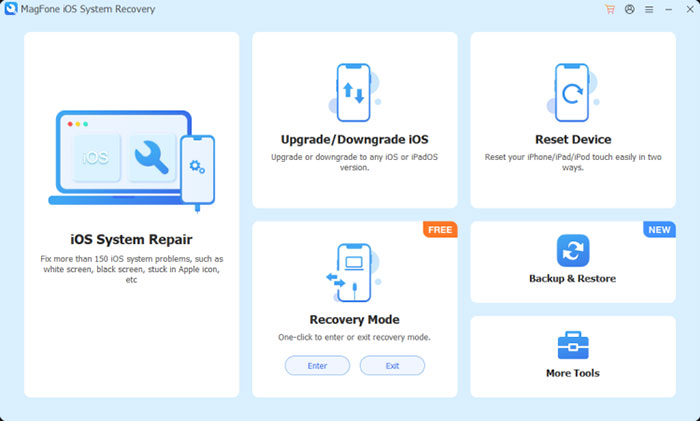
After the repair finishes, your iPhone or iPad should restart normally. If the issue is caused by a software problem, MagFone can help restore the device to a working state without requiring a full factory reset.
Part 3: MagFone iOS System Recovery Review: Pros and Cons
After exploring its features and repair process, MagFone iOS System Recovery has some clear advantages as well as a few limitations. It can be a helpful choice for fixing common iOS system issues, but users should also consider whether its features match their specific needs.
Pros:
- MagFone has a simple interface with clear instructions, making it easy for beginners to complete the repair process.
- It can fix various iOS system issues, including iPhone stuck on the Apple logo, recovery mode loops, black screen problems, and failed updates.
- It provides different repair modes, allowing users to choose between Standard Repair and Advanced Repair based on their device condition.
- Its Standard Repair mode aims to fix system problems while keeping existing data intact in many common situations.
- It offers a more guided recovery process compared with traditional methods like iTunes or Finder.
Cons:
- MagFone requires a computer and USB cable to repair iOS devices, so it cannot work directly on the iPhone or iPad.
- Some advanced repair features may require a paid version after the trial period.
- It cannot solve hardware-related problems, such as physical damage or faulty device components.
- The repair success rate depends on the specific iOS issue and device condition, so it may not fix every problem.
Part 4: Best MagFone iOS System Recovery Alternative: iOS System Recovery
If MagFone iOS System Recovery does not meet your needs, iOS System Recovery can be another option to consider. It is designed to fix common iPhone, iPad, and iPod touch system issues without complicated operations. With multiple repair modes and a user-friendly interface, it helps users troubleshoot problems such as stuck on the Apple logo, recovery mode loops, frozen screens, and iOS update failures.
Key Features of iOS System Recovery:
- Fix various iOS system issues, including boot loops, black screens, frozen devices, and update errors.
- Repair iPhone/iPad system problems without requiring complicated technical knowledge.
- Offer different repair modes to handle both common and more serious iOS errors.
- Support a wide range of iPhone, iPad, and iPod touch models and iOS versions.
- Allow users to enter and exit recovery mode with simple clicks.
- Provide a clear interface that guides users through the entire repair process.


How to Use iOS System Recovery?
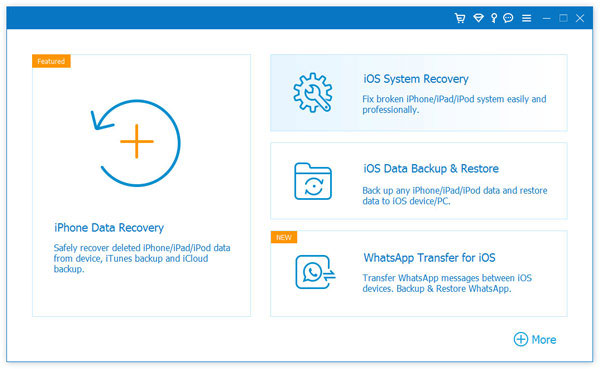
Step 1: Install and open iOS System Recovery on your computer, then connect your iPhone or iPad with a USB cable. Once the device is detected, select "More Tools" > "iOS System Recovery" from the main interface.
Step 2: Click "Start" and choose a suitable repair mode based on your device problem. The program will display the available repair options and guide you through the next steps.
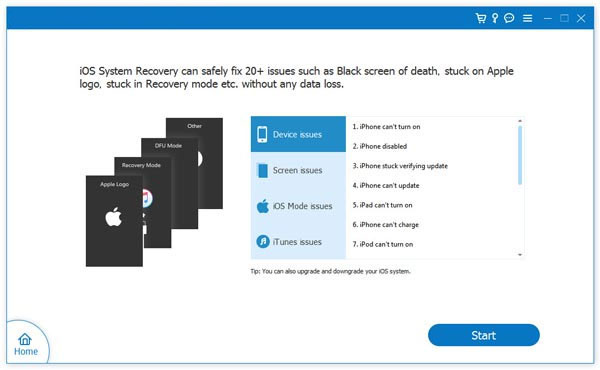
Step 3: Download the matching firmware package for your device. Make sure the device remains connected while the software verifies and prepares the firmware. Click "Repair" to begin fixing the iOS system issue.
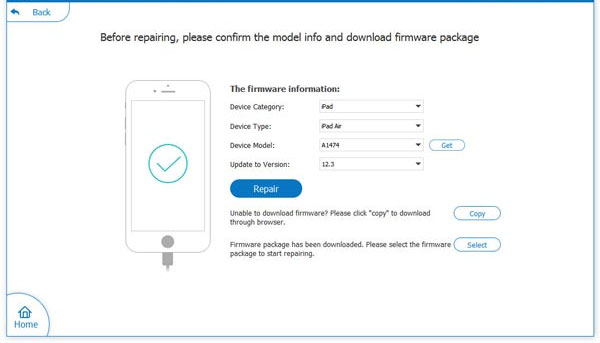
Step 4: Wait until the process is completed. Your device will restart automatically after the repair finishes.
FAQs About MagFone iOS System Recovery
Q1: Is MagFone iOS System Recovery safe to use?
Yes, MagFone iOS System Recovery is generally safe to use when downloaded from its official website. The software is designed to repair iOS system issues through firmware recovery rather than accessing your personal data directly. However, you should always back up important data before performing any system repair process.
Q2: Is MagFone iOS System Recovery free?
MagFone iOS System Recovery offers a free trial version that lets users check its interface and available functions. However, some repair features may require purchasing a license to unlock the full version.
Q3: Can MagFone fix an iPhone stuck on the Apple logo?
Yes, MagFone can help fix common software-related problems that cause an iPhone to get stuck on the Apple logo. You can connect your device to the computer and use its repair modes to troubleshoot the issue.
Q4: Does MagFone iOS System Recovery erase iPhone data?
The Standard Repair mode is designed to fix many iOS system problems while keeping existing data. However, Advanced Repair or certain serious repair situations may involve a higher risk of data loss, so creating a backup before repair is recommended. (How to back up your iPhone?)
Q5: Does MagFone iOS System Recovery work without iTunes?
Yes, MagFone works independently and does not require iTunes to repair iOS system issues. It provides a more guided process for users who want an alternative to iTunes or Finder recovery methods.
Conclusion
MagFone iOS System Recovery provides a simple way to troubleshoot common iPhone and iPad system problems, especially for users who want an easier alternative to iTunes or Finder. It offers useful repair features and a beginner-friendly process, but its limitations should also be considered. If you need another option, iOS System Recovery is worth exploring for fixing various iOS-related issues with a straightforward repair workflow.
Related Articles:
iPhone Stuck on Restore Screen? 7 Simple Fixes to Try Out
Top 7 Best TunesKit iOS System Recovery Alternatives 2026