
iToolab AnyGo Review: Overall Performance & the Best Alternative
Are you wondering if iToolab AnyGo really works for GPS spoofing on iOS and Android without causing errors or device issues? Many users are curious about the reliability and usability of location-spoofing tools, which is why a thorough iToolab AnyGo review is essential. This passage compiles real feedback on its performance, support quality, and overall satisfaction, helping you understand whether AnyGo lives up to its promises.
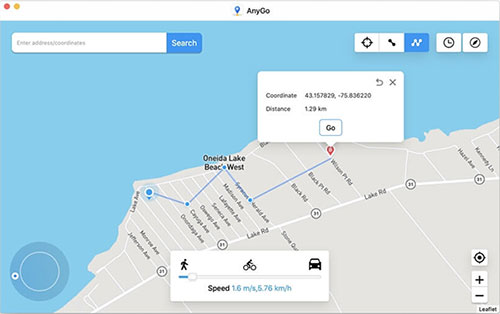
Part 1: iToolab AnyGo: Compatibility & Supported Games
iToolab AnyGo works with a wide range of Android and iOS devices, enabling GPS location spoofing without the need for rooting or jailbreaking. The table below provides a detailed overview of its device compatibility and the games and apps it supports.
|
Item
|
Details/Supported Games & Apps
|
|
Supported Operating Systems |
Android (up to Android 16) and iOS (up to iOS 26) |
|
Supported Device Types |
Most Android phones/tablets and iPhone/iPad devices without need for jailbreaking or root |
|
Location-based Games |
Pokémon GO, Monster Hunter Now, Ingress Prime, Jurassic World Alive, Wizards Unite, Pikmin Bloom, DqWalk, Soundmap, and other GPS-based games |
|
Other Supported App Types |
Social apps (e.g., WhatsApp, Snapchat, Instagram, Twitter), dating apps (e.g., Tinder, Bumble), navigation and tracking apps (e.g., Google Maps, Life360), basically any app relying on GPS/location data |
|
General Compatibility Note |
Supports a wide range of Android and iOS devices, reportedly over 6,000 Android phones and tablets |
Part 2: iToolab AnyGo: Main Features
iToolab AnyGo offers a range of powerful features for GPS location spoofing, including teleporting to any location and simulating movement along custom routes. The tool also provides joystick control, customizable speed, route management, and the ability to spoof multiple devices simultaneously. Below is the full list:
- Teleport GPS - instantly move your device's location to any spot worldwide with a single click.
- Simulate movement along a route - use two-spot or multi-spot modes (or import GPX files) to make your GPS "walk," "drive," or "cycle" between locations at custom speeds.
- GPS Joystick control - manually steer your location in any direction (360 degrees) using a virtual joystick or keyboard keys.
- Customizable speed & movement patterns - choose walking, cycling, or driving speed; pause, resume, or repeat routes; and simulate looped paths.
- Route management - save favorite locations and routes as well as view the history of past spoofed journeys for easy reuse.
- Support for spoofing multiple devices simultaneously - control GPS location on up to 15 devices at once.
Part 3: Is It Safe & Free to Use iToolab AnyGo [More FAQs]
iToolab AnyGo is not fully free and requires a paid license for full functionality, though it works on iOS and Android without jailbreak or root. The table below outlines key considerations, including the need for a computer, potential app/game penalties, and security risks from unauthorized versions:
|
Question
|
What you need to watch out for
|
|
Q1: Is AnyGo free? |
AnyGo is not fully free; full functionality requires a paid license. A limited free trial or free download may be available, but core features are locked behind a payment. |
|
Q2: Can you use it without jailbreaking/rooting? |
The tool works on iOS and Android without requiring jailbreak or root access. |
|
Q3: Need for external device (computer)? |
Many features require using a Windows or Mac computer to run AnyGo for GPS spoofing. |
|
Q4: Risk of app/game penalties or bans? |
GPS-spoofing tools can violate the terms of service of certain apps or games, which may lead to temporary or permanent account penalties. |
|
Q5: Security & privacy concerns (e.g., cracked versions)? |
Official versions are generally safer, but cracked or unauthorized versions may cause malware infections, data leaks, or system instability. |
Part 4: iToolab AnyGo: Ratings & Reviews
iToolab AnyGo has an overall rating of 4.2 out of 5, reflecting generally positive user feedback. The table below highlights what users like, common complaints, and the mixed overall sentiment regarding its performance:
|
Aspect
|
Typical Feedback/Ratings
|
|
Overall rating |
4.2/5 (based on ~1,000+ reviews) |
|
What users like |
1. Often described as "easy to use," with a clean interface and straightforward setup. 2. Many report that the tool worked as expected for GPS location spoofing or other supported tasks. |
|
Common complaints |
1. Some users say that after updates or on certain platforms, the tool stopped functioning properly, e.g., giving errors or failing to spoof location reliably. 2. Others report inconsistent support or difficulty getting issues resolved when the software fails. |
|
General user sentiment |
1. Many users are satisfied and recommend it. 2. Others feel results can be hit-or-miss depending on device or app version. |
Part 5: iToolab AnyGo: The Good & Bad
Why Do We Like It?
- Can teleport the GPS to any location instantly.
- Supports simulation of movement along custom routes.
- Allows joystick control for precise location adjustments.
- Can manage and save favorite routes for reuse.
- Supports multiple devices simultaneously.
Why Don't We Like It?
- Full functionality requires a paid license; not fully free.
- May not work reliably with all apps or games; compatibility issues can occur.
- Updates sometimes cause errors or unexpected malfunctions.
- Customer support can be slow or unresponsive at times.
- Using the tool with certain apps may violate terms of service, risking account penalties.
Part 6: What Could Be Better Than iToolab AnyGo
As said earlier, iToolab AnyGo comes with occasional compatibility issues with certain apps or games, and users report that updates can cause errors, and customer support is sometimes slow or unresponsive.
In contrast, Virtual Location Tool offers a more user-friendly interface, flexible movement modes, and the ability to spoof GPS directly on mobile devices. These advantages make this product a better choice than iToolab AnyGo for most users.
Where Virtual Location Tool is advantageous vs AnyGo?
> Stable and secure phone use - can spoof location stably with minimum risks.
> User-friendly interface - easier setup and navigation.
> Flexible movement modes - teleport, multi-spot, joystick, and adjustable speed.
> Saved locations - quickly reuse favorite routes.
> Cross-platform support - works on both iOS and Android.
> Frequent updates - stays compatible with new OS/game versions.
> Mobile-only spoofing - some modes don't require a PC.


How to use the best iToolab AnyGo alternative for smartphone location spoofing?
- Download and install the Virtual Location Tool on your computer.
- Open it and click "Get Started" on the main screen.
- Connect your mobile device to the computer using a USB cable (or follow instructions to connect via Wi-Fi).
- The program will detect your device automatically after a few moments.
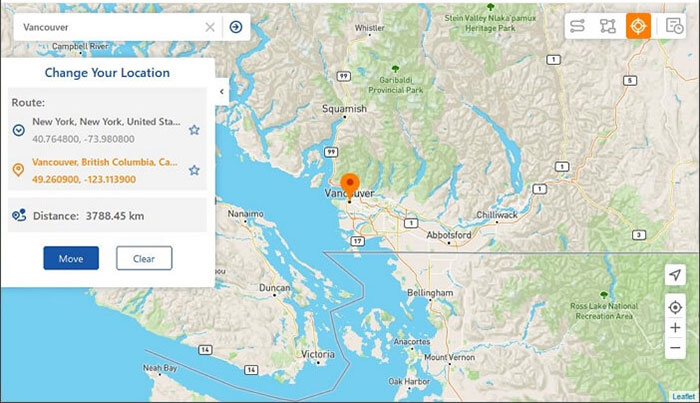
- Go to the upper-right corner of the interface and select "Teleport Mode".
- Enter your target location in the search bar, or input precise GPS coordinates to select an exact spot.
- The map pointer will move to the location you specified.
- Finally, click "Move" to apply the mock location on your smartphone.

At Last
Conclusion: Overall, iToolab AnyGo offers useful features for GPS spoofing, such as teleportation and route simulation, but it has some drawbacks, including occasional compatibility issues, reliance on a PC for many features, and mixed user support experiences. Comparing it to alternatives like Virtual Location Tool can help you decide which tool better fits your needs for a smooth, reliable GPS spoofing experience.
Hot Tip: Always use a spoofing location tool and avoid unauthorized or cracked copies, as these can lead to device issues or security risks, and make sure to check compatibility with your specific device and app before spoofing.
Related Articles:
[100% Success] How to Stop Sharing Location Without Them Knowing
11 Best Location Changers for Android and iOS [2025 Updated]
5 Means to Share Location on Android Devices with Friends/Family
iToolab UnlockGo (Android) Review: In-depth & Pertinent Analysis
