
How to Retrieve Deleted Text Messages on OPPO? 4 Ingenious Ways
"I accidentally deleted a text with an important code and I don't know how and/or if I can retrieve it. I have a new OPPO A6 Pro 5G and have been deleting SMS I won't need after I'm done with them." -- from Reddit
What to Do before You Retrieve Deleted Text Messages on OPPO?
- Stop Using the Phone: Prevent new data from overwriting deleted messages.
- Check Backups: Look for Google or app backups containing SMS.
- Charge Device: Ensure enough battery for recovery.
- Enable Permissions: Allow storage and notification access for recovery apps.
- Choose Method: Decide between Google Messages, Google Backup, recovery apps, or MobiKin Doctor for Android (without backup)
Next, let's see how to make SMS recovery from OPPO in 4 most productive ways:
- Part 1: Retrieve Deleted Text Messages on OPPO without Backup [Made It]
- Part 2: Retrieve Deleted Messages from an OPPO Phone via Google Messages
- Part 3: Restore Deleted Text Messages from OPPO via Google Backup
- Part 4: Recover Deleted SMS on OPPO via Deleted Messages Recovery App
- FAQs about Retrieving Deleted Text Messages on OPPO
Part 1: Retrieve Deleted Text Messages on OPPO without Backup [Made It]
Data recovery from an OPPO device can be handled efficiently with MobiKin Doctor for Android (Windows/Mac). This desktop program scans the phone's internal storage to locate deleted SMS and display them for preview before recovery. It supports retrieving conversations even when no prior backup exists. Users can export the recovered text messages to a computer for safekeeping or later reference.
Main Features of MobiKin Doctor for Android:
> Recover Deleted SMS: Retrieve deleted text messages on OPPO without backup.
> Restore Other Data: Recover contacts, call logs, photos, videos, and more.
> Preview Before Recovery: View deleted items before restoring them.
> Export to Computer: Save recovered messages and files to PC or Mac.
> Wide Device Support: Works with most OPPO and Android devices, covering OPPO Find Series (X9/X8/X7/X6/N5/N3/N2), Reno Series (15/14/13), A/F/K Series.
> Safe Process: Reads data on PC without overwriting existing files.
How to Recover?
- If you haven't already, root your smartphone.
- Then, launch the software and connect your OPPO phone to your computer.
- Follow the on-screen instructions to allow the software to recognize your connected phone.
- Once the OPPO device is successfully detected, the following interface will appear.
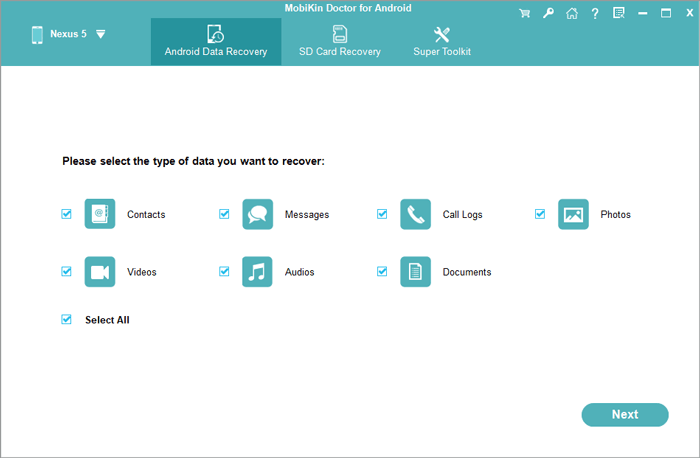
- On the main interface, select the "Messages" option and click "Next" to start scanning for files.
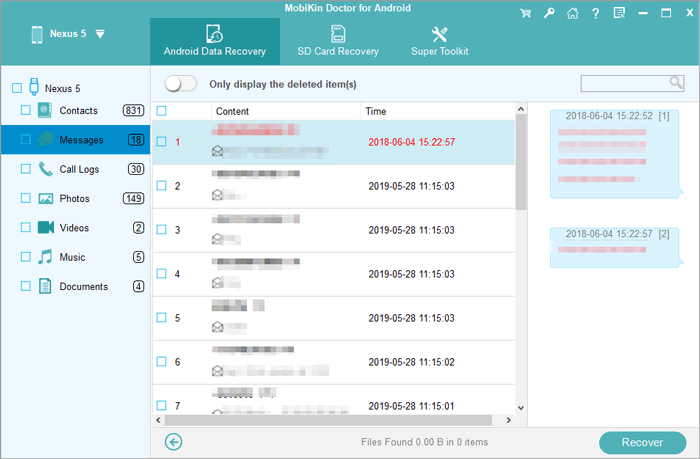
- After the scan completes, you can view and preview all deleted messages from your OPPO device.
- Select the messages you wish to recover and click the "Recover" button.
- Once restored, the deleted messages will be saved in HTML format, allowing you to view them easily on your PC.


Video tutorial:
Part 2: Retrieve Deleted Messages from an OPPO Phone via Google Messages
Archived conversations sometimes hold messages that appear lost in Google Messages. By checking the Archived section or restoring synced data, users may bring previously hidden SMS back to the main inbox. The app also syncs conversations with a Google account on many Android devices. When synchronization is active, message history can occasionally be restored during device setup.
How to Recover?
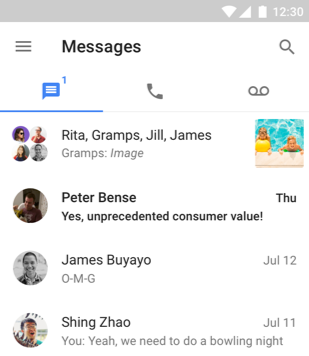
- Open the Google Messages app on your OPPO phone and make sure you are on the main conversation screen where all your message threads are displayed.
- Tap the profile icon located in the top-right corner of the screen to open the settings and additional options menu.
- From the drop-down list, select "Archived" to view conversations that have been archived instead of deleted.
- Browse the archived conversations and locate the message thread that you want to retrieve.
- Press and hold the selected conversation, and then tap the Unarchive icon to move it back to your main message inbox so you can access it normally.
Part 3: Restore Deleted Text Messages from OPPO via Google Backup
Cloud backups created through a Google account provide another path to recover missing SMS. Through Google Backup, text messages may be included in the device's automatic backup data. After performing a factory reset, the phone can restore that stored information during the setup process. Once the restoration finishes, the recovered messages will reappear in the messaging app.
How to Recover?
- Open Settings on your OPPO phone, go to Google > Backup, and confirm that a backup containing SMS was created before the messages were deleted.
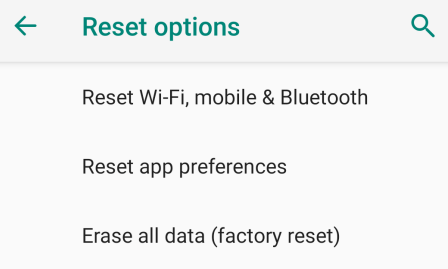
- Navigate to Settings > System (or Additional Settings) > Reset options, then choose Erase all data (factory reset) to prepare the phone for restoration.
- After the reset, restart the device and follow the on-screen setup instructions, connecting to Wi-Fi and signing in with the same Google account used for the SMS backup.
- When prompted during setup, select Restore from Google backup, choose the backup that includes your SMS messages, and complete the restoration process.
- Once the setup finishes, open the messaging app on your OPPO phone to see if the deleted text messages have been restored.
You can try restoring deleted text messages from an OPPO phone using Google Voice if the messages were sent or received through this service. Open the app, sign in to your Google account, go to the Menu, and check the Trash folder to find deleted conversations. If the messages are still in Trash, you can select them and restore them before they are permanently removed.
Part 4: Recover Deleted SMS on OPPO via Deleted Messages Recovery App
Notification-based recovery tools from the Play Store can also assist with retrieving removed texts. One example is the Deleted Messages Recovery App, which records incoming notifications and keeps copies of message content. If a message is later deleted, the stored notification data may still allow it to be viewed. This approach works best when the app was installed before the SMS was removed.
How to Recover?
- Open the Google Play Store, search for Deleted Messages Recovery App, and install the app on your OPPO phone.
- After installation, open the app and follow the initial setup instructions on the screen.
- Allow the app to access notifications and storage, which enables it to detect and store deleted messages.
- Start scanning for deleted messages: Tap the Scan or Recovery option so the app can check your device notifications and stored data for deleted SMS.
- Once the scan finishes, browse the recovered message list and locate the SMS you want to restore.
- Select the desired messages and tap Restore or Save to keep them on your device.

FAQs about Retrieving Deleted Text Messages on OPPO
Q1. Where do deleted text messages go on OPPO phones?
Most OPPO devices do not have a dedicated recycle bin for SMS. Once deleted, messages are removed from the messaging database but may remain in device storage until overwritten. Some messaging apps may keep archived or synced copies.
Q2. Can archived messages be restored on OPPO?
Yes, archived messages can be restored if they were not actually deleted. In Google Messages, users can open the Archived folder and move the conversation back to the main inbox. This process does not require data recovery.
Q3. How long can deleted messages be recovered on OPPO?
There is no fixed time limit, but recovery becomes harder once new data overwrites the storage space. Using the phone heavily after deletion may reduce recovery chances. It is best to attempt recovery as soon as possible.
Q4. Is it possible to retrieve deleted messages on OPPO from the carrier?
Yes, it's sometimes possible to retrieve deleted messages on an OPPO phone from your mobile carrier, but it depends on their retention policy. Carriers may keep SMS logs for a limited time, often including sender, recipient, timestamp, and occasionally the message content. Since not all carriers store full messages and older texts may be permanently deleted, using Google Backup or a recovery app is usually faster and more reliable.
Q5. What is the most marvelous way to retrieve deleted SMS from OPPO?
The most effective way to retrieve deleted SMS from an OPPO phone is to use MobiKin Doctor for Android, as it can scan the device deeply and recover messages even without a backup. Unlike standard apps or backups, it allows previewing and selectively restoring SMS to avoid unnecessary clutter. This makes MobiKin Doctor for Android the most reliable solution for quickly and safely recovering deleted text messages.
Related Articles:
9 Practical Techniques to Fix OPPO Phone Not Connecting to PC
5 Feasible Solutions to Recover Deleted WhatsApp Messages on OPPO
How to Bypass OPPO FRP/Google Lock in 5 Easy Ways? Fixed
4 Viable Options to Transfer Data from OPPO to iPhone 17/16/15/14/13
