
Fix Photos Disappeared from OnePlus Phone with 5 Easy Options
"All the pictures, videos in gallery and my files are disappeared. also documents. I checked it in root folders it there but didn't show on main gallery." -- from Reddit
* Why did my photos suddenly disappear from my OnePlus phone?
- Accidental deletion or cleaning apps like Clean Master removing photos during cleanup.
- Photos moved to Trash, hidden folders, or Private Safe instead of being deleted. (How to find hidden files from Android?)
- Google Photos or cloud sync removing local copies after backup.
- Gallery app bugs or indexing errors hiding images.
- SD card errors, corruption, or disconnection.
- System updates or storage glitches affecting Gallery display.
In today's post, we shall guide you through how to fix photos disappeared from OnePlus phone in 5 practical solutions.
- Part 1: Recover Disappeared Photos from OnePlus Trash Folder
- Part 2: Fix Photos Disappeared from OnePlus Phone via File Explorer
- Part 3: Retrieve Disappeared Pictures from OnePlus Using Files by Google
- Part 4: Find Photos That Disappeared from OnePlus via Google Photos
- Part 5: Recover Disappeared Photos from OnePlus without Backup
- FAQs for Photos Disappeared from OnePlus Phone
Part 1: Recover Disappeared Photos from OnePlus Trash Folder
The OnePlus Trash Folder is often the first place to check when photos vanish unexpectedly. It temporarily stores deleted images before they are permanently erased, giving users a short recovery window. If the images are still inside, they can be restored back to the Gallery with a simple tap. This makes it a quick and effortless way to recover recently lost media. Here's how:
- Open the Gallery app on your OnePlus 15/13/12/11/10/9/8/Nord, etc.
- Tap Albums or Collections.
- Find Trash, Recycle Bin, or Recently Deleted.
- Select the disappeared photos you want to recover.
- Tap Restore to return them to the Gallery.

If restoring photos from the OnePlus Trash folder does not work, try clearing the Gallery app cache to refresh the media database. Go to Settings > Apps > Gallery > Storage & Cache, and then tap Clear Cache. After that, restart your OnePlus phone and reopen the Gallery app to check whether the disappeared photos reappear.
Part 2: Fix Photos Disappeared from OnePlus Phone via File Explorer
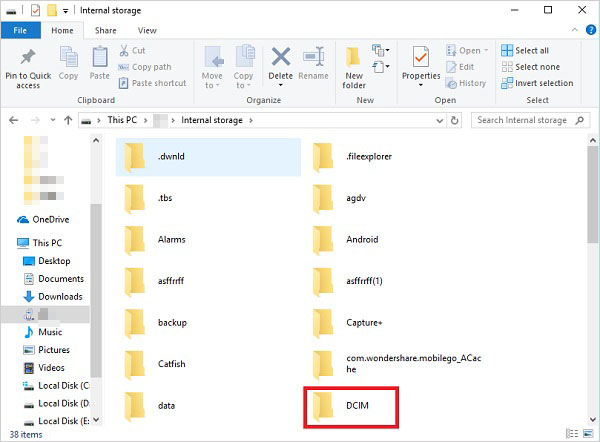
With File Explorer, users can dig deeper into the phone's internal storage to locate missing images. Sometimes photos are not deleted but simply misplaced or hidden in folders like DCIM or Pictures. By manually browsing directories, it becomes possible to bring those files back into view. This method helps confirm whether the data still physically exists on the device. Here's how:
- Connect your OnePlus phone to a Windows computer using a USB cable.
- Unlock the phone and tap Allow access/File Transfer when prompted.
- Open File Explorer on the PC.
- Go to: This PC > [Your OnePlus Device] > Internal Storage > DCIM > Camera.
- Check whether the disappeared photos are still stored there.
You May Also Like: 5 Best OnePlus Sync Software/Tools That Hold Your Attention
Part 3: Retrieve Disappeared Pictures from OnePlus Using Files by Google
Using Files by Google offers a cleaner way to scan storage for lost photos. It organizes files by type and location, making hidden or forgotten images easier to find. When photos are still present in storage but not shown in the Gallery, this app often reveals them. It also helps users move recovered images back into visible folders quickly. Here's how:
- Open Files by Google on your OnePlus phone.
- Tap Browse > Internal Storage > DCIM > Camera.
- Check whether the disappeared photos are still stored there.
- Also inspect folders like Pictures, Downloads, and WhatsApp Images.
- If you find the images, copy or move them to another folder as a backup.
- Restart the phone or clear the Gallery app cache if the photos still do not appear in Gallery.

Learn More: Files by Google Alternatives: 8 Best File Managers for Android
Part 4: Find Photos That Disappeared from OnePlus via Google Photos
Google Photos can act as a safety net when sync or backup is enabled. Deleted images may remain in its Trash section for a limited time before permanent removal. Restoring them from there returns the photos to both the cloud and the device. This option is especially useful when local storage no longer shows the files. Here's how:
- Open the Google Photos app on your OnePlus phone.
- Tap your profile picture or the Menu icon.
- Select Trash or Bin.
- Find the disappeared photos you want to recover.
- Tap and hold the pictures, then choose Restore.
- The recovered photos should return to both Google Photos and your OnePlus Gallery.
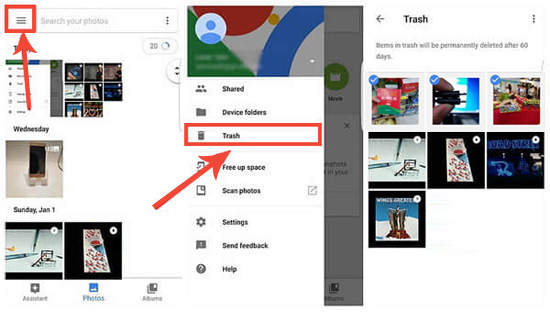
If the photos are not in Trash, try these extra checks:
- Verify you are signed into the correct Google account.
- Go to Google Photos > Settings > Backup and confirm backup was enabled.
- Visit photos.google.com on a computer to see whether the pictures are stored in the cloud.
If photos disappeared after using Clean Master, they may still be recoverable because some files are temporarily stored before permanent deletion. Users can check the Gallery Trash, Google Photos Bin, or recently cleaned folders to recover disappeared photos lost from Clean Master from a OnePlus phone with ease.
Part 5: Recover Disappeared Photos from OnePlus without Backup
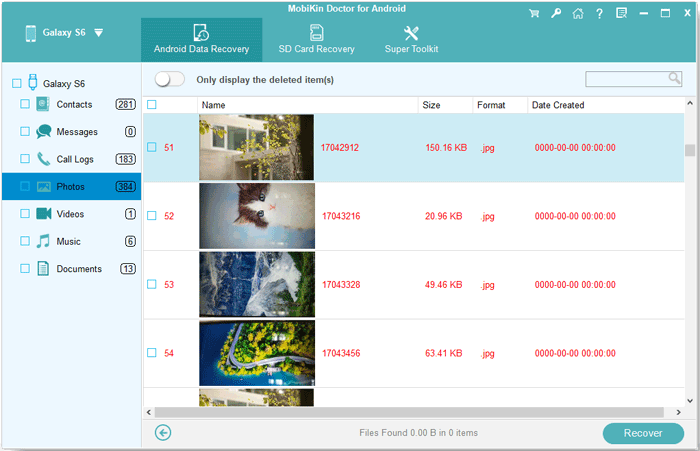
In more difficult cases, MobiKin Doctor for Android (Windows/Mac) (without Backup) can scan the device deeply to retrieve lost photos. It works even when no prior backup exists, pulling recoverable data directly from internal memory. The tool can detect traces of deleted images that are not visible through normal apps. This makes it a stronger option when standard recovery methods fail.
|
MobiKin Doctor for Android - Feature Category
|
Specific Capability
|
Recovers OnePlus Photos Without Backup
|
|
Core Function
|
Recovers lost photos, contacts, messages, etc. |
Yes - from internal storage or SD card. |
|
Scan Source
|
Scans device internal memory + external SD card. |
Yes - targets internal storage where OnePlus photos are saved. |
|
Preview Before Recovery
|
View found photos (thumbnails) before recovering. |
Yes - confirm your disappeared photos are recoverable. |
|
Root Requirement
|
Rooting required for internal storage scan on most Android devices. |
Likely required for OnePlus internal storage. |
|
Device Compatibility
|
Supports 8,000+ Android devices, including modern OnePlus models. |
Yes - includes OnePlus (by broad OS compatibility). |
|
Platform & Trial
|
Windows/Mac; free trial to scan & preview before purchase. |
Yes - trial lets you check if photos can be found without paying. |


Here's how to recover photos that disappeared from OnePlus using MobiKin Doctor for Android?
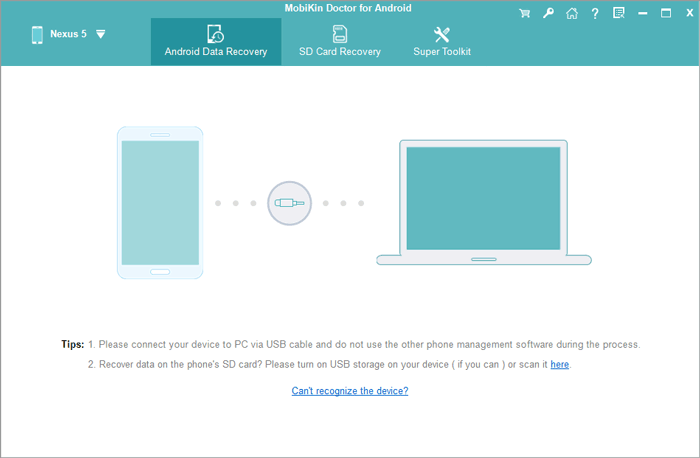
Step 1. Initiate - Begin by downloading and installing this mobile data recovery software on your computer. Next, connect your OnePlus phone to the computer using a USB cable. The program should automatically detect your OnePlus device.
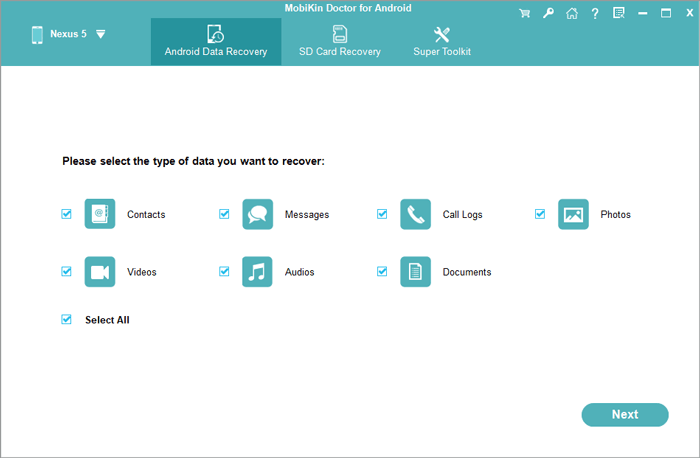
Step 2. Scan - In the software interface, choose "Photos" and click "Next" to initiate the scanning process for your OnePlus. If you are unable to locate the images you seek, it may be necessary to root your OnePlus phone as per the instructions provided to conduct a comprehensive scan.
Step 3. Retrieve - After the scanning process is complete, all available and deleted pictures will be shown. Select the images you wish to recover and click "Recover" to save them to your computer. (You have the option to preview the photos prior to recovery.)
Video Directions:
FAQs for Photos Disappeared from OnePlus Phone
Q1. What should I do if my SD card is not showing photos?
Reinsert the SD card, check for physical damage, and try accessing it via a computer. File corruption or improper unmounting can hide or delete images.
Q2. Can cloud sync issues remove my photos?
Yes. If sync settings are changed or Google Photos auto-backup deletes local copies, photos may seem to disappear from the device.
Q3. How can I prevent photos from disappearing in the future?
Enable regular cloud backup, avoid unnecessary storage cleaners, safely eject SD cards, and periodically check your Trash folders.
Q4. What is the most practical method to fix photos disappeared from OnePlus?
The most practical way to fix the issue is to first check built-in locations like the Gallery Trash and Google Photos bin, but these often don't help if the files are permanently removed.
In cases where no backup exists, a dedicated recovery tool becomes the most effective option because it can scan the device's internal storage for deleted media. Among these, MobiKin Doctor for Android is often considered the most pragmatic solution since it can recover lost photos directly from OnePlus devices even without a prior backup.
Related Articles:
Locked Out of OnePlus? 6 Options to Unlock OnePlus Phone without Password
How to Recover Deleted WhatsApp Messages in OnePlus? 4 Approaches
Fix OnePlus Phone Not Connecting to PC/Computer in 11 Ways
How to Transfer Text Messages from OnePlus to OnePlus? [4 Tactics]
