
4 Verified Solutions to Retrieve Deleted Text Messages on POCO
Deleted text messages on a POCO phone can sometimes carry information that is difficult to replace once it is gone. Some SMS contain legal, banking, or service-related information that is hard to replace. In many cases, users realize too late that an important conversation or verification code has disappeared from their device.
This guide on how to retrieve deleted text messages on POCO explains the process in a simple way and focuses on practical recovery options.
- Part 1: Recover Deleted SMS in Poco via Mi Cloud Backup
- Part 2: Restore Accidentally Deleted SMS on POCO via Google Messages Trash
- Part 3: Recover Deleted Text Messages on POCO via SIM Card or Local Message Cache
- Part 4: Retrieve Deleted Text Messages on POCO via Professional Product
- FAQs for Retrieving Deleted Text Messages on POCO
Part 1: Recover Deleted SMS in Poco via Mi Cloud Backup
Requirements:
- Mi Account must be logged in on the POCO device.
- Mi Cloud SMS sync must have been enabled before deletion.
- Active internet connection is required.
- A backup must exist before the messages were deleted.
Considerations:
- It may restore the entire system backup, not only SMS.
- Current messages may be overwritten during restoration.
- Sufficient storage space is needed for the restore process.
- If SMS sync was not enabled, the method will not work.
User Guide:
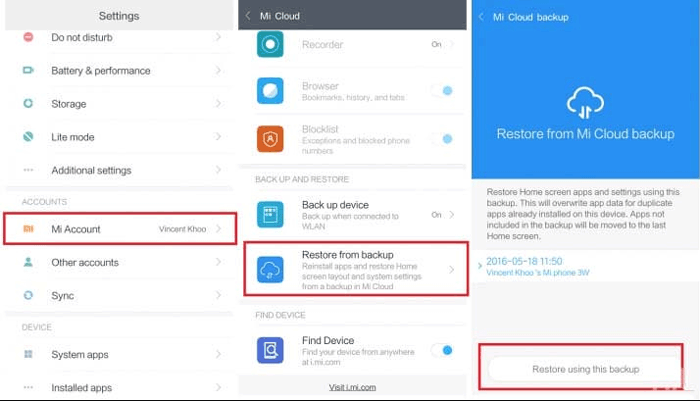
- Sign in to your Mi Cloud account at https://i.mi.com. (What if Mi Cloud won't work?)
- Check if an SMS backup exists and includes your deleted messages.
- On your POCO phone, go to Settings > Mi Account > Mi Cloud.
- Select Restore from backup.
- Choose a backup created before the messages were deleted.
- Start the restore process and wait for it to finish.
- Restart your phone to complete recovery.
People Also Like: 5 Most Dependable Methods to Back Up POCO Apps [Latest Info]
Part 2: Restore Accidentally Deleted SMS on POCO via Google Messages Trash
Requirements:
- Google Messages must be the default SMS app.
- The device must support the Trash or Recently Deleted feature.
- Deleted messages must still be within 30 days.
Considerations:
- Messages are permanently deleted after 30 days.
- If Trash is emptied, recovery is not possible.
- Some POCO devices may not show Trash if the app is outdated.
- It only works for messages deleted inside Google Messages.
User Guide:
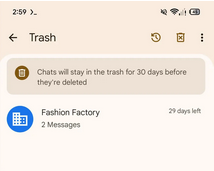
- Open the Google Messages app on your POCO phone.
- Tap your profile icon (top-right corner).
- Select "Trash"/"Recently deleted" from the menu.
- Browse the deleted conversations stored there.
- Long-press the SMS (or conversation) you want to recover.
- Tap the Restore icon.
- The message will return to your main inbox.
Part 3: Recover Deleted Text Messages on POCO via SIM Card or Local Message Cache
Requirements:
- Messages must have been stored on the SIM card.
- Some message data must still exist in local cache.
- The data must not have been overwritten.
Considerations:
- SIM storage is very limited.
- Most modern SMS are stored in phone memory, not SIM.
- Cache recovery is temporary and unreliable.
- It only works for very recently deleted messages.
User Guide:
- Open the Messages app on your POCO phone.
- Go to Settings > Advanced > SIM messages.
- Check if any SMS are still stored on the SIM card.
- If available, view or import those messages back to your phone.
- Restart your POCO device to refresh the system.
- Go to Settings > Apps > Messages.
- Tap Force stop, then reopen the Messages app.
- Check if deleted messages reappear after cache reload.
Part 4: Retrieve Deleted Text Messages on POCO via Professional Product
Requirements:
- PC (Windows/Mac) is required to download MobiKin Doctor for Android.
- USB cable connection to POCO.
- USB debugging must be enabled.
- Device must be detected by software.
- Root may be required for full recovery.
- Stable power and connection needed.
Considerations:
- Free version only supports scan/preview.
- Success depends on data not being overwritten.
- Factory reset reduces recovery.
- USB disconnect can interrupt recovery.
Key Features of MobiKin Doctor for Android (Windows/Mac):
> Recovers deleted SMS and other data types (contacts, call logs, photos, videos, documents, etc)
> Supports internal storage and SD card recovery modes.
> Allows preview of data before recovery.
> Offers quick scan and deep scan options.
> Works with rooted and non-rooted Android devices.
> Enables exporting recovered data to a computer.
> Supports a wide range of Android devices (including POCO C, M, X, and F series).
> Uses a read-only scanning process to prevent data loss.
> Provides a simple 3-step recovery process (connect, scan, recover).


User Guide:
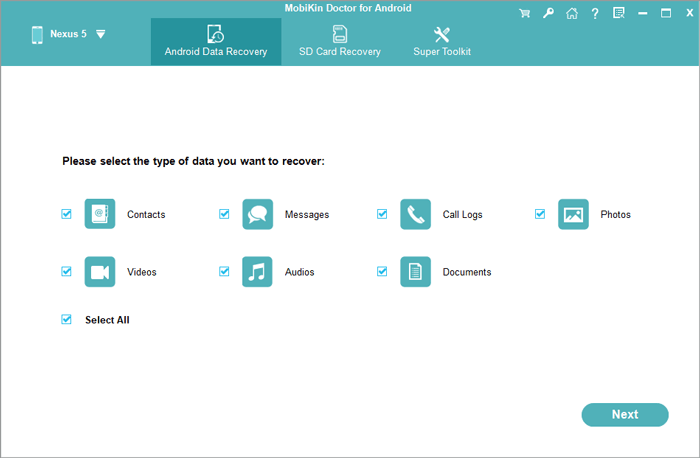
- Initially, download and install the software on your computer, then proceed to launch it.
- Connect your POCO to the computer using a USB cable and adhere to the on-screen instructions to ensure the device is recognized by the tool.
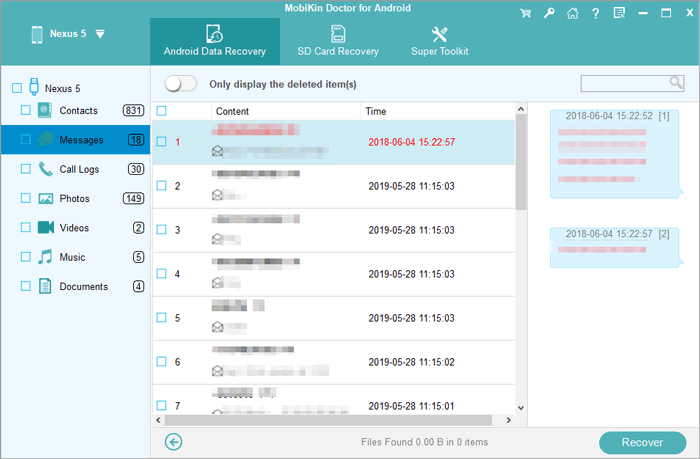
- Once the device is recognized, select "Messages" and click "Next".
- Follow the prompts to scan your POCO.
- To conduct a thorough scan of deleted SMS, your POCO may require rooting.
- After scan, preview all the messages shown on the interface and choose the deleted ones you wish to recover.
- Finally, click "Recover" to restore them and save them to your computer in a readable format.
Video Guide:
You May Also Like: How to Connect POCO to MacBook in 4 Simple & Secure Ways
FAQs for Retrieving Deleted Text Messages on POCO
Q1. Does POCO have a recycle bin for deleted SMS?
Some POCO phones using Google Messages may have a Trash folder, but most do not have a full SMS recycle bin.
Q2. Will factory reset help recover deleted SMS?
No, it usually makes recovery harder unless a backup is available.
Q3. Can I recover SMS deleted a long time ago on POCO?
Only if they exist in a backup or recovery tool scan; otherwise, old deleted SMS are usually gone.
Q4. Will new messages overwrite deleted SMS and affect recovery?
Yes, new data can overwrite deleted messages, reducing or preventing recovery success.
Q5. Can I recover permanently deleted SMS?
Only if they exist in a backup or recovery scan; otherwise, they cannot be restored.
Q6. Are SMS recovery apps safe to use?
SMS recovery apps can be safe to use, but their safety mainly depends on whether you download them from trusted, official sources. When using tools like MobiKin Doctor for Android, it is generally considered safe when obtained from the official provider, and it can help recover deleted text messages from POCO devices even without a backup.
However, recovery results are not guaranteed for every case, since success rate depends on factors like how long ago the SMS was deleted and whether new data has overwritten the storage.
Related Articles:
How to Transfer WhatsApp from POCO to POCO? 4 Trustworthy Ways
How to Recover Deleted Contacts on POCO? 4 Tried-and-true Approaches
4 Effective Strategies to Unlock POCO Phone without Effort
POCO Phone Frozen? Let's Fix It with 12 Clever Methods [2026]
