
How to Recover Deleted Text Messages from TECNO? 5 Easy Options
SMS often contains essential information that is difficult to replace once lost, from verification codes to personal reminders. (Can't receive your verification code text?)
Whether you need to restore accidental deletions or data loss caused by other reasons, the methods explained here focus on real-world use. You will learn how to recover deleted text messages from TECNO in 5 most feasible ways, with steps that any user can follow.
- #1: Find Deleted Text Messages on TECNO via Google Drive Backup
- #2: Recover Deleted SMS on TECNO via Recover Deleted Messages [Backup Needed]
- #3: Recover Deleted SMS Messages on TECNO from Google One Backup
- #4: Recover Permanently Deleted Text Messages on TECNO via Sender/Receiver
- #5: Recover Deleted Text Messages from TECNO Professionally [with No Backup]
- People Also Ask about Recovering Deleted Text Messages from TECNO
#1: Find Deleted Text Messages on TECNO via Google Drive Backup
Requirements:
- Google account signed in on the TECNO Spark, POP, POVA, Pouvoir (Power), Phantom, and Camon series.
- SMS backup enabled in Google Backup before deletion. (How to view Google Drive backups?)
- Stable internet connection.
- Same Google account used during restore.
- Factory reset required to trigger restore process.
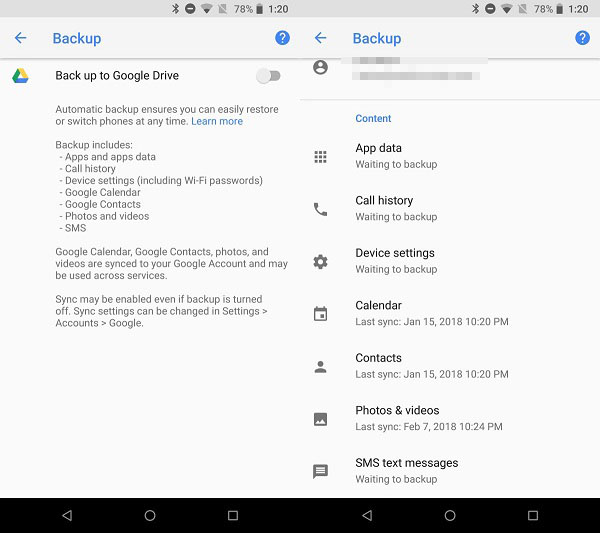
How-to Guide:
- Check if a Google backup with SMS exists (Settings > Google > Backup) and confirm it was made before deletion.
- Factory reset your TECNO phone (Settings > System > Reset > Erase all data).
- Restart the phone and begin the initial setup process.
- Sign in with the same Google account used for the backup.
- Choose "Restore from backup" when prompted.
- Select the backup that includes SMS messages.
- Wait for the restore process to finish and check your Messages app.
#2: Recover Deleted SMS on TECNO via Recover Deleted Messages [Backup Needed]
Requirements:
- Installed "Recover Deleted Messages" app from Google Play.
- Existing SMS backup in Google Drive or local storage.
- Google account login credentials.
- App permissions (SMS, storage, notifications).
- Backup created before messages were deleted.
How-to Guide:
- Install the "Recover Deleted Messages" app from Google Play Store.
- Open the app and grant required permissions such as SMS access, storage, and notification access.
- Check if the app detects an existing Google SMS backup (Google Drive backup) on your device.
- If a backup is found, tap "Restore" or "Recover All" inside the app interface.
- Sign in with the same Google account used to create the backup (if prompted).
- Allow the app to read the backup file and begin restoring messages.
- Wait for the process to finish, then open your Messages app to check restored SMS.
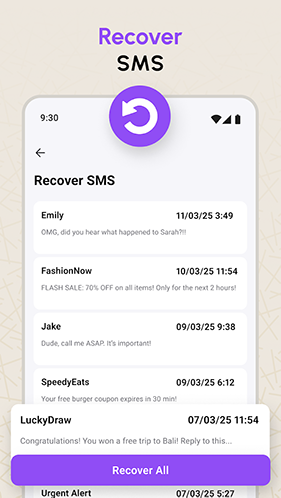
#3: Recover Deleted SMS Messages on TECNO from Google One Backup
Requirements:
- Google One backup enabled on TECNO device.
- SMS included in backup settings.
- Same Google account used for backup and restore.
- Factory reset of the device.
- Wi-Fi connection during setup and restore.
How-o Guide:
- Check if SMS backup exists in Google One (Settings > Google > Backup) and confirm it was created before deletion.
- Factory reset your TECNO phone (Settings > System > Reset > Erase all data).
- Restart the phone and begin the setup process.
- Sign in with the same Google account used for the backup.
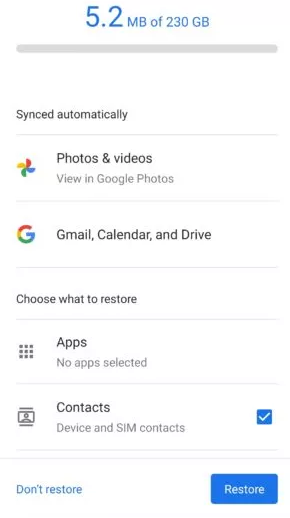
- Select "Restore from backup" when prompted.
- Choose the backup that includes SMS messages before tapping Restore.
- Wait for the restore to finish and check your Messages app.
#4: Recover Permanently Deleted Text Messages on TECNO via Sender/Receiver
Requirements:
- Contact still has original SMS in their device.
- Working communication with sender/receiver.
- Willingness to resend or forward messages.
- Conversation details (time, number, content) for verification.
How-to Guide:
- Check your Messages app conversation history and see if the thread still exists on your device.
- Ask the sender or receiver of the deleted SMS to resend the message content or screenshots.
- Request them to forward the original conversation if it is still available on their phone.
- Verify timestamps or details with them to make sure you recover the exact missing information.
- Save the resent messages immediately to avoid losing them again in the future.
#5: Recover Deleted Text Messages from TECNO Professionally [with No Backup]
Requirements:
- TECNO phone connected to a PC via USB cable.
- USB debugging enabled on the phone.
- Installed MobiKin Doctor for Android (Windows/Mac) software on computer.
- USB drivers installed for TECNO device.
- Phone recognized by the software (root may improve recovery chances).
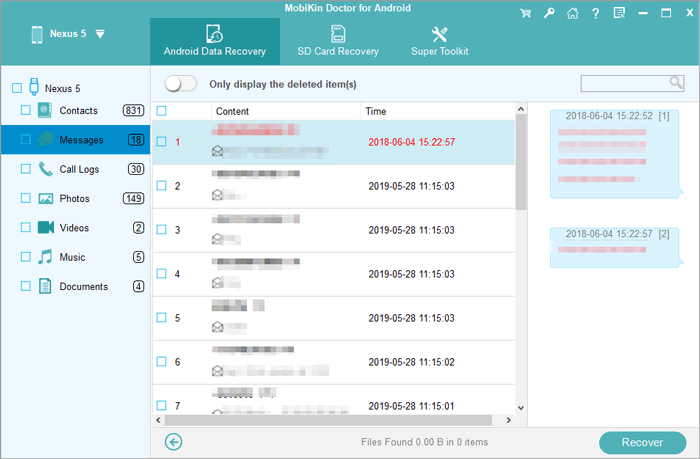
This tool can recover deleted SMS from TECNO by scanning internal storage or SD card, even when no prior backup exists. It also supports multiple data types, offers preview and selective recovery, and uses quick and deep scan modes to improve success while keeping the process simple and secure.
Best SMS Recovery Software Free Download:


How-to Guide:
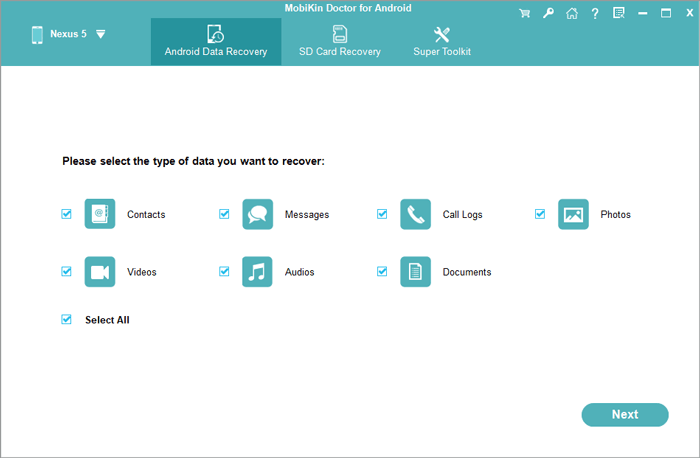
- First, download and install the program on your computer, then launch it.
- Connect your TECNO phone to the computer using a USB cable.
- Follow the on-screen instructions to have the TECNO recognized by the tool.
- Once recognized, select "Messages" and click "Next".
- Follow the prompts to scan your TECNO (For a complete scan of deleted messages, your TECNO may need to be rooted.).
- After scanning, preview all the SMS messages displayed on the interface and select the deleted ones you want to recover.
- Finally, click "Recover" to restore them and save them to your computer in a readable format.
Video Instructions:
People Also Ask about Recovering Deleted Text Messages from TECNO
Q1. Are deleted text messages really gone from a TECNO phone?
Not immediately. They are often marked as inactive in storage until new data overwrites them, which makes recovery possible only for a short time.
Q2. How long does Google keep SMS backups?
Google keeps SMS only within the latest backup; older deleted messages are not stored separately.
Q3. What happens if SMS were deleted before backup?
Those messages will not be included in the backup and cannot be restored.
Q4. Can I recover SMS without resetting my TECNO phone?
Usually no. Google backup restore typically requires a factory reset during setup to retrieve messages.
Q5. Do TECNO phones automatically back up messages?
Not always. SMS backup must be manually enabled in Google Backup or a third-party backup app.
Q6. Can mobile carriers recover deleted text messages?
Usually no. Carriers rarely store SMS content long-term and mainly keep metadata like time and number.
Q7. How long can deleted SMS stay recoverable?
It varies. Messages remain recoverable only until they are overwritten by new data on the phone.
Q8. Can I recover SMS from a broken TECNO phone?
Only if the device can still be accessed or a backup exists. Otherwise, recovery is very unlikely.
Q9. How can I prevent losing SMS on TECNO in the future?
Enable Google Backup or use SMS backup apps like "SMS Backup & Restore" regularly.
Q10. What is the best way to recover lost SMS from TECNO?
The most desirable way to recover lost SMS from a TECNO phone depends on whether you have a backup, but without backup, recovery options are usually very limited. In most cases, MobiKin Doctor for Android is the most clever tool because it can scan a connected TECNO device directly from a computer and help recover deleted messages more effectively than basic backup-based methods.
Related Articles:
5 Most Desirable Ways to Recover Deleted WhatsApp Data from TECNO
How to Transfer Messages from Samsung to TECNO in 5 Verified Ways
How to Recover Text Messages after Factory Reset Android? 5 Tactics
