
4 Easy Tactics to Perform SIM Card Data Recovery for HONOR
Losing important contacts can be a frustrating experience, especially when SIM contacts disappear unexpectedly. When you switch to a new HONOR device or perform a factory reset, SIM contacts may get lost, leaving you searching for reliable ways to restore them. Some rely solely on SIM storage without syncing contacts to cloud services, making recovery even more critical.
This passage provides four practical ways for SIM card data recovery for HONOR, guiding you through both built-in and third-party solutions to restore lost contacts efficiently.
- Option 1: Recover Data from a SIM Card on HONOR via Recently Deleted
- Option 2: Recover Data from HONOR SIM via Recover deleted Sim contacts n
- Option 3: Restore SIM Card Data on HONOR via Recover Contacts & Backup
- Option 4: Perform SIM Card Data Recovery for HONOR via MobiKin Software [without Backup]
Option 1: Recover Data from a SIM Card on HONOR via Recently Deleted
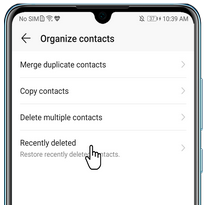
Some HONOR phones include a Recently Deleted option, allowing users to retrieve contacts that were removed within a limited retention period. This feature works directly inside the system's Organize contacts settings, making the process simple and fast.
Only items still stored in that temporary folder can be restored, as permanently erased SIM data will not appear. Because of this limitation, recovering SIM-card information depends entirely on whether the deleted contact is still held in that Recently Deleted queue.
User Manual:
- Open Settings on your HONOR phone.
- Use the search bar to look for Organize contacts and tap to open it.
- Check whether a Recently deleted option is available.
- If the recently deleted option exists, open it to view contacts that were removed recently.
- Select the contacts you want to recover.
- Tap Restore to return them to your contact list.
- Open the Contacts app to confirm that the restored SIM contacts are now visible.
Option 2: Recover Data from HONOR SIM via Recover deleted Sim contacts n
Recovery attempts can also be made through the Recover deleted Sim contacts n app, which scans SIM and phone memory for removable contact entries. The app may display contacts marked as deleted if they haven't been fully overwritten yet.
While it offers options to preview and selectively restore data, its success rate varies based on how the SIM card handles deletion. Since SIM cards do not support deep-level recovery, results from this app should be viewed as situational rather than guaranteed.
User Manual:
- Install the Recover deleted Sim contacts n app on your HONOR phone.
- Open the app and grant all required permissions so it can read SIM and phone contacts.
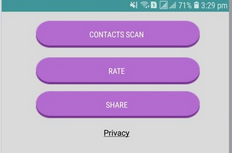
- Select the option to CONTACTS SCAN or Recover SIM contacts from the main menu.
- Let the app perform a full scan of your SIM card and phone memory.
- When the scan finishes, review the list of found deleted contacts (if any appear).
- Choose the contacts you want to restore, or tap Restore All.
- Save the recovered contacts to phone memory or export them as a VCF backup.
- Open the Contacts app on your HONOR device to confirm the restored entries are visible.
- Avoid adding or deleting contacts during the process to prevent overwriting recoverable SIM data.
Option 3: Restore SIM Card Data on HONOR via Recover Contacts & Backup
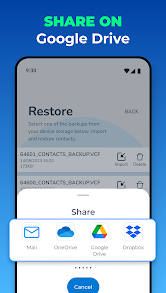
Another method is provided by Recover Contacts & Backup, which focuses primarily on restoring contacts from previously created backups. This tool allows users to export and import VCF files, making it helpful if a backup exists before data loss.
Although it can read SIM and phone contacts, it usually recovers information only when it was saved earlier through the app's backup features. As a result, deleted SIM data without a prior backup is rarely recoverable with this method.
User Manual:
- Install the Recover Contacts & Backup app from Google Play on your HONOR phone and open it.
- Grant all required permissions (Contacts, Phone) so the app can scan SIM-card and phone-stored contacts.
- Go to the "Recovery" or "Restore" option inside the app.
- Choose the SIM-card source (if the app detects SIM contacts separately).
- Run the scan to let the app search for deleted or missing SIM contacts.
- Preview the found contacts (if the app displays recoverable entries).
- Select the contacts you want to restore or choose "Restore All."
- Save the restored contacts to phone memory or export them as a VCF backup.
- Check the Contacts app on your HONOR device to confirm that the restored SIM-related entries appear.
If nothing is recovered, it likely means the SIM contacts were permanently erased (SIM cards do not support deep undelete) - so only backups (VCF files or Google Contacts sync) can restore them.
Option 4: Perform SIM Card Data Recovery for HONOR via MobiKin Software [without Backup]
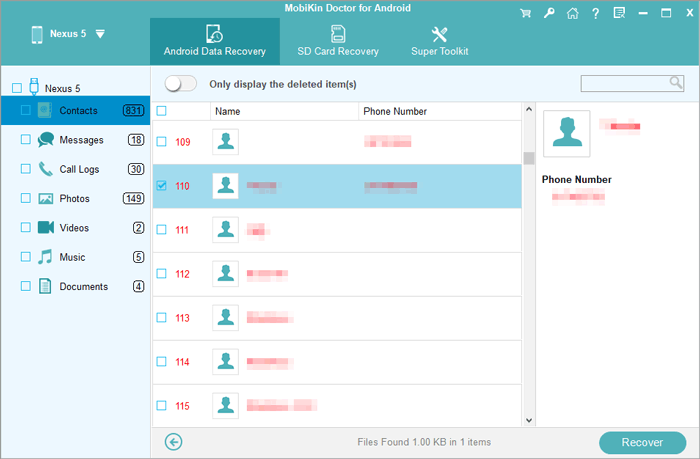
More advanced retrieval is possible through MobiKin Doctor for Android (Windows/Mac), a professional desktop recovery utility capable of scanning deeper areas of device storage. When connected to a computer, it attempts to detect recoverable contacts that may no longer appear through basic apps.
While it primarily focuses on internal storage, some SIM-related contact data might still be found if the phone mirrors those entries. Even so, once the SIM card itself purges information completely, no software-including this one-can guarantee restoration.
|
Key Feature
|
Description
|
|
SIM Card Contact Recovery for HONOR |
Scans SIM and device storage for deleted contacts, previews recoverable entries, and restores to VCF, CSV, or HTML. Offers higher recovery success than mobile-only apps. |
|
Deep Scan of Internal Storage |
Recovers deleted contacts, messages, call logs, and media. Detects hidden files and uses advanced scanning algorithms; some recovery is possible without root. |
|
Selective Preview & Recovery |
Displays recoverable items by category. Allows selective recovery to avoid overwriting and confirms what can be restored. |
|
Wide Compatibility & Easy Operation |
Supports most HONOR (Magic, Number, Note, X, Play, V, etc) and Android devices. Simple USB connection, step-by-step guidance, and it works on Windownd Mac. |
|
High Recovery Success Rate |
Advanced scanning techniques ensure a higher chance of recovering lost contacts and SIM data. |
|
Security & Privacy Protection |
Data is read-only during recovery to prevent overwriting; keeps sensitive information secure. |
|
More Features |
Allows backup/export of recovered data, supports multiple file types, and provides file recovery for SD card. |
User Manual:
- Download and install MobiKin Doctor for Android on your Windows or Mac computer.
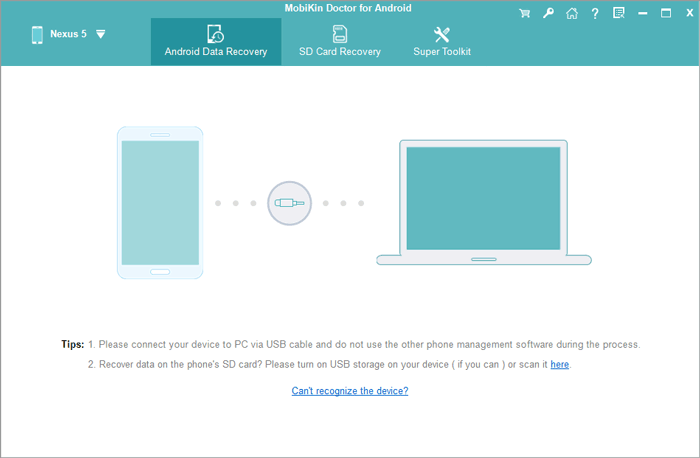
- Connect your HONOR phone to the computer via USB and enable USB debugging on the phone.
- Launch the software and wait for it to detect your device automatically.
- Select the data types you want to recover, such as contacts or SMS and ensure SIM contacts are included if available.
- Tap "Next" and start a scan to let the software search for lost contacts from both phone memory and SIM card.
- Preview the found contacts and select the ones you want to restore.
- Recover the contacts by saving them to your computer in a suitable format (VCF, CSV, or HTML).
- Check your HONOR phone to ensure recovered contacts appear in your contact list or import them from the saved files if needed.


Wrapping Up
Among the methods discussed, MobiKin Doctor for Android could be the most reliable and comprehensive solution. Unlike the Recently Deleted option, which is only available on some HONOR phones, or mobile apps like Recover deleted Sim contacts n and Recover Contacts & Backup, MobiKin Doctor can deeply scan both phone and SIM storage to locate deleted contacts.
This product provides a higher recovery success rate, secure handling of sensitive data, and the ability to preview and selectively restore contacts.
Related Articles:
4 Secure Ways to Bypass Google Account/FRP on Huawei without PC
5 Easy & Quick Ways to Transfer Photos from HONOR to Mac [2026]
6 Best HONOR Sync Software Options in 2026 [Latest Review]
4 Stress-relief Methods to Transfer Data from HONOR to HONOR
