Can Someone Recover Data After iPhone Reset? What You Must Know
TL;DR:
To keep your old iPhone data from being recovered, back up what you need, erase the device properly, and use MobiKin Eraser for iOS when you want a more thorough wipe.
- "Erase All Content and Settings" removes personal data from the iPhone, but other copies may remain elsewhere.
- Check iCloud, iTunes/Finder backups, and synced devices for photos, messages, contacts, and other data.
- Recovery mainly depends on whether a usable backup or synced copy still exists.
- Connect the iPhone to MobiKin Eraser for iOS, click "Erase", select a security level, type "delete", and start the erase process.
Resetting an iPhone is usually the first thing people do before selling, giving away, or starting fresh with a device. But can someone recover data after iPhone reset? The answer depends on how the iPhone was erased and whether copies of your data still exist elsewhere. In this guide, we'll explain what can be recovered after an iPhone reset, when recovery may still be possible, and how to permanently erase your iPhone if you want to prevent anyone else from accessing your private data.
- Part 1: Can Someone Recover Data After an iPhone Reset?
- Part 2: What Data Can Still Be Recovered After an iPhone Reset?
- Part 3: When Can Someone Recover Data from a Reset iPhone?
- Part 4: Permanently Erase an iPhone So Data Can't Be Recovered [Recommended]
- FAQs About Recovering Data After an iPhone Reset
Part 1: Can Someone Recover Data After an iPhone Reset?
Yes, but it depends on what you mean by "reset." If you use "Erase All Content and Settings," the iPhone removes your personal data and returns to the setup screen. In most cases, the old data cannot simply be accessed from the device afterward.
However, resetting an iPhone does not necessarily remove every other copy of your data. Photos, messages, contacts, and other files may still exist in an iCloud backup, an iTunes or Finder backup, or another synced device. So, if you're planning to sell or give away your iPhone, a normal reset may not be enough if your goal is to make sure your private data cannot be recovered from any available copy.
Part 2: What Data Can Still Be Recovered After an iPhone Reset?
If you're wondering what someone might recover after an iPhone reset, it mainly depends on where the data still exists. Common types of personal data include:
- Photos and videos saved in iCloud Photos or a backup.
- Messages and iMessages included in an iCloud or computer backup.
- Contacts, calendars, notes, and other synced information.
- App data and documents stored in an iCloud backup.
- Call history, Safari data, and other information included in a backup.
In other words, a reset removes the data from the iPhone itself, but it doesn't automatically delete copies stored elsewhere. Those copies may still be available for recovery or access.
Part 3: When Can Someone Recover Data from a Reset iPhone?
Whether data can be recovered after an iPhone reset depends largely on whether another copy still exists. Here are some common situations:
- An iCloud backup still exists. If the iPhone was backed up before the reset, its data may still be restored to another device.
- An iTunes or Finder backup is available. A backup stored on a computer can contain data from the iPhone before it was reset.
- The data was synced elsewhere. Photos, contacts, messages, or other information may still be available on another Apple device or cloud service.
- The iPhone wasn't fully erased. If the reset process was interrupted or didn't complete properly, some personal information may remain on the device.
So, if you're giving away or selling an old iPhone, don't just focus on resetting the device. Check whether your personal data still exists in backups or other connected services, too.
Part 4: Permanently Erase an iPhone So Data Can't Be Recovered
If you're planning to sell, donate, or give away your old iPhone, simply resetting it may not be enough for your needs. MobiKin Eraser for iOS provides a more thorough way to wipe the device and make the erased data unrecoverable. It lets you choose the security level and permanently erase personal data directly from your iPhone.
Key Features of MobiKin Eraser for iOS:
- Permanently erase contacts, messages, call history, calendars, notes, photos, videos, and other personal data.
- Remove both existing and previously deleted data from the iPhone.
- Offer Low, Medium, and High security levels for different erasing needs.
- Overwrite device data to prevent recovery with data recovery tools.
- Clean up unwanted files and other data to free up storage space.
- Support iPhone, iPad, and iPod touch devices.


To permanently erase your iPhone with MobiKin Eraser for iOS:
Step 1: Download and install MobiKin Eraser for iOS on your computer. Connect your iPhone to the computer with a USB cable. Unlock the device and tap "Trust" if prompted.
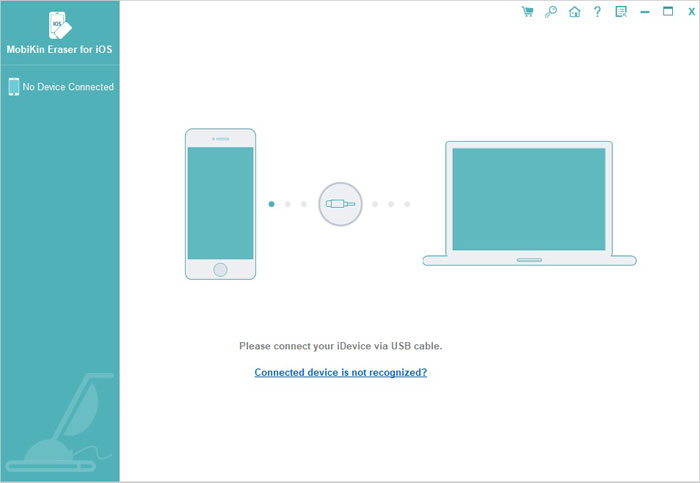
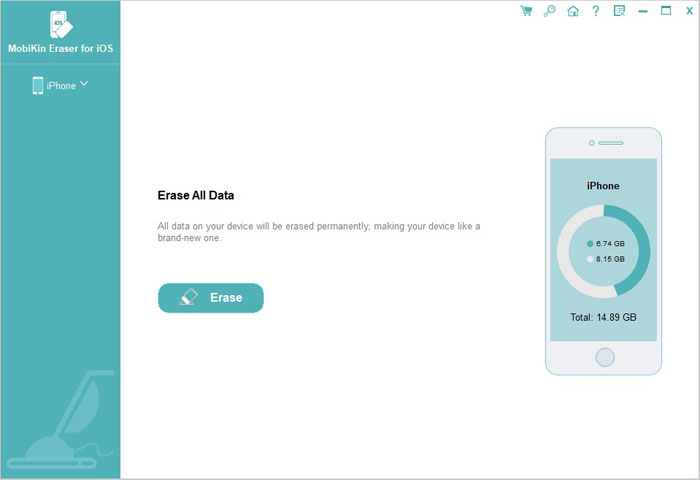
Step 2: After the device is detected, click "Erase". If "Find My iPhone" is enabled, turn it off as instructed by the program.
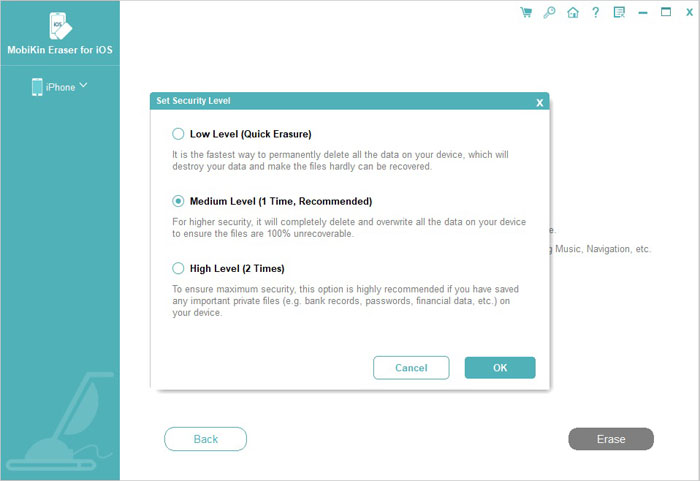
Step 3: Click "Medium" or choose your preferred option under "Select Security Level", then click "OK" to confirm.
Step 4: Type "delete" in the input box and click "Erase". Click "OK" to confirm and let the program begin erasing the device.
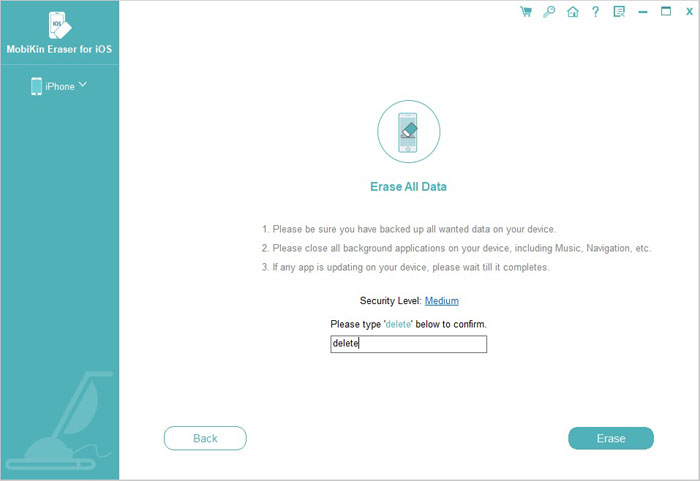
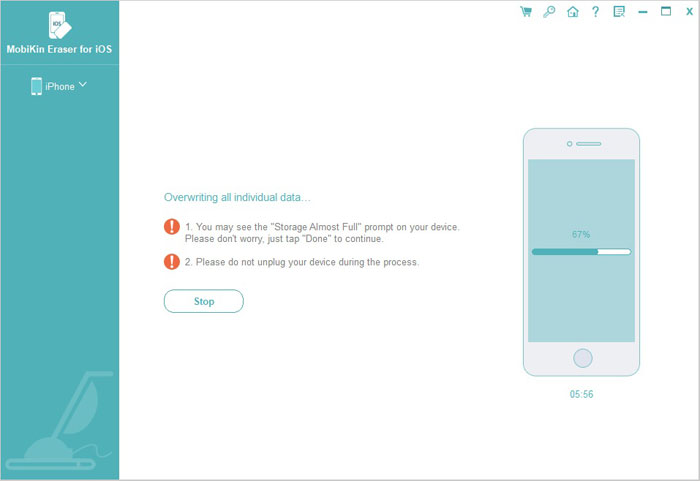
Step 5: Keep the iPhone connected during the process. After the device reboots, MobiKin Eraser for iOS will continue overwriting the data based on the security level you selected.
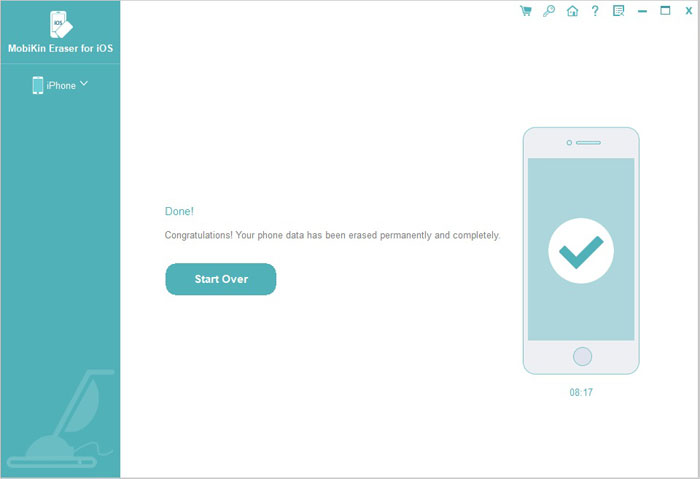
Step 6: When the process is complete, the program will indicate that the data has been permanently erased.
FAQs About Recovering Data After an iPhone Reset
Q1. Can I recover photos after resetting my iPhone?
Yes, if the photos were synced with iCloud Photos or included in an iCloud, iTunes, or Finder backup. If no copy exists elsewhere, recovering the photos after a proper reset is generally not possible.
Q2. Does an iPhone reset delete everything permanently?
"Erase All Content and Settings" removes your personal data from the device and restores it to factory settings. However, it does not automatically delete backups or copies stored in other locations.
Q3. Can someone recover deleted data from a reset iPhone?
A properly erased modern iPhone is designed to make the previous data inaccessible. However, if your data still exists in a backup, cloud service, or another device, someone with access to that copy may still be able to retrieve it.
Q4. How can I permanently erase my iPhone before selling it?
First, back up anything you want to keep, then use "Erase All Content and Settings" to remove your personal information. If you want an additional data-erasing solution, you can use a dedicated tool such as MobiKin Eraser for iOS to thoroughly wipe the device before handing it to someone else. (How to Erase iPhone Data for Selling?)
Conclusion
An iPhone reset removes your personal data from the device, but copies may still remain in iCloud, computer backups, or other synced devices. If you're keeping the iPhone, a normal reset may be enough. If you're selling or giving it away, however, take extra care to erase your private data thoroughly. A dedicated tool like MobiKin Eraser for iOS can provide a more thorough way to wipe the device before handing it over.
Related Articles:
How to Wipe An Stolen/Lost iPhone Remotely
5 Ways to Delete All or Multiple Messages on iPhone