
iMyFone Fixppo Review: Is It Worth the Price? [Fair Analysis]
TL;DR:
- iMyFone Fixppo provides a comprehensive set of functions for addressing common iOS system issues.
- Nevertheless, its relatively high cost, potential connection instability, and the risk of data loss associated with Advanced Mode should be carefully considered before purchase.
- This review also examines iOS System Recovery as an alternative, comparing the two tools in terms of features, pricing, device compatibility, and limitations to help readers make an informed choice.
An iPhone stuck on the Apple logo, a screen that refuses to respond, or an iOS update that never seems to finish can quickly turn an ordinary day into a frustrating one. iMyFone Fixppo claims to offer a way out of these situations, but does it deliver when a device is actually in trouble?
This iMyFone Fixppo review takes a closer look at its repair functions, compatibility, pricing, safety, and real-world usability to help you know whether Fixppo can actually resolve common iOS problems.
- Part 1: iMyFone Fixppo - Brief Introduction
- Part 2: iMyFone Fixppo - Compatibility
- Part 3: iMyFone Fixppo - Pricing & Safety
- Part 4: How to Use iMyFone Fixppo
- Part 5: iMyFone Fixppo - Pros & Cons
- Part 6: A More Cost-effective Alternative to iMyFone Fixppo
- Part 7: FAQs about iMyFone Fixppo
- Summary - Compare iOS System Recovery vs. iMyFone Fixppo
Part 1: iMyFone Fixppo - Brief Introduction
Introduction:
iMyFone Fixppo is a desktop-based iOS system repair and recovery tool that helps troubleshoot various iPhone, iPad, and iPod touch issues, such as frozen screens, screen of death, recovery mode problems, and failed iOS updates. It offers features including Standard Mode and Advanced Mode repairs, one-click recovery mode entry/exit, and iOS upgrading or downgrading, with Standard Mode aiming to fix system issues without erasing existing data.
Main Features:
|
Feature
|
Key Details
|
|
iOS System Repair |
Fixes over 150 common iOS/iPadOS system issues, including frozen screens, Apple logo loops, black screens, and boot failures. |
|
Standard Repair Mode |
Resolves common system problems while aiming to preserve existing device data. |
|
Advanced Repair Mode |
Handles more serious iOS system problems when Standard Mode fails, but erases existing device data. |
|
Enter/Exit Recovery Mode |
Allows users to enter or exit iPhone Recovery Mode with one click for free. |
|
iOS Upgrade/Downgrade |
Upgrades or downgrades compatible iOS devices using available firmware without iTunes or jailbreaking. |
|
Device Reset |
Resets iPhone and iPad devices, including situations where the passcode is unavailable. |
|
Data Backup & Restore |
Provides options to back up device data before certain operations and restore it afterward. |
|
Apple TV Support |
Helps troubleshoot supported tvOS system problems on Apple TV devices. |
|
Cross-Platform Compatibility |
Supports both Windows and macOS computers. |
Part 2: iMyFone Fixppo - Compatibility
According to the official iMyFone website, Fixppo supports the following devices and operating systems:
- iPhone: iPhone 5 through iPhone 17 series, including iPhone SE, 6, 7, 8, X, XR, XS, 11, 12, 13, 14, 15, and 16 series.
- iPad: iPad, iPad mini, iPad Air, and iPad Pro.
- iPod: iPod touch, iPod shuffle, iPod nano, iPod mini, and iPod classic.
- Apple TV: Apple TV 1st, 2nd, 3rd, 4K, and HD models.
- iOS: iOS 9 through iOS 27, including older versions.
- iPadOS: iPadOS 9 through iPadOS 26, including older versions.
- Windows: Windows 7, 8, 10, and 11 (32-bit and 64-bit).
- macOS: macOS 10.11 (El Capitan) through macOS 15 (Sequoia).
Part 3: iMyFone Fixppo - Pricing & Safety
iMyFone Fixppo - Pricing
iMyFone Fixppo offers a free trial with limited functionality, while completing iOS system repairs requires a paid license. According to Geekflare's pricing information, individual users can choose from three subscription options:
|
Plan
|
Price (USD)
|
License Duration
|
|
1-Month Plan
|
$49.99 |
Monthly subscription |
|
1-Year Plan
|
$79.99 |
Annual subscription |
|
Lifetime Plan
|
$89.99 |
One-time purchase |
- Free features: Entering and exiting Recovery Mode with one click.
- Paid features: Completing Standard Mode and Advanced Mode repairs and accessing other premium functions.
- Business plan: Customizable according to the number of devices and licensing requirements.
iMyFone Fixppo - Safety
iMyFone Fixppo is a legitimate iOS repair program available from the developer's official website, and its supported repair operations do not require jailbreaking your device. However, Advanced Mode erases existing device data, so backing up important files before starting a repair is strongly recommended.
Part 4: How to Use iMyFone Fixppo
The following guide takes Standard Mode as an example to demonstrate how to use iMyFone Fixppo to repair common iOS system issues. Follow the three steps below to complete the repair process while aiming to preserve your existing iPhone data:
- Open iMyFone Fixppo iOS System Recovery on your PC.
- From the main interface, select Apple System Repair, then choose Standard Mode to proceed.
- Once Fixppo recognizes your device, it will automatically detect its model and show the available compatible firmware versions.
- Choose your preferred firmware and click Download.
- Since the firmware package may be several gigabytes, the download duration depends on your internet speed and Apple's server response.
- When the firmware download and verification are complete, click Start Standard Repair to begin fixing your iPhone.
- Keep your device connected throughout the process. Once the repair is finished, your iPhone should reboot automatically.
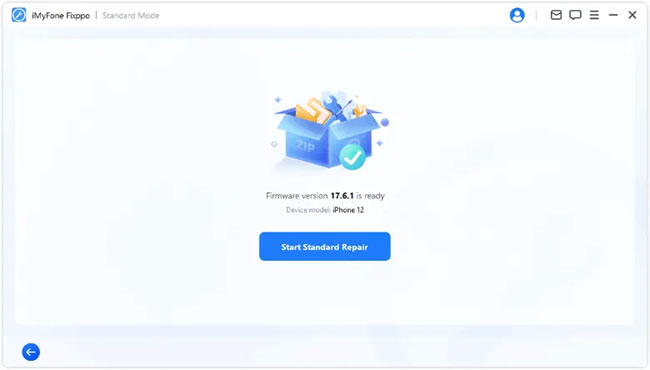
My Hands-On Experience with Fixppo: My iPhone 15 Pro got stuck on the Apple logo after an iOS update, so I decided to give Fixppo a try (Somewhat costly), but things didn't go smoothly at first. The connection failed twice, and even after getting the device recognized, the connection seemed unstable, forcing me to reconnect the phone and repeat parts of the process several times. Fortunately, persistence paid off, and Fixppo eventually completed the Standard Mode repair successfully, bringing my iPhone back to normal operation.
Part 5: iMyFone Fixppo - Pros & Cons
Advantages:
- Supports more than 150 iOS, iPadOS, and tvOS system issues.
- Offers Standard Mode to repair common iOS problems while preserving existing data.
- Provides Advanced Mode for dealing with more serious system problems.
- Allows users to enter or exit Recovery Mode with one click for free.
- Supports iOS upgrading and downgrading without jailbreaking.
- Features a straightforward interface with step-by-step repair instructions.
- Supports a wide range of iPhone, iPad, iPod touch, and Apple TV models.
- Includes additional utilities such as device reset and data backup and restore.
- Compatible with both Windows and Mac computers.
Disadvantages:
- Requires a paid license to complete most iOS system repairs.
- Advanced Mode erases all existing data on the device.
- Firmware downloads can take time, depending on internet speed.
- May fail to resolve certain system problems, so repair success is not guaranteed.
- Cannot fix physical hardware problems, such as damaged screens, batteries, or logic boards.
- Short-term subscription plans may have device limitations.
- A bit pricey compared with its counterparts.
Part 6: A More Cost-effective Alternative to iMyFone Fixppo
When iOS devices encounter problems such as Apple logo loops, frozen screens, or failed updates, iOS System Recovery offers a practical way to diagnose and repair these software glitches. It provides several repair options for different system issues, along with firmware-based recovery that can help bring a faulty iPhone back to working order without collecting its private data.
Compared with iMyFone Fixppo, it may be a more effective alternative for users seeking another repair solution, particularly when Fixppo fails to complete the job.
Download It Safely - No ads, no bundled apps, and no background uploads.


How to Use?
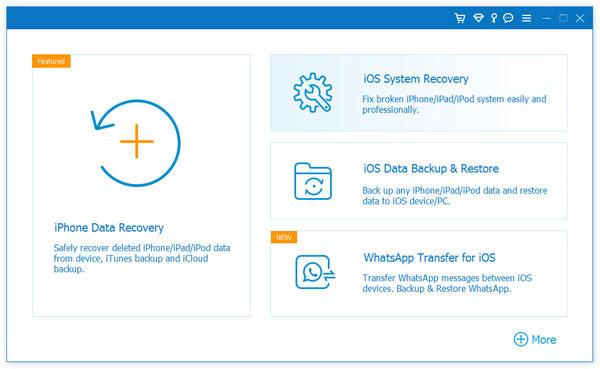
Step 1. Launch the iOS System Recovery Module - Download and install iOS System Recovery on your computer, then connect your iPhone or iPad using a USB cable. Launch the software, navigate to More Tools, and select iOS System Recovery from the main interface.
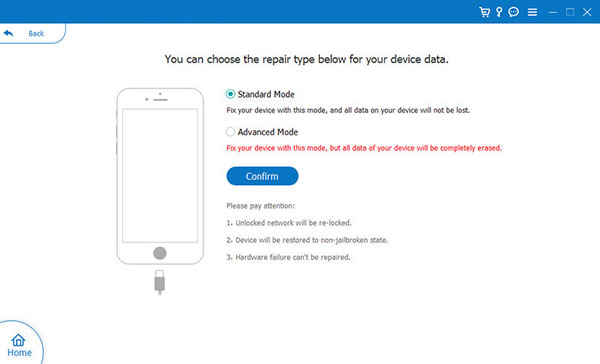
Step 2. Choose Standard Mode - Follow the on-screen instructions to proceed and select Standard Mode as an example. This mode aims to resolve iOS system issues without erasing your existing data. Click Confirm to continue.
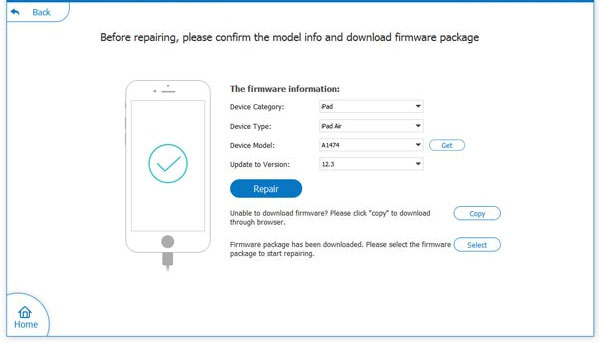
Step 3. Download Firmware and Repair Your Device - Check whether the device information displayed on the screen is correct. The program will then download the corresponding firmware package for your iPhone or iPad. Once the download is complete, follow the on-screen instructions to finish the repair.
Part 7: FAQs about iMyFone Fixppo
Q1. What is the difference between Standard Mode and Advanced Mode?
Standard Mode is intended for common iOS system problems and attempts to preserve user data. Advanced Mode is suitable for more serious issues that Standard Mode cannot resolve, but it requires erasing the device.
Q2. What should I do if iMyFone Fixppo cannot detect my iPhone?
First, check the USB cable and port, reconnect your iPhone, and ensure your computer can recognize the device. If it is still undetected, follow Fixppo's instructions to put the iPhone into Recovery Mode or DFU Mode.
Q3. Does iMyFone Fixppo work with the latest iPhone 18 series?
Not officially confirmed yet. Although iMyFone Fixppo advertises support for all iPhone models and iOS versions, its published compatibility list currently names the iPhone 17 series but does not explicitly mention the iPhone 18 series. Therefore, users should download the free trial and connect their iPhone 18 to verify compatibility before purchasing a license.
Q4. What should I do if Fixppo cannot repair my iPhone?
Try Standard Mode again after checking the firmware download and USB connection. If the issue persists, you can consider Advanced Mode, but back up your data first because this operation erases the device. Hardware-related problems require professional repair instead.
Q5. Does iMyFone Fixppo require iTunes?
No. Fixppo is a standalone desktop application that uses its own repair process and firmware packages. It can perform supported iOS system repairs without relying on iTunes or Finder.
Summary - Compare iOS System Recovery vs. iMyFone Fixppo
Both tools provide Standard and Advanced repair modes for troubleshooting iPhone and iPad system problems. However, they have different strengths when it comes to pricing, device compatibility, additional utilities, etc.
|
Comparison Point
|
iOS System Recovery
|
iMyFone Fixppo
|
|
Pricing
|
Lower listed entry price, starting at $19.90 for a monthly license. (Win) |
Its listed monthly plan costs $49.99. |
|
Device Compatibility
|
Explicitly lists support for the iPhone 18 series and iOS 27. (Win) |
Advertises broad iPhone and iOS compatibility, but does not explicitly list the iPhone 18 series in its published model list. |
|
Quick Repair
|
Provides a Quick Fix option for certain common iOS problems, alongside its repair modes. (Win) |
Offers free one-click Recovery Mode entry and exit, but actual system repairs require a paid license. |
|
Additional Utilities
|
Primarily focuses on iOS system repair, with other FoneLab functions available separately. |
Integrates data backup and restore utilities into its toolkit. (Win) |
|
Apple Device Support
|
Supports iPhone, iPad, and iPod touch devices. |
Also supports Apple TV and tvOS system repair. (Win) |
Related Articles:
How to Fix Error 11 on iTunes While Restoring iPhone/iPad: 11 Ways
How to Recover Photos from iPhone in Recovery Mode? 4 Practical Ways
7 Tested Ways to Fix iPhone Stuck on Restore Screen 2026
Fix System UI Not Responding Error on Android Phone in 12 Ways