
3 Easy Approaches to Change Netflix Region Safely [with FAQs]
Accessing exclusive content on Netflix often means dealing with regional restrictions that limit the shows and movies available in your country. Many users wonder how to change their Netflix region to unlock a wider variety of content from other countries.
In today's passage, you'll learn different methods to bypass these geo-blocks, including using VPNs and Virtual Location Tools, which allow users to change their Netflix region quickly and securely.
Part 1: How to Change the Country on Netflix via Surfshark VPN
Surfshark VPN is a top-tier choice for streaming Netflix with its reliable ability to bypass geo-restrictions. It offers fast and secure connections to servers in various countries, allowing users to easily change their Netflix region. With a no-logs policy and consistent performance, Surfshark ensures smooth, uninterrupted streaming without the risk of being detected by Netflix's VPN blockers.
One-List Guide:
- First, download and install a VPN like Surfshark VPN. This will allow you to connect to a server in a different country and "spoof" your location.
- Netflix content varies by country, so you'll need to choose a VPN server from the country whose content you want.
- Once connected, reset your Netflix connection: on mobile, force quit the app; on desktop, close and reopen the entire browser.
- Netflix doesn't show which country library you're connected to, but you'll know by searching for specific shows or movies.
- As long as you're connected to the correct country's VPN server, you'll access that region's content.
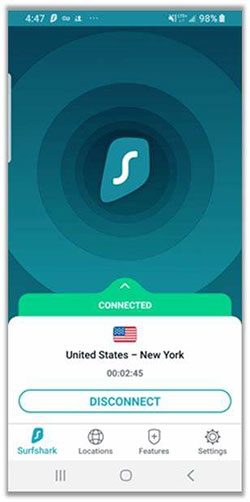
If you can't change your Netflix region with this VPN, try these solutions: ensure you're using a reliable VPN that unblocks Netflix, switch to a different server or a dedicated Netflix server if available, and clear your browser cache and cookies. Also, try disconnecting and reconnecting the VPN, or force-quitting and restarting the Netflix app. If these don't work, consider using a premium VPN with better Netflix support.
Part 2: How to Change Netflix Region via Android TV
Android TV offers a great platform for streaming, and with a few simple steps, you can easily change your Netflix region with it. By connecting to a server in the desired country, you can access exclusive content available in that region. However, this method requires using a reliable VPN like ExpressVPN to bypass geo-restrictions and stream content smoothly on your Android TV.
One-List Guide
- Install a VPN: Download and install a VPN app (e.g., ExpressVPN) on your Android TV.
- Connect to a VPN Server: Open the VPN app and connect to a server in the country you want to access on Netflix.
- Clear Netflix Cache: Go to Settings > Apps > Netflix and clear the app's cache.
- Restart Netflix App: Close and reopen the Netflix app on your Android TV to refresh the connection.
- Browse Netflix Content: Search for region-specific shows or movies to verify the change.
- Enjoy Streaming: Watch Netflix with access to the content library of the connected country.
You May Also Like: How to Transfer Videos from Android to Android in 6 Ways? Full Analysis
Part 3: How to Change Netflix Region via a Professional Program
Do you want to change your Netflix region with minimal risks? Unlike traditional VPNs, Virtual Location Tool lets you spoof your location without the need for a VPN, ensuring a smoother experience with no connection interruptions. This software is an excellent choice for those seeking a reliable, hassle-free way to access region-locked Netflix content without the usual VPN limitations.
Key Features:
- Change Netflix Region Without VPN: Spoof your location easily to access content from different Netflix regions without a VPN.
- Precise Location Spoofing: Select any global location and change your Netflix region with a few clicks.
- Safe and Secure: Bypass Netflix's geoblocking securely with minimal risk.
- User-Friendly Interface: Simple and intuitive, making it easy to change your Netflix region.
- No Interruptions in Streaming: Enjoy smooth, uninterrupted streaming without connection drops or slow speeds.
- Supports Multiple Platforms: Works on both Windows and Mac for seamless region changes.
- Flexible Location Options: Change your location for Netflix and other apps, offering versatile use.
Free Download:


One-List Guide
- Begin by downloading and installing the best location changer on your Windows or macOS computer.
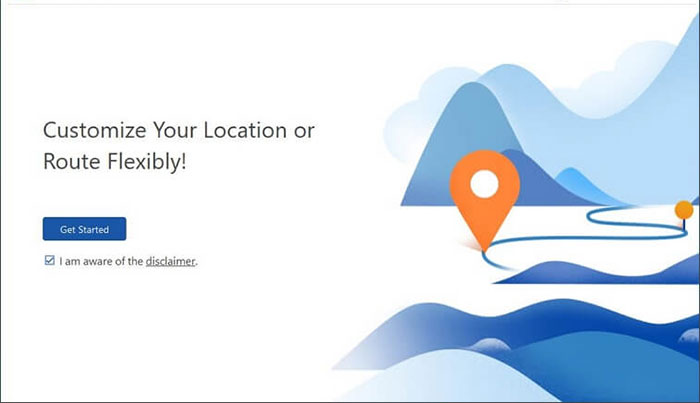
- After you have launched the application, click on "Get Started" on the main screen.
- Utilize a USB cable to connect your smartphone to the computer and wait a moment for the software to detect your device.
- In the top-right corner of the interface, choose "Teleport Mode."
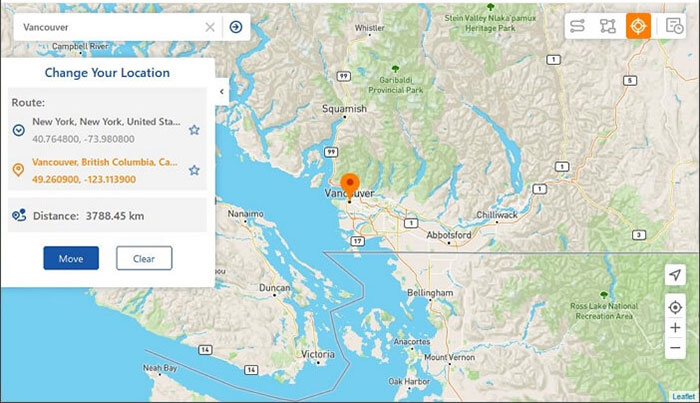
- Next, input your desired destination into the search bar or provide specific GPS coordinates for precise location identification.
- Once the map pointer moves to your selected location, press "Move" to immediately change the region for Netflix.
Part 4: FAQs about Changing Netflix Region
Q1: Is it legal to change my Netflix region with a VPN?
While using a VPN is legal in most countries, Netflix's terms of service prohibit bypassing regional content restrictions. However, many users still use VPNs to access other content libraries.
Q2: Can I use a free VPN to change my Netflix region?
While free VPNs can work, they often have slower speeds and may not reliably bypass Netflix's VPN detection. It's recommended to use a premium VPN for better results.
Q3: Can Netflix detect my VPN?
Yes, Netflix actively detects and blocks certain VPNs. Using a reliable and premium VPN that is regularly updated can help avoid detection.
Q4: Does changing my Netflix region affect my account?
No, changing your region with a VPN does not affect your Netflix account or subscription. Your account and preferences remain the same.
Q5: Can I use Netflix on multiple devices in different regions?
Yes, you can use Netflix on different devices with different regions by connecting each device to a VPN server in the desired country.
Q6: Can I access Netflix from any country?
With the help of a VPN, you can access Netflix content libraries from many countries. However, not all VPNs can bypass Netflix's geoblocking effectively.
Q7: Can I get caught for changing my Netflix region with a VPN?
While Netflix may block accounts or restrict access if it detects VPN use, it is rare for a user to be banned. However, repeatedly using a VPN could trigger account restrictions.
Conclusion - Should I Use a VPN or Virtual Location Tool
Overall, both a VPN and the Virtual Location Tool can help you change your Netflix region, but they offer different advantages. While VPNs are widely used, they may suffer from slower speeds and occasional connection issues.
Virtual Location Tool, on the other hand, provides a more reliable, hassle-free solution with no VPN limitations and smoother streaming. Ultimately, if you're looking for speed and ease, this program may be the better choice for accessing region-specific Netflix content.
Related Articles:
7 Easy Options to Transfer Videos from PC to Android Phone/Tablet
How to Recover Permanently Deleted Videos from Android? 4 Clever Ways
How to Change Location on TikTok in 2026? Best 5 Methods Available
How to Send High Quality Videos from Android to iPhone 17/16? 7 Best Ways
