
Top 5 Best Xiaomi Phone Repair Software/Tools You'd Better Know
When a Xiaomi phone refuses to start, gets stuck on the logo, or locks its owner out after a failed update, frustration quickly sets in. Many of these searches are mostly tied to system failures, access issues, and the desire to fix problems without visiting a service center, where time, cost, and data loss often become concerns.
This is exactly where Xiaomi phone repair software enters the picture, offering practical ways to bring a malfunctioning device back to working order at home. In the sections below, this article will take a close look at five repair tools; just move on to check them out.

Top 1: Best Xiaomi Phone Repair Software - Android Repair
Designed for users who prefer a guided fix rather than manual flashing, Android Repair focuses on resolving common Xiaomi system failures such as boot loops, black screens, and repeated crashes. The repair process follows a clear step-by-step flow, which reduces the chance of mistakes during recovery.
Most operations work without rooting, making it suitable for stock Xiaomi phones. However, its scope stays centered on system repair rather than deep-level Xiaomi servicing.
What Are the Core Characteristics of Android Repair?
- One-click system repair for common issues like boot loops, black screens, crashes, and frozen logos on Android devices.
- Automatic firmware matching detects the correct system package for each device, reducing the risk of flashing the wrong firmware.
- No root required for most repairs, helping preserve device security and warranty status.
- Boot and startup recovery restores phones stuck on the Mi, POCO, or Samsung logo.
- Fixes OS corruption caused by failed updates, software conflicts, incomplete installations, etc.
- Stabilizes system performance by reducing random reboots, freezes, and system lag after repair.
- Guided repair process walks users through each step with clear on-screen instructions.
- Pre-repair backup reminders help prevent accidental data loss during deeper fixes.
- Safety checks built in to prevent firmware mismatch and reduce repair-related risks.
- Apply to Mi 15–11T (Ultra/Pro), T 14–10T (Pro/Lite), Mi Note 10–2 (Lite/Pro), Mi Mix/Fold/Flip, Mi Play, Mi Max, CC/Civi/Redmi/POCO/Samsung, etc.
So, how can I use Android Repair to repair my Xiaomi device?

- Launch the Android Repair utility on your computer after free download from above.
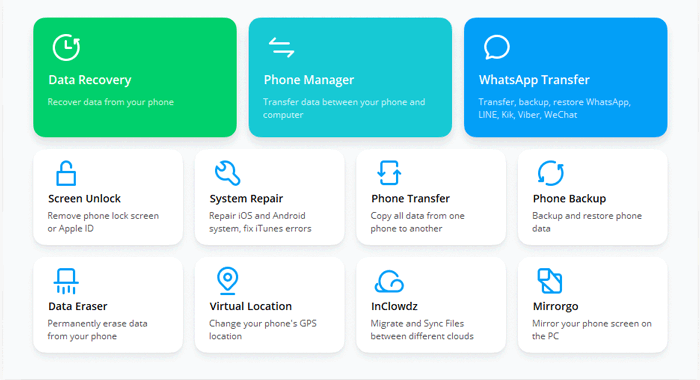
- Connect your Xiaomi device to the computer using a USB cable and select "Android Repair" from the left-hand menu.
- The tool will display the Xiaomi issues it is capable of resolving.
- You may review these issues and click "Start".
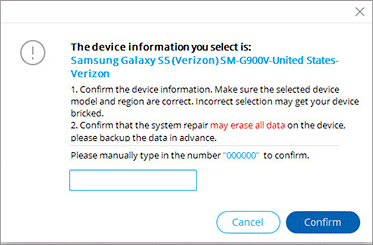
- Enter your Mi device information in the subsequent interface and click "Next" to proceed.
- Type the number "000000" into the designated field and press "Confirm" to continue.
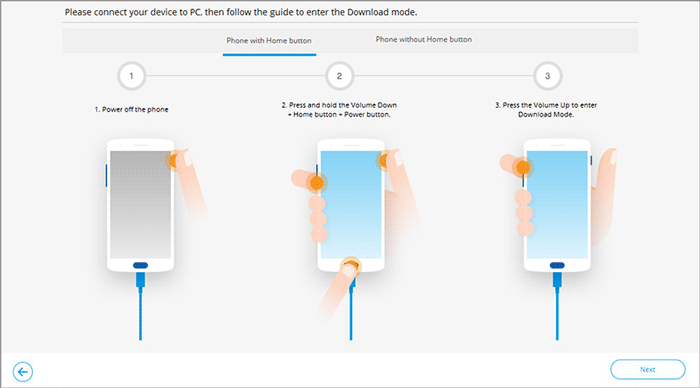
- Follow the simple instructions on the screen to boot your Xiaomi phone into download mode.
- After that, you will need to click "Next" to download the firmware for your device.
- Once this is completed, the software will automatically begin the process of repairing the MIUI system.
The Good:
- Very beginner-friendly, with a guided repair process that requires no technical background, making it suitable for everyday Xiaomi users.
- Effectively fixes common Xiaomi system issues such as boot loops, black screens, frozen logos, and system crashes without rooting.
- No data loss for Xiaomi system repair during the process.
The Bad:
- Primarily focuses on system-level repair, offering limited control over advanced Xiaomi-specific operations like EDL flashing or Mi Account handling.
- Paid software, and the free version has restricted repair capabilities.
Top 2: Xiaomi Repair Tool
Built with service technicians in mind, Xiaomi Repair Tool targets complex Xiaomi software faults that ordinary utilities often cannot resolve. It supports firmware flashing, device revival, and recovery across a wide range of Qualcomm and MediaTek Xiaomi models.
The program performs well when dealing with bricked phones or corrupted system partitions. That said, its interface assumes prior repair experience and offers limited guidance for beginners.
The Good:
- Designed specifically for professional Xiaomi phone repair, supporting Qualcomm and MediaTek models with deep flashing and recovery functions.
- Strong at handling advanced faults, including unbricking, firmware repair, and complex system errors that basic tools cannot resolve.
The Bad:
- The interface is not beginner-oriented, requiring prior experience with flashing modes and Xiaomi repair workflows.
- Limited learning resources and documentation compared with more mainstream repair program.
Top 3: Xiaomi Pro Tool
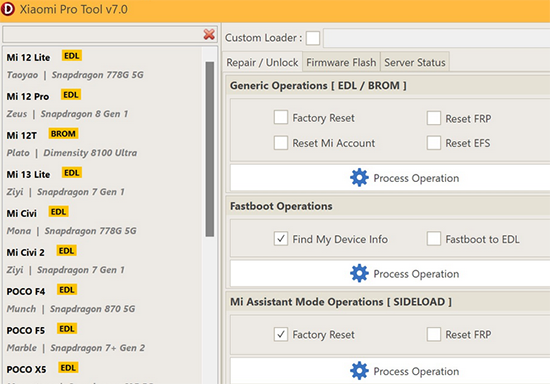
A more flexible approach to Xiaomi maintenance can be seen in Xiaomi Pro Tool, which combines multiple repair and unlocking functions into a single workspace. It allows users to work in Fastboot, Recovery, or EDL mode, making it useful for restoring malfunctioning Xiaomi devices.
Tasks such as flashing firmware or handling account-related locks are handled in one environment. Its effectiveness depends largely on the user's familiarity with Xiaomi repair procedures.
The Good:
- A versatile all-in-one Xiaomi repair utility, supporting flashing, bootloader operations, FRP bypass, and Mi Account-related tasks.
- Works across multiple modes, such as Fastboot, Recovery, and EDL, making it useful for repairing soft-bricked Xiaomi devices.
The Bad:
- As a third-party tool, update frequency and compatibility with the latest Xiaomi models can lag behind official releases.
- Some advanced features may require activation or paid access.
Top 4: XiaoMiTool V2
Created for enthusiasts who want control over firmware management, XiaoMiTool V2 emphasizes flashing and restoration rather than traditional repair workflows. It automatically identifies suitable ROMs, helping users reinstall or downgrade Xiaomi Mi 15–11T/Note 10–2/MI Mix/Fold/Flip/Mi Max/CC/Civi system software when instability appears.
This software runs across different operating systems, which adds convenience for non-Windows users. Despite its strengths, careful ROM selection is essential to avoid further system issues.
The Good:
- Free and open-source, making it attractive for Xiaomi enthusiasts who want to repair, flash, or downgrade firmware without cost.
- Automates ROM selection and flashing, helping users restore Xiaomi phones with official or custom ROMs more safely.
The Bad:
- Not strictly a repair tool, as it focuses more on flashing and modification than fixing severe system corruption.
- Incorrect ROM selection or driver issues can still risk bricking a Xiaomi device if used carelessly.
Top 5: Xiaomi Fire Tool
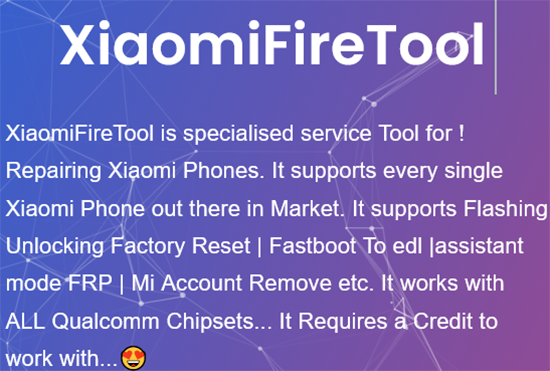
Aimed squarely at professional repair scenarios, Xiaomi Fire Tool addresses serious Xiaomi phone failures, including dead boots and deep software locks. It supports EDL-based flashing and advanced recovery tasks often required in repair shops.
The product proves effective when standard flashing methods fail to revive a device. Its advanced nature means it is best handled by experienced users who understand the risks involved.
The Good:
- Built for deep-level Xiaomi repair, including flashing, FRP bypass, Mi Account removal, and EDL-based recovery.
- Particularly effective for dead or hard-bricked Xiaomi phones, making it popular in professional repair shops.
The Bad:
- Uses a credit-based system, which can increase costs for frequent repairs.
- Advanced operations often erase user data, and misuse can cause irreversible damage if proper precautions aren't taken.
Final Words
Upon reviewing all five options, it becomes clear that not every repair tool suits everyday users. Some demand technical knowledge, others rely on risky flashing steps, and a few are built mainly for repair shops rather than personal use. What sets Android Repair apart is its focus on fixing Xiaomi system issues through a guided process that avoids unnecessary complexity.
For users who want stability restored without turning their phone into a testing ground, it offers a calmer, safer path to recovery.
Related Articles:
Mi Backup and Restore: 6 Simple Ways to Back Up & Restore Xiaomi Smoothly
How to Hard Reset Xiaomi/Redmi/Mi with/without Computer? 6 Options
How to Transfer Data from Mi to Mi/Xiaomi/Redmi? 6 Simple Solutions
