
TunesKit WhatsApp Transfer Review 2026: Is It Worth a Go?
WhatsApp data migration during device upgrades can be complicated, especially due to the inability to transfer WhatsApp between Android devices or from Android to iPhone with some programs. TunesKit WhatsApp Transfer helps iPhone users move, back up, and restore WhatsApp chats, ensuring important messages and media remain safe.
This TunesKit WhatsApp Transfer review examines its features, performance, and limitations, offering guidance for users who want reliable data management.
- Part 1: TunesKit WhatsApp Transfer: Overview
- Part 2: TunesKit WhatsApp Transfer: Main Features
- Part 3: TunesKit WhatsApp Transfer: Pricing & Security
- Part 4: Why Choose/Not Choose TunesKit WhatsApp Transfer
- Part 5: FAQs for TunesKit WhatsApp Transfer
- Part 6: What Could Be Better than TunesKit WhatsApp Transfer
Part 1: TunesKit WhatsApp Transfer: Overview
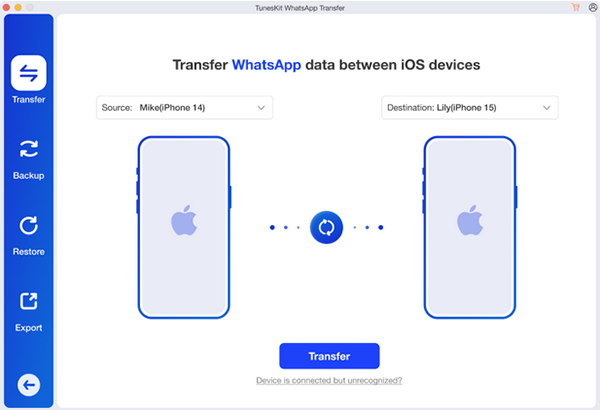
This program offers iPhone users a seamless way to manage their WhatsApp data, enabling easy transfer of chats, media, and attachments between devices. It also allows backing up conversations to a computer and restoring them whenever needed. Whether upgrading to a new iPhone or safeguarding important messages and files, the software ensures WhatsApp data is preserved efficiently without any loss.
Part 2: TunesKit WhatsApp Transfer: Main Features
Before diving into the full list of capabilities, it's helpful to see the main features of TunesKit WhatsApp Transfer at a glance. The table below highlights what this tool can do, from moving WhatsApp data between iPhones to backing up, restoring, and exporting chats efficiently.
|
Key Features
|
Main Details
|
|
iPhone-to-iPhone WhatsApp Transfer |
Move WhatsApp data between iPhones without erasing existing data. |
|
Backup WhatsApp Data |
Save WhatsApp or WhatsApp Business data from iPhone/iPad to PC for free |
|
Selective Restore |
Restore specific WhatsApp backups from PC to a new phone |
|
Full Data Support |
Handle all types of WhatsApp data, including chats, photos, videos, and attachments |
|
Multi-App Support |
Transfer, backup, restore, and export chat messages from LINE, Kik, and Viber |
|
Export WhatsApp to Computer |
Export chats and media files in readable formats for storage or sharing |
|
High-Speed Transfer |
Quickly move WhatsApp data between devices without long waiting times |
Part 3: TunesKit WhatsApp Transfer: Pricing & Security
The following table outlines the current pricing plans for TunesKit WhatsApp Transfer on both Windows and Mac, including monthly, yearly, and lifetime options. Each plan specifies device limits and highlights discounts:
|
Plan
|
Windows Price (5 iDevices/1 PC)
|
Mac Price (5 iDevices/1 Mac)
|
|
1 Month License
|
$19.95 (30% off) |
$19.95 (30% off) |
|
1-Year License
|
$39.95 (30% off) |
$35.95 (30% off) |
|
Lifetime License
|
$49.95 (up to 5 devices; $59.95 up to 10; $399.95 unlimited) |
$49.95 (up to 5 devices; $59.95 up to 10; $399.95 unlimited) |
Is it safe to use TunesKit WhatsApp Transfer?
Yes - TunesKit WhatsApp Transfer is generally considered safe for managing WhatsApp data on iPhones, as it keeps your device and messages secure during transfers, backups, restores, and exports. (How can I manage my WhatsApp account on Android?)
Many users report that it works as advertised, offering a clean interface and smooth operation. However, some feedback notes occasional issues with effectiveness or customer support, so results may vary depending on individual devices and use cases.
Before using the software, users can download a coupon from https://thesoftware.shop/tuneskit-whatsapp-transfer-review-download-coupon/ to get a discount. While it is generally reliable and easy to operate, some users may occasionally encounter minor performance or support issues.
Part 4: Why Choose/Not Choose TunesKit WhatsApp Transfer
Why We Like TunesKit WhatsApp Transfer
- Can transfer WhatsApp data between iPhones without erasing existing content.
- Allows backing up WhatsApp (including Business) chats and media to a computer.
- Lets you selectively restore backup files to a new phone.
- Supports exporting chats in readable formats.
- Works with multiple messaging apps (LINE, Kik, Viber) beyond WhatsApp.
Why We Don't Like TunesKit WhatsApp Transfer
- Does not support WhatsApp transfer between Android devices.
- Limited features for Android users compared with some competitors.
- Occasional reports of slower performance or partial recovery results.
- Some users experience delays or issues with customer support.
Part 5: FAQs for TunesKit WhatsApp Transfer
Q1. Does TunesKit WhatsApp Transfer work well with WhatsApp Business?
Yes, the software fully supports WhatsApp Business accounts, allowing you to transfer, back up, and restore both personal and business-related chats and media.
Q2. What other apps are supported besides TunesKit WhatsApp Transfer?
In addition to WhatsApp, the tool also supports messaging apps like LINE, Kik, and Viber, enabling you to transfer, back up, restore, and export messages from these apps as well.
Q3. Will my existing WhatsApp data be erased during transfer?
No, transferring WhatsApp between iPhones using TunesKit does not erase existing data on the target device, ensuring your current messages remain intact.
Q4. Are there any limitations on the number of devices?
Licenses vary: some cover up to 5 devices, others up to 10, and there is also an unlimited license option. This allows you to choose a plan based on your device usage.
Q5. Is there a free trial version?
Yes, a free trial version is available, letting you explore key features like transfer, backup, and restore before committing to a paid license.
Q6. Does TunesKit offer customer support and updates?
Yes, all purchased licenses include free technical support and software updates during the license period, ensuring you have assistance if any issues arise.
Part 6: What Could Be Better than TunesKit WhatsApp Transfer
A stronger alternative to TunesKit WhatsApp Transfer is Social App Transfer, which excels not only because it supports WhatsApp transfers across Android-to-Android, Android-to-iOS, and iOS-to-Android devices, but also due to its faster transfer speeds and broader compatibility.
It offers more flexible backup and restore options, allowing selective recovery of chats and media. For users seeking a truly versatile solution for all their WhatsApp migration needs, Social App Transfer provides a more complete and reliable experience.
Social App Transfer - Main Features:
- Cross-Platform Support - Transfer WhatsApp between Android and iPhone.
- Selective Restore - Restore specific chats or media.
- Fast & Reliable - Quick transfers with minimal errors.
- Backup & Export - Save and export WhatsApp data in multiple formats.
- User-Friendly - Simple interface for beginners and experts.
- Secure & Private - Encrypted transfers to protect data.
- WhatsApp & LINE - Manage chats, photos, videos, and audio.
- Google Drive Restore - Recover WhatsApp messages from Google Drive.
- Preview & Export - Preview and selectively export messages and media.


How to use the best TunesKit WhatsApp Transfer alternative?
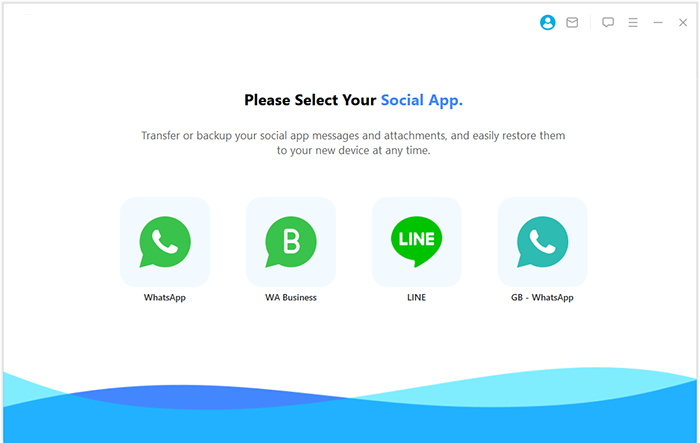
- Begin by downloading and installing Social App Transfer on your computer, then open the program.
- From the menu on the left, choose the WhatsApp icon.
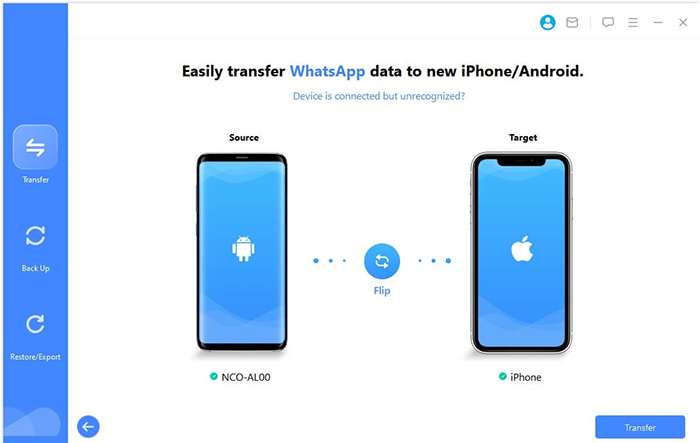
- Next, connect both of your mobile devices (either Android or iOS) to the computer using USB cables.
- Follow the prompts displayed on the screen to ensure that the devices are correctly recognized.
- The software will promptly identify both devices, designating one as the source and the other as the destination.
- If the assignment is incorrect, simply click the Flip button to interchange them.
- Finally, click Transfer in the lower-right corner to initiate the transfer of your WhatsApp data.
The Bottom Line
TunesKit WhatsApp Transfer handles iPhone-to-iPhone data effectively, but its limited support for cross-platform transfers may not meet all users' needs. Understanding these restrictions helps users choose tools that better match their devices and data requirements.
Assuming you're looking for a solution that works across Android and iPhone, including Android-to-Android and Android-to-iOS WhatsApp transfers, Social App Transfer is a strong alternative to TunesKit WhatsApp Transfer, providing faster transfers, selective restoration, and broader compatibility.
Related Articles:
TunesKit iPhone Data Recovery Review: The Best Solution for iPhone Data Recovery
How to Recover Deleted Files from WhatsApp with/without Backup? 6 Tactics
Syncios WhatsApp Transfer vs. Wondershare MobileTrans: Which Is Better?
