Total Files Review and Best Alternatives for Better iOS Data Management
TL;DR:
If you are looking for a better Total Files alternative, this guide will help you find the right solution.
- Learn what Total Files is and its key features.
- Discover the pros and cons of Total Files in real use cases.
- Compare the best Total Files alternatives, including iCloud, Documents by Readdle, Google Drive, Files, and the powerful iOS data management tool like MobiKin Assistant for iOS.
Total Files is a popular file management app for iPhone and iPad that allows users to organize documents, access cloud storage, and manage media files in one place. While it offers convenient features for everyday file browsing, many users find its performance limited when handling large files or performing advanced data transfers. As a result, people often look for more powerful and efficient alternatives. This article explores the best Total Files alternatives and highlights a reliable solution for iOS data management needs.
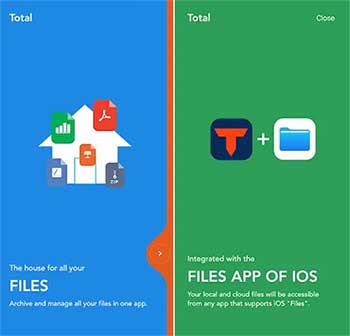
Part 1: What Is Total Files?
Total Files is a multifunctional file management app for iPhone and iPad that helps users organize, access, and transfer different types of files in a single platform. It brings together local storage, cloud services, and network connections into one interface, making file handling more flexible and convenient than the default iOS system. While it is useful for everyday file browsing and basic management, it is not designed for advanced data transfer, full device backup, or large-scale file migration tasks.
File Management:
Total Files allows users to manage files stored locally on their iPhone or iPad in a more structured way. Users can create folders, sort documents, rename files, and move or delete iPhone files directly within the app. This makes it easier to keep personal files organized without relying on multiple built-in iOS apps.
Cloud Integration:
The app supports connection with major cloud storage services such as Google Drive, Dropbox, and OneDrive. This enables users to access and manage files stored online while also syncing them with local device storage. It provides a unified experience for handling both cloud-based and offline files.
Network Access:
Total Files can connect to network storage systems like SMB servers and NAS devices. This feature allows users to browse files stored on home or office networks, stream media content directly, or download files remotely without needing to transfer them manually to a local device first.
Media and Document Tools:
The app includes built-in tools for viewing and playing different types of media files. Users can watch videos, listen to audio files, and open documents such as PDFs or text files without installing additional applications. It also supports basic playback and reading functions for quick access.
File Utilities:
Total Files provides simple utility functions such as compressing and extracting ZIP archives. It also includes a built-in browser for downloading files directly from the internet. These tools make it easier to handle common file tasks within a single application.
Part 2: Total Files Pros & Cons
Total Files offers a convenient all-in-one file management experience for iOS users, but it also comes with certain limitations depending on more advanced usage needs.
Pros:
- Provides a simple and user-friendly interface for easy iPhone file browsing and organization.
- Supports multiple file types, including documents, photos, videos, and audio.
- Integrates with major cloud services such as Google Drive, Dropbox, and OneDrive.
- Allows access to network storage like SMB servers and NAS devices.
- Includes built-in media players and document viewers for quick access without extra apps.
Cons:
- Not ideal for large-scale file transfers or bulk data operations.
- Lacks full system-level backup and restore functionality for iOS devices.
- Performance may decrease when handling very large files or unstable network connections.
- Limited compared to desktop-based tools for advanced iPhone data management tasks.
As users begin to require faster transfers, deeper device control, and more reliable backup solutions, many of them start looking for more powerful alternatives.
Part 3: Best Total Files Alternatives
If Total Files no longer meets your needs—especially for faster transfers, larger file handling, or full iPhone data management—there are several strong alternatives worth considering. These tools offer better performance, broader functionality, and more reliable cross-device control.
1. MobiKin Assistant for iOS (Best Overall Alternative)
MobiKin Assistant for iOS is a powerful desktop-based iOS data management tool designed for transferring, backing up, and organizing iPhone files with ease. It allows users to manage photos, videos, contacts, messages, music, and more directly from a computer without relying on iTunes. Compared with Total Files, it is much more suitable for bulk data transfer, full device backup, and fast file export/import between iPhone and PC/Mac.
Key Features:
- Supports one-click transfer of data between iPhone and computer without iTunes.
- Enables full or selective backup of iPhone data to PC/Mac.
- Allows easy export and import of contacts, messages, photos, videos, music, and more.
- Provides a clear file preview interface before transferring data.
- Supports management of multiple iOS devices on the same computer.
- Ensures safe data handling without overwriting existing files.


How to Use:
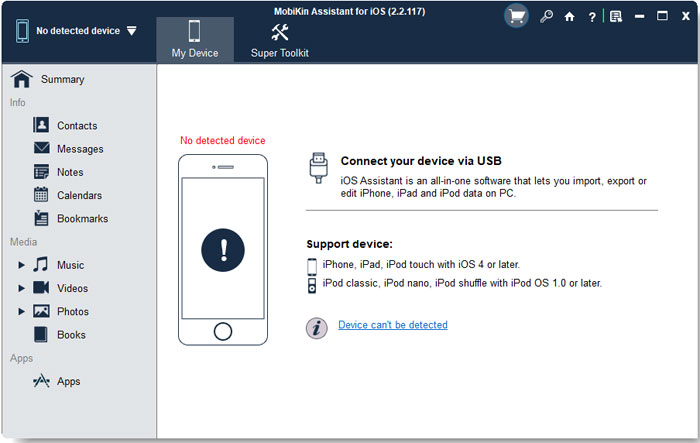
Step 1: Install and launch MobiKin Assistant for iOS on your computer. Connect your iPhone via USB cable and let the software detect it.
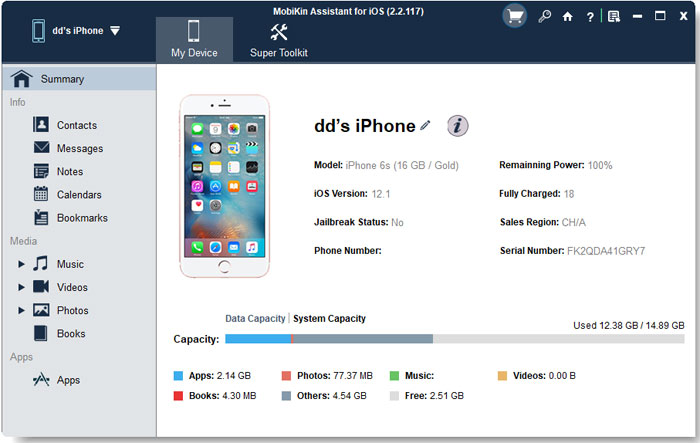
Step 2: Select the data categories you want to manage (such as photos, contacts, messages, music, etc.), then preview the detailed information before proceeding.
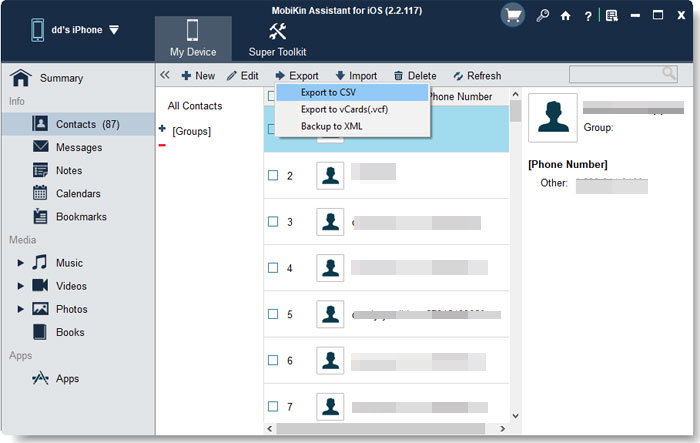
Step 3: Choose the action you need - click "Export" to transfer data to your computer, click "Import" to add files to your iPhone, or click "Delete" to remove unwanted items directly.
Step 4: If you want to back up or restore data with one click, open the "Super Toolkit" and go to the "iTunes Backup and Restore" section.
Video Guide:
2. iCloud Drive
Apple's built-in cloud storage service offers seamless syncing across Apple devices. It is ideal for users who want automatic backup and easy access to files anywhere, but it has limited free storage and depends heavily on internet connectivity.
3. Documents by Readdle
A popular iOS file manager that provides strong file organization features, cloud integration, and a built-in browser for downloads. It is more advanced than Total Files in terms of productivity tools but still mainly focused on mobile-level file handling.
4. Google Drive
A widely used cross-platform cloud storage solution that allows easy file sharing and collaboration. It works well for syncing files across devices but requires a stable internet connection and does not offer deep iPhone system management.
5. Files (Apple Built-in App)
The native iOS file manager is simple and reliable for basic file access and cloud integration. However, it lacks advanced features and customization compared to third-party apps.
Part 4: FAQs about Total Files
Q1: Is Total Files free to use?
Total Files offers a free version with basic features, but some advanced functions may require a paid upgrade depending on the app version and usage needs.
Q2: Can I transfer large files with Total Files?
It can handle large files to some extent, but performance may decrease when dealing with very large files or bulk transfers compared to desktop-based solutions.
Q3: Is Total Files safe to use?
Yes, it is generally considered safe when downloaded from the official App Store. However, as with any file manager, users should be careful when accessing unknown network sources or files.
Words in the End
Total Files is useful for basic file management, cloud access, and simple media handling on iOS devices. However, it falls short in advanced data transfer and full device control. For users who need faster performance and deeper management features, alternatives are necessary. Among them, MobiKin Assistant for iOS stands out as a more complete and efficient solution for iPhone data handling.
Related Articles:
8 Best My File Manager Alternatives to Manage iPhone/iPad
Top 9 Photo Manager Apps for iPhone in 2026