Is DearMob iPhone Manager Worth It? Full Review & Top Alternative
When it comes to managing iPhone data without relying on iTunes, many users start looking for a simpler and more flexible solution. That's where DearMob iPhone Manager comes into play. Designed to help you transfer, back up, and organize files like photos, videos, music, and contacts, this tool aims to make iOS data management easy even for beginners. But is it really worth trying?
In this review, we'll take a closer look at what DearMob iPhone Manager is, explore its key features, weigh its pros and cons, examine its pricing, and introduce a reliable alternative to help you make the best choice.
Part 1: What is DearMob iPhone Manager?
DearMob iPhone Manager is an all-in-one desktop tool designed to help you manage, transfer, back up and restore data on your iPhone or iPad without relying on iTunes. It brings all your important files into one clean interface, making it easier to organize and control your iOS data from your computer. In simple terms, it works as a modern and more user-friendly alternative to iTunes, especially for users who prefer a straightforward way to handle files.
With DearMob iPhone Manager, you can manage a wide range of data types, including:
- Photos
- Music
- Podcasts
- Movies and videos
- Apps
- eBooks
Besides media files, it also supports backing up important personal data such as:
- Contacts
- Text messages (SMS)
- Calendars
- And more
The software lets you view and manage all your iPhone content directly on your computer. All you need to do is connect your device via a USB cable, and you can start transferring or organizing files in just a few clicks.
DearMob iPhone Manager is compatible with iPhones and iPads running iOS 7.0 or later. On the computer side, it works with macOS 10.9 and above, as well as Windows systems, making it accessible for most users.
Now that you understand what DearMob iPhone Manager is, let's move on to explore its key features in detail.
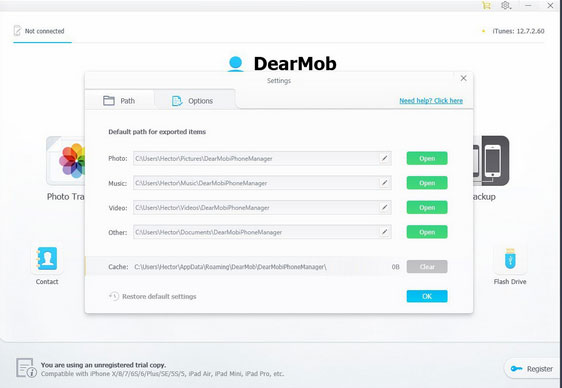
Part 2: DearMob iPhone Manager Key Features
One of the biggest strengths of DearMob iPhone Manager is that it combines powerful features with a clean and simple interface. It covers almost everything you need for iPhone data management, without making the process complicated. Below are its main features:
1. Photo Transfer
DearMob makes it easy to transfer photos between your iPhone and computer. This is especially useful since iPhones don't support expandable storage, and photos can quickly take up space.
You can export photos from your iPhone to a PC or Mac in just a few clicks. It also supports the HEIC format and allows you to convert photos to JPG automatically, making them easier to view and share on different devices.
2. Music Sync
Transferring music to an iPhone can be frustrating with traditional tools, but DearMob simplifies the process. You just connect your device, drag and drop your music files, and sync them instantly.
This makes it a great choice for users who want to manage their offline music library without using iTunes.
3. Video Management
DearMob offers flexible video management options. You can easily transfer videos from your iPhone to your computer, or import videos from your computer to your iPhone.
It also includes a built-in video converter, which can automatically convert unsupported formats into iPhone-friendly MP4 files. This saves time and avoids compatibility issues.
4. Backup & Restore
Backing up your iPhone with DearMob is simple and fast. With just one click, you can save important data from your device to your computer.
It also supports encrypted backups, which helps protect your private data. When needed, you can restore your device from previous backups easily by selecting the desired backup file.
5. App Management
DearMob brings back app management features that many users miss. You can uninstall multiple apps at once or install apps using local IPA files stored on your computer.
This is especially helpful for users who want more control over their apps without relying on the App Store.
6. Manage More Data Types
Beyond media files, DearMob also lets you manage contacts, messages, calendars, bookmarks, podcasts, and eBooks. It gives you a more complete way to organize your iPhone data.
7. Use iPhone as External Storage
Another useful feature is the ability to use your iPhone like a USB flash drive. You can transfer various file types between your computer and iPhone, making it a convenient storage option.
Overall, DearMob iPhone Manager offers a well-rounded set of features that can meet most users' daily needs. Next, let's take a look at its pros and cons.
Part 3: DearMob iPhone Manager Pros & Cons
Like any iPhone management tool, DearMob iPhone Manager has its strengths and weaknesses. Overall, it performs well in terms of speed, usability, and feature coverage, but there are still a few limitations you should know before deciding.
Pros
- DearMob uses GPU acceleration to speed up file transfers and backups, allowing it to handle large files like 4K videos smoothly and efficiently.
- Despite offering many features, the software keeps a clean and simple layout, making it beginner-friendly and easy to navigate.
- It supports a wide range of file types, including photos, videos, music, contacts, messages, and more, so you can manage everything in one place.
- You can create full or selective backups and even encrypt them for better data security, which is useful for protecting sensitive information.
- The tool can automatically convert unsupported media formats into iPhone-compatible ones, saving time and avoiding compatibility issues.
- It uses strong encryption methods to keep your backups and files safe, giving users more peace of mind.
Cons
- DearMob mainly relies on a USB connection, which may feel inconvenient compared to wireless transfer options.
- Users often need to download and install updates from the official website instead of updating directly within the app.
- While a trial version is available, many advanced features are restricted until you upgrade to the paid version.
- Like most third-party tools, its performance may be affected by iOS updates or system changes over time.
Part 4: Pricing of DearMob iPhone Manager
DearMob iPhone Manager offers a simple pricing structure with both short-term and long-term options. While it doesn't provide a fully free version (only a limited trial), its paid plans are reasonably priced compared to similar tools.
Here are the main pricing options:
- 1-Year License – $29.95: This plan covers one Mac for one year. It's a good choice if you only need the software for a limited time or want to test it before committing long-term.
- Lifetime License – $39.95: For just a slightly higher price, you can get lifetime access. This plan supports up to two Macs and includes free updates, making it a more cost-effective option in the long run.
- Family License – $69.95: This plan is ideal for families or small teams. It offers lifetime access for 3 to 5 Macs, allowing multiple users to share the software at a lower cost per device.
Part 5: Best Alternative to DearMob iPhone Manager
If you feel that DearMob iPhone Manager doesn't fully meet your needs, MobiKin Assistant for iOS is one of the best alternatives you can consider. It offers a similar all-in-one solution, but focuses more on flexible data management and selective control.
With this tool, you can transfer, manage, back up, and even edit your iPhone data directly from your computer—without relying on iTunes. It's especially suitable for users who want a simple yet powerful way to organize their files and avoid complicated syncing processes.
Key Features of MobiKin Assistant for iOS:
- You can transfer multiple types of data between iPhone and computer, without data loss.
- The software allows you to back up your iPhone to a computer with one click and restore backups whenever needed, without overwriting previous files.
- Supports over 14 file types, including videos, photos, music, contacts, messages, notes, Safari bookmarks, voice memos, podcasts, ringtones, and more.
- You can directly manage your iPhone data on a computer, such as adding, deleting, editing contacts, and organizing files easily.
- Fully compatible with iPhone 17/16/15/14/13/12/11/X/8/7/6, iPad 10/9/8/Pro/Air/mini/4, and etc.


How to use MobiKin Assistant for iOS to transfer and manage iPhone/iPad data:
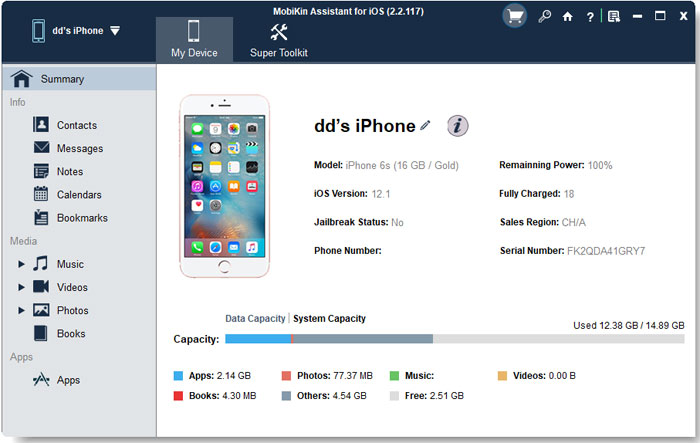
Step 1: Connect your device
Download and install the program on your computer. Then connect your iPhone via a USB cable and let the software detect your device.
Step 2: Transfer Data between iOS device and computer
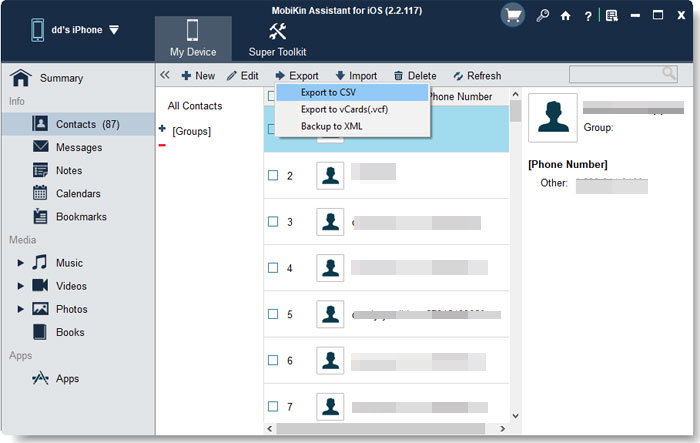
Choose a file category (e.g., Photos, Music, Contacts) from the left sidebar. Preview and select the files you want. Click "Export" to transfer data from iPhone to computer, or click "Import" to add files from computer to iPhone
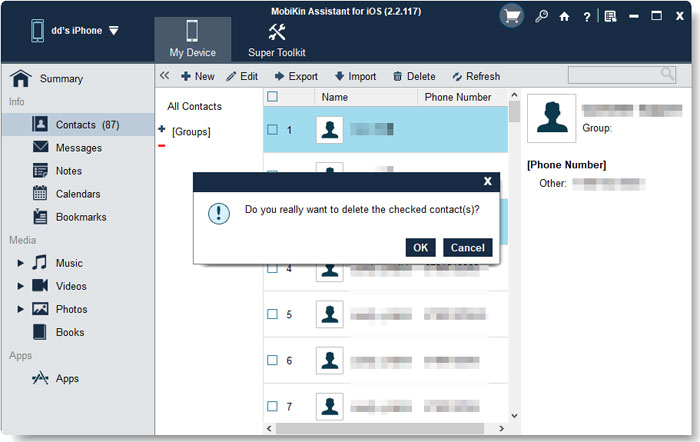
Step 3: Manage Data (Delete, Edit, Organize)
- Delete files: Remove unwanted photos, contacts, or apps directly.
- Edit data: Modify contact details, notes, or calendar entries.
- Organize files: Group contacts, clean duplicates, and manage content efficiently.
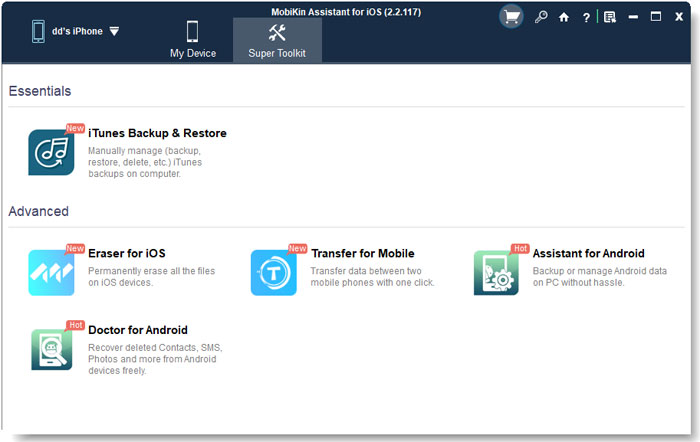
Step 4: One-Click Backup & Restore
Go to the Super Toolkit section on the top menu and click "iTunes Backup & Restore". Choose "Backup" to save your iPhone data to the computer, or select "Restore" and pick a previous backup file.
Video Guide:
Conclusion
DearMob iPhone Manager is a solid choice for users who want a simple and efficient way to manage iPhone data without iTunes. It offers useful features like photo transfer, media management, and backup & restore, all wrapped in an easy-to-use interface. However, it still has some limitations, such as restricted free features and reliance on USB connections.
If you're looking for a more flexible and practical solution, MobiKin Assistant for iOS is a great alternative. It provides powerful data management options, supports more customizable operations, and makes transferring, editing, and backing up your iPhone data even easier.
In the end, the best tool depends on your needs—but both options can help you take better control of your iPhone data.
Related Articles:
Top 9 Best PhoneCopy Alternatives/Similar Apps [Pros/Cons]
10 Best AirDrop Alternatives for Windows/iOS/Android/Online