
HONOR Device Clone Review: Is This App Worth Entrusting? [Informative]
When upgrading to a new HONOR smartphone, one of the biggest concerns is how to transfer all your important data without losing anything. Many users want to know if it's reliable, fast, and secure for transferring contacts, messages, photos, videos, and apps, especially when moving to a new HONOR device.
HONOR Device Clone is designed to make this process simple and stress-free, providing a direct, encrypted connection between your old phone and your new HONOR device. This HONOR Device Clone review explores how the tool works, its main features, and why it might not be the ideal solution for a smooth data migration.
Section 1: HONOR Device Clone: Overview & Core Features
What Is HONOR Device Clone?
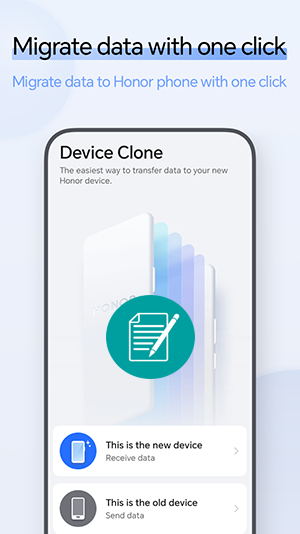
HONOR Device Clone is a built-in data-migration tool on HONOR and Huawei phones that helps you transfer data from an old device to a new HONOR phone. It can move contacts, messages, photos, apps, and more over a secure Wi-Fi connection without needing a computer. The process is simple and fast, making it convenient when switching to a new HONOR device.
What Are the Key Features of HONOR Device Clone?
|
Characteristics
|
Further Explanation
|
|
Data Transfer Type |
Transfers contacts, messages, photos, videos, call logs, apps, and more. |
|
Connection Method |
Uses encrypted local Wi-Fi hotspot between devices. |
|
Cross-Platform Support |
Works with Android and iOS devices transferring to HONOR. |
|
Speed |
Fast transfer with no internet required. |
|
Data Security |
No cloud upload - direct phone-to-phone transfer. |
|
Transfer Stability |
Supports reconnection and resume if interrupted. |
|
App Support |
Copies many third-party apps on Android devices. |
|
Backup Requirement |
No backup needed prior to transfer. |
Section 2: HONOR Device Clone: How to Use
Transferring data from your old Android or iPhone to a new HONOR device is quick and secure with HONOR Device Clone. Follow the steps below to easily move your contacts, messages, photos, apps, and more in just a few taps:
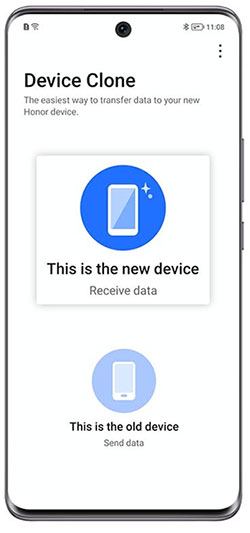
- On the new HONOR device, go to Settings > System & Updates > Device Clone.
- Tap "This is the new device."
- On the old phone (Android or iPhone), open Device Clone and tap "This is the old device."
- On the new HONOR phone, select the type of your old device (e.g., HONOR/Android or iPhone).
- Follow the on-screen instructions to establish a secure wireless connection between the devices.
- On the old phone, select the data you want to transfer (contacts, messages, photos, videos, apps, etc.).
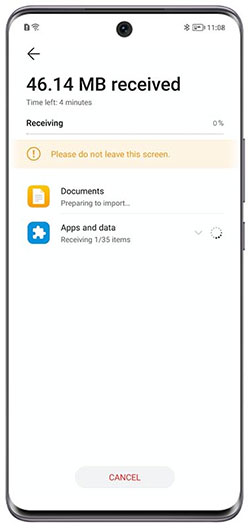
- Tap Next to start the migration process.
- Wait until the transfer is complete, then start using your new HONOR device with all your selected data.
Section 3: HONOR Device Clone: Accessibility and What's New
HONOR Device Clone continues to evolve to make phone-to-phone data transfer easier, faster, and more accessible for every user. The table below highlights its accessibility and the latest improvements so you can quickly understand what's new. Here's a brief introduction to lead into the table:
|
Category
|
Summary
|
|
Accessibility |
Available on most HONOR smartphones as a built-in feature, allowing users to easily transfer data during device setup or later from Settings. |
|
Compatibility |
Supports transfers from Android and iOS devices to HONOR phones with a simple, guided setup process. |
|
Ease of Use |
Designed for all user levels with clear on-screen instructions, automatic device detection, and one-tap transfer initiation. |
|
What's New |
Recent updates improve transfer speed, stability, and support for more app data, while enhancing security with encrypted local connections. |
|
Reliability Improvements |
Better resume-transfer handling in case of interruptions and smoother performance with large data volumes. |
|
Cost |
Completely free and built-in. |
Section 4: HONOR Device Clone: Pros and Cons
The Good:
- Fast phone-to-phone transfer without needing the internet.
- Secure local connection with no cloud upload required.
- Supports transferring a wide range of data types.
- Simple setup suitable for all user levels.
- Free and built-in on HONOR devices.
- Works with both Android and iOS source devices.
The Bad:
- Transfers are mainly one-way to HONOR devices only.
- Some third-party app data may not transfer fully.
- Requires both devices to be physically present.
- Large data transfers may take noticeable time.
- iOS-to-HONOR transfers have more limitations than Android-to-HONOR.
Section 5: HONOR Device Clone: FAQs
Q1. What data can be transferred?
You can transfer common data like contacts, text messages, photos, videos, call logs, calendars, files, and many Android apps. In most cases, app icons, layouts, and basic app data can also move across, making your new HONOR phone feel familiar right away.
Q2. Is the transfer secure?
Yes. The data is transferred directly between devices via an encrypted local Wi-Fi connection, without passing through the internet or cloud storage. This means your personal information stays private and only exists on the two devices involved in the transfer.
Q3: Does Device Clone erase data on my old phone?
No. The transfer process only copies your data to the new HONOR device. All original content remains safely stored on your old phone unless you choose to manually delete it afterward.
Q4. How long does the transfer take?
The transfer time depends on the total amount of data being copied, as well as the device performance and wireless strength. Smaller transfers can finish in just a few minutes, while large photo libraries, videos, and apps may take noticeably longer.
Q5. Can Device Clone resume if interrupted?
Newer versions are designed with improved reconnection and stability, so interruptions like dropped connections are handled better than before. However, for the smoothest experience, it's still best to keep both phones close together with enough battery power during the transfer.
Section 6: HONOR Device Clone: 2 Best Replacements
6.1 Using MobiKin Transfer for Mobile
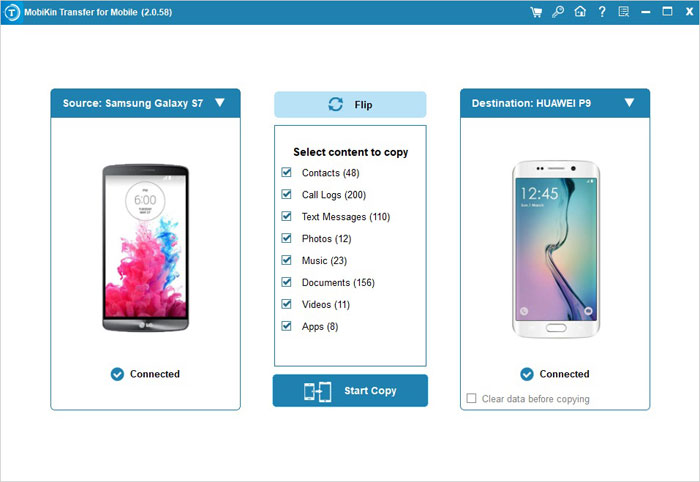
Switching phones can be stressful without the right tools, and MobiKin Transfer for Mobile (Windows and Mac) provides a smooth solution that serves as an effective alternative to HONOR Device Clone. It enables the transfer of contacts, messages, photos, videos, and apps between Android and iOS devices with ease.
Users can selectively choose which data to move, avoiding unnecessary clutter on their new device. The tool also ensures security by performing direct device-to-device transfers or using encrypted connections, keeping personal information safe throughout the process.
Why Pick MobiKin Transfer for Mobile?
- Transfers data between Android and iOS devices seamlessly.
- Moves contacts, messages, photos, videos, call logs, apps, and more.
- Lets you selectively choose which data type to migrate.
- Ensures fast and stable transfers, even with large amounts of data.
- Provides direct device-to-device or encrypted transfer for security.
- Features a user-friendly interface with guided steps.
- Receives regular updates for compatibility with new devices and OS versions.


How to use the best HONOR Device Clone alternative?
- Begin by downloading and installing the trial version of the Transfer for Mobile software.
- After the installation is finished, open the program on your computer.
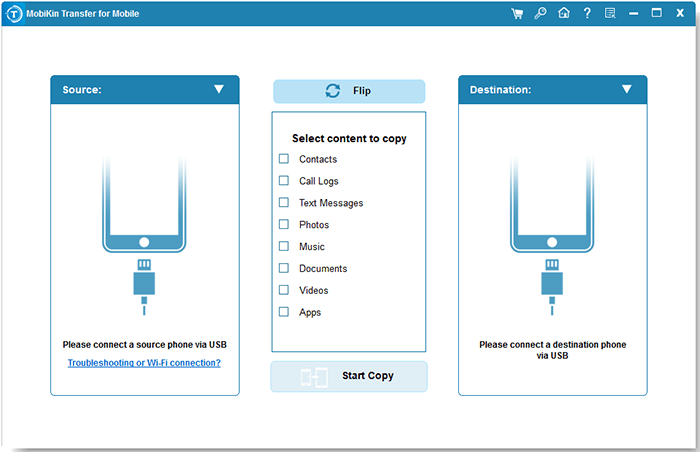
- Utilize two USB cables to connect both Android/iPhone/HONOR phones to your computer.
- The software will automatically recognize the connected devices, and you will see the data available for transfer displayed in the central menu.
- Make sure your source phone is positioned on the left side of the interface. If not, please click the "Flip" button.
- Select the types of data you wish to transfer and click the "Start Copy" icon in the central panel.
6.2 Using Smart Transfer: Copy My Data
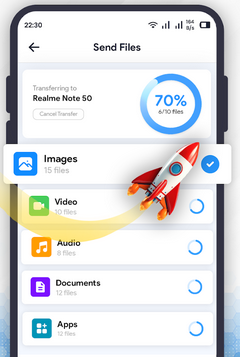
For those who prefer a mobile-first approach, the Smart Transfer: Copy My Data app offers a convenient way to migrate data quickly and efficiently. It supports moving essential data such as contacts, messages, media files, and compatible apps from any Android or iOS phone to a new HONOR device.
The app automatically detects connected devices, simplifying the setup and reducing transfer time. With its intuitive interface and reliable performance, it provides a practical and user-friendly alternative for anyone upgrading their phone.
You May Also Like: How to Use Copy My Data? Full Guide, Tips, Reviews, & Alternative
Final Thoughts
HONOR Device Clone does make transferring data easier, but if you want something faster, more stable, and capable of handling almost any phone, MobiKin Transfer for Mobile takes the crown. It moves contacts, messages, photos, videos, and even app data with fewer hiccups, making the switch to a new phone almost effortless.
Think of it as hiring a professional mover instead of asking your clumsy friend to carry all your boxes-less stress, zero lost data. So, while HONOR Device Clone gets the job done, MobiKin Transfer for Mobile makes you feel like a tech wizard without breaking a sweat!
Related Articles:
5 Easy & Quick Ways to Transfer Photos from HONOR to Mac [2026]
How to Transfer Data from POCO to iPhone [Updated Guide]
