How to Transfer Data from Samsung to HONOR? 5 Easy Techniques
TL;DR:
This guide introduces four practical ways to transfer data from Samsung to HONOR, helping users choose a suitable method to move important files, contacts, media, and apps with confidence. Of all the methods below:
- MobiKin Transfer for Mobile offers the easiest and safest way to move data from Samsung to HONOR, providing a direct transfer process.
- With support for all mainstream data types, it allows users to select what they need and complete Samsung-to-HONOR migration quickly while keeping the original data safe.
"I'm waiting for my Magic8 Pro to arrive and I'm wondering how easy and straightforward it'll be to set up my new phone with all my apps, photos and data from my Samsung S25 Ultra." -- from Reddit
Switching from one smartphone brand to another often raises practical concerns, especially when moving from Samsung to HONOR. Thus, users frequently ask how to transfer data from Samsung to HONOR easily and safely without losing files. Frankly, reliable tools and built-in features help ensure that personal information remains intact and protected throughout the process. Now, read on to find the trusted methods to do this expertly.

- Way 1: How to Transfer Data from Samsung to HONOR in One Tap [Trouble-free]
- Way 2: How to Transfer Files from Samsung to HONOR via Device Clone
- Way 3: How to Switch from Samsung to HONOR via Android Switch
- Way 4: How to Transfer Data from Galaxy to HONOR with Google Backup
- FAQs about Transferring Data from Samsung to HONOR
Way 1: How to Transfer Data from Samsung to HONOR in One Tap [Trouble-free]
When moving files, contacts, and media between devices, one solution often highlighted is MobiKin Transfer for Mobile (Windows/Mac). It provides a straightforward way to copy data from Samsung to HONOR without requiring complex steps.
The tool supports multiple data types, including photos, messages, and apps, ensuring that users can replicate their old phone's environment on the new one. Its compatibility across Android devices makes it a reliable option for seamless migration.
Main Features of MobiKin Transfer for Mobile
|
Feature
|
Key Details
|
|
Samsung to HONOR Transfer |
Move contacts, SMS, call logs, photos, videos, music, apps, and documents directly between Samsung and HONOR phones. |
|
Cross-Platform Support |
Works across Android to/from iOS, Android to/from Android, iOS to/from iOS, and iOS to/from Android. |
|
Selective Data Transfer |
Lets you choose specific data categories instead of transferring everything. |
|
Fast & Secure Transfers |
Provides 20–30% faster transfer speeds compared to competitors, with zero data loss. |
|
Wide Device Compatibility |
Supports 8,000+ Android devices (Samsung, HONOR Magic 8 Pro, Magic V6, 600 Pro, 600 Lite, X80i, X7e Plus 5G, Huawei, Xiaomi, OnePlus, etc.) and all major iOS versions up to iOS 27. |
|
Simple 3-Step Process |
1. Install software → 2. Connect devices → 3. Start transfer. No technical skills required. |
|
Clean & Safe Software |
100% free of spyware, malware, or ads; ensures privacy protection during transfers. |
|
Multi-Network Support |
Works with devices on different carriers (AT&T, Verizon, T-Mobile, Sprint, etc.). |
Free & Safe Download:


User Manual:
01: Install and Launch Program
- Download and install the trial version on your PC.
- Launch the program to view the initial interface.
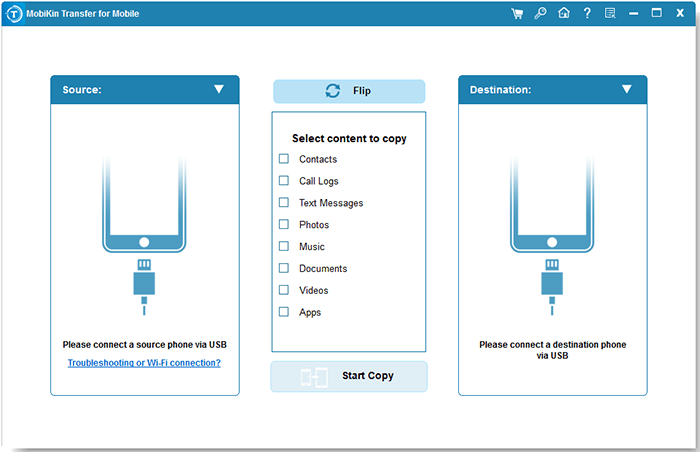
02: Connect Samsung and HONOR
- Use USB cables to connect Samsung and HONOR phones to your computer.
- Ensure Samsung is set as the source device.
- Tap Flip if the source phone is incorrect.
- View transferable files in the menu.
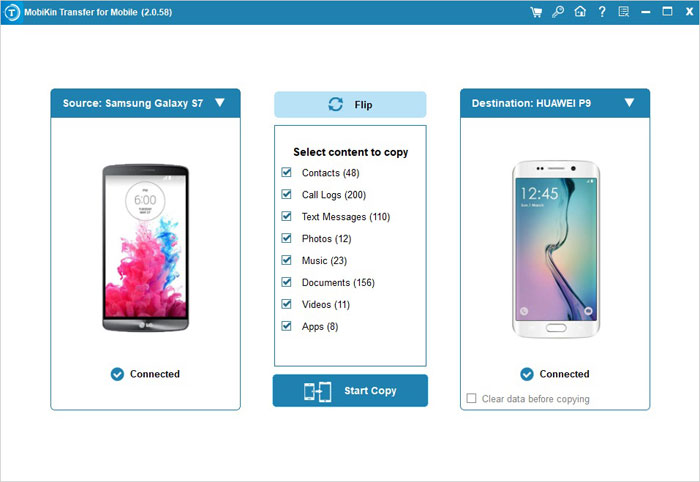
03: Select and Transfer Files
- Pick file categories such as Contacts, Music, Videos, Photos, or Apps.
- Tap Start Copy to begin transferring data from Samsung to HONOR immediately.
Video Directions:
Way 2: How to Transfer Files from Samsung to HONOR via Device Clone
Another option worth noting is Device Clone, which focuses on duplicating the entire phone's contents. By connecting both devices, users can initiate a direct transfer that replicates contacts, call logs, and multimedia files. This method is particularly useful for those who want a complete copy of their Samsung phone onto their HONOR device. The process is designed to be efficient, minimizing the time spent on manual transfers.
User Manual:
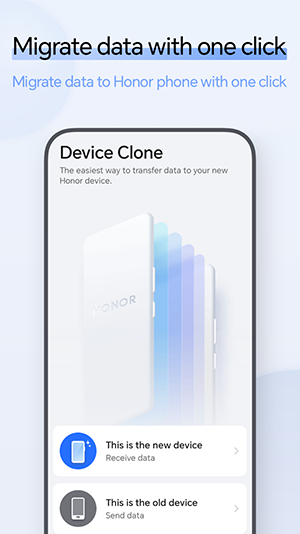
- Open Device Clone on your HONOR phone, select This is the new device, and choose Other Android device as the source phone type.
- Open or install Device Clone on your Samsung phone, then select This is the old device.
- Use the Samsung phone to scan the QR code displayed on the HONOR phone to create a direct wireless connection between both devices.
- Select the files and data you want to transfer, including contacts, photos, videos, calendar, documents, and supported apps.
- Tap Transfer on the Samsung phone and keep both devices nearby, unlocked, and connected until the migration finishes.
- After completion, check the transferred content in Gallery, Contacts, and Files on your HONOR phone.
- For a smoother transfer, make sure both phones have enough battery, sufficient storage space, and updated software before starting.
Note: Some protected app data, banking apps, and certain chat histories may not be transferred and may require separate backup or migration methods.
Way 3: How to Switch from Samsung to HONOR via Android Switch
For those who prefer a guided approach, Android Switch offers a structured way to move essential data. It allows users to select specific categories like contacts, messages, or photos before initiating the transfer. This selective migration ensures that only the necessary files are moved, avoiding clutter on the new HONOR phone. The tool's step-by-step interface makes it accessible even for users with limited technical experience.
User Manual:
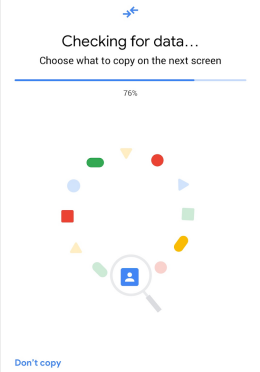
- Turn on your new HONOR phone and start the initial setup process, then choose Copy apps & data when prompted.
- Select Android device as the source phone and prepare your Samsung phone for the transfer.
- Connect the Samsung and HONOR phones using a compatible USB cable or choose the wireless transfer option if available.
- Unlock your Samsung phone, scan the QR code shown on the HONOR phone if requested, and allow the required permissions.
- Select the data you want to move from Samsung to HONOR, including apps, contacts, photos, videos, text messages, call history, and some settings.
- Tap Copy/Transfer to start the migration and keep both phones connected until the process is complete.
- Check the transferred content on your HONOR phone by opening Gallery, Contacts, Messages, and Apps.
Way 4: How to Transfer Data from Galaxy to HONOR with Google Backup
Lastly, Google Backup provides a cloud-based solution for data migration. By backing up the Samsung device to a Google account, users can restore the same data onto their HONOR phone during setup.
This method is especially convenient for those who rely heavily on Google services, as it automatically syncs apps, contacts, and settings. While it requires a stable internet connection, the advantage lies in its simplicity and integration with Android's ecosystem.
User Manual:
- Open Settings on your Samsung Galaxy phone, go to Google > Backup, enable Backup by Google Drive/Google One, and tap Back up now to save your data.
- Turn on your HONOR phone, connect it to Wi-Fi, and sign in with the same Google Account used on your Galaxy device.
- During HONOR phone setup, select Copy apps & data and choose the option to restore from a Google backup.
- Select your Samsung Galaxy backup from the available backup list and confirm the restore process.
- Choose the data you want to transfer, such as apps, contacts, SMS messages, call history, device settings, and supported app data.
- Tap Restore and keep your HONOR phone connected to Wi-Fi and power until the transfer finishes.
- Check your transferred content on HONOR by opening Contacts, Messages, Photos, and Apps.
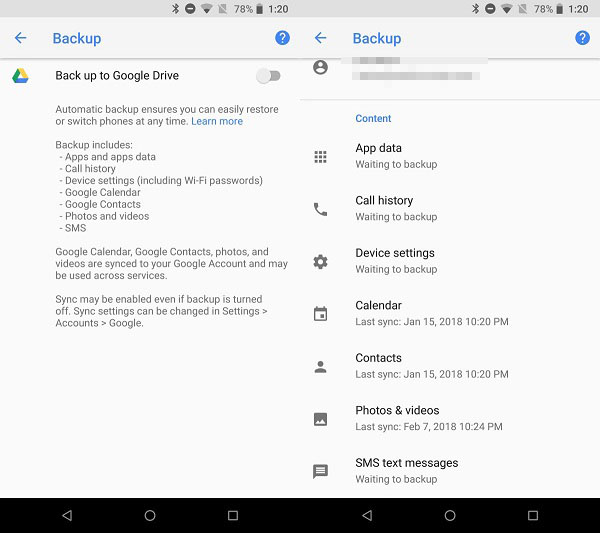
Note: If some files are missing, transfer them separately because Google Backup may not restore certain downloads, Samsung-specific data, hidden files, or unsupported app data.
FAQs about Transferring Data from Samsung to HONOR
Q1. What is the easiest way to transfer data from Samsung to HONOR?
The easiest and most efficient way to transfer data from Samsung to HONOR is MobiKin Transfer for Mobile (Windows/Mac), which provides a direct and simple phone migration process without relying on cloud backups. It allows you to selectively transfer contacts, messages, photos, videos, call logs, music, and other files from Samsung to HONOR quickly and securely.
Q2. Can I transfer WhatsApp chats from Samsung to HONOR?
Yes, but WhatsApp transfer usually requires WhatsApp's own migration or backup features. Some chat history and media may need a separate transfer process because standard phone migration tools may not move all app-specific data.
Q3. Why is my Samsung-to-HONOR transfer taking so long?
The transfer speed depends on the amount of data, connection method, and phone performance. Large collections of photos, videos, and apps may require more time. Keeping both phones charged and connected during the process can help avoid interruptions.
Q4. Why can't my Samsung phone connect to HONOR Device Clone?
- Device Clone is not installed or updated on the Samsung phone.
- Required permissions are not allowed.
- Wi-Fi connection problems.
- Low battery.
- Unsupported Android versions.
* HONOR recommends following the in-app instructions to connect the old and new devices through scanning a code or manual connection.
Q5. Can I transfer apps from Samsung to HONOR without reinstalling them manually?
Android Switch and Google Backup can reinstall many apps automatically during setup. However, apps that do not support Android backup or apps installed outside Google Play may need manual installation.
Q6. Will transferring data from Samsung to HONOR delete anything on my Samsung phone?
No. Normal transfer methods copy data to your HONOR phone and do not erase files from the Samsung device. It is still recommended to create a backup before migration.
Q7. What should I do if some Samsung data does not transfer to HONOR?
Check whether the missing content is stored in unsupported locations, such as hidden folders, downloads, or apps that do not support backup. You can manually move files through USB, cloud storage, or use a dedicated transfer tool for selective migration.
Prior to starting the transfer, fully charge both devices and connect them to a stable Wi-Fi or USB setup. This simple step prevents interruptions and ensures that your data moves smoothly from Samsung to HONOR without delays.
Related Articles:
4 Easy Fixes to HONOR FRP Bypass 2026 [For Both MagicOS & EMUI]
HONOR Backup & Restore: 5 Clever Ways to Back Up & Restore HONOR
Samsung Phone Not Connecting to PC/Computer? 7 Helpful Tips
Samsung Galaxy Recovery: 4 Ways to Recover Data from Normal/Broken Samsung