iMyFone LockWiper Review: Features, Price, Pros & Cons
TL;DR:
iMyFone LockWiper helps remove supported iPhone locks through a guided desktop process, but check compatibility and data-loss risks before buying.
- Features: It handles screen passcodes, Apple ID issues, Screen Time restrictions, and supported MDM locks.
- Unlocking steps: Open LockWiper, select "Unlock Screen Passcode," connect your iPhone via USB, download the firmware, and click "Unlock." This erases device data.
- Pricing: Choose a monthly, yearly, or lifetime plan based on your needs and the number of devices supported.
- Safety: Download from a trusted source, back up your data when possible, and confirm compatibility before paying.
- User feedback: Experiences vary, so check reviews and feature limitations before deciding.
Getting locked out of your iPhone is frustrating, especially when you can't remember the passcode or access important settings. iMyFone LockWiper is designed to help with several common iOS unlocking problems, but is it worth paying for? In this review, we'll look at its main features, walk through the screen passcode removal process, and examine its pricing, pros and cons, and real user feedback. We'll also cover its safety and limitations to help you decide whether LockWiper is the right fit for your situation.

- Part 1: What Is iMyFone LockWiper?
- Part 2: Key Features of iMyFone LockWiper
- Part 3: How to Use iMyFone LockWiper to Unlock an iPhone
- Part 4: iMyFone LockWiper Pros and Cons
- Part 5: How Much Does iMyFone LockWiper Cost?
- Part 6: Is iMyFone LockWiper Safe and Legit?
- Part 7: What Real Users Are Saying about iMyFone LockWiper
- Part 8: Final Verdict - Is iMyFone LockWiper Worth Trying?
- FAQs About iMyFone LockWiper
Part 1: What Is iMyFone LockWiper?
iMyFone LockWiper is a desktop tool designed to unlock iPhones and iPads when you can't get past a lock screen or access certain device features. It can remove screen passcodes, help with Apple ID issues, bypass Screen Time restrictions, and remove MDM profiles in supported situations. The software is available for Windows and Mac, with different unlocking modes for different problems. However, not every feature works in every situation, and some unlocking operations can erase your device data, so it's worth checking the requirements before you start.
Part 2: Key Features of iMyFone LockWiper
iMyFone LockWiper is designed for different iPhone and iPad lock issues, from forgotten screen passcodes to Apple ID and Screen Time restrictions. Here are its main features and what you can do with them.
Unlock iPhone Screen Passcodes
If you've forgotten your passcode or entered it incorrectly too many times, LockWiper can help remove the screen lock. It supports common passcode types, including 4-digit, 6-digit, and custom numeric or alphanumeric codes. Be aware that this process typically erases the data on your device.
Remove Apple ID
LockWiper can help remove an Apple ID from a device in certain situations, such as when you can't remember the account password. However, the process depends on your iOS version, device settings, and whether Find My is enabled.
Bypass Screen Time Passcodes
Forgot the passcode you set for Screen Time? LockWiper offers a way to regain access to restricted settings without entering the old code. The steps and data requirements may vary depending on your device and iOS version.
Remove MDM Restrictions
If your iPhone or iPad is managed by an organization, some settings may be restricted by Mobile Device Management (MDM). LockWiper can help remove supported MDM profiles without requiring administrator credentials, provided the device meets the necessary conditions.
Handle Different Unlocking Needs
Rather than using one method for every problem, LockWiper provides different modes for different types of locks. You can select the option that matches your situation and follow the on-screen instructions.
Support a Range of Apple Devices
LockWiper works with supported iPhone, iPad, and iPod touch models. Compatibility varies by unlocking feature and iOS version, so check the official requirements before starting, especially if you're using a newer device or a recent iOS release.
Overall, LockWiper brings several unlocking options into one program, which can be convenient if you're dealing with different types of device locks. Just keep in mind that some operations erase data, and certain features have specific requirements that may limit when they work.
Read Also:
Part 3: How to Use iMyFone LockWiper to Unlock an iPhone
If you've forgotten your iPhone passcode, iMyFone LockWiper offers a guided way to remove the screen lock. You'll need a computer, a USB cable, and a firmware package. Before you begin, keep in mind that removing the screen passcode will erase the data on your iPhone.
Step 1: Download and Launch LockWiper
Click the secure download button below and install iMyFone LockWiper on your Windows PC or Mac.


Step 2: Choose the unlocking mode
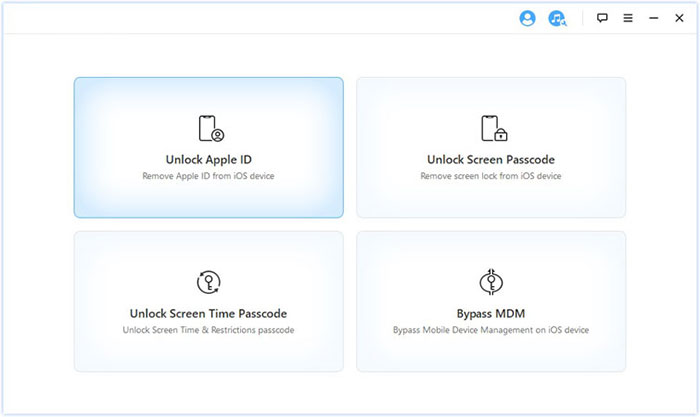
Open the program, and select "Unlock Screen Passcode" from the main interface.
Step 3: Connect Your iPhone
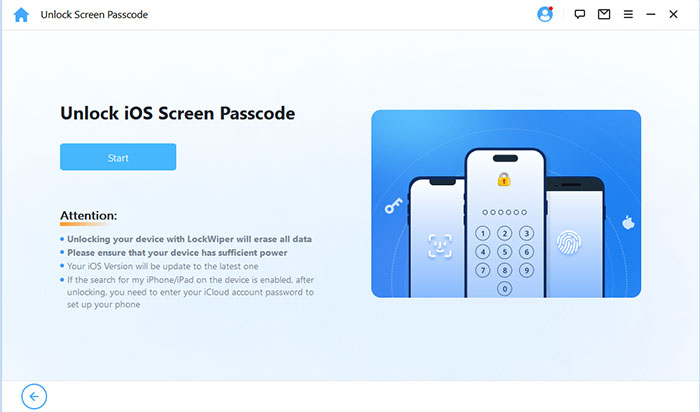
Use a USB cable to connect your iPhone to the computer, then click "Start" and follow the on-screen instructions to put your device into Recovery Mode. If that doesn't work, you can try DFU Mode instead.
Step 4: Download the Firmware Package
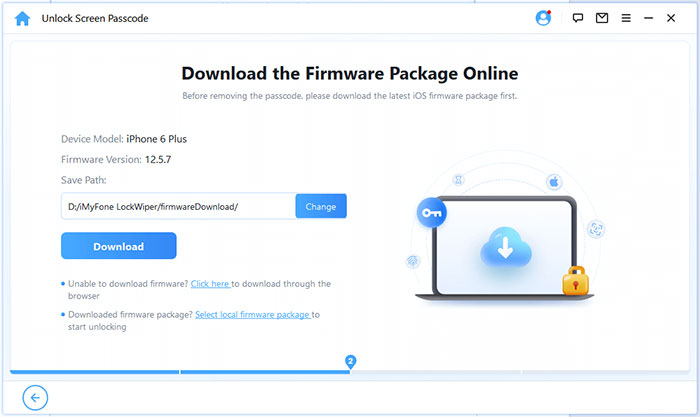
LockWiper will detect your device model and display the firmware package you need. Choose a storage location if necessary, then click "Download" and wait for the package to download and pass verification.
Step 5: Start Unlocking Your iPhone
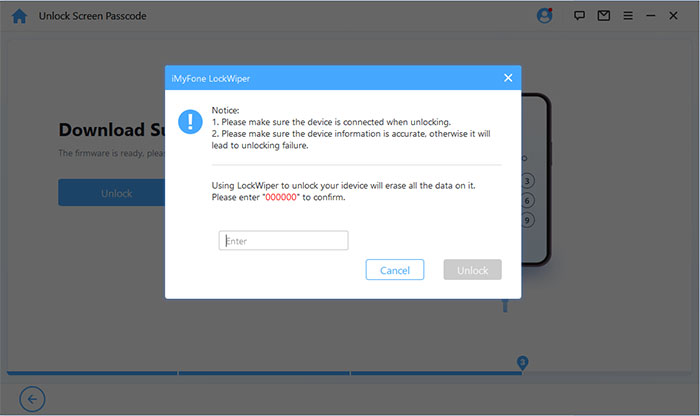
Once the firmware is ready, click "Unlock" and read the warning on the screen. Enter "000000" to confirm that you understand the consequences, then click "Unlock" again to proceed.
Step 6: Finish to unlock your iPhone
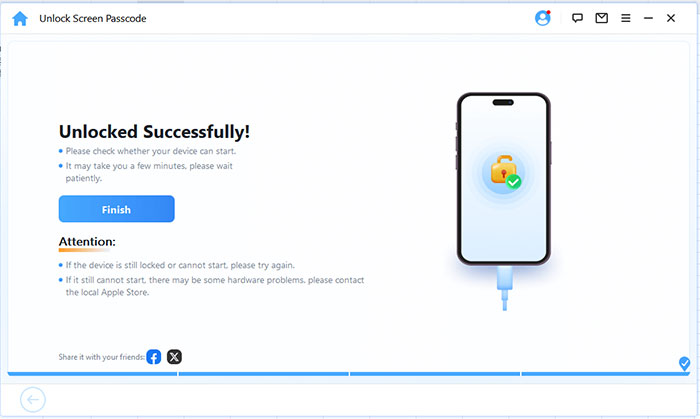
Keep your iPhone connected to the computer while LockWiper removes the screen passcode. Don't disconnect the cable or interrupt the process. When it's complete, follow the instructions to set up your iPhone again.
Part 4: iMyFone LockWiper Pros and Cons
iMyFone LockWiper offers several ways to handle iPhone unlocking problems, but it also has some limitations to consider before buying.
Pros
- It supports multiple unlocking tasks, including screen passcode removal, Apple ID removal, Screen Time passcode removal, and MDM restriction removal.
- The interface is straightforward, with on-screen instructions that guide you through connecting your device and completing the unlocking process.
- It works on both Windows and Mac, so you can choose the version that suits your computer.
- It supports a range of iPhone and iPad models, with compatibility depending on the unlocking feature and iOS version.
- A free trial lets you explore the software and check device compatibility before purchasing a license.
Cons
- Most unlocking operations require a paid license, so the free trial may not be enough if you need to complete the process.
- Removing an iPhone screen passcode typically erases all data on the device, so you'll need a backup to restore your files afterward.
- Not every feature works with every device, and certain unlocking methods depend on your iOS version and device settings.
- Some situations, particularly those involving Apple ID or Activation Lock, have specific restrictions, so LockWiper may not solve every locking issue.
- If Apple's built-in recovery options can solve your problem, purchasing a separate unlocking tool may not be necessary.
Part 5: How Much Does iMyFone LockWiper Cost?
iMyFone LockWiper offers three pricing plans for users who need to unlock their iPhones or iPads. The main differences are the subscription period and the number of supported devices.
- 1-Month Plan ($29.99): This plan is suitable if you only need to unlock one iOS device for a specific problem. It's a monthly subscription that renews automatically, although you can cancel it before the next renewal.
- 1-Year Plan ($49.99): If you expect to use LockWiper more than once, the yearly plan costs less than paying for several monthly subscriptions. It supports one iOS device and renews annually.
- Lifetime Plan ($59.99): This is a one-time purchase that supports up to five iOS devices. It's worth considering if you want to keep the software available for future unlocking needs without paying a recurring subscription fee.
All three plans include the core unlocking features, such as removing screen passcodes, handling supported Apple ID issues, removing Screen Time passcodes, and bypassing MDM restrictions. They also include access to customer support.
Read Also:
Part 6: Is iMyFone LockWiper Safe and Legit?
Yes, iMyFone LockWiper is a legitimate commercial tool for unlocking supported iPhone and iPad devices. However, like any unlocking software, it has limitations, and some operations may erase your data.
Before using it, keep these points in mind:
- Download from the official website to avoid modified installers or potentially unsafe downloads. You can also download it here:
- Back up your iPhone if possible, as removing a screen passcode typically erases the device.
- Check device compatibility before purchasing, since supported features vary by iOS version and device model.
- Review the refund policy and subscription terms before paying for a license.
Overall, LockWiper is worth considering for supported unlocking problems, but check the requirements carefully before getting started.
Part 7: What Real Users Are Saying about iMyFone LockWiper
The official iMyFone website features reviews from 478 users, with feedback ranging from successful unlocks to compatibility issues. Some users praise the software for being easy to use, while others report difficulties with specific devices.
For example, Luke Wright said the software “absolutely saved me thousands” and praised the support team. Another user, Chona Antiojo, simply reported that the device was unlocked. However, not every experience was positive. One iPad Pro user reported being unable to bypass Activation Lock, even after trying the process several times.
Overall, user experiences suggest that LockWiper can be helpful for certain unlocking problems, but results aren't guaranteed for every device or lock type. Before purchasing, check compatibility with your specific iPhone or iPad and contact support if you're unsure which feature you need.
Part 8: Final Verdict - Is iMyFone LockWiper Worth Trying?
iMyFone LockWiper is worth considering if you need to unlock an iPhone and Apple's built-in options don't solve your problem.
- Best for: Users who have forgotten their screen passcode or need help with supported Apple ID, Screen Time, or MDM issues.
- Main advantage: Multiple unlocking options and a guided process in one tool.
- Main drawback: Most features require payment, and some unlocking methods erase device data.
- Before buying: Check device compatibility and make sure the tool supports your specific unlocking needs.
Our verdict: LockWiper can be a convenient option for supported iPhone unlocking problems, but check the limitations before purchasing.
FAQs About iMyFone LockWiper
Q1. Is iMyFone LockWiper free to use?
iMyFone LockWiper offers a free trial that lets you check device compatibility and try basic functions. However, removing most locks requires a paid license.
Q2. Will iMyFone LockWiper erase my iPhone data?
It depends on the unlocking mode. Removing a screen passcode erases your device data, while Screen Time passcode removal and supported MDM operations can be completed without data loss. Apple ID removal also has specific requirements.
Q3. Can iMyFone LockWiper unlock any iPhone?
No. Compatibility depends on your iPhone model, iOS version, and the type of lock. Try the free version to check whether your device is supported before purchasing.
Q4. Can iMyFone LockWiper remove Apple ID without a password?
Yes, it can remove an Apple ID in supported situations, but the process depends on your device settings and iOS version. Not every Apple ID or Activation Lock situation is supported.
Q5. Does iMyFone LockWiper work on Windows and Mac?
Yes. LockWiper offers desktop versions for both Windows and macOS. Check the official system requirements to make sure your computer is compatible.
Q6. Can I cancel my iMyFone LockWiper subscription?
Yes. Monthly and yearly plans renew automatically, but you can cancel the subscription to prevent future renewals. The lifetime plan is a one-time purchase.
Conclusion
iMyFone LockWiper brings several iPhone unlocking options into one program, making it a practical choice for supported lock issues. Its guided interface is helpful, but compatibility restrictions, subscription costs, and the risk of data loss are worth considering. Before buying, check that your device and unlocking problem are supported. If Apple's built-in recovery options don't meet your needs, LockWiper may be worth a try.
Related Articles:
Does Jailbreak Remove MDM? Answered in 2026
Top 9 iPhone Unlock Software Review [Updated]