MotoReaper Motorola FRP Tool Review: Does It Really Work? Answered
TL;DR:
MotoReaper is an outdated, high-risk tool primarily effective only on older Motorola models (Android 9 and earlier), but its lack of official sources and paid activation make it unsafe for modern devices. For newer phones, a reliable alternative like Android Lock Wiper offers far better compatibility and security.
NOTE: The unlocking products discussed in this article are recommended exclusively for legal and proper use; we firmly oppose their utilization for unauthorized activities.
A MotoReaper Motorola FRP Tool review can help users mainly determine whether the tool is still useful, safe, and compatible with their Motorola phone. Since FRP protection, Android versions, and device models continue to change, checking MotoReaper's supported models, ease of use, safety concerns, and limitations is important before trying it.
This article examines the key features, pros and cons, compatibility, and possible alternatives to help you decide whether MotoReaper Motorola FRP Tool is a suitable choice for your situation.
- Section 1: Overview of MotoReaper Motorola FRP Tool
- Section 2: Supported Devices of MotoReaper Motorola FRP Tool
- Section 3: How to Download & Use MotoReaper Motorola FRP Tool
- Section 4: Is MotoReaper Motorola FRP Tool Free & Safe
- Section 5: Pros & Cons of MotoReaper Motorola FRP Tool
- Section 6: What Could Be Better than MotoReaper Motorola FRP Tool
- Q&A about MotoReaper Motorola FRP Tool
Section 1: Overview of MotoReaper Motorola FRP Tool
MotoReaper Motorola FRP Tool is a specialized utility for bypassing Google Factory Reset Protection (FRP) on compatible Motorola phones, with support reported for Qualcomm and MediaTek chipsets. It generally works through a USB connection and modes such as Fastboot or EDL, without requiring the user to enter the previously synced Google account credentials.
However, compatibility varies by Motorola model, chipset, Android version, and firmware, while some versions may also require activation, so users should verify device support and obtain the tool from a trustworthy source.
You Might Also Like: How to Recover Data from Broken Motorola Phone? 5 Possible Solutions
Section 2: Supported Devices of MotoReaper Motorola FRP Tool
MotoReaper is an outdated tool - its latest version v5.0.2 was last updated in 2017, and it was originally designed for Android 5.1 through 7.0. Although some sources claim support up to Android 13, the tool works most reliably on Android 9 and earlier versions, while it is known to frequently fail on Android 11 and newer.
|
Device Series
|
Specific Models Mentioned
|
|
Moto G Series |
G4, G5, G6, G7, G8, G22, G Power, G Stylus, G Fast, G Play |
|
Moto E Series |
E5, E6, E7 |
|
Moto Z Series |
Moto Z Play |
|
Motorola One Series |
(no specific model given) |
|
Moto X Series |
(no specific model given) |
|
Other models |
Motorola Droid Turbo 2 |
NOTE: In short, MotoReaper is a non-official FRP bypass tool that works primarily with older Motorola phones (especially the G series) and older Android builds. It is unlikely to succeed on new devices or new systems, and downloading it involves considerable security risks.
Click to Learn: How to Transfer Data from Motorola to PC? 5 Verified Methods
Section 3: How to Download & Use MotoReaper Motorola FRP Tool
1. How to Download
Note: The following links come from third-party websites; use them at your own risk.
- One source provides a download link to MediaFire with the filename MotoReaper_v5.0.2.zip.
- Another source mentions that the tool can be found on the "GSM Sulteng" website.
- Always scan the downloaded file with an antivirus, and never use any so-called "cracked" versions.
2. How to Install
- Use WinRAR, 7-Zip, or Windows built-in extraction to unzip the package into a dedicated folder (e.g., C:\MotoReaper).
- Avoid extracting to a temporary folder, as some files may be needed later.
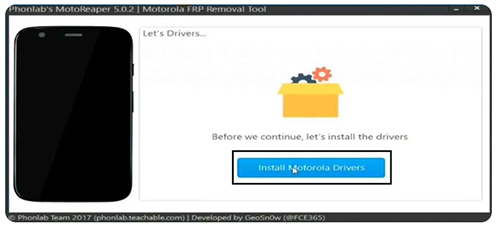
- Install drivers - Install the Motorola USB drivers on your computer.
3. How to Use
- Boot the phone - Turn on the phone and enter Bootloader/Fastboot mode or EDL mode (refer to your device's specific key combination).
- Connect - Use a USB cable to connect the phone to your computer.
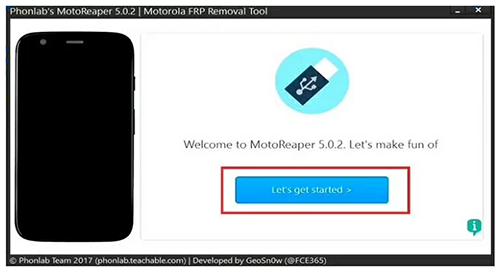
- Extract and run - Unzip the downloaded ZIP file, right-click MotoReaper.exe, and select "Run as administrator".
- Start unlocking - Once the software detects your device, click the "Bypass FRP" (or similar) button.
- Wait - Wait 1-3 minutes until the process completes.
- Reboot - Restart your phone. It should now skip the Google account verification screen.
Section 4: Is MotoReaper Motorola FRP Tool Free & Safe
MotoReaper is not truly free (as it requires a paid activation) and its safety is questionable due to the lack of an official download source and the high risk of downloading malware-infected or cracked versions. Based on the information from the Passfab page you provided, here is a table summarizing whether MotoReaper is free and safe.
|
Aspect
|
Details
|
|
Is MotoReaper Free? |
Not entirely. You can download the software for free, but to legally use it with full functionality, you typically need to register for the PhonLab e-Campus course, which costs around $40 USD**. Some users may also find remote unlocking services that charge a fee (e.g., $15.00 for Motorola FRP removal), but that is a service fee, not the tool's price. In comparison, other paid FRP tools start at $14.95/month, but MotoReaper itself is often listed as a "free" option - though that "free" version is usually limited or requires a paid activation code. |
|
Is MotoReaper Safe? |
It carries significant risk. According to sources, it is "generally" safe only when downloaded from trusted sources. However, because there is no official website, you must obtain it from third-party sites (e.g., MediaFire). The same sources explicitly warn you to scan for malware and avoid cracked versions, as many distributed copies contain Trojans or viruses. Thus, while the tool itself may be safe if sourced cleanly, the lack of an official channel makes it inherently risky. |
Section 5: Pros & Cons of MotoReaper Motorola FRP Tool
Pros of MotoReaper Motorola FRP Tool
- Motorola-focused: It is tailored specifically for Motorola phones and works with many older Motorola models.
- Fast FRP removal: The process can often be completed within a few minutes on supported devices.
- Free to use: MotoReaper is generally available without a purchase fee.
- Simple operation: It provides relatively straightforward instructions with only a few steps.
- No flashing required: It can bypass the Google account lock without flashing the device on supported models.
Cons of MotoReaper Motorola FRP Tool
- Limited Android compatibility: It mainly supports older Android versions and may not work with newer systems.
- Older Motorola models only: Many recent Motorola devices may be incompatible.
- Requires USB drivers: The process may require the appropriate Motorola USB drivers and Bootloader mode.
- No official website: MotoReaper is distributed through third-party sources, which can raise download-security concerns.
- Limited support: Users may have difficulty finding current troubleshooting guidance when the tool fails.
Section 6: What Could Be Better than MotoReaper Motorola FRP Tool
For FRP locks on newer Android versions, Android Lock Wiper proves far more dependable than MotoReaper - a long-abandoned relic of a tool. The latter only accommodates obsolete systems below Android 7.0, whereas the former runs smoothly on the latest iterations, including Android 14 and 15, while extending broad compatibility to over 6,000 device models from brands.
This edge stems from its employment of contemporary unlocking algorithms and secure communication with official servers, which jointly deliver a success rate and stability far surpassing MotoReaper's when dealing with modern handsets.
Core Features of Android Lock Wiper:
> Motorola FRP Bypass: Helps bypass FRP on supported Motorola models.
> Screen Lock Removal: Removes screen locks, including PINs, passwords, patterns, and biometric locks.
> No Data Loss on Samsung: Unlock Galaxy screen lock without data loss.
> Google FRP Removal: Bypasses Google account verification on supported devices.
> Wide Brand Support: Supports Motorola, Samsung, Huawei, and other brands.
> Simple Operation: Provides a guided unlocking process.
> Firmware Support: Downloads required firmware or data packages.
> No Google Password: Can remove FRP without the previous Google password on supported devices.
> Multiple Unlock Modes: Offers different methods based on device and Android version.

Below is how to bypass Google FRP lock on Motorola via Android Lock Wiper:
Step 1: Setup & Select Mode - Install the software on your computer, then launch it and choose "Remove Google Lock (FRP)" with Advanced Mode enabled.
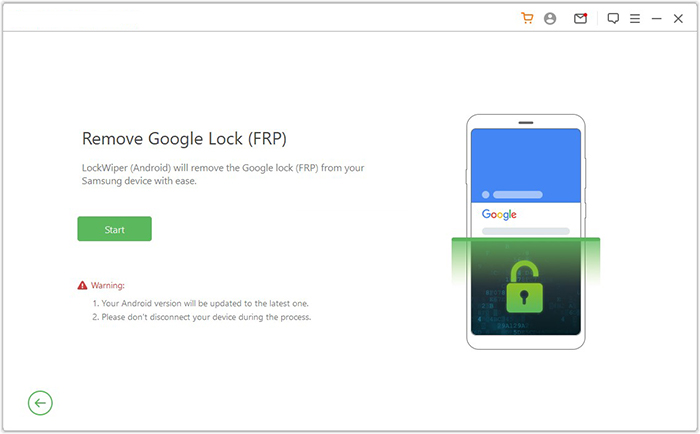
Step 2: Connect & Prepare Your Phone - Plug your Motorola phone into the PC via USB, and click "Start" (back up your data if prompted). Enter the required device details (model, country, carrier, etc.), then follow the on-screen instructions to boot your phone into Recovery Mode. Next, put the device into Download Mode and make sure USB Debugging and OEM Unlocking are turned on.
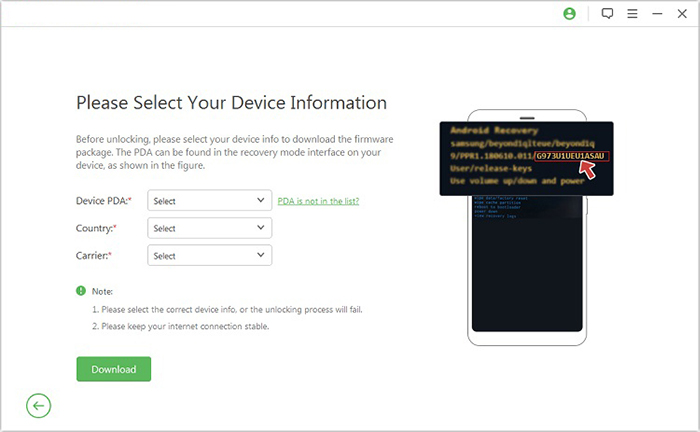
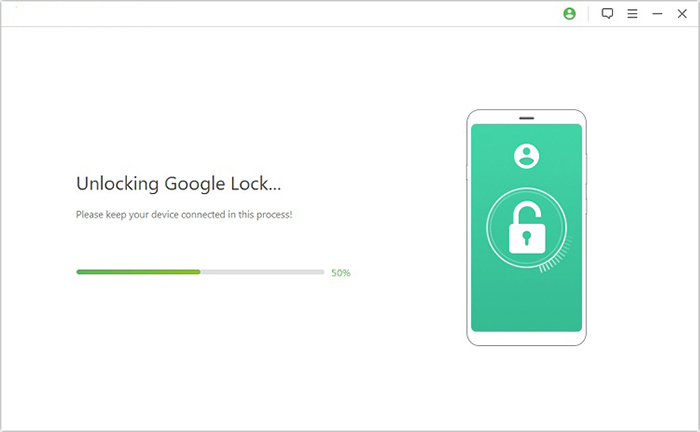
Step 3: Download, Extract & Unlock - Download the necessary firmware package (selecting PDA, country, and carrier), then start the extraction process. The tool will automatically process the firmware and complete the FRP removal. Once finished, your device will be unlocked.
Q&A about MotoReaper Motorola FRP Tool
Q1. Does MotoReaper require root access?
No. MotoReaper is generally described as working without root access and may use modes such as Fastboot or EDL during the FRP-removal process.
Q2. Does MotoReaper work with Qualcomm and MediaTek phones?
Some versions can support Motorola devices using Qualcomm and MediaTek chipsets. Actual compatibility depends on the specific model, Android version, and firmware.
Q3. Can MotoReaper remove FRP without the previous Google account?
MotoReaper is intended to bypass Google account verification on supported Motorola devices. It should only be used on a phone that the user owns or has permission to unlock.
Q4. Does using MotoReaper erase data on the phone?
FRP removal and data wiping are separate processes, but the device may already have been factory-reset before the FRP screen appears. Therefore, users should not assume that the process will restore previously deleted data.
Q5. Why is MotoReaper not detecting my Motorola phone?
Possible causes include missing USB drivers, an incompatible cable or USB port, an unsupported Android version, an incompatible chipset, or an incorrect Fastboot/EDL mode. Checking compatibility and reinstalling the required drivers may help.
Q6. Does MotoReaper need an Internet connection?
Some versions may work offline after activation, while downloading the program, drivers, or completing activation may require an Internet connection.
Q7. What should I do if MotoReaper fails to bypass FRP?
Check the exact Motorola model, Android version, chipset, firmware, USB drivers, and connection mode first. If the phone is unsupported, using the previously synced Google account or contacting Motorola support is a safer option than repeatedly trying incompatible FRP tools.
In a Nutshell
A MotoReaper Motorola FRP Tool review is more than a simple check of whether the program can bypass FRP; it also raises questions about compatibility, security, ease of use, and ongoing support. MotoReaper may remain useful for certain supported Motorola devices, but newer phones can require different solutions. Before using it, check your exact Motorola model and Android version first.
Related Articles:
5 Easy Tactics to Recover Deleted Data on Motorola Phone
4 Tested Ways for Screen Mirroring Motorola to PC/TV [Latest]
How to Transfer Music from Computer to Motorola Android Phone? 5 Means