
Nokia FRP Bypass: Top 5 Ways to Bypass FRP Lock on Nokia Devices
TL;DR:
- A locked Nokia device does not necessarily mean the end of its useful life. As discussed below, there are five Nokia FRP bypass solutions to consider, although their compatibility, costs, and success rates may differ across devices.
- For a second-hand Nokia phone, contacting the previous owner to remove their Google account is often the simplest option.
- If you own the device but cannot remember your credentials, Google's account recovery service should be your first choice.
Note: Make sure you own the Nokia device or have permission to remove its FRP lock. Thank you for your cooperation. Plus, the content discussed in this article does not apply to Nokia non-smartphones/devices.
Google explains that Android/Nokia device protection is activated when a Google Account is added to a device. After an unauthorized factory reset, the phone requires the screen lock or a Google Account previously synchronized with the device. (It also advises waiting 24 hours after a recent Google Account password change before performing a factory reset.)
The following table summarizes common situations that trigger Nokia FRP. And after that, we shall guide you through 5 easy options for Nokia FRP bypass.
|
User situation
|
Why FRP appears
|
|
Forgot Google password |
Cannot complete account verification |
|
Bought a used Nokia |
Previous owner's account remains associated |
|
Reset through Recovery Mode |
Ownership verification is triggered |
|
Changed Google password recently |
May encounter a temporary verification delay |
|
Received a second-hand or refurbished device |
Previous account may not have been removed |
Way 1: Bypass Nokia FRP via Special Code
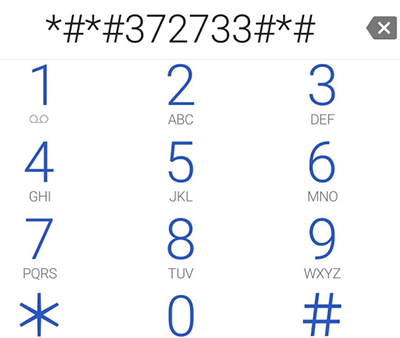
According to the GSMNeo FRP Nokia FRP Bypass Guide, some Nokia phones may support a special dialer code that opens hidden menus during the Google account verification process. Here's how to do it:
- Power on the Nokia phone.
- Connect the phone to a Wi-Fi network.
- Proceed to the Google account verification screen.
- The guide mentions using a special dialer code ##372733## to access hidden menus on supported devices.
- Menu availability depends on the phone model and firmware.
- If the code is unsupported, use Google's account recovery or contact authorized Nokia support.
Limitations:
- The code may not work on newer Android versions.
- Hidden-menu access depends on the Nokia model and firmware.
- Accessing a diagnostic menu does not necessarily provide permission to remove FRP.
Way 2: Bypass Nokia FRP Lock with Android Lock Wiper
Android Lock Wiper is a dedicated Android unlocking tool designed to help users remove various screen locks and Google FRP restrictions. It provides an 'Unlock Other Devices' option on its program screen, which may support FRP removal on certain Nokia devices. However, compatibility and success depend on the Nokia model and Android version, so check device support before proceeding.
Safe Download: Free from ads, unwanted bundles, and background uploads.
Learn how it works:
Step 1: Install and Launch the Software: Download and install the product on your computer. Open it, select Remove Google Lock (FRP), choose Advanced Mode, and connect your Nokia phone to the PC using a USB cable. Click Start to proceed.
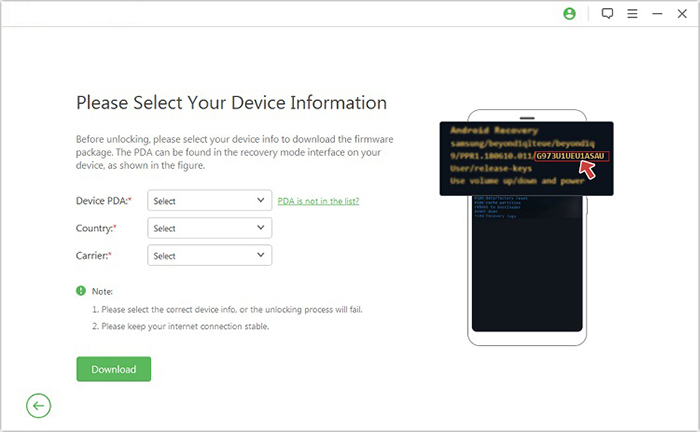
Step 2: Prepare Your Device: Enter the required Nokia device information and click Next. Follow the on-screen instructions to enter Recovery Mode, select the appropriate PDA, country, and carrier, and download the required data package.
Step 3: Complete the Process: Click Start to Extract and follow the prompts to enter Download Mode. Enable USB debugging and OEM unlocking if supported and instructed, extract the firmware, and complete the remaining software-guided steps.
Limitations:
- Requires a Windows computer and a stable USB connection.
- Some unlocking procedures may involve data loss.
- Not all Nokia models and Android versions are supported.
Way 3: Remove Nokia Google FRP Lock via Android Unlock
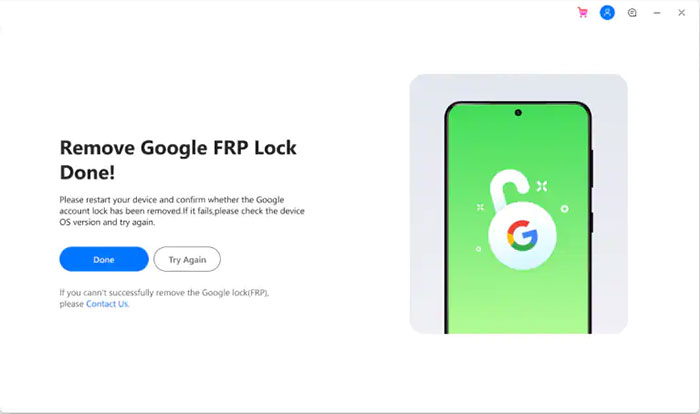
Android Unlock is a versatile unlocking tool designed to remove various Android screen locks and Google FRP restrictions, including FRP locks on supported Nokia devices. It provides a guided unlocking process that simplifies device preparation and FRP removal. The steps below demonstrate a test on a Nokia T10 running Android 12, in which the tool successfully bypassed the FRP lock.
Here's how you can do this:
- Launch Android Unlock on your Windows PC and go to Toolbox > Screen Unlock.
- On the following screen, choose Android to continue.
- Select Remove Google Account/FRP Lock from the available options.
- Choose Nokia as your device brand from the supported manufacturer list.
- Allow the software to download and install the required device drivers automatically.
- Power off your Nokia phone and connect it to the computer using a USB cable.
- While connecting the phone, press and hold the Volume Up and Volume Down buttons together for about three seconds.
- Follow the on-screen prompts to complete the process, provided you are authorized to unlock the device.
Limitations:
- Requires a computer and additional software installation.
- Certain unlocking features require a paid subscription.
Way 4: Perform Nokia FRP Bypass via UnlockBoot
According to its official guide, UnlockBoot provides a remote unlocking service in which a technician helps remove the Google account verification lock without requiring you to root your device or install complicated unlocking software. Here are the details:
- Visit UnlockBoot's Website: Open the UnlockBoot Nokia Google FRP Removal Service page and select the Nokia FRP removal service.
- Enter Your IMEI Number: Find your Nokia phone's IMEI number and enter it in the required field to check service eligibility.
- Place Your Order: Click Unlock Now, proceed to checkout, and complete the payment
- Check Your Email: Wait for UnlockBoot to send you an email containing instructions for the remote FRP removal process.
- Contact a Technician: Reach out to an UnlockBoot technician via WhatsApp, Facebook, or live chat to arrange a remote session.
- Prepare Your Devices: Connect your Nokia phone to a Windows PC using a USB cable and install USB Redirector if instructed.
- Complete FRP Removal: Follow the technician's instructions to establish the remote connection and complete the authorized FRP removal process.
- Restart and Set Up Your Nokia: Once the process is finished, restart your phone and follow the on-screen setup instructions.
Limitations:
- Requires payment for the remote unlocking service.
- You need a stable internet connection and a compatible Windows PC.
- The process depends on technician availability and scheduling.
- Success may vary depending on the device model and security patch.
Way 5: Bypass FRP on Nokia Device via Emergency Call
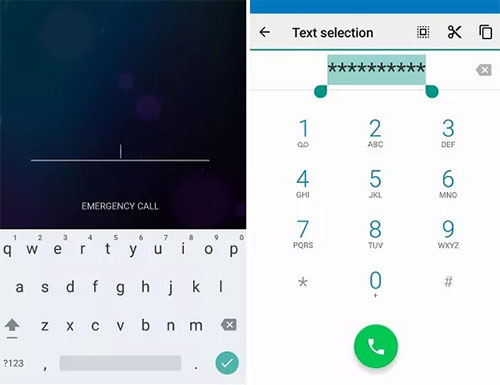
Nokia users running Android 11 may be able to access certain device functions through the Emergency Information feature on the initial setup screen. The tutorial describes using this entry point to reach device settings. However, Emergency Call is intended for emergency use, and the method should not be used to circumvent Google's ownership verification.
For a legitimate recovery, follow these steps:
- Connect to Wi-Fi: Turn on your Nokia phone and connect it to a stable Wi-Fi network from the initial setup screen.
- Check Emergency Information: Return to the welcome screen and open the Emergency Information option to check the emergency details available on your device.
- Recover Your Google Account: If you cannot remember the previously synchronized Google account, use Google's official account recovery service.
- Verify Device Ownership: Sign in using a Google account previously synchronized with the Nokia phone before the factory reset
- Complete Phone Setup: Follow the on-screen instructions to finish setting up your Nokia device.
- Contact Nokia Support: If Google verification continues to fail, contact Nokia support or an authorized service provider with proof of purchase.
Limitations:
- The method may not work on newer Android versions.
- Available options vary across Nokia models and software versions.
- Security updates may have patched the vulnerabilities used by older tutorials.
- It does not guarantee successful FRP removal.
Hot Tip:
Before selling, giving away, or resetting your Nokia phone, take a moment to prepare it properly:
- Remove your Google account before performing a factory reset.
- Keep your Google account email address and password somewhere secure.
- Verify that your Google account can be accessed before resetting the device.
- If buying a used Nokia phone, ask the seller to remove their Google account and complete the initial setup with you.
- Keep your purchase receipt or proof of ownership in case you need help from Nokia support.
Related Articles:
7 Effective Approaches to Flash a Dead Android Phone Securely
How to Transfer Photos from Nokia Phone to Computer? 4 Wise Picks
4 Methods to Transfer Contacts from Android to Nokia [Simple Clicks]
Best 10 Android Unlock Apps to Unlock Phones Easily [Productive]