EFRP Me APK Review: Is It Safe & Worth Trying for FRP Bypass?
TL;DR:
EFRP Me APK may appeal to users looking for a free, computer-free option, but uncertain compatibility and the risks of unofficial APK downloads are significant drawbacks. I would prioritize the phone manufacturer's official support or a reputable tool like Android Lock Wiper, mentioned in this article.
NOTE: We support the lawful use of EFRP Me APK or its replacement for legitimate purposes and condemn their use in any unauthorized activities. Thank you for your cooperation.
EFRP Me APK Review Based on My Trial Experience:
After reviewing EFRP Me APK's installation process and reported FRP-bypass methods, here's a summary of its potential pros and cons. The following score is a personal assessment based on tests.
|
Evaluation Criteria
|
My Experience
|
Score
|
|
Ease of use
|
The general instructions are straightforward, but some steps may be confusing for beginners. |
3/5 |
|
Installation
|
Direct APK installation is convenient, although finding a trustworthy download source is difficult. |
3/5 |
|
Unlocking success
|
Results are uncertain (It worked for Android 8.0.1 in my test). |
2/5 |
|
Cost
|
The APK is generally described as free to use. |
5/5 |
|
Security
|
Unofficial downloads raise concerns about file integrity and privacy. |
2/5 |
|
Overall rating
|
A free option with notable compatibility and security limitations. |
2.6/5 |
- Section 1: What Is EFRP Me APK
- Section 2: EFRP Me APK - Compatibility & Core Features
- Section 3: Is EFRP Me APK Safe & Free
- Section 4: How to Download & Use EFRP Me APK
- Section 5: EFRP Me APK - Main Strengths & Weaknesses
- Section 6: What Could Be Better Than EFRP Me APK [Comparison Table]
- FAQs about EFRP Me APK
Section 1: What Is EFRP Me APK
EFRP Me APK is a third-party Android application commonly associated with bypassing Factory Reset Protection (FRP) on devices locked after a factory reset. It is often discussed as an alternative for users who cannot access the Google account previously linked to their phones. However, since it is not an official Google tool, users should exercise caution when downloading and using it from unofficial sources.

Section 2: EFRP Me APK - Compatibility & Core Features
Compatibility: Some trusted sources report support for Android 5.0 through Android 13. For instance:
- Samsung: Galaxy A52, Galaxy A71, Galaxy Note 20, Galaxy S23.
- Xiaomi: Mi 11, Mi 11i.
- Redmi: Redmi 9A, Redmi 9C, Redmi Note 11 Pro.
- OPPO: Find X2, Find X3, Reno 6, Reno 7.
- OnePlus: OnePlus Nord N100, Nord N200, Nord N30.
- Motorola: Moto E series, Moto G series.
Core Features:
|
Characteristics
|
Main Details
|
|
FRP bypass |
Can be installed and run directly on a compatible Android phone without a computer. |
|
Shortcut access |
Provides shortcuts to certain system settings, browsers, and account menus used during the process. |
|
Multiple APK versions |
Different APK variants may be available for different Android versions or device brands. |
|
No root required |
Some reported methods do not require rooting the phone. |
|
Lightweight APK file |
Can be downloaded and installed as an APK without requiring a full desktop software package. |
|
Step-by-step unlocking process |
Third-party guides provide instructions for navigating the required menus, although the available steps may differ across devices and Android versions. |
Section 3: Is EFRP Me APK Safe & Free
Is EFRP Me APK Safe?
- Unofficial application: Not developed or endorsed by Google.
- Malware risks: Unverified APKs may contain malicious code.
- Privacy concerns: Data-collection practices may be unclear.
- Installation risks: Unknown sources can expose devices to threats.
- Uncertain results: Success varies by device and security patch.
- Limited support: Reliable technical assistance may be unavailable.
- Safety precautions: Verify the source, scan the APK, and check permissions before Google account recovery or bypass..
Is EFRP Me APK Free?
Yes, EFRP Me APK is generally reported to be free to download and use for its basic FRP-bypass functionality. Unlike many desktop-based unlocking programs, it does not typically require a paid subscription or a computer to run. However, third-party download sites may display advertisements or promote paid alternatives, so be cautious of websites asking for payment to access the APK.
Section 4: How to Download & Use EFRP Me APK
How to Download EFRP Me APK?
- Find a download source - Look for a reputable website like https://efrp.app/ offering EFRP Me APK. The app is not officially distributed by Google, so verify the source carefully.
- Download the APK file - Open the download page on your Android phone and save the installation file.
- Allow installation if necessary - In Settings, find the option to allow app installations from the browser or file manager you are using.
- Install the APK - Open the downloaded file and follow the installation prompts.
- Review permissions - Check the app's requested permissions and disable permission to install unknown apps again when finished.
How to Use EFRP Me APK?
Step 1: Prepare the Device and Enable TalkBack - Connect your device to a working network. Then press and hold Volume UP + Power together, tap Use, and long-press both buttons again. Wait until TalkBack fully activates - a flash message will confirm it. (The TalkBack doesn't work?)
Step 2: Navigate with TalkBack and Launch Google Assistant - Swipe in an "L" shape and double-tap While Using the App. Then double-tap Use Command Voice and say loudly: Open Google Assistant.
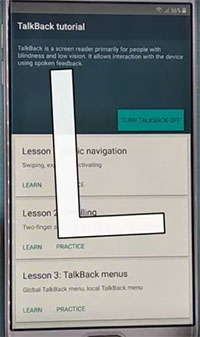
Step 3: Disable TalkBack and Sign in to Samsung Account - At the Welcome to Bixby screen, press Volume UP + Power again to turn TalkBack off. Tap Sign In and log in with your registered Gmail/Samsung account, tap Cancel when asked about faster sign-in, then tap Continue > Continue.
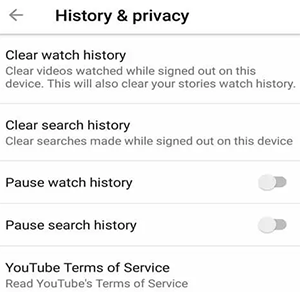
Step 4: Set Up YouTube - Tap the Keyboard icon and search. Open YouTube to launch the app. Tap the Profile icon, go to History and Privacy > YouTube Terms of Service, and tap Accept & Continue > No Thanks.
Step 5: Install and Configure Alliance Shield X - Search "efrp me easy firmware" in the browser, scroll down, and select Open Alliance Shield (Samsung Store). Tap Continue > Install > Open, tap Skip if prompted, and register or sign in. Then tap Next > Device Admin > Activate, and turn on Knox > Agree > Next > Finish.
Step 6: Stop Setup Apps and Complete Final Setup - In App Manager, search and select Android Setup, then tap Actions > Force Stop > Wipe Data. Repeat for Samsung Setup Wizard and Google Play Services. Finally, search Samsung Setup Wizard again, tap Activities, select the first activity (com.sec.android.app…), tap Open on the Configure popup, and tap Skip > Finish on the Please Wait… screen.
Section 5: EFRP Me APK - Main Strengths & Weaknesses
EFRP Me APK - Key Strengths
EFRP Me APK is generally reported as a free tool, making it an accessible option for users seeking FRP-related solutions. It can be installed directly on compatible Android devices without necessarily requiring a computer. In addition, third-party guides provide instructions that may help users understand the process.
EFRP Me APK - Key Weaknesses
EFRP Me APK is distributed through unofficial sources, which raises concerns about malware, privacy, and file integrity. Its success rate varies depending on the phone model, Android version, and security patch level. Furthermore, it is not easy to use, and you may struggle to find trustworthy assistance when problems arise.
Section 6: What Could Be Better Than EFRP Me APK [Comparison Table]
Want a more structured FRP-unlocking solution? Android Lock Wiper offers a desktop-based alternative to EFRP Me APK. It helps remove Google FRP locks on a wider range of Android devices, with USB connection and guided on-screen instructions.
Depending on the supported model, its functions include Google account verification removal and screen-lock removal. Compared with EFRP Me APK, it provides a dedicated software interface and a higher success rate, although a paid license may be required.
Safe Download (Ad-free, bundle-free, and no background uploads):

How to Use?
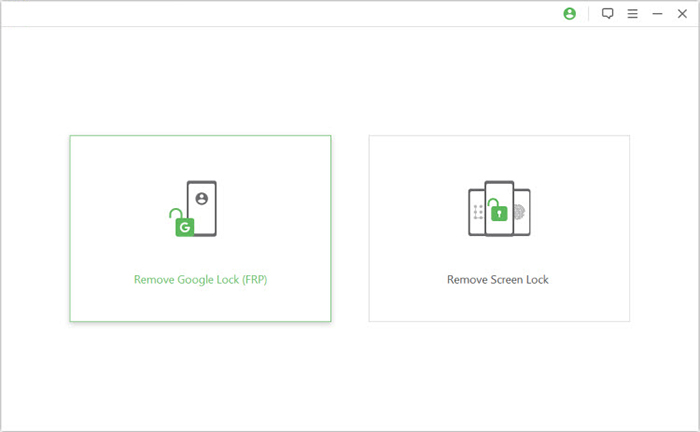
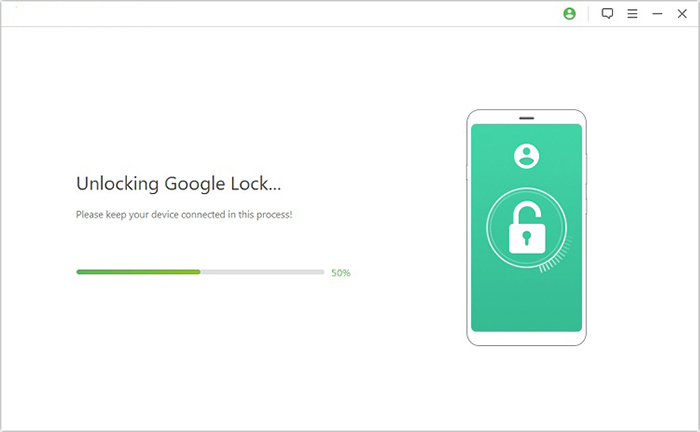
01. Install and connect your device - Download and install Android Lock Wiper on your computer, launch it, select Remove Google Lock (FRP) and choose Advanced Mode. Connect your Android phone via USB, click Start, and back up your data whenever possible, for it may result in data loss after FRP bypass.
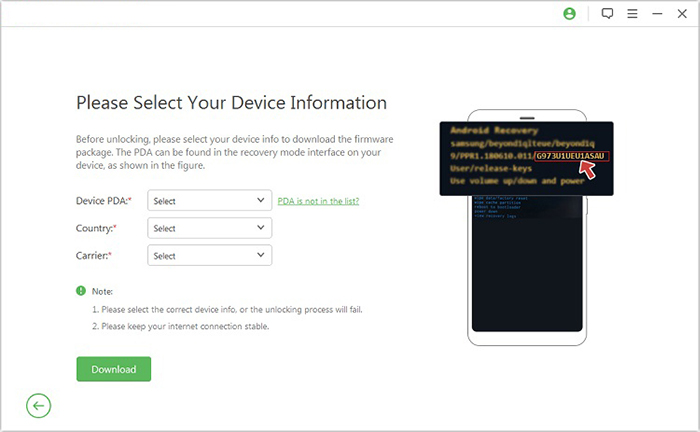
02. Prepare the phone and download firmware - Enter the requested device details and follow the on-screen guidance to access Recovery Mode. Select the appropriate PDA, country, and carrier information, then download the required package and follow the instructions to extract the firmware and prepare your phone.
03. Complete the FRP removal process - Follow the software's prompts to enter Download Mode and configure the required settings, such as USB debugging and OEM unlocking, where supported. Once the necessary components have been extracted, allow the software to attempt to remove the Google FRP lock.
A Comparison Table:
|
Aspect
|
EFRP Me APK
|
Android Lock Wiper
|
|
Usage
|
APK-based FRP bypass option operated on the phone. |
Desktop software that guides users through unlocking via USB. |
|
Compatibility
|
Mainly for Android 5.0 to Android 13.0. |
Supports a broader range of Android devices. |
|
Cost
|
Generally reported as free to download and use. |
Offers a free trial, but full unlocking features require a paid license. |
|
Reliability
|
Results may be inconsistent. |
Has been continuously tested and optimized by professional testers. |
FAQs about EFRP Me APK
Q1: Why does EFRP Me APK fail to unlock my phone?
The method may be blocked by newer Android versions, manufacturer-specific restrictions, or security patches. Check your device's exact model and software version, or contact the manufacturer for assistance with ownership verification.
Q2: Does EFRP Me APK work on Android 14 or later?
Reliable compatibility with Android 14 and later is not clearly established. Results may vary even on older Android versions, depending on the device's firmware.
Q3: Can it unlock a second-hand phone linked to the previous owner's Google account?
It is discussed as an option for FRP-locked second-hand phones, but success is not guaranteed. The recommended approach is to ask the previous owner to remove their Google account or contact the manufacturer with proof of ownership.
Q4: What should I do if EFRP Me APK does not work?
Verify that the APK is compatible with your device and that the installation file is intact. If the process still fails, use Google's account-recovery process or contact the phone manufacturer for assistance.
Q5: Will a factory reset remove Google FRP?
No. A factory reset may trigger FRP rather than remove it. A locked device may still require verification with a Google account previously synced to the phone.
Related Articles:
Android Phone Data Erasure Report: What It Is and How to Get One?
5 Tactics to Recover Formatted Data from Android Phone with/without Backup
Top 6 Best App Backup and Restore Alternatives [Worth a Shot]