
Chimera Tool Review: Features, Updates, User Guide, FAQs, & 1 Alternative
TL;DR:
Is Chimera Tool review worth investing in? Chimera Tool suits professional repair technicians, offering FRP removal, firmware updates, & IMEI repair with regular updates - but its $99.90–$189.90 licensing and reported support issues warrant caution. Some professionals handling varied system repairs will likely find it valuable, while casual users needing simple lock removal may prefer a cheaper, easier alternative like Android Lock Wiper.
NOTE: We encourage the lawful and responsible use of Chimera Tool and its alternatives for legitimate purposes and strictly oppose any unauthorized use. Thank you for your cooperation.
"I bought Chimera Tool's subscription because I work as a software technician in a repair shop (flashing, unlocking, bypassing...). It is very useful and efficient for my job." -- from Reddit
This Chimera Tool review examines its core features, supported devices, licensing costs, and latest updates, while weighing its advantages against drawbacks such as learning curve, extra credit costs, and reported support concerns. It also covers practical usage, troubleshooting tips, and a simpler alternative for users focused on FRP and screen-lock removal.
- Section 1: What Is Chimera Tool
- Section 2: Key Features of Chimera Tool
- Section 3: Chimera Tool: Latest Updates & Real User Case
- Section 4: Where to Download & How to Use Chimera Tool
- Section 5: Chimera Tool: Advantages & Disadvantages
- Section 6: What If Chimera Tool Doesn't Work
- Section 7: Best Alternative to Chimera Tool
- FAQs about Chimera Tool
Section 1: What Is Chimera Tool
Chimera Tool is a mobile phone servicing software used by technicians to perform various maintenance and repair operations on smartphones. It helps address software-related problems, modify certain device settings, and carry out specialized procedures for phone servicing. The tool is commonly used in mobile repair shops for troubleshooting devices and handling technical tasks that may be difficult to complete through standard phone settings.
Section 2: Key Features of Chimera Tool
Before using Chimera Tool, it is worth examining its main functions, supported devices, license costs, and repair reliability. The table below summarizes these aspects, along with safety considerations and other details that can help you decide whether it suits your phone repair needs.
|
Feature
|
Details
|
|
Main Purpose |
Smartphone servicing, software troubleshooting, and mobile phone repair. |
|
Key Functions |
FRP removal, firmware updates, bootloader operations, IMEI repair, and device information reading, depending on the model and procedure. |
|
Supported Devices |
Supports selected phones from brands such as Samsung, Xiaomi, Huawei, Motorola, OPPO, vivo, and OnePlus. Compatibility varies by model. |
|
Pricing |
Basic at $99.90, Professional at $149.90, and Premium at $189.90, with annual limits of 100, 1,500, and 5,000 phone connections, respectively. Professional includes a 10% discount on credit-based procedures, while Premium offers a 15% discount and priority support. |
|
Success Rate |
No independently verified universal success rate is available. Results depend on the device model, firmware version, security patch, and repair procedure. |
|
Safety |
Use the official software source and verify compatibility before starting. Certain operations may erase data or affect device functionality. |
|
Operating System |
Primarily a Windows-based application. Check the system requirements before installation. |
|
Best For |
Mobile repair technicians and experienced users who need tools for smartphone servicing and software-related repairs. |
Section 3: Chimera Tool: Latest Updates & Real User Case
Chimera Tool regularly releases updates to improve its phone servicing functions, expand device compatibility, and introduce new repair solutions. The table below outlines the latest reported changes:
|
Update Area
|
Latest Changes
|
|
Version |
Version 48.30.1425, released on October 22, 2026. |
|
Samsung FRP Removal |
Added a new FRP removal method for selected Samsung devices powered by Exynos processors, using Download Mode. |
|
Supported Models |
The new solution covers selected Galaxy S, Note, FE, and Z Flip series devices. |
|
Device Compatibility |
Continued expansion of support for additional phone models and software versions. |
|
Repair Improvements |
Updated existing servicing procedures to improve repair workflows and extend available operations. |
Real User Case: Account Ban and Customer Support Complaint
A negative experience published by UnlockBoot on May 7, 2026, raises concerns about Chimera Tool's account policies and customer service. The author claimed to have paid $145 for the service, switched to another computer, and subsequently found the account banned. The author also alleged that support provided an unsatisfactory response and refused to restore account access.
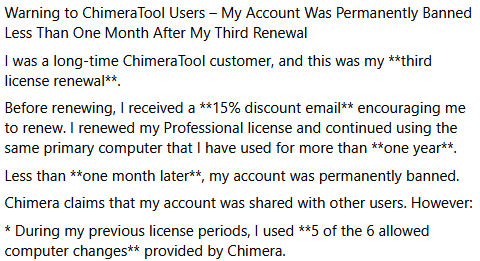
This report represents an individual user's account, not independent proof that Chimera Tool routinely bans customers or mishandles payments. Nevertheless, it highlights several issues worth checking before purchasing a license:
- Account restrictions: Understand the rules governing computer changes and account access.
- Customer support: Review how technical problems and account suspensions are handled.
- Refund policies: Check the applicable refund terms before making a payment.
- Independent reviews: Compare feedback from multiple sources rather than relying on a single positive or negative report.
My Personal Take: Chimera Tool's changelog demonstrates ongoing development, but new features alone cannot establish its overall reliability or customer satisfaction. Prospective buyers should weigh its device-specific repair capabilities against licensing restrictions, support experiences, and the possibility that a particular procedure may not work on their phone.
Section 4: Where to Download & How to Use Chimera Tool
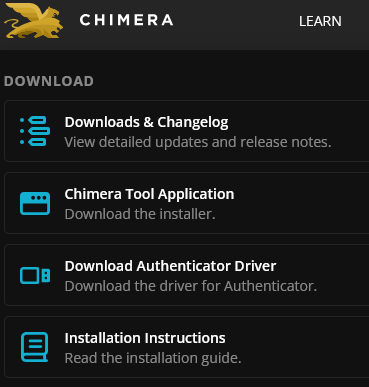
The safest place to download Chimera Tool is its official website, where you can find the latest installer, required drivers, and installation instructions. The software is intended for Windows computers, so check the current system requirements before installing it. Learn how to use it below (taking FRP lock removal as an example):
Step 1. Visit the official Chimera Tool website, download the latest version of the software, and install it on your Windows computer. Launch the program and prepare the necessary USB cable and drivers for your device.
Step 2. Turn off your locked phone (e.g., Samsung) completely before proceeding with the connection process.
Step 3. Remove the back cover only if your specific model requires internal access. Locate the device's designated test point using reliable model-specific service instructions, as its position varies between Samsung models.
Step 4. Connect the phone to your computer using the required test-point method. Follow the manufacturer's service guidance carefully to avoid damaging internal components.
Step 5. Wait for Chimera Tool to recognize the connected device. If detection fails, check the USB connection, drivers, and test-point placement before trying again.
Step 6. In the software, navigate to Repair → Remove FRP lock → Start, provided this option is supported by your device and firmware version. Follow any additional prompts displayed by the program.
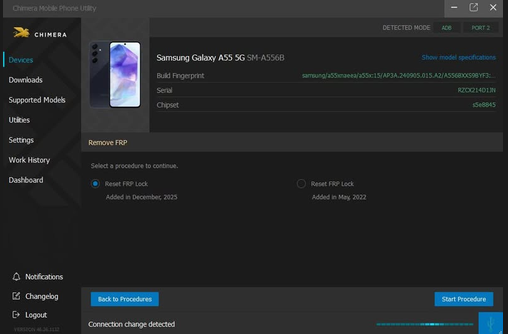
Step 7. Allow the operation to finish and check the software's status message to confirm whether the FRP removal succeeded. Completion time varies by device and procedure, so removal within seconds is not guaranteed.
Note: The exact menus and procedures depend on the device model, firmware, and Chimera Tool version. Back up important data before performing repairs, and use lock-removal functions only on devices you own or are authorized to service.
Section 5: Chimera Tool: Advantages & Disadvantages
Chimera Tool combines several smartphone servicing functions in one application. However, its technical learning curve, Windows-only support, and licensing requirements may make it less appealing to casual users.
|
The Good
|
The Bad
|
|
Multiple Functions: Handles FRP removal, firmware servicing, and other repairs. |
Learning Curve: Advanced operations require technical knowledge. |
|
Wide Compatibility: Supports selected models from various Android brands. |
Windows Only: No native macOS or Linux version. |
|
Guided Workflows: Provides instructions for supported procedures. |
Connection Issues: Driver or USB problems may interrupt repairs. |
|
Regular Updates: Adds new procedures and device support. |
Extra Costs: Some operations require additional credits. |
|
All-in-One Tool: Combines multiple servicing functions. |
Special Equipment: Some procedures require test-point access. |
|
Technician-Friendly: Useful for handling varied repair jobs. |
Support Concerns: Some users report account and support issues. |
Section 6: What If Chimera Tool Doesn't Work
If Chimera Tool fails to detect your phone or complete a repair, the problem may stem from connection issues, missing drivers, incorrect device modes, or unsupported operations. Try these troubleshooting methods before attempting the repair again:
- Check the USB Cable and Port - Use a reliable data cable and try another USB port. Avoid faulty hubs or loose connections.
- Update the Drivers - Check Windows Device Manager for driver errors and install the required USB or device drivers.
- Verify the Connection Mode - Put your phone in the correct mode, such as Download Mode or Fastboot Mode, if required.
- Restart the Software - Close Chimera Tool, restart your computer, and reopen the application.
- Check Compatibility - Confirm that your phone model, firmware version, and security patch support the selected operation.
- Review the Error Message - Follow the recommended troubleshooting steps and avoid repeatedly running procedures that could damage data or device functionality.
- Verify Your License - Ensure your account is active and has sufficient credits for the operation.
- Contact Support - If the problem persists, provide technical support with your phone model, firmware version, and error message.
Section 7: Best Alternative to Chimera Tool
If Chimera Tool repeatedly fails to complete a repair, consider an alternative that specifically supports your phone model and the task you need to perform. For Android screen-lock and Google FRP issues, Android Lock Wiper provides a simpler alternative to Chimera Tool, with broader compatibility across phone brands and lock types.
It may offer a higher success rate for supported unlocking tasks, while Chimera Tool often involves more technical procedures. Its guided instructions and straightforward interface also make it easier for beginners to follow the unlocking process.
Here's how to use this tool easily:
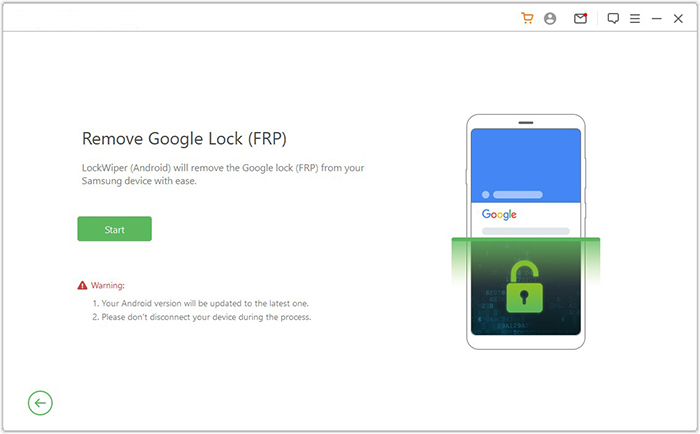
- Begin by downloading and installing the software onto your computer. After installation is complete, choose "Remove Google Lock (FRP)" and select "Advanced Mode." (Download It Safely - No ads, no bundled apps, and no background uploads.)
- Connect your Android device to the computer via a USB cable, then click "Start." Backing up your Android device beforehand is recommended to prevent any potential data loss during the FRP bypass process.
- Follow the prompts to enter the required information about your Android device and click "Next." Follow the on-screen instructions to boot your Android into recovery mode.
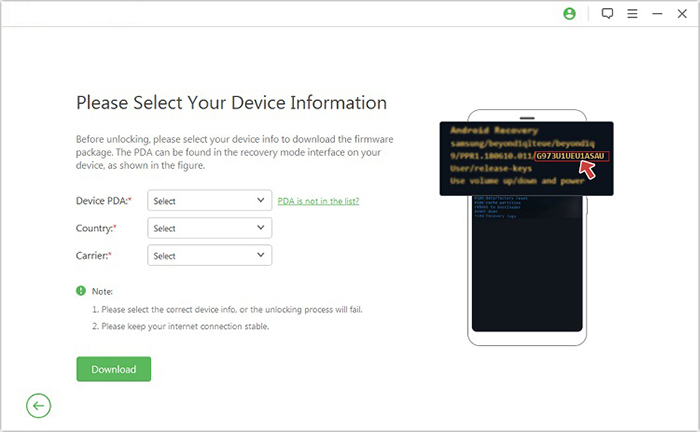
- On the following screen, select the appropriate PDA, country, and carrier, then click "Download" to obtain the required data package.
- Next, click "Start to Extract" and follow the on-screen prompts to place your device into Download Mode, enable USB debugging, activate OEM unlock, and extract the firmware along with other essential tasks.
- Finally, the software will begin the unlocking process for your Android smartphone. After a brief notification, you will be able to access your device without verifying any Google account.

FAQs about Chimera Tool
Q1. Does Chimera Tool require a physical box or dongle?
No. Chimera Tool operates as a software-based mobile servicing solution, so a separate hardware box or dongle is not required for its standard workflow.
Q2. Can Chimera Tool work without an internet connection?
Some supported operations may work offline, while others require an internet connection for authentication, account access, or online services. Requirements depend on the selected procedure.
Q3. Does Chimera Tool erase data during repairs?
Certain operations, such as factory resets and some firmware procedures, can erase personal data. Back up important files before starting any repair that may affect the phone's storage.
Q4. Why is Chimera Tool not detecting my phone?
Common causes include faulty USB cables, missing drivers, incorrect connection modes, disabled USB debugging where required, or an incompatible device configuration. Try another USB port, check the drivers, and follow the connection instructions for your specific model.
Q5. Can I use Chimera Tool on multiple computers?
The license determines how many computers you can associate with your account and how frequently you can change them. Review the applicable computer-connection rules before switching between a desktop and laptop.
Q6. Is Chimera Tool suitable for everyday phone maintenance?
Chimera Tool is primarily intended for specialized mobile servicing rather than routine tasks such as transferring photos, organizing files, or syncing contacts. Users who mainly need everyday Android management may find a standard phone-management application more appropriate.
Related Articles:
EFRP Me APK Review: Is It Safe & Worth Trying for FRP Bypass?
How to Unlock SIM Card on Android Phones? 4 Clever Strategies
How to Unlock A Disabled iPhone without iTunes or iCloud: 3 Easy Ways
5 Tactics to Recover Formatted Data from Android Phone with/without Backup