
UnlockRiver Review: Can It Really Bypass iPhone SIM & Android FRP?
TL;DR:
- UnlockRiver provides a convenient online option for removing carrier SIM restrictions and handling certain Android unlocking requests, but its mixed customer reviews and inconsistent success rates deserve attention.
- While my trial confirmed that it could unlock an iPhone, its Android FRP service did not work as expected, so checking device compatibility, pricing, and refund conditions before ordering is essential.
- If UnlockRiver cannot meet your needs, iPhone SIM Bypasser and Android Lock Wiper are two alternatives worth considering for supported devices.
Note: Before using UnlockRiver or any alternative tool, please make sure you are the legitimate owner of the iPhone or Android device or have obtained the owner's explicit authorization to unlock it. Thank you for your cooperation.
Unlocking a phone through an online service sounds simple until you start wondering whether the promised result is worth the money. Is UnlockRiver a reliable choice for removing iPhone SIM restrictions or getting past Android FRP locks? Before placing an order, it is worth examining an UnlockRiver review, comparing real customer experiences to see whether it can successfully unlock iPhone SIM restrictions and Android device FRP locks.
- Section 1: What Is UnlockRiver
- Section 2: How to Use UnlockRiver
- Section 3: UnlockRiver - Customer Reviews from Trustpilot
- Section 4: Is UnlockRiver Safe & Free
- Section 5: UnlockRiver - Pros & Cons
- Section 6: Two Dependable Alternatives to UnlockRiver
> 6.1 Using iPhone SIM Bypasser
> 6.2 Using Android Lock Wiper - FAQs about UnlockRiver
Section 1: What Is UnlockRiver
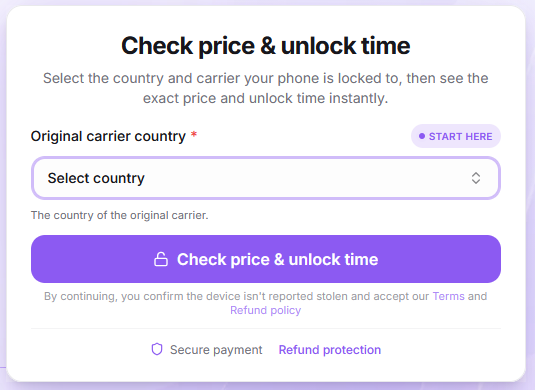
UnlockRiver is a web-based phone unlocking service that allows users to request carrier unlocking for iPhones and Android devices without installing additional software. Users typically need to provide their phone model, IMEI number, current carrier, and other relevant information before submitting an unlocking request and paying the applicable fee.
Besides network unlocking, UnlockRiver also offers IMEI-related checking services, although its processing times, customer support, and unlocking reliability have received mixed user feedback.
According to UnlockRiver's official website, the service supports 4,000+ phone models and more than 600 mobile carriers worldwide. Its compatibility covers major iPhone and Android brands, including Samsung, Google, Motorola, Xiaomi, and OnePlus.
|
Category
|
Supported brands/carriers
|
|
Phone brands |
Apple, Samsung, Google, Motorola, Huawei, Xiaomi, OnePlus, Sony, Nokia, Hisense, itel, TECNO, and 100+ other manufacturers |
|
US carriers |
AT&T, Verizon, T-Mobile, Spectrum |
|
UK carriers |
Vodafone, EE, Three, O2 |
|
European carriers |
Orange, Telefónica, Vodafone |
|
Canadian carriers |
Manage GPS spoofing from PC or Mac for stability. |
|
Trial & Paid Plans |
Bell, Rogers |
|
Latin American carriers |
Claro, Movistar, Telcel |
|
Global coverage |
600+ mobile carriers worldwide |
You Might Also Like: How to Unlock SIM Card on Android Phones? 4 Clever Strategies
Section 2: How to Use UnlockRiver
UnlockRiver provides an online phone unlocking service that allows users to submit unlocking requests without installing additional software. However, unlocking availability and success are not guaranteed for every device or carrier. Check the refund policy before payment and only submit unlocking requests for devices you legally own or are authorized to unlock.
Step 1. Visit the UnlockRiver Website: Open your browser and navigate to the UnlockRiver official website. Find the phone unlocking service and start your request (Taking iPhone SIM lock bypass as an example).
Step 2. Enter Your Phone Information: Select your phone brand and model, then provide the required information, such as your IMEI number, original country, and current carrier.
Step 3. Check Device Compatibility: Wait for UnlockRiver to check whether your device is eligible. Review the available unlocking service, quoted price, and estimated processing time.
Step 4. Submit Your Order and Make Payment: If the service meets your requirements, confirm your order and complete the payment according to the website's instructions.
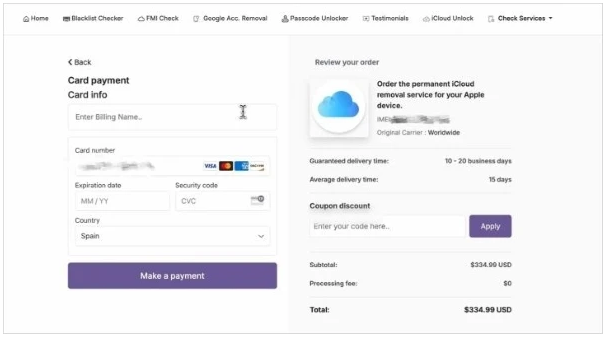
Step 5. Wait for the Unlocking Process: Allow UnlockRiver to process your request. The waiting period may vary depending on your device model and carrier. Check your registered email for order updates.
Step 6. Complete the Unlocking Process: Once you receive the unlocking confirmation, follow the instructions provided in the email. Depending on your device, you may need to restart it or insert a SIM card from another carrier to verify the result.
My Trial Experience: During my test, UnlockRiver successfully removed the carrier SIM restriction from my iPhone, allowing it to recognize a SIM card from another network. However, my attempt to use its Android FRP unlocking service was unsuccessful. Overall, UnlockRiver offers a convenient approach to carrier unlocking, but I'd recommend checking device eligibility, refund conditions, and carrier requirements carefully before placing an order.
Section 3: UnlockRiver - Customer Reviews from Trustpilot
According to UnlockRiver's Trustpilot review page, the service has a 4.2/5 TrustScore based on 3,391 reviews at the time of checking. Customer experiences are mixed, with some praising its refund handling while others complain about unsuccessful unlocking requests and customer support.
1. Positive Review

Analysis: This customer appreciated UnlockRiver's willingness to issue a partial refund after discovering that the purchased Samsung phone was already unlocked. The experience suggests that the company may offer some flexibility when handling refund requests, although administrative fees can still apply.
2. Negative Review
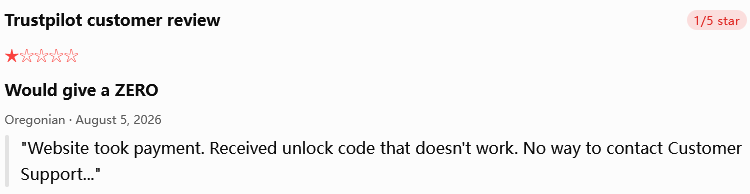
Analysis: This reviewer complained that the supplied unlocking code failed and that the available customer support channels were inaccessible. Although UnlockRiver subsequently responded, explaining that it could provide a full refund after receiving video evidence of the error, the incident highlights potential concerns about unlocking reliability and after-sales support.
Section 4: Is UnlockRiver Safe & Free
Safety:
Since most of its services are handled online, users do not generally need to download unknown applications or modify their phone's hardware. However, this does not automatically guarantee complete security or successful unlocking. Here are several factors worth considering:
- Customer feedback: UnlockRiver has received both positive and negative reviews. Some users report successful unlocking, while others complain about delayed processing, unsuccessful requests, and difficulties contacting customer support.
- Payment security: UnlockRiver states that it uses SSL/TLS protection and Stripe for payment processing.
- Refund policy: Eligible unsuccessful orders may qualify for refunds, but certain conditions apply. For example, incorrect IMEI information may make an order non-refundable, while incorrect carrier or model details may result in a partial refund.
- Device eligibility: Lost, stolen, or blacklisted devices may be rejected. Users should also verify that they own the device or have proper authorization to unlock it.
Pricing:
UnlockRiver is primarily a paid unlocking service. Although users can browse its website and access some informational resources without charge, most actual unlocking services and device-status checks require payment. The final price depends on the phone model, original carrier, country, and selected service.
|
UnlockRiver service
|
Reported price
|
|
IMEI blacklist check |
$3.47 |
|
US carriers |
$3.47 |
|
Complete iPhone check |
$3.47 |
|
$20–$50 |
|
|
iCloud Activation Lock removal |
Up to $200 |
|
iPhone carrier unlocking |
Varies by carrier and model; some quotes reach $249.99 |
Section 5: UnlockRiver - Pros & Cons
UnlockRiver offers a relatively simple ordering process without requiring software installation, but its pricing transparency, processing time, and unlocking reliability may leave some users with concerns. Here are its main advantages and disadvantages based on the four referenced reviews.
Pros of UnlockRiver
- Easy to use: Its online interface makes it relatively straightforward to submit an unlocking request, even for users without technical experience.
- No software installation required: Users can access its services through a web browser without downloading additional applications.
- Wide device compatibility: It claims to support various iPhone and Android brands, as well as numerous mobile carriers.
- Remote unlocking: Users can submit requests from home without visiting a phone repair shop.
- Multiple unlocking services: Besides carrier SIM unlocking, it advertises IMEI checking, blacklist checking, and certain device-lock-related services.
- Convenient payment options: It supports multiple payment methods for international customers.
Cons of UnlockRiver
- Paid services: Most actual unlocking services require payment, and free options are limited.
- Unclear upfront pricing: The final cost varies according to the device, carrier, country, and unlocking service.
- Inconsistent success rates: Some users report successful unlocking, while others experience unsuccessful requests or incorrect unlock codes.
- Potential processing delays: Certain orders may take several hours or days to complete.
- Customer support concerns: Some customer reviews mention slow responses and difficulties resolving order-related problems.
- Refund uncertainty: Refund eligibility and conditions may not always be clear to customers before purchasing.
- Privacy considerations: Users must provide sensitive device information, including their IMEI, so they should carefully review the service's privacy and data-handling policies.
Section 6: Two Dependable Alternatives to UnlockRiver
> 6.1 Using iPhone SIM Bypasser
Removing iPhone restrictions becomes more manageable with iPhone SIM Bypasser, which includes a SIM lock bypass feature for supported iPhone models. Beyond carrier unlocking, it offers solutions for iCloud Activation Lock, Screen Time passcodes, and other device access restrictions.
Its straightforward interface guides users through each operation without requiring advanced technical knowledge. Rather than relying on several separate programs, users can handle multiple iPhone unlocking tasks within a single application.
Safe Download: No ads, bundled software, or background uploads.


How to Use iPhone SIM Bypasser?
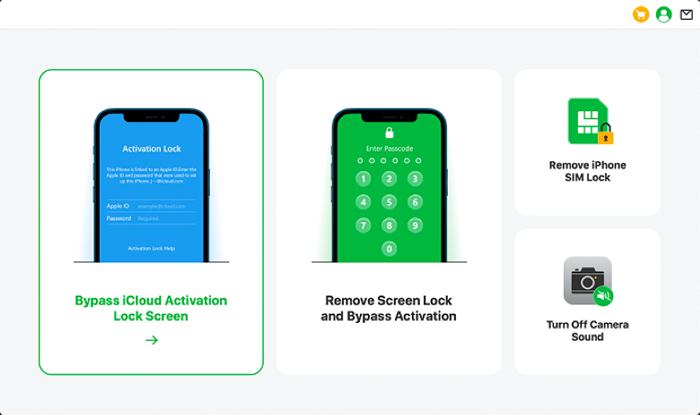
Step 1. Download and Install the Software: Download and install iPhone SIM Bypasser on your computer. Launch the program, select "Remove iPhone SIM Lock", review the instructions and precautions, and click "Start" to continue.
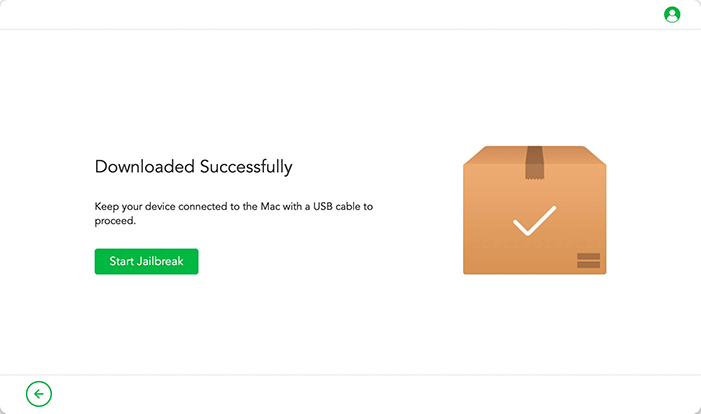
Step 2. Connect Your iPhone: Connect your iPhone to the computer using a USB cable. The program will automatically download the appropriate jailbreak package for your iOS device. Once the download is complete, click "Start Jailbreak".
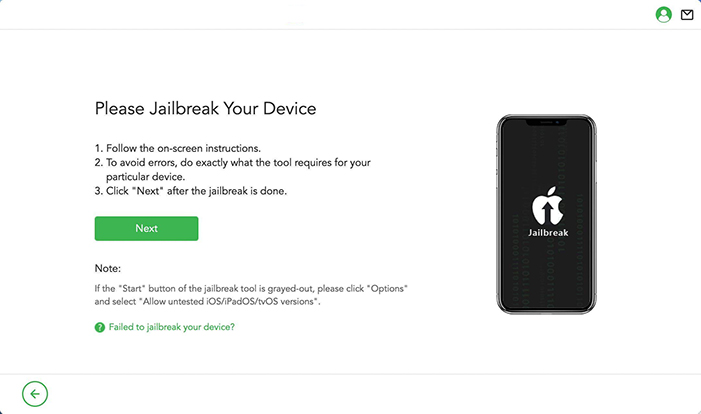
Step 3. Jailbreak Your Device: Follow the on-screen instructions to put your iPhone into DFU mode. Wait for the program to complete the jailbreaking process, then click "Next" to proceed.
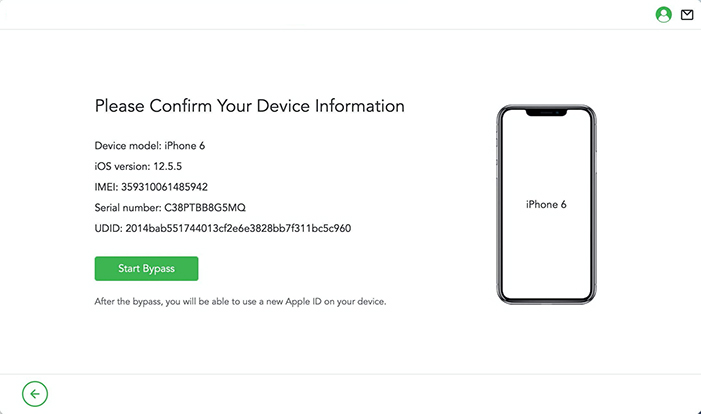
Step 4. Start Removing the SIM Lock: Verify that the displayed device information is correct and click "Start Bypass". The software will begin processing the SIM lock removal. Wait patiently until the process finishes.
> 6.2 Using Android Lock Wiper
When Android users encounter Google account verification after a factory reset, Android Lock Wiper serves as a potential UnlockRiver alternative for FRP removal. It supports FRP bypass on selected Samsung phones as well as devices from other Android manufacturers, making it useful beyond the Samsung ecosystem.
Its guided operation keeps the process manageable, even for users who are unfamiliar with FRP-related procedures. With support for different Android brands and models, it offers another option for those struggling to regain access to their locked devices.
Safe Download (No ads, no bundles, & no background uploads):
FAQs about UnlockRiver
Q1. How long does UnlockRiver take to unlock a phone?
Processing times vary by device, carrier, and service. Some requests take hours, while others may require several days.
Q2. Is UnlockRiver legitimate?
UnlockRiver is an operating online unlocking service, but its reliability is not guaranteed. Customer feedback is mixed, with some users reporting delays and refund difficulties.
Q3. Can UnlockRiver unlock a blacklisted or reported-lost phone?
Generally, no. Blacklisted or reported-lost devices are usually ineligible for standard carrier unlocking. Contact the original carrier to resolve the issue.
Q4. Does UnlockRiver erase phone data during unlocking?
Standard remote carrier unlocking generally does not erase personal data. However, other unlocking procedures may carry data-loss risks, so backing up your phone is recommended.
Q5. Can UnlockRiver unlock a financed phone?
It depends on the carrier's policies, payment status, and device eligibility. Contact your carrier to confirm whether your phone qualifies.
Q6. Will an UnlockRiver carrier unlock be reversed after a software update?
A successfully completed permanent carrier unlock should generally remain after routine software updates. Temporary workarounds may behave differently.
Related Articles:
What to Do If You Forgot Screen Time Passcode on iPhone/iPad/Mac?
Best 10 Android Unlock Apps to Unlock Phones Easily [Productive]
How to Bypass Apple ID/Account Password with 3 Error-free Ways?
How to Recover iPhone Contacts After Factory Reset with or without Backup?