
GPS Joystick vs. MagFone Location Changer: Which Tool Is Optimal?
If you are exploring ways to spoof your GPS location, you might be interested in differences in platform compatibility (Android only vs. cross-platform), movement modes (joystick, teleport, route simulation), stability and reliability, pricing, and security/privacy risks between popular tools.
This is where the comparison of GPS Joystick vs. MagFone Location Changer comes in handy, helping users decide which tool fits their needs best. By examining features, usability, and limitations, you can better understand which solution will work reliably for gaming, social apps, or location testing.
- Part 1: GPS Joystick vs. MagFone Location Changer: Overview & Platforms Supported
- Part 2: GPS Joystick vs. MagFone Location Changer: Security & Pricing
- Part 3: GPS Joystick vs. MagFone Location Changer: Reviews & Customer Support
- Part 4: GPS Joystick vs. MagFone Location Changer: Pros & Cons
- Part 5: GPS Joystick vs. MagFone Location Changer: Which One Is Preferable
- Part 6: GPS Joystick vs. MagFone Location Changer: Best Alternative
Part 1: GPS Joystick vs. MagFone Location Changer: Overview & Platforms Supported
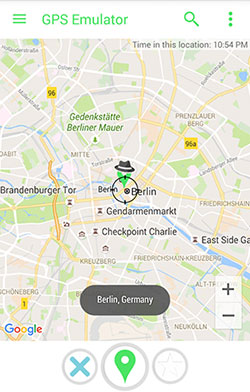
GPS Joystick is a mobile app that allows users to simulate or spoof their real GPS location on a smartphone. It lets you "move" your device to any location in the world without physically travelling there, often with joystick-like controls for precise movement. This tool is commonly used for location-based games, social apps, or testing location-dependent services.
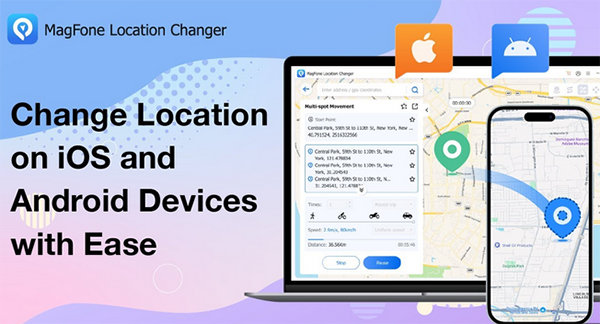
MagFone Location Changer is an app that lets users virtually change the GPS location of their smartphone. It allows you to set your device to any location worldwide, making it appear as if you are somewhere else. This tool is often used for location-based games, social apps, or testing location-specific features without physically being there.
GPS Joystick - Supported Platforms:
- Designed for Android devices.
- Does not officially support iOS - iOS spoofing is generally unavailable or unreliable.
- Works on both rooted and non-rooted Android phones (with mock-location permissions).
MagFone Location Changer - Supported Platforms:
- Supports Android devices (broad range of brands and versions).
- Supports iOS devices (iPhone, iPad, iPod touch) without requiring jailbreak.
- Runs on Windows and macOS computers - the Location Changer software is desktop-based, allowing control from PC or Mac.
Part 2: GPS Joystick vs. MagFone Location Changer: Security & Pricing
This table provides a clear comparison of GPS Joystick and MagFone Location Changer, highlighting both their pricing structures and security considerations. It helps users quickly understand the cost, stability, and potential risks associated with each GPS spoofing tool.
|
Tool
|
Pricing Plans
|
Security/Risk & Stability Notes
|
|
GPS Joystick
|
Typically a low-cost one-time purchase (often under US$1) or nominal fee. |
- No root or jailbreak required for basic spoofing; security and stability are minimal - some users report bugs (e.g., GPS drift, "rubber-banding," or teleport resets). - Use of mock-location APIs can trigger warnings from Android. Spoofing always carries the risk of detection or ban if used with apps/games that check for fake GPS. |
|
MagFone Location Changer
|
Multiple license options: Monthly (~US$9.95), Quarterly (~US$19.95), Yearly (~US$39.95), or Lifetime (~US$89.95) - covers up to ~10 devices on one PC/Mac. |
- Designed without root or jailbreak requirement, which reduces device-security risk. Provides regular updates, better stability, and privacy assurances. - Still, spoofing with any tool may breach app/game terms of service - account bans remain possible. |
You May Also Like: MagFone Location Changer Review: Does It Meet My Expectations? Fixed
Part 3: GPS Joystick vs. MagFone Location Changer: Reviews & Customer Support
This table highlights the differences in user satisfaction and support between GPS Joystick and MagFone Location Changer. Overall, MagFone offers a more reliable, professionally supported experience, while GPS Joystick tends to have inconsistent performance and limited official assistance.
|
Tool
|
General User Reviews/Feedback
|
Customer Support/Notes
|
|
GPS Joystick
|
- Mixed to negative reviews: users report frequent bugs, crashes, GPS errors, joystick not working, or app instability. - Some users find it workable in certain cases, but overall reliability seems inconsistent. |
Support appears minimal and mostly user-driven; many users report issues after OS updates, with no strong track record of official updates or dedicated support. |
|
MagFone Location Changer
|
- Generally positive feedback: praised for ease-of-use, stable performance across Android and iOS, and flexible spoofing options (routes, joystick, teleport). - Occasional detection or stability issues may occur on newer OS versions, but overall user satisfaction is higher than many free alternatives. |
Official support and active maintenance are offered: cross-platform updates, compatibility with Android and iOS, multiple movement modes, and a professional help center ensure more reliable assistance than freeware tools. |
Part 4: GPS Joystick vs. MagFone Location Changer: Pros & Cons
Pros of GPS Joystick
- Provides a joystick for controlling location movement.
- Works on many Android phones without root.
- Easy to install and start for basic spoofing.
- Free or very low-cost, suitable for casual use.
Cons of GPS Joystick
- Stability and reliability are inconsistent; may experience bugs or location resets.
- Only supports Android.
- Can be detected by apps/games, risking bans.
- Limited official support and updates.
Pros of MagFone Location Changer
- Supports both Android and iOS without root/jailbreak.
- Multiple movement modes (teleport, route simulation, joystick).
- More stable, regularly updated, with official support.
- User-friendly interface and simple setup.
Cons of MagFone Location Changer
- Pricy subscription or license.
- Free trial offers limited functionality.
- Spoofing may still trigger app/game detection.
- Some OS versions may have minor compatibility issues.
See More: 7 Best Pokemon GO Joysticks for Enhanced Gameplay [Trusted]
Part 5: GPS Joystick vs. MagFone Location Changer: Which One Is Preferable
When choosing between GPS Joystick and MagFone Location Changer, the decision largely depends on your priorities and platform needs. GPS Joystick is inexpensive and quick to set up, making it suitable for casual Android users willing to accept occasional bugs and limited support.
In contrast, MagFone Location Changer offers broader platform compatibility, better stability, and professional customer support, making it ideal for users who need reliable performance across Android and iOS.
Overall, for serious or frequent GPS spoofing, MagFone is generally the preferable choice, while GPS Joystick works for simple, occasional use.
Part 6: GPS Joystick vs. MagFone Location Changer: Best Alternative
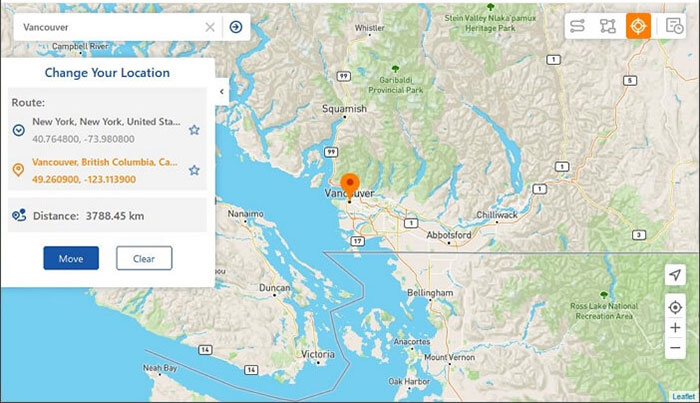
If you're looking for the best alternative to both GPS Joystick and MagFone Location Changer, take a look at Virtual Location Tool. This program supports both Android and iOS without requiring root or jailbreak, making it much more versatile than many spoofing tools.
Its multiple movement modes, including teleport, joystick, route simulation, and multi-stop paths. For users who want stable, cross-platform GPS spoofing with advanced control options, this one is often the most complete and user-friendly choice.
Why is Virtual Location Tool the best alternative?
|
Feature
|
Description
|
|
Teleport GPS |
Works on Android and iOS without root or jailbreak. |
|
Multiple Movement Modes |
Teleport, route simulation, multi-stop, and joystick control. |
|
Adjustable Speed & Routes |
Customize movement speed and create two-point or multi-point paths. |
|
Real-Time GPS Updates |
Works across apps with real-time location changes. |
|
Desktop-Based Control |
Manage GPS spoofing from PC or Mac for stability. |
|
Trial & Paid Plans |
Free trial available; full features require subscription/license. |
|
Favorite Locations |
Save frequently used locations for quick access. |
|
Route Simulation with Pause/Resume |
Allows pausing and resuming routes for more realistic movement. |
How to use the reliable GPS Joystick and MagFone Location Changer alternative?
- Start by downloading and installing a reliable fake GPS tool on your Windows/MacOS computer.
- After launching the program, click "Get Started" on the main screen.
- Use a USB cable to connect your smartphone to the computer and wait briefly for the software to recognize your device
- From the top-right corner of the interface, select "Teleport Mode."
- Then, type your target destination into the search bar or enter specific GPS coordinates to locate it precisely.
- Once the map pointer shifts to your chosen spot, hit "Move" to instantly update your location for legitimate use cases.


In Closing
After reviewing both tools, Virtual Location Tool emerges as the best substitute, offering full support for both Android and iOS without root or jailbreak. Its multiple movement modes, route customization, and real-time GPS control combine the strengths of GPS Joystick and MagFone Location Changer in one stable, user-friendly package.
So, when you are seeking a versatile, reliable, and secure GPS spoofing solution, try this product to get the most complete and convenient experience.
Related Articles:
[Full Guide] How to Share Location between iPhone and Android in 2025?
4 Widely-used Ways to Send Fake Live Location on WhatsApp for Android/iOS
How to Mirror Android to Mac without Obstacles? 8 Desirable Ways
