
How to Sync iQOO to PC/Computer? 4 Advanced Techniques 2026
TL;DR:
In conclusion, while all four methods offer viable ways to sync your iQOO to a PC, MobiKin Backup Manager for Android is highly recommended for its speed, flexibility, and ease of use, making it the top choice for a hassle-free experience. For users who prefer a wireless and integrated approach, vivo Cloud or Windows Phone Link provides convenient alternatives, though they may offer less comprehensive backup control.
Many iQOO users face increasing storage pressure as photos, videos, and apps continue to accumulate on their devices. Moving large files like photos, videos, and apps to a computer to save space helps maintain smooth phone performance and prevents unnecessary clutter.
This approach also makes it easier to keep important data organized and safely stored in another location. To handle different needs and device conditions, focus on this article to sync iQOO to PC with 4 tried-and-true ways that are practical and easy to follow.
Watch the videos below for a clear, visual explanation of this topic.
Option 1: Sync IQOO to PC via MobiKin Android Backup & Restore [5 Mins]
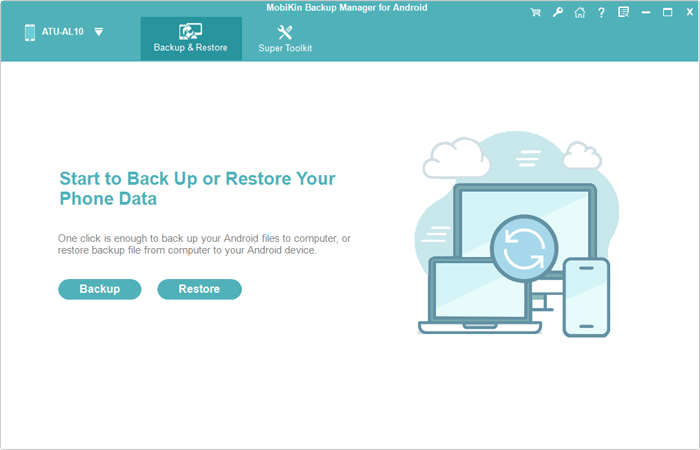
A reliable way to sync an iQOO phone with a computer is provided by MobiKin Backup Manager for Android (Windows/Mac). This program, termed MobiKin Android Backup & Restore, allows users to back up contacts, messages, call logs, photos, videos, and apps from the device to a PC in just a few clicks.
Both USB and Wi-Fi connections are supported, giving flexibility when establishing the link between the phone and the computer. Once the backup is created, the saved files can also be restored to the same device or another Android phone whenever necessary. Here are its KEY FEATURES:
- Easy iQOO to PC sync - Quickly connects iQOO phones to a PC for smooth data transfer and backup.
- One-click backup & restore - Backs up or restores Android data with a single click.
- Supports multiple data types - Handles contacts, messages, photos, videos, apps, and more.
- Selective backup/restore - Lets users choose specific files instead of a full-device backup.
- Safe restore process - Restores data without overwriting existing files.
- Wide device support - Works with thousands of Android models, including iQOO.
- USB & Wi-Fi connection - Supports both cable and wireless syncing options.
- Simple interface - Easy for beginners to use without technical skills.
User Manual:
- After downloading and installing the software on your computer, launch it.
- Then, connect your IQOO phone to the computer using a USB cable.
- It may be necessary to enable USB debugging mode on your IQOO to ensure it is detected.
- Once this is activated, the screen will display options for 'Backup' and 'Restore'; please select 'Backup'.
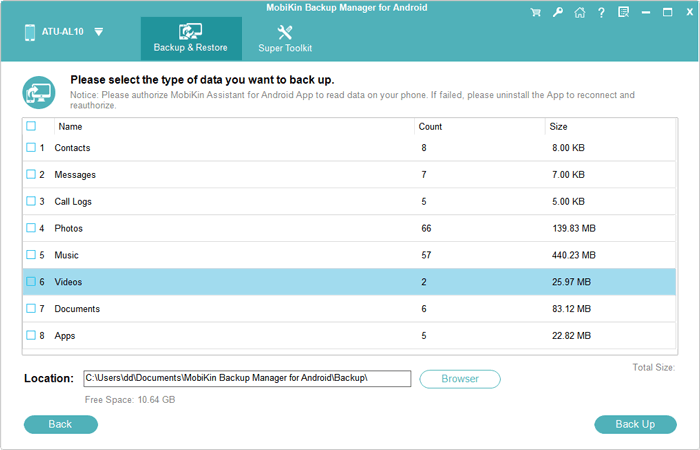
- Select the types of data you wish to back up, and then specify a storage location on your PC.
- Finally, click 'Back Up' to transfer the data from your IQOO phone to your computer.


Video Tutorial:
Option 2: Connect IQOO to PC for Data Sync with vivo Cloud
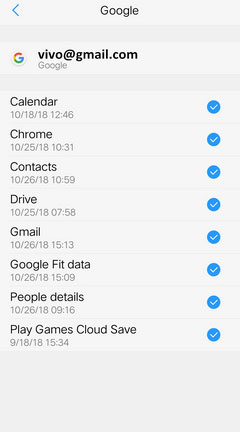
Cloud-based synchronization is available through vivo Cloud for iQOO devices. Data such as contacts, photos, notes, and messages can be uploaded automatically from the phone after the service is enabled in the settings. Access to the stored content is possible from a computer simply by logging into the cloud portal with a vivo account. Files can then be viewed, restored, or managed directly through a web browser without connecting the phone to the PC.
User Manual:
- Open a browser on your PC and visit the official cloud portal: https://yun.vivo.com.cn/welcome
- Log in using your vivo account (phone number, email, or password).
- On your iQOO phone, go to Settings > vivo Account > Cloud Service.
- Turn on data synchronization for items like contacts, photos, notes, or messages.
- After syncing, return to the cloud website on the PC to view, download, or manage the synced data.
Option 3: Back Up an IQOO Phone to a PC via vivo Desktop Suite
Wireless or wired data management can be carried out using vivo Desktop Suite. After connecting the iQOO phone to the computer, the software provides options to back up important content and maintain device files from a desktop interface. The program also allows users to choose where the backup will be stored on the PC. Through this process, key information on the phone can be preserved and synchronized with the computer for safer storage.
User Manual:
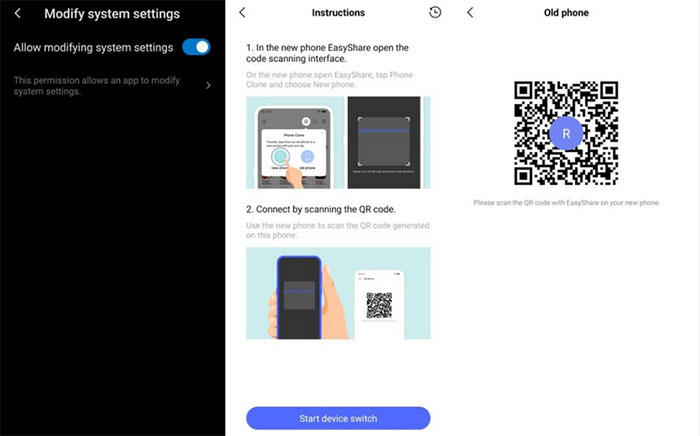
- Install EasyShare on both the PC and the iQOO phone.
- Connect the phone and PC using Wi-Fi (same network) or a USB cable.
- For wireless connection, open EasyShare on the phone and scan the QR code shown on the PC.
- Once the devices are connected, open the Backup section on the PC interface.
- Select New Backup, choose the storage location and data types, and click Start Backup to save the phone data to the computer. (EasyShare won't work?)
Option 4: Sync IQOO Phone with PC with Windows Phone Link
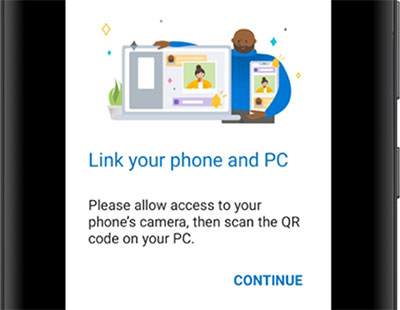
Integration between Android phones and Windows computers is enabled through Microsoft Phone Link. Notifications, messages, photos, and calls from an iQOO device can appear directly on the PC once the pairing process is completed. The connection is typically established by scanning a QR code and granting the necessary permissions on the phone. With the link active, users can interact with phone content and stay updated without constantly switching devices.
User Manual:
- Open Phone Link on your Windows 10/11 computer from the Start menu.
- Choose Android as the device type.
- Install or open Link to Windows on the iQOO phone.
- Scan the QR code displayed on the PC using the phone to pair the devices.
- Grant the required permissions on the phone to enable syncing of notifications, messages, photos, and calls.
FAQs about Syncing IQOO to PC
Q1. Can I sync iQOO to a PC wirelessly?
Yes. Wireless syncing is possible through cloud services, Bluetooth, or PC management tools that support Wi-Fi connections. These methods remove the need for a physical cable while allowing data to move between the devices.
Q2. Why is my iQOO phone not recognized by the PC?
This may occur if the USB mode is set to charging only, the cable is faulty, or drivers are missing on the computer. Switching to File Transfer mode, changing the cable, or updating drivers often resolves the issue.
Q3. Can I sync photos from iQOO to a PC automatically?
Yes. Cloud services or photo backup applications can upload images from the phone automatically. Once uploaded, the photos can be accessed or downloaded from the PC through the associated account.
Q4. Is syncing iQOO to a PC safe?
Syncing is generally safe when using trusted tools and official services. It is recommended to connect to secure networks and keep backup files stored in reliable locations.
Q5. What types of data can be synced between iQOO and a PC?
Common data types include contacts, text messages, photos, videos, music, documents, and app data. The exact categories depend on the syncing method or software used.
Q6. What is the easiest way to sync an iQOO phone to a PC?
The easiest way to sync an iQOO phone to a PC is by using MobiKin Backup Manager for Android (Windows/Mac), which provides a quick and organized way to transfer contacts, messages, photos, and more between devices.
It is widely regarded as one of the most desirable and safest solutions because it creates reliable backups and restores data without complicated settings. If you want a smooth and secure sync process, give MobiKin Backup Manager for Android a try right now.
Related Articles:
4 Ways to Transfer Text Messages from IQOO to IQOO 15/13/12/11/10/9/8/7
IQOO Mobile Hard Reset: 4 Options to Factory Reset IQOO Phones
5 Most Reliable Contact Recovery Software for IQOO [Validated]
5 Tried-and-true Methods to Unlock IQOO Phone without Effort
