
How to Recover Deleted WhatsApp Messages in OnePlus? 4 Approaches
Losing WhatsApp messages on your OnePlus can get baffled, whether due to phone issues, like factory resets, system crashes, or app errors, or simply out of curiosity or concern about retrieving deleted messages from friends or groups. Many users wonder how to recover deleted WhatsApp messages OnePlus, especially when important chats or media vanish unexpectedly.
This tutorial will walk you through 4 effective recovery methods, covering both built-in solutions like Google Drive backups and third-party tools, so you can restore your lost conversations without technical hassle.
- Part 1: Recover Deleted WhatsApp Messages on OnePlus without Backup via Expert Tool
- Part 2: Recover Recently Deleted WA Messages in OnePlus via Notification History
- Part 3: Recover Deleted Chats from WhatsApp on OnePlus via Google Drive Backup
- Part 4: See WhatsApp Deleted Messages in OnePlus via WhatsDeleted: Recover Messages
- FAQs about Recovering Deleted WhatsApp Messages from OnePlus
Part 1: Recover Deleted WhatsApp Messages on OnePlus without Backup via Expert Tool
Requirements:
- PC and USB connection: A Windows or Mac computer and a working USB cable are needed.
- USB debugging enabled: Enable USB debugging on the OnePlus under Settings > About phone > Build number and developer options.
- WhatsApp data included: Messages must still exist in internal storage (deleted but not overwritten).
- App permissions: Grant storage access if prompted by the software.
- Software installed: Android Data Recovery must be installed on the computer and up-to-date.


Key Characteristics:
|
Feature
|
Description
|
|
Comprehensive Data Recovery |
Restore WhatsApp messages, attachments, contacts, SMS, photos, videos, and documents. |
|
Multiple Recovery Scenarios |
Handles data lost from deletion, system crashes, OS updates, or SD card issues. |
|
Flexible Source Options |
Recovers from internal memory, SD card, or SIM card. |
|
Selective Recovery |
Allows restoring specific files or folders instead of recovering everything, saving time and storage. |
|
Backup Capability |
Back up both deleted and existing WhatsApp data to your computer. |
|
Fast Scanning Mode |
Quickly scans large volumes of data to locate deleted files efficiently. |
|
Wide Device Compatibility |
Works with 8,000+ Android brands and versions, covering various OnePlus models. |
|
Safety and Reliability |
Scans without overwriting existing data, preventing further loss. |
Quick Guide:
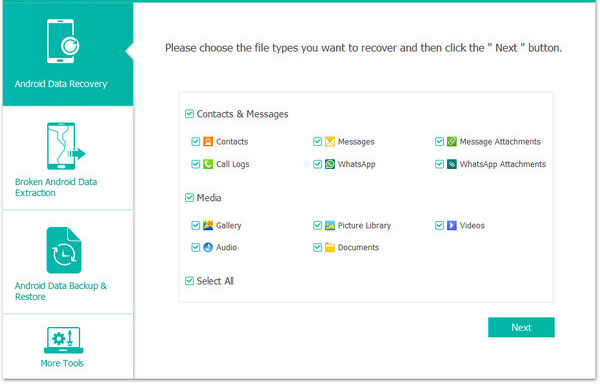
- Launch the Android Data Recovery application and link your OnePlus cell phone to your computer via a USB cable.
- You must activate USB debugging on OnePlus by adhering to the on-screen prompts, allowing the program to detect your phone.
- Once the connection is successfully made, a window will pop up enabling you to choose the file types you wish to recover.
- Select WhatsApp or WhatsApp Attachments and press Next to initiate the scanning process for deleted conversations.
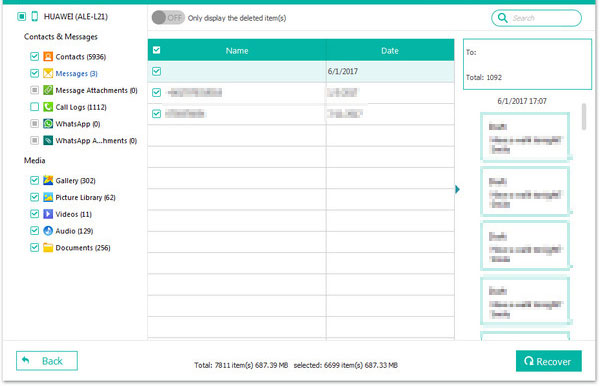
- After the scan concludes, review the chats you intend to restore.
- Choose the items you wish to recover and click Recover to commence the recovery.
How to configure WhatsApp backup on OnePlus? Quick Guide: Open WhatsApp > Settings > Chats > Chat backup, sign in to your Google account, and tap Back up to create an immediate backup. Set Back up to Google Drive to Daily and enable Include videos if needed, making sure the correct Google account is selected. Also, confirm your OnePlus has enough storage and a stable Wi-Fi connection.
Part 2: Recover Recently Deleted WA Messages in OnePlus via Notification History
Notification History is an Android feature that keeps a log of recent app notifications, allowing you to view WhatsApp message previews even if the sender deletes them.
To enable it on a OnePlus phone, go to Settings > Notifications & status bar > Notification history and turn it on. It works by saving the notification text at the moment the message arrives, so it can only show recently received message previews and usually does not recover media or old chats.
Requirements:
- Android version: OnePlus must run Android 11+.
- Enable Notification History as mentioned above.
- WhatsApp notifications: Must be enabled and not blocked.
- Message timing: Only messages received after enabling can be captured.
Quick Guide:
- Enable Notification History first: Go to Settings > Notifications & status bar > Notification history and make sure it is turned on, otherwise past WhatsApp messages won't be recorded.
- Receive the WhatsApp message normally: The message must arrive while notifications are enabled; deleted messages sent before notification logging won't appear.
- Open Notification History: Navigate again to Settings > Notifications & status bar > Notification history to view all recent notifications.
- Locate WhatsApp entries: Scroll through the list and tap WhatsApp notifications to read the message preview that was saved before deletion.
- Understand the limitations: This method usually recovers text only, not photos, videos, or voice notes, and works best for recently deleted messages.
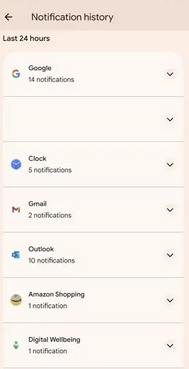
Note: Notification history only keeps messages for a short time and usually saves text previews only. Media files, voice notes, and older messages are not stored.
Part 3: Recover Deleted Chats from WhatsApp on OnePlus via Google Drive Backup
Requirements:
- Backup exists: A Google Drive backup must have been created before messages were deleted.
- Same Google account: You must be signed into the same account used for the backup.
- Same phone number: WhatsApp must be restored with the same phone number linked to the backup.
- Internet connection: A stable Wi-Fi connection is needed to download the backup.
- Sufficient storage: Ensure your OnePlus has enough internal storage to restore chats and media.
Quick Guide:
- Confirm a valid Google Drive backup: Open WhatsApp > Settings > Chats > Chat backup on your OnePlus and check that a Google Drive backup exists from a date before the chats were deleted.
- Sign in to the correct Google account: Make sure your OnePlus is logged into the same Google account used for the WhatsApp backup.
- Verify the same phone number: You must restore using the exact phone number linked to the backup.
- Uninstall WhatsApp: Long-press WhatsApp > Uninstall, then restart the phone to prevent restore conflicts.
- Reinstall WhatsApp from Google Play: Download WhatsApp again and open it.
- Verify your number: Enter your phone number and complete SMS verification.
- Tap Restore when prompted: When WhatsApp detects the Google Drive backup, choose Restore to recover deleted chats.
- Wait for the restoration to finish: Keep Wi-Fi enabled and do not close the app while chats and media are restoring.
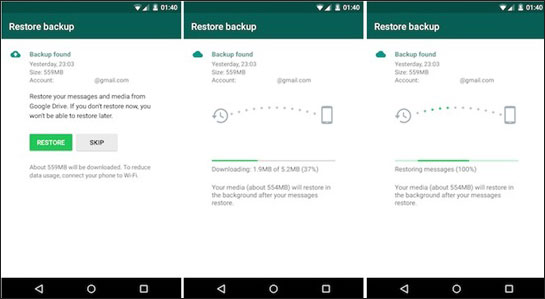
Attention: Will restoring from Google Drive overwrite my current WhatsApp chats? Yes. Restoring a backup replaces current chat data with the content from the backup date, so newer messages after that backup will be lost unless saved elsewhere.
You Might Also Like: How to Access WhatsApp Backup on Local, Google Drive, iCloud, etc.?
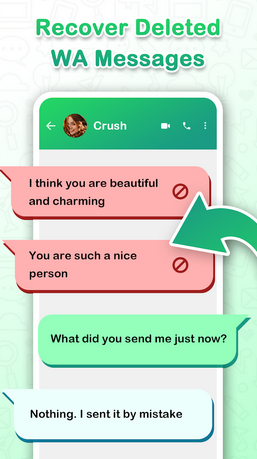
Part 4: See WhatsApp Deleted Messages in OnePlus via WhatsDeleted: Recover Messages
Requirements:
- App installed: Must be installed before messages are deleted.
- Notification access: Granted so the app can monitor messages.
- Storage permissions: Allowed to recover media.
- WhatsApp notifications: Enabled and not blocked.
- Message timing: Only messages after setup can be recovered.
- Background operation: App must run in the background and avoid battery restrictions.
Quick Guide:
- Install WhatsDeleted: Recover Messages from Google Play on your OnePlus 14/13/12R/12/11R/11, Nord CE 4/4/3, R Ace 3V/3/2, etc.
- Open the app and accept the initial setup so it can start monitoring notifications.
- Grant Notification Access when prompted; this is required to capture WhatsApp messages before they're deleted.
- Allow storage/media permissions if you want the app to save deleted photos, videos, or voice notes.
- Ensure WhatsApp notifications are enabled in Settings > Notifications on your OnePlus.
- Use WhatsApp normally and wait for messages to arrive; the app records them from notifications.
- Open WhatsDeleted after a message is deleted to view the recovered text or supported media.
- Check different sections inside the app (deleted messages or deleted media) to find what was removed.
FAQs about Recovering Deleted WhatsApp Messages from OnePlus
Q1: Why can't I see deleted messages even after installing recovery apps?
Most free recovery apps rely on notifications, so messages deleted before the app was installed or when notifications were disabled cannot be recovered. Encrypted chats and media are especially limited.
Q2: Do I need the same phone number to restore WhatsApp messages?
Yes. WhatsApp requires the same phone number and the same Google account used to create the backup in order to restore chats.
Q3: Can I recover WhatsApp messages deleted a long time ago?
Only if a backup from that time still exists. If newer backups have overwritten older ones, those messages cannot be recovered using official methods.
Q4: How can I prevent WhatsApp message loss on OnePlus in the future?
Enable daily Google Drive backups, keep WhatsApp notifications turned on, and ensure your OnePlus phone has enough storage and stable Wi-Fi to complete backups automatically.
In Closing
Overall, unlike other approaches, Android Data Recovery can recover deleted chats, attachments, media, and even messages lost from system crashes or app errors with the highest success rate when you don't have a backup. It offers:
- Comprehensive recovery: Retrieves WhatsApp messages, media, contacts, SMS, and more.
- Flexible & safe: Works with various OnePlus models and Android versions while protecting existing data.
- Preview & selective restore: Allows users to view recoverable files and restore only what's needed, saving time and storage.
Related Articles:
7 Latest Approaches to Transfer Data from OnePlus to iPhone 17/16/15/14/13/12/11
3 Hassle-free Ways: How to Recover Deleted Messages on OnePlus Phone
Top 6 Ways to Transfer WhatsApp Messages to New Phone (iOS/Android)
How to Recover WhatsApp from Broken/Dead Phone in 6 Ways? [Android/iOS]
