
Tenorshare UltData WhatsApp Recovery Review [In-depth Evaluation]
Do you wonder how effective Tenorshare UltData WhatsApp Recovery is at recovering deleted WhatsApp messages, media, and attachments without errors? Before committing to any recovery tool, people often need confirmation that it works with their device, Android or iOS version, or WhatsApp/WhatsApp Business accounts.
This Tenorshare UltData WhatsApp Recovery review examines the software's features, usability, performance, and limitations to help users make an informed choice.
- Part 1: Tenorshare UltData WhatsApp Recovery: Overview & Key Features
- Part 2: How to Use Tenorshare UltData WhatsApp Recovery
- Part 3: Tenorshare UltData WhatsApp Recovery: Pricing & Custom Support
- Part 4: Tenorshare UltData WhatsApp Recovery: Pros & Cons
- Part 5: Q&A about Tenorshare UltData WhatsApp Recovery
- Part 6: Best 2 Tenorshare UltData WhatsApp Recovery Alternatives
Part 1: Tenorshare UltData WhatsApp Recovery: Overview & Key Features
Overview:
This is a specialized tool designed to recover deleted or lost WhatsApp messages, photos, videos, and attachments from both Android and iOS devices. The software offers a straightforward interface that guides users through scanning, previewing, and restoring data with minimal effort. It is popular for its high recovery success rate and ability to retrieve WhatsApp data even without a previous backup.
Key Features:
|
Feature Category
|
Core Characteristics
|
|
WhatsApp Data Recovery |
Recovers deleted photos, texts, videos, voice notes, documents, and attachments. |
|
Backup-Free Recovery |
Retrieves WhatsApp data even without a previous backup on the device. |
|
Device Compatibility |
Supports both Android and iOS WhatsApp and WA Business accounts. |
|
Selective Recovery |
Allows previewing data and choosing specific items to restore. |
|
Cross-Platform Export |
Exports recovered data to a computer in readable formats like HTML, CSV, and more. |
|
Flexible Connection Options |
Works via USB connection for Android and iOS devices. |
Part 2: How to Use Tenorshare UltData WhatsApp Recovery
Quick Steps:
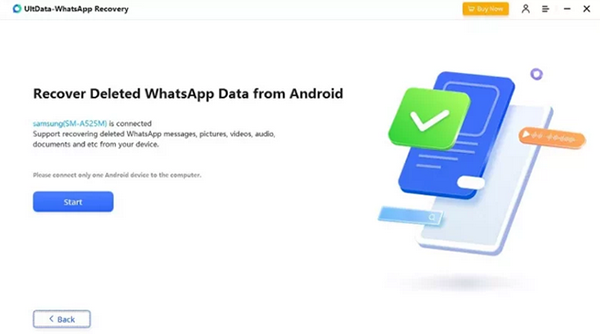
- Download and install UltData WhatsApp Recovery on your computer, then launch the program.
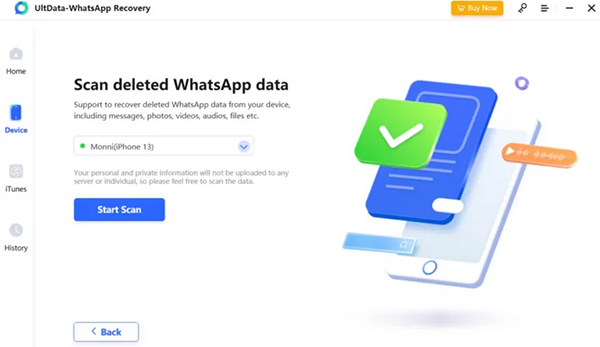
- Click the Device button to proceed, and connect your Android or iOS device to the PC.
- Next, press Start Scan to begin searching for deleted WhatsApp data.
- The scanning process is quick, allowing you to locate lost messages, photos, videos, and other attachments within moments.
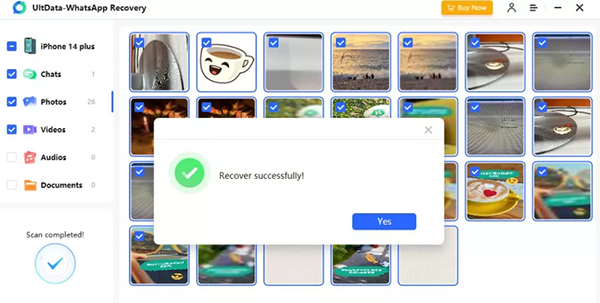
- Once the scan is complete, select the specific types of data you want to recover.
- After previewing the WhatsApp data, click Recover to restore the deleted content to your device or computer.
You May Also Like: Top 6 Ways to Transfer WhatsApp Messages to New Phone (iOS/Android)
Part 3: Tenorshare UltData WhatsApp Recovery: Pricing & Custom Support
The table below summarizes the pricing plans and support details for Tenorshare UltData WhatsApp Recovery, helping users quickly compare options. It highlights each license type, cost, and what kind of support or features are included.
|
Plan/License
|
Price (USD)
|
Details/Support
|
|
1-Month License
|
$35.95 |
Covers 1 PC + up to 5 mobile devices. Includes free technical support & monthly updates; auto-renewable, cancel anytime. |
|
1-Year License
|
$39.95 |
Covers 1 PC + up to 5 mobile devices. Includes free technical support & annual updates; auto-renewable by default. |
|
Lifetime License
|
$49.95 |
Covers 1 PC + up to 5 mobile devices. Includes free technical support; lifetime updates; one-time purchase. |
|
Free Trial/Demo
|
Free |
Allows scan and preview only; full recovery requires license. |
|
Support & Refund Policy
|
- |
30-day money-back guarantee if product fails; free technical support for licensed users. |
Part 4: Tenorshare UltData WhatsApp Recovery: Pros & Cons
Why Do We Like It?
- High success rate for recovering deleted WhatsApp messages, photos, videos, voice notes, and other media.
- Simple and intuitive interface: scanning, previewing, and recovery steps are easy even for non-technical users.
- Allows data preview before full recovery - you can check which items are retrievable and selectively restore what you want.
- Supports both Android and iOS devices, giving flexibility across different platforms.
Why Don't We Like It?
- Free version offers limited functionality - full recovery often requires a paid license.
- Recovery success isn't guaranteed: in some cases, especially with newer devices or certain data types, recovery may fail or remain partial.
- Handling large amounts of data can be slow and time-consuming.
- Some data types may not always be recoverable, and results can be inconsistent depending on device condition.
- Requires a computer to perform recovery; mobile-only operation is not supported.
- Users may need to enable developer options and USB debugging on Android, which can be confusing for beginners.
Part 5: Q&A about Tenorshare UltData WhatsApp Recovery
Q1: Is it safe to use Tenorshare UltData WhatsApp Recovery?
Yes, Tenorshare UltData WhatsApp Recovery is generally considered safe to use, as it only accesses your device data with your permission and does not modify system files. The software allows users to preview and selectively recover data, which minimizes the risk of accidental data loss. However, it is recommended to download the program from the official website to avoid unofficial or potentially unsafe versions.
Q2: How long does the scanning process take?
Scanning time depends on the amount of data on your device, but generally it completes within a few minutes.
Q3: Are all WhatsApp data types recoverable?
Most common data types, such as messages, photos, videos, voice notes, and documents, are recoverable, though some items may not be retrievable depending on device condition.
Q4: What is the overall score for this software? Why?
Objectively, Tenorshare UltData WhatsApp Recovery scores around 6.5/10. It offers a user-friendly interface, fast scanning, and supports both Android and iOS, making data recovery straightforward. However, recovery success can be inconsistent depending on device condition and data type, and the free version only allows scanning and preview.
Part 6: Best 2 Tenorshare UltData WhatsApp Recovery Alternatives
6.1 Using MobiKin WhatsApp Recovery for Android
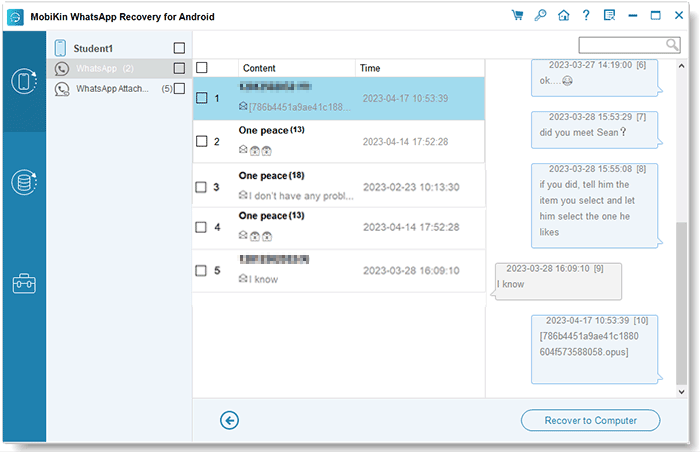
As a reliable solution for retrieving WhatsApp data from Android devices, MobiKin WhatsApp Recovery for Android allows users to recover messages, photos, videos, and attachments efficiently. The software offers selective recovery, enabling restoration of only the data you need, which saves time and storage.
Compared to other recovery tools, its pricing is competitive, providing strong functionality without a hefty subscription. After-sale support is also noteworthy, with responsive customer service and guidance available for troubleshooting or technical questions.


How to Use the Best Tenorshare UltData WhatsApp Recovery alternative?
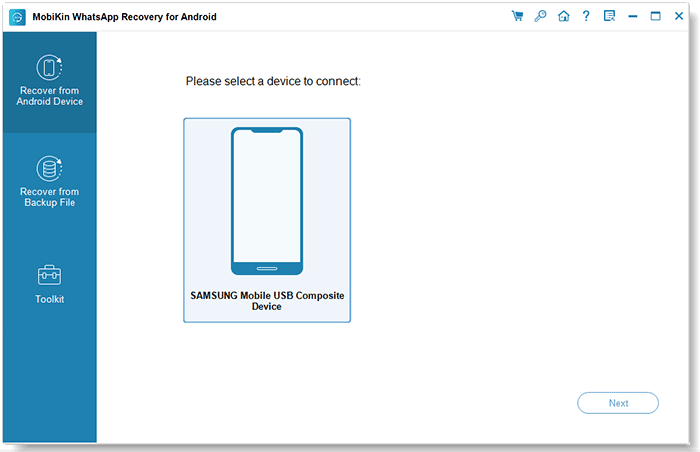
- Start by downloading and installing MobiKin Recovery for WhatsApp on your computer.
- After installation, select "Recovery from Android Device" from the left-hand panel.
- Connect your Android phone or tablet via USB and enable USB debugging.
- Follow the on-screen instructions to disable end-to-end encryption for the backup.
- The software will automatically begin backing up your WhatsApp data.
- Once the process is complete, you can view your chat history and attachments on the computer, using the preview function to select specific items for recovery.
- Finally, click "Recover to Computer" to export the chosen conversations in your preferred format for easy access or future use.
More to Explore: [Practical] Top 9 WhatsApp Backup Extractors You'd Better Know
6.2 Using MobiKin Doctor for iOS
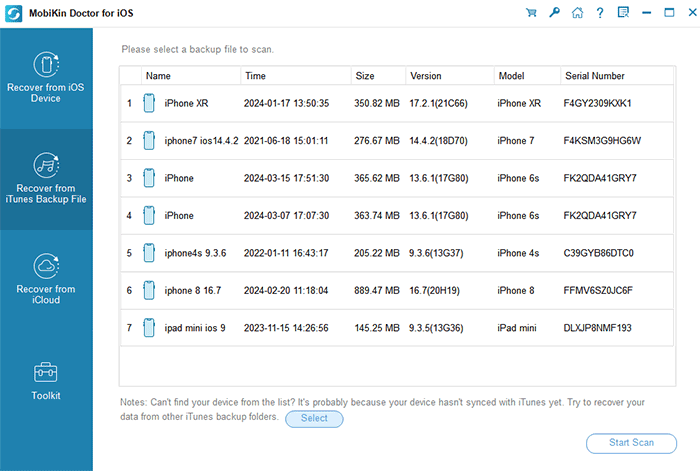
Designed for iOS users, MobiKin Doctor for iOS simplifies the process of restoring deleted WhatsApp conversations, media, and other app data from iPhones and iPads. Advanced scanning algorithms ensure a high success rate, and the preview feature allows users to verify recoverable content before completing the restoration.
Pricing plans are also flexible, offering one-time and yearly options that are budget-friendly while maintaining full functionality. Comprehensive post-sale assistance, including step-by-step support and responsive technical assistance, makes it a strong alternative to Tenorshare UltData WhatsApp Recovery.
At Last
Overall, Tenorshare UltData WhatsApp Recovery offers a straightforward approach to retrieving existing or lost messages and attachments, with support for both Android and iOS devices. While it provides a user-friendly interface and selective recovery options, its success may vary depending on device condition and data type.
Related Articles:
How to Recover WhatsApp Accounts in Various Scenarios? 4 Ways
10 Easy Fixes to WhatsApp Contacts Not Showing Up [Complete Guide]
What Happens If I Uninstall WhatsApp App? A Comprehensive Guide 2025
WhatsApp Backup Stuck? Try the 17 Reliable Solutions [2025 Latest]
