
How to Completely Remove Contacts from realme SIM Card? 4 Tactics
Your personal contact information is one of the most sensitive pieces of data stored on your realme phone. Many realme users seek ways to completely remove contacts from realme SIM card to protect personal contact information before transferring the device to someone else or to ensure sensitive numbers cannot be accessed if the SIM is lost, stolen, or borrowed.
This article will cover 4 effective ways to permanently remove contact info from SIM card on realme, offering practical solutions for anyone looking to secure their information.
- Part 1: When Completely Remove Contacts from realme SIM Card
- Part 2: Get Contacts Off SIM Card in realme Completely via Phone's Settings
- Part 3: Delete SIM Contacts in realme Completely via Delete Multi Contacts - Merge
- Part 4: Delete SIM Card Contacts Permanently via SIM Manager
- Part 5: Completely Remove Contacts from realme SIM Card Using Expert Software
- FAQs for Completely Removing Contacts from realme SIM Card
Part 1: When Completely Remove Contacts from realme SIM Card
There are several scenarios where you might need to completely remove contacts from a realme SIM card, such as changing realme 15/14/13/12/11, GT, C, Neo, and Narzo series, dealing with SIM issues, or managing privacy concerns. Clearing SIM contacts can also be relevant when updating or decluttering stored numbers, or preparing the SIM for transfer or disposal. Here are the full lists:
- Selling or Giving Away Your Phone - To protect personal contact information before transferring ownership.
- Switching to a New SIM or Phone - To avoid duplicate contacts or unwanted data transfer.
- SIM Card Malfunction or Corruption - Clearing contacts to fix issues or prepare the SIM for reuse.
- Privacy Concerns - To ensure sensitive numbers are not accessible if the SIM is lost or stolen.
- Cleaning Up Outdated Contacts - Removing old or irrelevant contacts to declutter your SIM.
- Before Recycling or Disposing of the SIM - To permanently erase personal information.
- Preparing for International Roaming or SIM Swap - To avoid conflicts with new carrier settings or contacts.
Part 2: Get Contacts Off SIM Card in realme Completely via Phone's Settings
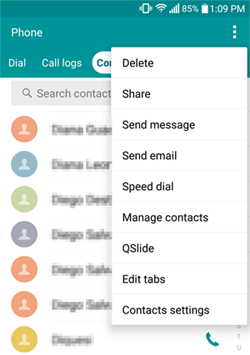
Contacts can be removed directly through the built-in settings on a realme phone. The process allows users to select SIM card contacts and delete them either individually or in bulk. While convenient and requiring no additional downloads, the deletion may sometimes leave small traces that could be recoverable with specialized software.
How-to Guide:
- Open Settings - Go to your realme phone's Settings app.
- Access Contacts - Scroll down and tap Contacts (or SIM & Contacts, depending on your model).
- Import/Export Contacts - Select Import/Export Contacts to manage your contacts.
- Backup Contacts (Optional) - Choose Export to Phone Storage to save a copy of your SIM contacts before deletion.
- Select SIM Card Contacts - Tap SIM card as the source to view all contacts stored on the SIM.
- Delete All Contacts - Choose Delete All or manually select contacts you want to remove.
- Confirm Deletion - Tap OK/Confirm to permanently erase contacts from the SIM card.
- Verify Deletion - Reopen Contacts > SIM card to ensure all contacts have been removed.
You May Also Like: How to Transfer Contacts from iPhone to realme: Guide 2026
Part 3: Delete SIM Contacts in realme Completely via Delete Multi Contacts - Merge
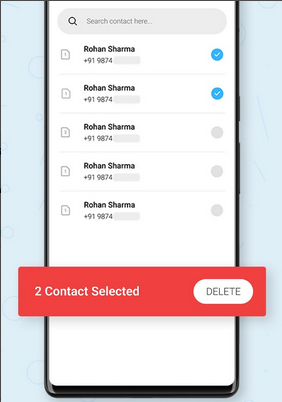
Bulk management of SIM contacts becomes easier with a dedicated app designed for selecting and removing multiple entries at once. Users can choose individual contacts or select all to ensure the SIM card is cleared efficiently.
The interface guides users through confirmation steps to avoid accidental deletion of important numbers. This capability is provided by Delete Multi Contacts - Merge, which makes cleaning SIM contacts faster and more organized.
How-to Guide:
- Install the App - Download and install Delete Multi Contacts - Merge from the Google Play Store.
- Open the App - Launch the app on your realme phone.
- Grant Permissions - Allow access to your contacts when prompted so the app can manage them.
- Select SIM Contacts - Choose SIM card as the source to display all contacts stored on the SIM.
- Select Contacts to Delete - Tap Select All to mark all SIM contacts, or pick individual contacts you want to remove.
- Delete Contacts - Tap the Delete button to remove the selected contacts from the SIM card.
- Confirm Deletion - Confirm the action in the prompt to permanently erase the contacts.
- Verify Removal - Open the Contacts app and check the SIM card section to ensure all contacts are deleted.
Part 4: Delete SIM Card Contacts Permanently via SIM Manager
A focused approach to SIM management is possible using a specialized application that supports both viewing and deleting contacts. It provides verification features to ensure that selected contacts are permanently removed and not accidentally retained.
With options for single or multiple deletions, users gain better control over their SIM card data. SIM Manager stands out in this regard, offering a reliable way to erase SIM contacts completely from a realme device.
How-to Guide:
- Install SIM Manager - Download and install SIM Manager from the Google Play Store.
- Open the App - Launch SIM Manager on your realme phone.
- Grant Permissions - Allow the app to access your contacts and SIM card when prompted and start the setup.
- Select SIM Card - Choose the SIM card as the source to view all stored contacts.
- Select Contacts to Delete - Tap Select All to mark all contacts or manually pick specific contacts.
- Delete Contacts - Tap the Delete button to remove the selected contacts permanently.
- Confirm Deletion - Confirm the deletion in the pop-up prompt to finalize the removal.
Part 5: Completely Remove Contacts from realme SIM Card Using Expert Software
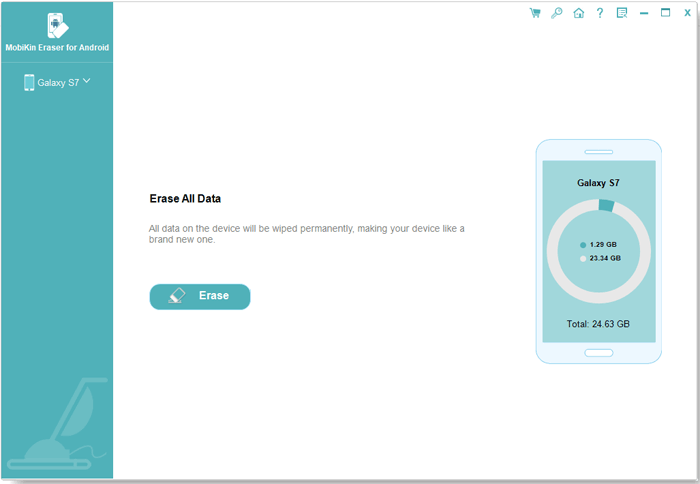
For users concerned with data security and permanent deletion, advanced software provides the highest level of protection. All selected contacts can be completely wiped so that they cannot be recovered by expert recovery tools like MobiKin Eraser for Android (Windows/Mac). Encryption and secure deletion algorithms guarantee that personal information is fully erased.
This professional software excels at permanently removing SIM contacts while prioritizing the security of sensitive data. (Note: This program will erase all data on your phone, including contacts, so it is advisable to perform a full backup of your device before proceeding.)
Main Features:
- Permanent Data Deletion - Erases all selected contacts from the SIM or device so they cannot be recovered by any recovery tool.
- SIM Card & Phone Support - Works on both SIM contacts and phone-stored contacts for comprehensive cleanup.
- Advanced Security Algorithms - Ensures sensitive numbers are fully removed, protecting personal information.
- Selective or Bulk Deletion - Allows users to delete individual contacts or clear all SIM contacts at once.
- User-Friendly Interface - Simplifies the deletion process, making it easy even for non-technical users.
- Fast and Efficient - Quickly removes large amounts of contacts without affecting other phone data.
- Work for 8,000+ Android phones/tablets, covering realme GT, Number, C, Neo, and Narzo series.


How to use MobiKin Eraser for Android to remove your contacts from your SIM card realme permanently?
- Begin by downloading and installing the data erasure tool on your computer, which you will utilize to permanently delete data from your realme phone, including all contact information.
- Connect your realme device to the computer via a USB cable and enable USB debugging if prompted.
- Launch the software and adhere to the on-screen instructions to permit it to recognize your realme device.
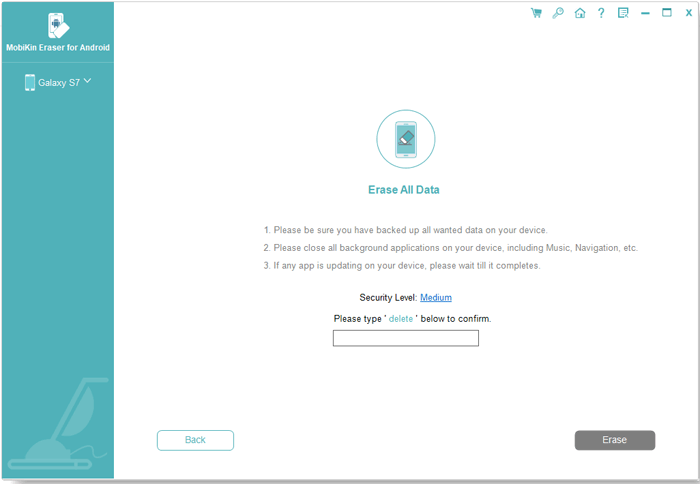
- Once detected, select "Erase" from the main interface.
- Choose your desired security level and confirm the action by typing "delete" when prompted
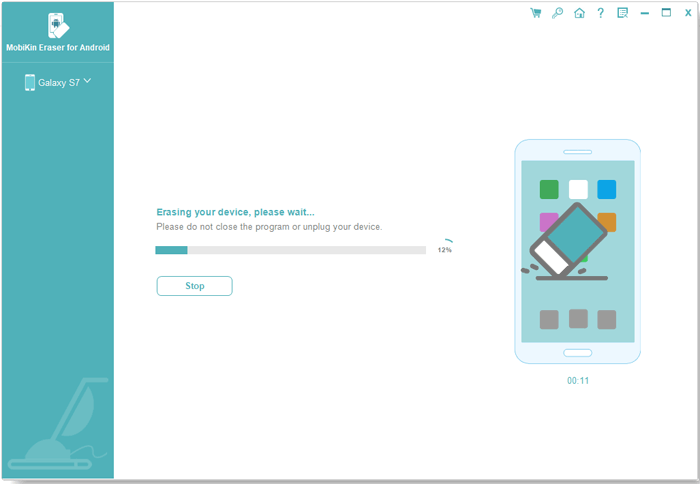
- After confirmation, click "Erase" once more.
- Utilize Low Level to prevent basic recovery, Medium Level for erasing media files, and High Level for securely eliminating sensitive data.
- Follow the instructions, click "Continue," and all contacts and other files will be permanently erased.
Video Guide:
FAQs for Completely Removing Contacts from realme SIM Card
Q1: Will deleting SIM contacts affect contacts saved in my realme memory or cloud?
No, deleting SIM contacts only removes the numbers stored on the SIM. Contacts saved in phone memory, Google account, or cloud backup remain unaffected.
Q2: Can I recover realme SIM contacts after permanent deletion?
Generally, no. Once contacts are removed from the SIM and not backed up, they cannot be recovered. Always export or back up important contacts before deletion.
Q3: Will deleting realme SIM contacts affect my messaging or call history?
No, deleting contacts from the SIM does not remove call logs or SMS history, but the names associated with numbers may no longer display if they were only stored on the SIM.
Q4: Is it safer to delete contacts via MobiKin Eraser for Android rather than the phone settings?
Yes, using MobiKin Eraser for Android is generally safer than deleting contacts via phone settings. The tool is designed with advanced security features that ensure your contacts are permanently erased from the SIM or device.
Unlike the standard phone settings or some other apps, which may leave traces or allow recovery, MobiKin Eraser performs a complete, unrecoverable deletion. This makes it an ideal choice for protecting personal information and sensitive data when clearing SIM or phone contacts.
Related Articles:
How to Unlock realme Phone with/without Losing Data? 6 Methods Included
How to Fix realme Phone Not Connecting to PC? 8 Solutions & 1 Alternative
How to Hard/Factory Reset realme 15/14/13/12/11/10/9/8/C21Y/C11 Quickly
5 Productive Ways for SIM Card Data Recovery for realme [Tested]
