
Top 4 Best Google Pixel Contacts Erasers [With Trial Experience]
Privacy protection has become a top concern when preparing a smartphone for resale or handover. Using a Google Pixel contacts eraser allows users to permanently remove personal contacts before selling, donating, or giving away their Pixel to prevent sensitive information from falling into the wrong hands.
Without proper deletion, private numbers and emails may be exposed to unintended recipients, creating potential risks. This article highlights five great Google Pixel contacts erasers that help Pixel owners erase contacts safely and effectively.
Top 1: Best Google Pixel Contacts Eraser - Mobikin Eraser for Android
For Pixel users who want a deeper wipe than the stock app provides, Mobikin Eraser for Android (Windows/Mac) fits the job well. It clears contacts stored on the device and synced accounts with thorough overwrite steps. The desktop-assisted process helps prevent erased entries from coming back after sync. This makes it suitable when preparing a Google Pixel for resale or hand-off.
Core Features of MobiKin Eraser for Android:
- Permanent Data Erasure: Securely wipes Google Pixel contacts so they cannot be recovered.
- Multiple Security Levels: Lets you choose how deeply contacts and other data are erased.
- Broad Data Coverage: Removes contacts along with messages, media, apps, and accounts. (Back up your phone files if you don't want to lose them)
- Simple 3-Step Use: Connect the Pixel, select an erase level, and start the process.
- Deep Clean Support: Overwrites previously deleted contacts to prevent data traces.
- Enhanced Security: Uses overwrite algorithms to protect privacy and reduce the risk of data leaks.
- Affordable Pricing: Offers cost-effective plans compared with many professional data-wipe tools.


How to completely erase Pixel contacts from PC using MobiKin Eraser for Android?
- Open the program on your computer, then use a USB cable to link your Google Pixel phone to the system.
- Follow the prompts on the screen so the software can successfully detect your device.
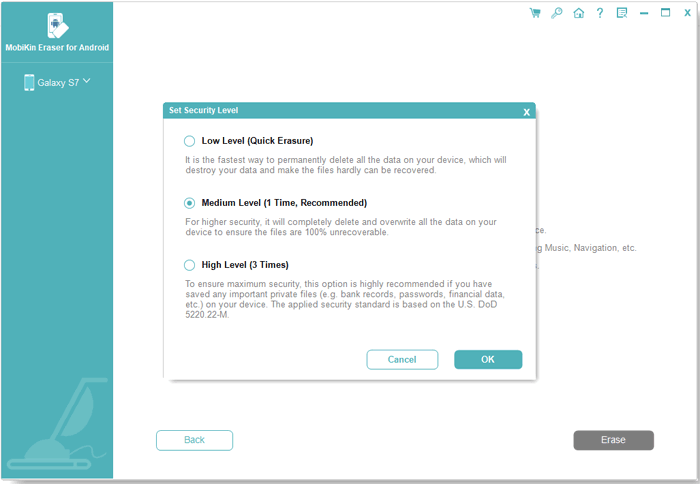
- From the main dashboard, click "Erase" and select a preferred security level on the "Erase All Data" screen.
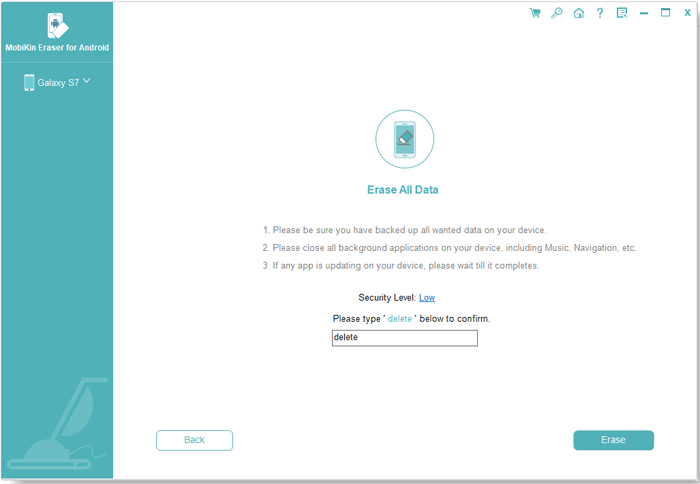
- Keep in mind that this action will permanently remove all content from your Pixel phone and cannot be undone.
- Type "delete" into the confirmation field and press "Erase" to start erasing contacts and other info.
- Wait until the process finishes, then follow the on-screen guidance to factory reset the phone for a full clean result.
Video Directions:
Merits:
- Offers a deep erase that goes beyond simple deletion, helping ensure contacts don't reappear after syncing.
- Works via a desktop interface, so you can review and confirm before actual removal.
- Good choice when prepping a device (like a Pixel) for resale or transfer.
Demerits:
- Requires connection to a computer, not just a phone-only operation.
- Not as fast as one-tap phone apps.
My Trial Experience:
- During my test on a Google Pixel, it removed contacts more thoroughly than standard deletion and didn't let them reappear after sync. The desktop-assisted steps took a bit longer, but the sense of control and safety felt worth it.
You Might Also Like: How to Recover Deleted Contacts on Google Pixel? 4 Reliable Options
Top 2: One-Click Erase All Contacts
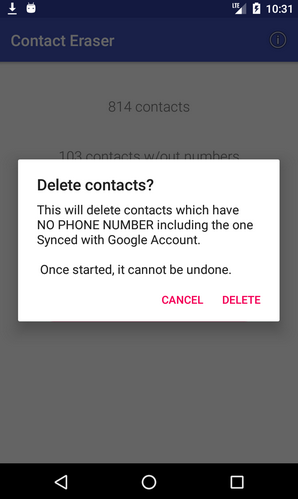
When speed is the main concern, One-Click Erase All Contacts keeps things extremely simple. A single action removes the entire address book from a Pixel phone without extra menus. The layout is minimal, which reduces the chance of deleting the wrong data. It works best for users who already backed up contacts and just want them gone fast.
Merits:
- Extremely fast and straightforward - one action clears everything.
- No extra menus, making it easy for beginners.
- Works entirely on the device without any need for a computer.
- Great for full wipes when you're absolutely sure you don't need contacts anymore.
Demerits:
- No selective erase - you can't choose which contacts to keep or delete.
- Higher risk of accidental loss if you tap without backing up.
- Doesn't offer advanced options like account filters.
- Cannot recover once erased (unless manually backed up elsewhere).
My Trial Experience:
- This one lived up to its name by clearing the entire Pixel contact list almost instantly. It was incredibly fast, though I had to double-check backups since there's no room for selective cleanup.
Top 3: Delete all Phonebook Contacts
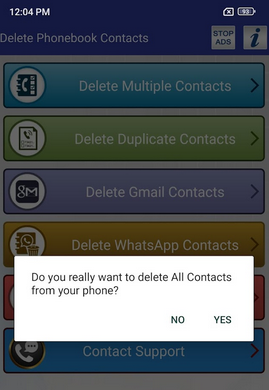
Designed around bulk removal, Delete all Phonebook Contacts gives Pixel owners more control over what gets erased. Contacts from phone storage, SIM, or Google accounts can be removed together or separately. The selection-based approach suits people who don't want a full wipe. As a Pixel contacts eraser, it balances speed with choice.
Merits:
- Lets you clear contacts grouped by source (Phone, SIM, Google account).
- More control than "one-click" - you can decide what type of contacts to erase.
- Works all on the Pixel itself, no desktop needed.
- Useful if some accounts should stay untouched.
Demerits:
- Still focuses on bulk removal, not granular edits.
- Interface may be less intuitive than simpler tools.
- Backup isn't always built in - you must manage this separately.
- Might delete synced contacts that reappear unless sync is paused.
My Trial Experience:
- Using it on a Pixel gave me the flexibility to erase contacts by storage source instead of wiping everything blindly. The process felt practical, even if the interface wasn't the most polished.
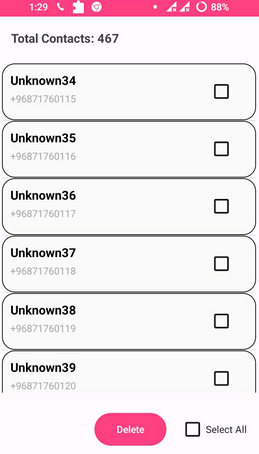
Top 4: Delete All Contacts: One Tap
With a focus on ease of use, Delete All Contacts: One Tap targets users who dislike complicated settings. The app removes contacts from a Pixel device almost instantly after confirmation. Its straightforward flow makes it friendly even for first-time users. This simplicity helps when clearing contacts before troubleshooting or resetting a phone.
Merits:
- Fast and almost instantaneous on Pixel devices.
- Clean design that's easy to understand and use.
- Good for quick erasure before troubleshooting issues.
- Works entirely on the phone - no extra gear needed.
Demerits:
- Like other one-tap tools, it removes everything at once.
- Doesn't let you pick specific contacts to save.
- Lacks advanced options like filtering by account type.
- Little to no backup feature, so recovery isn't built in.
My Trial Experience:
- The app handled contact removal on my Pixel with minimal steps and no learning curve. It worked best for quick clearing, but the lack of fine control meant I had to be absolutely sure before tapping.
Summary
It is a safeguard for personal and professional information to clear contacts from a Google Pixel. The tools discussed above offer varying levels of control, speed, and security, making it possible to select a solution that fits your exact needs. Among them, careful consideration of safety, thoroughness, and ease of use will guide the choice for any user.
Pro Tips: For those seeking the most reliable and comprehensive option, Mobikin Eraser for Android stands out as the best. It not only removes all contacts permanently but also overwrites previously deleted entries, supports multiple security levels, and safeguards privacy with simple steps, making it ideal for anyone preparing a Pixel for resale or donation.
Related Articles:
Contacts Didn't Transfer to New Pixel? 9 Fixes & 1 Ultimate Way
Google Pixel 10 vs iPhone 17: Which One to Pick [Expert Advice]
4 Easy Tactics to Export Text Messages from Google Pixel 10/9/8/7/6/5/4/3
5 Smart Ways for Google Pixel FRP Bypass [Based on Our Tests]
