
How to Completely Remove Contacts from TECNO SIM Card? 3 Ways & FAQs
Contacts stored on a TECNO SIM card can quickly become cluttered with duplicates or outdated entries. Cleaning up contact info on the SIM to avoid clutter or errors helps maintain an organized contact list and smoother communication. Privacy is another important consideration - users may want to prevent others from accessing sensitive contacts if the SIM is lost or stolen.
This passage outlines how to completely remove contacts from TECNO SIM card, ensuring both security and efficiency.
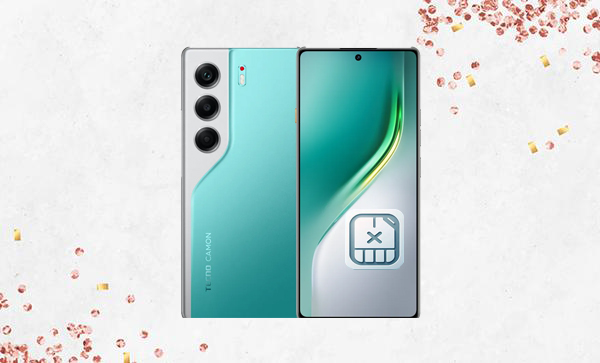
- Part 1: Completely Remove Contacts from TECNO SIM Card via Contacts App
- Part 2: Completely Remove Contacts from TECNO SIM Card with SIM Contacts Manager
- Part 3: Completely Remove Contacts from TECNO SIM Card via Eraser for Android [Dedicated]
- Part 4: Q&A about Completely Removing Contacts from TECNO SIM Card
Part 1: Completely Remove Contacts from TECNO SIM Card via Contacts App
For managing SIM contacts on a TECNO phone, the Contacts app offers a straightforward solution. It allows users to select individual or multiple contacts stored on the SIM and delete them with ease. While simple and built into the device, it may be time-consuming to remove large numbers of contacts. However, it ensures that only the SIM-stored contacts are affected, leaving phone memory or cloud contacts intact.
How-to Guide:
- Launch Contacts App: Open the Contacts app on your TECNO TECNO Spark, POP, POVA, Pouvoir, Phantom, and Camon.
- Access SIM Contacts: Tap the menu (three dots) or go to options like "Contacts Management" or "Organize," then choose the SIM card (SIM 1 or SIM 2).
- Delete Contacts: Long-press a contact to delete it, or use "Select All" to remove all contacts from the SIM.
- Alternative via Settings: Go to Settings > Contacts > Manage Contacts > Delete, then select the SIM card to clear.
- Confirm Deletion: Check that no contacts remain in the SIM card storage within the Contacts app.
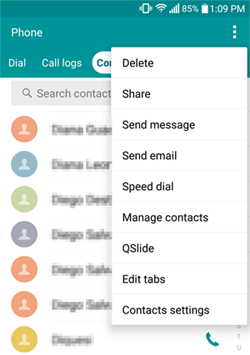
If your contacts are synced with Google or other cloud accounts, deleted SIM contacts might reappear while sync is on. To prevent this, go to Settings > Accounts > Google and temporarily turn off Contacts sync before deleting SIM contacts in the Contacts app. You can turn sync back on afterward if you want your contacts backed up to the cloud.
Part 2: Completely Remove Contacts from TECNO SIM Card with SIM Contacts Manager
Bulk deletion and advanced management become easier with the SIM Contacts Manager app. This tool provides options to select all contacts on the SIM, remove duplicates, or delete contacts in batches. Its intuitive interface helps prevent mistakes during deletion. Users can efficiently clear SIM 1 or SIM 2 without impacting other storage locations on the phone.
How-to Guide:
- Install & Open the App: Download SIM Contacts Manager and launch it.
- View SIM Contacts: Allow permissions and switch to view contacts stored on your SIM card.
- Select Contacts: Tap and hold a contact to select it, or use the multi-select option to pick several at once.
- Delete Contacts: Tap Delete to remove the selected contacts from the SIM.
- Bulk Delete: To erase all, use Select All before tapping Delete for a full wipe.
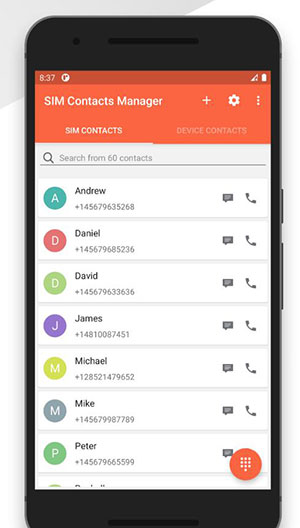
Note: Can SIM Contacts Manager export contacts before deletion? Yes. The app allows you to export contacts to your phone storage, a cloud account, or a file, providing a backup before you permanently delete SIM contacts.
Part 3: Completely Remove Contacts from TECNO SIM Card via Eraser for Android [Dedicated]
When a more permanent removal is needed, MobiKin Eraser for Android (Windows/Mac) can erase contacts thoroughly from the SIM card. The software uses a secure deletion process that ensures contacts cannot be recovered even with specialized recovery tools. It also supports batch processing, saving time when clearing numerous entries at once. With MobiKin Eraser, users gain full control over SIM data while maintaining device security.
More Features & Main Considerations:
|
Factors
|
Description
|
|
Permanent Data Erasure |
Wipes all data on the device permanently, including contacts, messages, photos, and apps. |
|
Erase Contacts (SIM/Phone) |
Deletes all contacts from SIM card or phone memory during the wipe. |
|
Multiple Security Levels |
Offers Low, Medium, and High erasure options for different security needs. |
|
Erase Deleted/Hidden Data |
Overwrites previously deleted files to prevent recovery. |
|
Easy 1-Click Operation |
Simple process: connect device, choose level, and start erasure. |
|
Compatible With Most Android Devices |
Works with nearly all Android phones, including almost all TECNO models. |
|
Backup Recommendation |
Back up your device before wiping, as erased data cannot be restored. |
How to remove your contacts from your TECNO SIM card permanently using MobiKin Eraser for Android?
Step 1: Begin by downloading and installing the data erasure tool on your computer, which you will utilize to permanently delete data from your TECNO phone, including all contact information in its SIM card.


Step 2: Connect your TECNO device to the computer via a USB cable and enable USB debugging if prompted. Next, launch the software and adhere to the on-screen instructions to permit it to recognize your device.
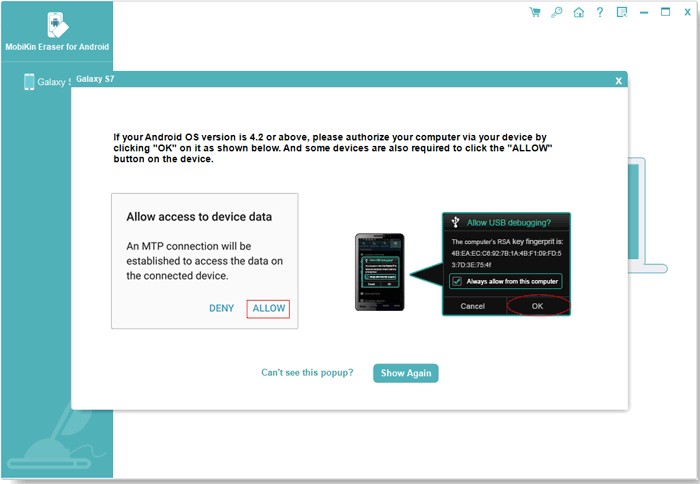
Step 3: Once detected, select "Erase" from the main interface. Choose your desired security level and confirm the action by typing "delete" when prompted. After confirmation, click "Erase" once more.
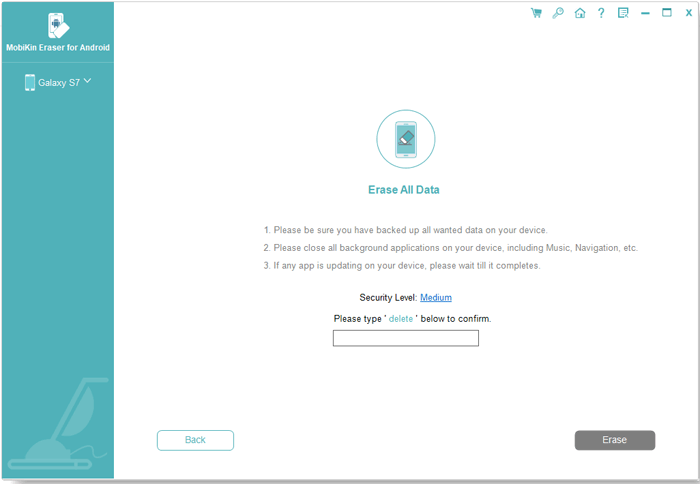
Step 4: Utilize Low Level to prevent basic recovery, Medium Level for erasing media files, and High Level for securely eliminating sensitive data. Finally, follow the instructions, click "Continue," and all contacts and other files will be permanently erased.
Video Instructions:
Part 4: Q&A about Completely Removing Contacts from TECNO SIM Card
Q1: Will deleting SIM contacts remove them from my phone memory?
No. Deleting SIM contacts only removes them from the SIM card itself; contacts stored in your phone memory or cloud accounts remain unaffected.
Q2: Can I recover SIM contacts after deleting them?
Only if you created a backup before deletion. Without a backup, deleted SIM contacts cannot be restored.
Q3: Is it possible to delete contacts from SIM 1 and SIM 2 separately?
Yes. When using the Contacts app or SIM Contacts Manager, you can choose the specific SIM card (SIM 1 or SIM 2) to delete contacts from individually.
Q4: Do I need an internet connection to delete SIM contacts?
No, deleting SIM contacts is performed locally on your device, so an internet connection is not required.
Q5: Will deleting contacts affect WhatsApp or other messaging apps?
It may affect apps that rely on SIM contacts, such as WhatsApp, by removing them from their contact list. Contacts stored in the phone memory will still appear in these apps. (Can I retrieve lost WhatsApp chats from TECNO?)
Q6: Is there a way to delete duplicate contacts on the SIM?
Yes. Some apps, including SIM Contacts Manager, have a merge or remove duplicates feature to clean up redundant entries before or after deletion.
Q7: Can I delete SIM contacts on multiple TECNO devices at once?
No. You must remove SIM contacts separately on each device, as the SIM card can only be managed on the device it is inserted into.
Q8: Is it safe to delete SIM contacts using third-party apps?
Yes. Reputable apps like MobiKin Eraser for Android are designed specifically for SIM and phone management, allowing safe and permanent deletion of all your TECNO data.
Related Articles:
How to Unlock TECNO Phone in 5 Ways [Step-by-step Guide]
4 Smart Solutions to TECNO to Mac Transfers [USB/WiFi Connections]
4 Easy Options to Transfer/Copy Contacts from TECNO to TECNO
