
Top 5 TECNO Data Erasers You Should Never Miss [Tried-and-true]
TECNO phones often store contacts, messages, photos, financial apps, and social media data, making it crucial for users to manage their privacy carefully. Whether you are upgrading, switching devices, or giving your phone away, it's important to ensure all personal data is permanently erased before selling, donating, or passing your TECNO device to someone else.
A reliable TECNO data eraser can help you securely wipe sensitive information and prevent potential data recovery by unauthorized parties. This article will introduce 5 tools to do it, comparing their pros and cons to help you make the best choice for protecting your personal information.
Top 1: Best TECNO Data Eraser - MobiKin Eraser for Android [Thorough]
Designed for users who want absolute privacy before selling or giving away a phone, this solution focuses on permanent data destruction rather than simple deletion. Multiple erasure levels overwrite existing files so personal data cannot be recovered with forensic tools.
It works smoothly with TECNO devices, making it a reliable TECNO data eraser for clearing internal storage completely. MobiKin Eraser for Android (Windows and Mac) is especially suitable when a factory reset alone doesn't feel secure enough.
|
Key Features
|
Description
|
Why It's Good for TECNO Phones
|
|
Permanent Data Erasure
|
Uses advanced overwrite methods to permanently delete data so it cannot be recovered. |
Ensures personal data on TECNO devices is fully removed before resale or handover. |
|
Multiple Erase Levels
|
Provides different erasure modes (low, medium, high) to balance speed and security. |
Allows TECNO users to choose quick cleanup or deep erasing based on their needs. |
|
Full-Device Wipe
|
Can erase contacts, messages, call logs, photos, videos, apps, and system data. |
Helps TECNO users perform a complete data cleanup beyond a basic factory reset. |
|
High Data Security
|
Prevents recovery using common data recovery software or forensic tools. |
Protects sensitive information stored on TECNO phones from privacy leaks. |
|
Broad Android Compatibility
|
Supports 8,000+ Android devices, covering TECNO Spark, POP, POVA, Pouvoir (Power), Phantom, and Camon. |
Works reliably as a TECNO data eraser without brand or model limitations. |
|
User-Friendly Interface
|
Simple, guided steps reduce the risk of accidental mistakes. |
Suitable for TECNO users with limited technical experience. |
|
Ideal for Phone Resale
|
Designed for devices being sold, donated, or recycled. |
Ensures TECNO phones are wiped clean before changing ownership. |
How-to Guide:
- Begin by installing and launching MobiKin Eraser for Android on your computer, then connect your TECNO phone via a USB cable.
- Enable USB debugging on the TECNO phone to permit the software to detect your device, and then choose the Erase option.
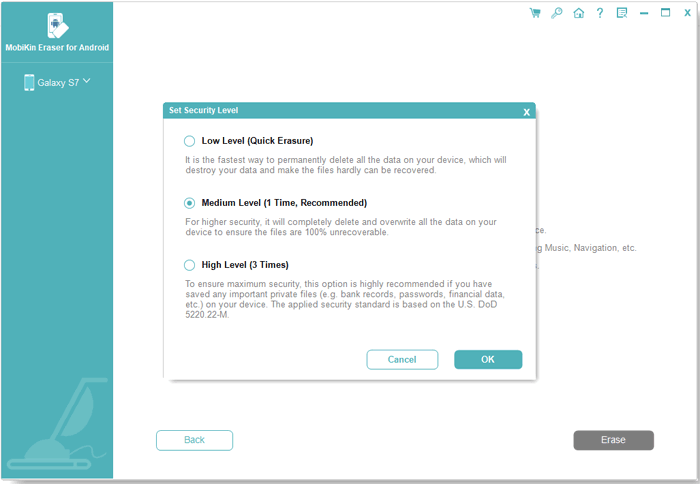
- Choose a security level (Low, Medium, High) and confirm your selection by typing 'delete', followed by clicking Erase again.
- The software will proceed to scan and erase data based on the selected security level.
- To eliminate system data and settings, perform a factory reset on the TECNO by adhering to the provided instructions to permanently remove all information.


Video Tutorial:
The Good:
- Permanently erases data using overwrite methods, making recovery extremely difficult.
- Offers multiple erasure levels for different privacy needs.
- Works well before selling, recycling, or giving away Android phones.
- Clear and guided interface suitable for non-technical users.
The Bad:
- Full functionality requires a paid license.
- Needs a computer connection, which may be inconvenient.
- Deep erasing can take time when wiping large amounts of data.
Top 2: Files by Google
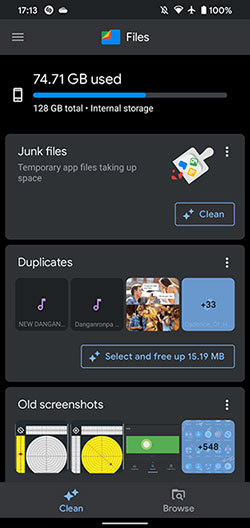
For everyday cleanup rather than military-grade wiping, this option emphasizes simplicity and accessibility. It helps remove unnecessary files, duplicates, and cached data, which is useful before a basic reset on TECNO phones.
While it doesn't overwrite data at a deep level, it still plays a role as a lightweight TECNO data eraser for routine storage management. Files by Google is best used as a preliminary step before more advanced erasing tools.
The Good:
- Simple and intuitive storage management tool.
- Effectively removes junk files, duplicates, and large items.
- Free to use with no ads.
- Helpful for basic cleanup on Android devices.
The Bad:
- Does not securely overwrite data.
- Deleted files may still be recoverable
- Not designed for permanent data destruction.
- Limited value for privacy-focused users.
Top 3: Android Data Eraser App
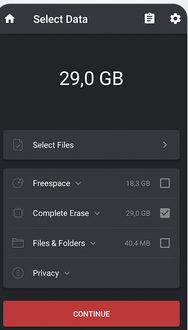
Selective deletion is the main strength here, allowing users to target photos, videos, or folders that contain sensitive information. By overwriting free space, it reduces the chances of deleted files being recovered later.
Compatibility with a wide range of Android brands makes it a practical TECNO data eraser for users who want more control than a standard delete option. Android Data Eraser App fits well for users balancing privacy needs with ease of use.
The Good:
- Easy-to-use interface for selective data deletion.
- Supports common file types like photos and videos.
- Useful for basic privacy cleanup.
- Lightweight and simple to operate.
The Bad:
- Secure deletion depth is limited.
- May not fully overwrite free space.
- Stability issues reported on some devices.
- Not suitable for high-security erasure needs.
Top 4: SDelete - File Shredder
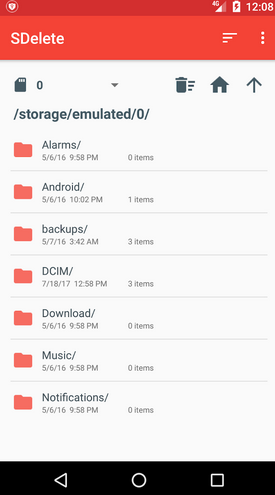
Rather than focusing on a flashy interface, this tool prioritizes secure shredding of chosen files. It applies overwriting techniques that go beyond normal deletion, helping protect personal information on TECNO devices.
Because it supports both file and free-space wiping, it can function as a dependable TECNO data eraser in daily privacy scenarios. SDelete - File Shredder is often favored by users who want straightforward, no-nonsense data destruction.
The Good:
- Focuses on overwriting files rather than simple deletion.
- Suitable for targeted file shredding.
- Free and straightforward for basic use.
- Can help reduce chances of data recovery.
The Bad:
- The interface is less intuitive.
- Erasing process can be slow.
- Limited advanced options.
- Not ideal for full-device data wiping.
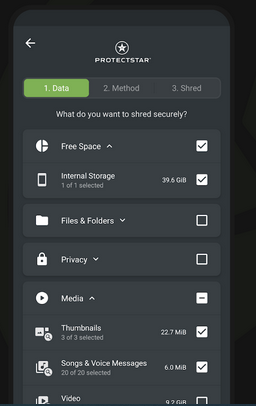
Top 5: iShredder Data Eraser
Security standards are the highlight of this option, with certified deletion algorithms used to ensure data cannot be restored. It is particularly effective for users preparing TECNO phones for resale or recycling.
The combination of file shredding and space wiping makes it a strong TECNO data eraser for privacy-conscious individuals. iShredder Data Eraser stands out for those who want an extra layer of confidence beyond typical Android cleanup tools.
The Good:
- Uses certified secure deletion algorithms.
- Supports shredding files and wiping free space.
- Designed for strong privacy protection.
- Suitable for devices being sold or recycled.
The Bad:
- Advanced features may require payment.
- More complex than basic cleanup tools.
- Can be excessive for everyday storage management.
- Performance varies depending on device and Android version.
Closing Remarks
After reviewing various options, MobiKin Eraser for Android is the superior TECNO data eraser compared to other tools. Its combination of advanced security, flexibility, and ease of use makes it ideal for TECNO users. Key advantages of MobiKin Eraser for Android include:
- Permanent data erasure with overwrite methods, preventing recovery of sensitive files.
- Multiple erase levels to balance speed and security according to your needs.
- Full-device wipe, covering contacts, messages, photos, videos, apps, and system data.
- High compatibility with TECNO phones and other Android devices.
- User-friendly interface with guided steps for safe and easy operation.
- Ideal for phone resale or donation, ensuring personal data is completely removed.
- For anyone looking to securely erase a TECNO device, MobiKin Eraser for Android offers the most reliable, efficient, and comprehensive solution.
Related Articles:
5 Best TECNO Contact Backup and Restore Solutions in 2026
4 Easy Solutions to TECNO FRP Bypass [Technical Expertise]
How to Unlock TECNO Phone in 5 Ways [Step-by-step Guide]
5 Most Desirable Ways to Recover Deleted WhatsApp Data from TECNO
