
4 Stress-free Ways to Permanently Delete Deleted Text Messages on Xiaomi
TL;DR:
To permanently erase deleted texts, users must go beyond basic deletion-using dedicated wiping software, clearing app cache and data, performing a factory reset, or employing an overwriting tool like Shreddit. Taking these extra steps ensures that old conversations cannot be recovered, even after a factory reset or when the phone changes hands.
Most Xiaomi owners assume that tapping "delete" removes a text message for good. That assumption is wrong. The phone simply hides the message and marks its storage space as free. Until new data overwrites that space, recovery tools can bring the message back.
The following passage covers methods that go beyond a factory reset, like using data-wiping software or physically overwriting the storage, to ensure all personal data is irretrievable. You will also find how to permanently delete deleted text messages on Xiaomi in 4 stress-free ways - none of which require technical degrees or risky rooting.
- Part 1: Permanently Delete Deleted Text Messages on Xiaomi via a Dedicated Tool
- Part 2: Permanently Delete Deleted SMS on Xiaomi by Manually Deleting & Clearing App Cache
- Part 3: Permanently Delete Deleted Messages on Xiaomi by Factory Reset
- Part 4: Permanently Delete All Deleted Text Messages on Xiaomi via Shreddit - Data Eraser
- FAQs for Permanently Deleting Deleted Text Messages on Xiaomi
Part 1: Permanently Delete Deleted Text Messages on Xiaomi via a Dedicated Tool
A dedicated wiping utility like MobiKin Eraser for Android (Windows/Mac) is designed to go beyond normal deletion by targeting SMS records and hidden fragments stored in system memory. It overwrites existing and previously deleted text message data, making recovery attempts extremely difficult on Xiaomi devices.
The tool typically runs a full scan-and-erase process that removes not only visible conversations but also residual database traces. In terms of permanence, it offers one of the strongest approaches for ensuring deleted SMS cannot be restored.
Core Features of MobiKin Eraser for Android:
> Full data erasure - Permanently removes all existing data (contacts, SMS, photos, apps, etc.).
> Permanently deletes already-deleted texts on Xiaomi - Scans and overwrites residual traces, making old texts unrecoverable.
> Three security levels - Low (1 pass), Medium (recommended), High (3 passes).
> Wide compatibility - Supports Android 6.0 - the latest version and all major brands including Xiaomi.
> Simple 3 steps - Connect via USB > choose level > type "delete" and erase.
* Mandatory backup - Erases the entire phone irreversibly; back up your Xiaomi before use.


User Tutorial: Set up this software on your computer and learn how to permanently delete deleted text messages from Xiaomi via MobiKin Eraser for Android:
Step 1 - Connect and set up: Open the software on your computer and connect your Xiaomi phone via a USB cable. (Note: Wi-Fi connection is not supported for this step - a USB cord is required.) Follow the on-screen instructions to allow the software to detect your device.
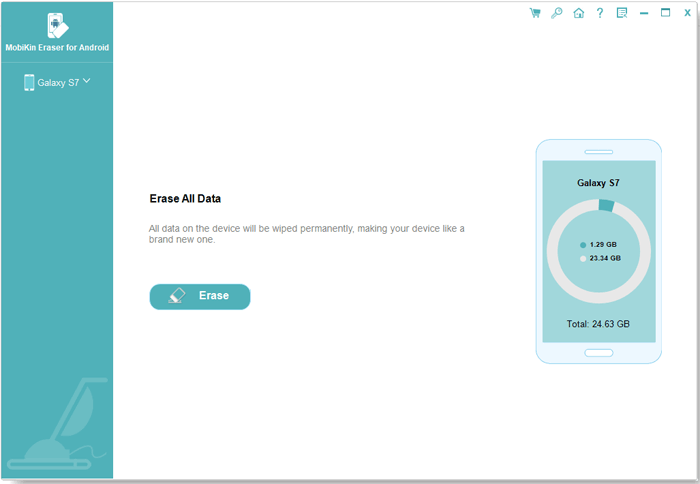
Step 2 - Choose erase settings: Click "Erase" on the main interface, then select a security level in the "Erase All Data" screen. Keep in mind that the next steps will permanently delete all data on your Xiaomi phone with no chance of recovery. Type "delete" into the designated box and press "Erase" to begin the process.
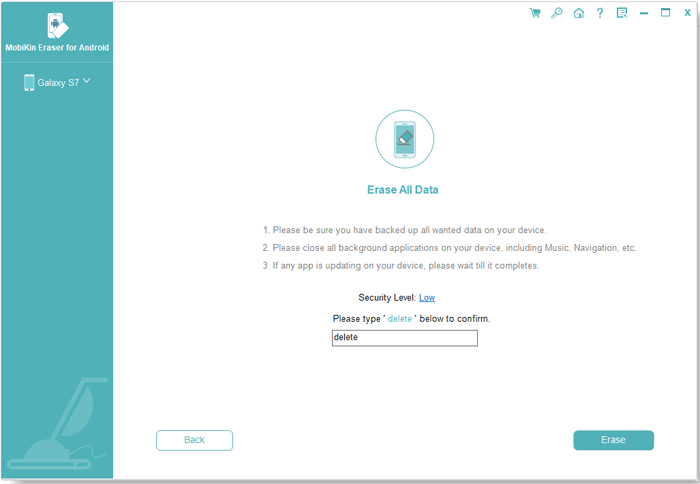
Step 3 - Complete erasure and factory reset: Wait a short moment for the process to finish. Once done, follow the on-screen prompts to perform a factory reset on your Xiaomi.
Video Directions:
My Trial Experience: MobiKin Eraser for Android felt like a deep cleaning tool rather than a normal delete function. It scanned the Xiaomi device and removed SMS traces that weren't visible in the Messages app. The process went beyond basic deletion by targeting hidden data fragments in storage. After finishing, the phone felt like it had no leftover message history.
You Might Also Enjoy: How to Move Apps to SD Card Xiaomi/Redmi in 4 Ways? [Practical]
Part 2: Permanently Delete Deleted SMS on Xiaomi by Manually Deleting & Clearing App Cache
On Xiaomi phones, manually removing messages combined with clearing cache provides a basic level of cleanup. Conversations are first deleted through the Messages app, then temporary files are removed through system settings.
Clearing cache helps eliminate leftover app references, while reducing minor traces linked to recent activity. However, this method alone cannot fully guarantee permanent deletion of SMS because deeper storage fragments may still remain recoverable.
Here's how it works:
- Delete SMS manually: Open the Messages app on your Xiaomi phone, locate the conversation or individual messages you want to remove, then long-press the thread. Tap the Delete option (usually shown as a trash bin icon) and confirm the action to remove it from your inbox.
- Clear app cache: Go to Settings > Apps > Manage apps, then find and select Messages. Enter Storage, and tap
- Clear cache to remove temporary files that may still reference recently deleted SMS data.
- Clear app data (storage): In the same Storage section of the Messages app settings, tap Clear data/Clear storage and confirm. This will reset the app and remove remaining SMS database records, along with any stored message-related information on the device.
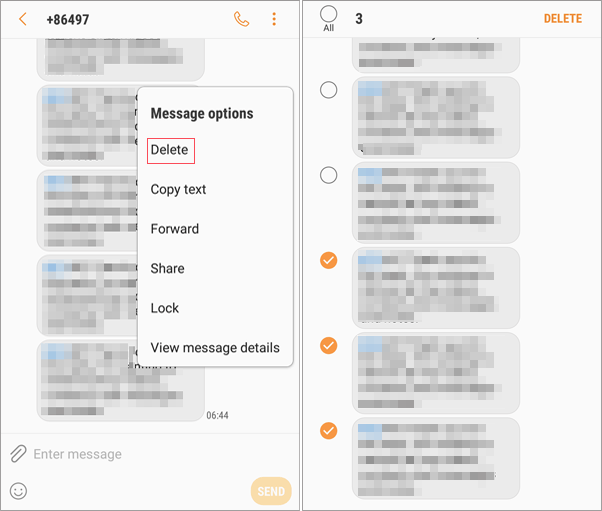
My Trial Experience: Manual deletion with cache clearing was simple but limited in impact. I deleted all SMS threads first, then cleared cache from the Messages app settings. It helped remove temporary files and cleaned the interface slightly. Still, it didn't feel strong enough for full permanent removal.
People Also Like: Top 5 Best Xiaomi Phone Repair Software/Tools You'd Better Know
Part 3: Permanently Delete Deleted Messages on Xiaomi by Factory Reset
A factory reset is a system-level action that wipes user data, including SMS databases, settings, and installed applications. Once initiated, the device returns to its original state, removing all visible messages and app content.
When encryption is enabled beforehand, the reset becomes more effective since the encryption key is destroyed along with the data. Even so, without additional overwriting, some low-level traces may still exist in storage sectors.
Here's how it works:
- Back up important data first (optional): Save contacts, photos, and files to Google account, Mi Cloud, or a PC before proceeding, since everything will be erased. (Mi Cloud doesn't work?)
- Go to reset settings: Open Settings > tap About phone > select Factory reset (or Additional settings > Backup & reset depending on MIUI version).
- Start full wipe: Tap Erase all data (factory reset) > confirm with your PIN/password if prompted.
- Wait for the process to complete: The phone will reboot and automatically erase apps, SMS, system data, and user files.
- Set up the device again (optional for secure use): After reset, set it up as new without restoring old backups if you want to avoid bringing back deleted messages from cloud backup.
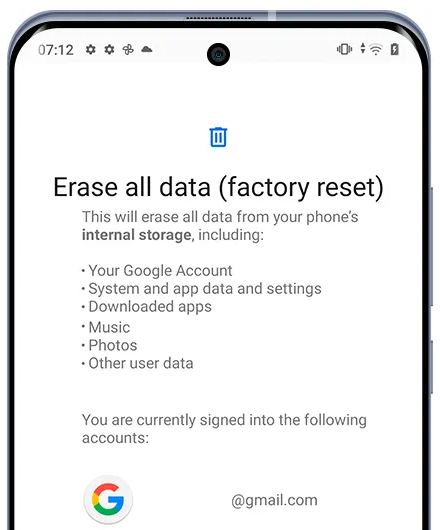
My Trial Experience: The factory reset was more powerful and reset the phone to its original state. It erased apps, settings, and SMS in one process after reboot. The device looked completely new during setup. However, I still considered that some data traces might remain without encryption.
Part 4: Permanently Delete All Deleted Text Messages on Xiaomi via Shreddit - Data Eraser
Using Shreddit - Data Eraser focuses on overwriting deleted space multiple times to prevent recovery of SMS on Xiaomi devices. It targets unused storage blocks where previously deleted messages may still linger.
By repeatedly writing random data over these areas, it reduces the chance of forensic recovery. This approach strengthens permanent deletion, especially when used after standard deletion or a reset.
Here's how it works:
- Install Shreddit - Data Eraser: Download and install the Shreddit app from a trusted app store (Google Play) on your Xiaomi device.
- Grant required permissions: Open the app and allow storage access so it can scan and overwrite deleted data areas.
- Select SMS/data wipe option: In Shreddit, choose the option for Messages/SMS or full storage wipe depending on your goal.
- Start secure erasing process: Tap Erase or Shred to begin overwriting deleted SMS data multiple times, making recovery difficult.
- Wait for completion: Let the process finish without interrupting it to ensure all residual message traces are overwritten.
- Reboot the device (recommended): Restart your Xiaomi phone after wiping to finalize system cleanup and refresh storage indexing. (Any Shreddit - Data Eraser alternative?)
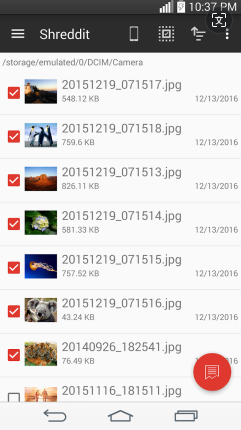
My Trial Experience: Shreddit - Data Eraser took more time but felt more thorough. It overwrote deleted storage areas repeatedly, slowing the phone during the process. This made SMS recovery much harder compared to simple deletion. After it finished, the data felt effectively unrecoverable.
FAQs for Permanently Deleting Deleted Text Messages on Xiaomi
Q1: Are deleted text messages on Xiaomi really gone forever?
Not immediately. When you delete SMS on Xiaomi, they are often marked as "deleted" but may still exist in internal storage until overwritten.
Q2: Can I recover deleted SMS from Xiaomi after deletion?
Yes, recovery is possible using data recovery tools or backups if the data has not been overwritten yet.
Q3: Does emptying the Messages app recycle bin remove SMS permanently?
No. It only removes visibility. Data may still remain in system storage temporarily.
Q4: Is a factory reset enough to permanently delete SMS on Xiaomi?
It helps, but advanced recovery tools may still retrieve data unless the storage is overwritten afterward.
Q5: Can Xiaomi cloud backups restore deleted messages?
Yes. If Mi Cloud backup is enabled, deleted SMS can be restored from a previous backup.
Q6: Do SMS backup apps affect permanent deletion?
Yes. If backup apps are active, deleted messages may still exist in cloud or local backups.
Q7: How do I check if my deleted SMS are still recoverable?
If the phone has not been heavily used after deletion, recovery chances are still high using recovery tools.
Ending Words
You cannot delete a message once and assume it is gone for good. Phone storage often keeps traces longer than expected. Each method only takes a few extra minutes but adds a stronger layer of protection against recovery. This helps prevent old conversations from reappearing on a used phone, repair attempt, or recovery tool.
After using any permanent deletion method, you can test it by sending a message, deleting it, and trying to recover it with a free recovery app. If the message cannot be restored, the method worked. If it still appears, repeat the overwrite or wiping process once more.
Related Articles:
Mi Mover Not Working? User Guide, Errors, Fixes, Alternative, & FAQs
How to Fix Xiaomi Touch Screen Not Working? 10 Reliable Solutions
How to Transfer WhatsApp from POCO to POCO? 4 Trustworthy Ways
Xiaomi Mi Phone Not Connecting to PC/Computer? 12 Easy Solutions
