Documents by Readdle App for iPhone Review & Alternative [2025 Latest]
Documents by Readdle is a versatile file management app for iOS, offering a powerful suite of tools to organize, view, and interact with various file formats, all in one place. Whether you're managing PDFs, Word documents, or audio files, this app provides a seamless experience with its intuitive interface. It also integrates cloud storage, making it easy to sync and access your files across devices. However, while Documents by Readdle has many strengths, it may not be the perfect solution for everyone.
In this post, we'll dive into its main features, pros and cons, security, pricing, and who should use it. Plus, we'll recommend the best alternative to Documents by Readdle for those looking for a different option. Keep reading to find out more!
Part 1: Documents by Readdle Main Features
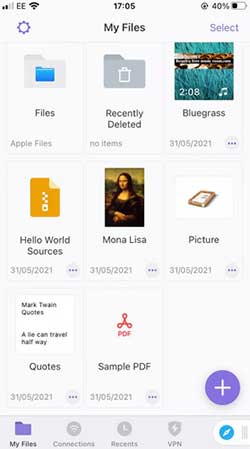
Documents by Readdle stands out as one of the most comprehensive file management apps for iOS, offering a range of features that make it easy to manage and interact with your files. Here are its key features:
- File Organization: You can organize files into folders, making it easy to navigate through documents, images, videos, and more. It supports various file formats, including PDFs, Word documents, Excel files, and images.
- PDF Viewing and Editing: The app allows you to open, annotate, and highlight PDFs. You can also fill out PDF forms and sign documents directly within the app.
- Cloud Integration: It supports integration with major cloud storage services like iCloud, Dropbox, Google Drive, and OneDrive. This enables seamless access to your files from different platforms.
- File Compression: Documents by Readdle also allows you to zip and unzip files, making it easier to manage large files or send multiple documents in one package.
- Media Player: You can view videos, play music, and listen to audiobooks without leaving the app. The built-in media player supports various formats, making it an all-in-one multimedia hub.
- Browser and Downloader: The app includes a built-in web browser, allowing you to download files from the internet and manage them directly in the app.
These features make Documents by Readdle a powerful tool for users who need to manage and edit various types of files on their iOS devices.
You May Want to Know:
Part 2: Documents by Readdle Pros & Cons
Documents by Readdle has a lot of great features, but it also has a few drawbacks. Here's a quick look at its pros and cons:
Pros:
- It's an all-in-one tool for managing files, allowing you to view, organize, and edit documents, media, and more in one place.
- It supports cloud storage integration with services like iCloud, Dropbox, Google Drive, and OneDrive, making it easy to access and sync files across devices.
- The app has an easy-to-use, clean interface, which helps you navigate through your files and complete tasks like editing and file compression.
- You can edit PDFs by annotating, highlighting, and signing documents, which is useful for working with forms and contracts.
- It allows offline access, so you can work on files without needing an internet connection.
- The file compression feature lets you zip and unzip files, making it easier to manage large or multiple documents.
Cons:
- The app lacks advanced editing features like OCR or text reflow, which can limit its usefulness for complex document editing.
- Managing a large collection of files can be tricky, as the organization options may not be as intuitive as on desktop apps.
- It doesn't offer much customization, like theme changes or advanced settings, which might disappoint users who prefer more control.
- While the app is free, some features, like advanced PDF editing or extra cloud storage, require a paid subscription.
- The app can take up a lot of storage space, especially if you're syncing large files or downloading content, which could be an issue over time. (6 Easy Ways to Transfer Large Videos from iPhone to PC)
Part 3: Is Documents by Readdle Safe?
Documents by Readdle is generally safe to use. It's developed by Readdle, a reputable company known for creating reliable apps. The app uses encryption for cloud storage, keeping your files secure when synced across devices. You can also set a password or use Face ID/Touch ID to protect sensitive files.
However, as with any app, be cautious when downloading files from the internet. While the app itself is secure, files from untrustworthy sources can still pose risks.
In short, Documents by Readdle is safe, but always practice good security habits, like using strong passwords and avoiding suspicious downloads.
Part 4: Is Documents by Readdle Free?
Documents by Readdle is free to download and use for most basic features, such as viewing, organizing, and syncing files, as well as using the built-in PDF reader and media player. However, some advanced features, like premium PDF editing tools and additional cloud storage, require a subscription.
The premium version, called Documents Pro, costs around $29.99 per year. This unlocks features like advanced editing options for PDFs, more storage, and other enhancements that can improve your experience.
So, while the app is free to use for basic functions, you may need to pay for a subscription to access its full set of features.
You May Want to Know:
Part 5: Who Should Use Documents by Readdle?
Documents by Readdle is ideal for anyone who needs an all-in-one tool to manage files on their iOS devices. It's particularly useful for:
- Frequent Document Users: If you regularly work with PDFs, Word docs, or other files, this app makes it easy to view, edit, and organize them all in one place.
- Cloud Storage Users: If you use cloud services like Google Drive, Dropbox, or iCloud, you'll appreciate the seamless integration, allowing you to access and sync your files across multiple devices.
- On-the-Go Professionals: For people who need to work on documents or media while traveling, the ability to access files offline and edit them without internet access is a big plus.
- PDF Editors: If you often need to annotate, highlight, or sign PDFs, Documents by Readdle offers these features without needing a separate app.
- Casual Users: Even if you're just looking for an easy way to organize and view your files, the app's simple, user-friendly interface makes it great for non-tech-savvy users.
In short, Documents by Readdle is a great choice for anyone who wants a versatile, easy-to-use file manager and document viewer on their iPhone or iPad.
You May Want to Know:
Part 6: Best Alternatives to Documents by Readdle
While Documents by Readdle offers a solid set of features, some users may prefer a more specialized tool for managing their iOS files and data. One such alternative is MobiKin Assistant for iOS, a comprehensive solution for managing, backing up, and transferring data on iPhone and iPad. If you're looking for an alternative that focuses more on data management and device management, MobiKin Assistant for iOS might be the right fit for you.
Key Features of MobiKin Assistant for iOS:
- Allows you to back up your iPhone or iPad data and restore it to the device easily.
- Transfer various types of files, including photos, videos, contacts, and messages, between your iOS device and computer.
- Preview and manage iOS data before transferring.
- No storage limitation, no data loss or overwriting.
- Manage, edit and delete iOS data on computer.
- Fully compatible with all iPhone and iPad running iOS 26 or earlier.


How to use Assistant for iOS - the best Documents by Readdle alternative, to transfer and manage iPhone data on computer:
Step 1: Download and install the appropriate version of MobiKin Assistant for iOS on your Mac or PC. Connect your iPhone to the computer using a USB cable. The software will quickly detect your device.
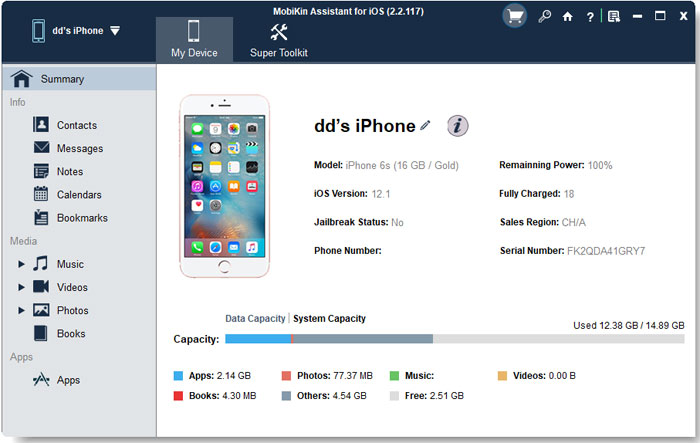
Step 2: Once connected, your iPhone data will be organized and displayed in the left sidebar. Browse through the tabs, and the program will begin scanning your iPhone files.
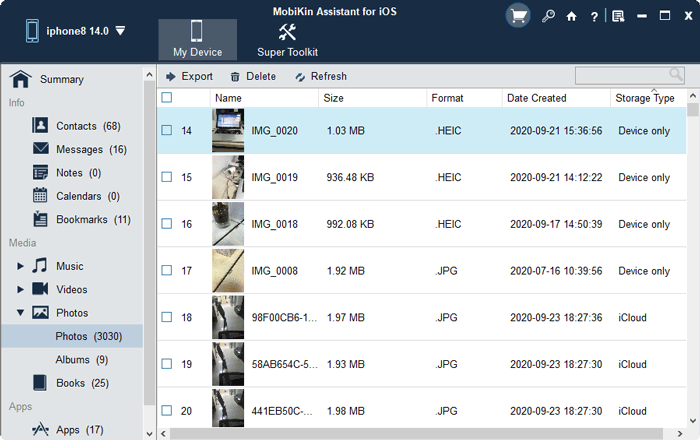
Step 3: After the scan is complete, you can preview the data. To transfer files to your computer, click "Export" at the top. To move files from your computer to your iPhone, click "Import." If you want to delete unnecessary data from your device, simply click "Delete."
The interface makes it easy to manage your data with all options clearly displayed.
Words in the End
In conclusion, Documents by Readdle is a solid tool for managing and organizing files on iOS devices, offering features like cloud integration, PDF editing, and media management. However, if you need more advanced data management or are looking for a specialized solution, MobiKin Assistant for iOS is an excellent alternative. It provides a robust set of features for transferring, backing up, and managing iPhone data on your computer, making it a great choice for users seeking more control over their device's content.
Related Articles
Tips to Restore Deleted SMS Messages from iPhone
DiskDigger Alternative Tool for iOS
8 Solutions to Fix Contacts Disappeared from iPhone
What if iPhone Won't Restore? Here Are the Full List of Fixes