ST MTK Tool Review: Is It Secure & Beneficial? [With FAQs]
TL;DR:
- ST MTK Tool is a free Windows utility for servicing MediaTek-based Android devices, offering features like FRP bypass, screen lock removal, and data formatting for phones running Android 5.0 to 12.
- However, it has notable drawbacks, including limited device compatibility, uncertain download safety since there's no verified official website, and a low success rate due to driver and connection issues.
- For users seeking a more reliable alternative, Android Lock Wiper provides broader device support (8,000+ models) and a simpler, guided FRP bypass process.
Note: We support the lawful use of ST MTK Tool and its alternative, Android Lock Wiper, and strictly oppose any unauthorized or illegal use of these tools. Thank you for your understanding and cooperation.
ST MTK Tool has caught the attention of Android users looking for a free way to handle FRP locks, forgotten screen passwords, and other phone servicing tasks. Yet, finding a download is only part of the story, as device compatibility, installation difficulties, and security concerns can complicate the process.
This ST MTK Tool review explores its main features, download and usage procedures, advantages and drawbacks, and common troubleshooting methods. You'll also learn whether the program is worth trying and which alternatives may offer a more convenient unlocking experience.
Part 1: What Does ST MTK Tool Do
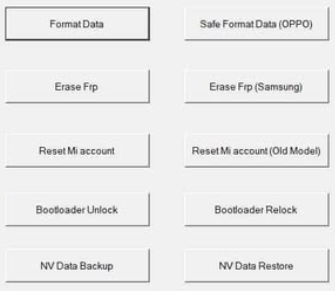
ST MTK Tool is a Windows utility used to service and unlock Android devices powered by MediaTek (MTK) chipsets. It provides functions such as FRP bypass, screen lock removal, data formatting, and certain account-lock management operations on supported devices. Generally, this program works for Android devices running Android 5.0 to Android 12, so compatibility should be checked for the specific device.
Part 2: What Are the Main Features of ST MTK Tool
Again, feature availability depends on the device model and tool version. Formatting or unlocking operations may erase data or affect device functionality, so use the tool only on devices you own or are authorized to service.
|
Feature
|
Key Details
|
|
Format Data |
Erases user data on compatible Android devices. |
|
Safe Format Data (OPPO) |
Provides a data-formatting option for supported OPPO phones. |
|
Erase FRP |
Removes Factory Reset Protection on compatible devices. |
|
Erase FRP (Samsung) |
Offers a separate FRP-removal function for supported Samsung phones. |
|
Reset Mi Account |
Provides account-reset functions for supported Xiaomi devices. |
|
Bootloader Unlock |
Unlocks the bootloader on compatible devices. |
|
Bootloader Relock |
Relocks the bootloader on supported devices. |
|
NV Data Backup |
Backs up supported non-volatile device data. |
|
NV Data Restore |
Restores compatible NV data from a backup. |
Part 3: How to Free Download ST MTK Tool
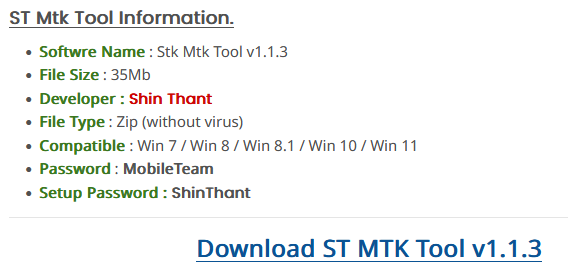
You can download ST MTK Tool from third-party websites that distribute Android servicing utilities. However, ST MTK Tool does not have a verified official website, so its authenticity and security cannot be guaranteed.
Security Tip: Avoid disabling Windows Defender or your antivirus simply to install the tool. If a security warning appears, investigate it rather than bypassing the protection. Always use ST MTK Tool only on devices you own or are authorized to service.
How to Download?
- Visit the download page: Open the Mobile Team Officials ST MTK Tool page on your computer.
- Find the download link: Locate the ST MTK Tool download section and check the listed version and system requirements.
- Download the package: If the file is available, download the archive to your Windows PC.
- Extract the files: Use a trusted archive utility to extract the downloaded ZIP or RAR file.
- Scan before installation: Scan the archive and extracted files with updated security software, and verify the file's source before running any executable.
You May Also Like: MCT MTK FRP Bypass Tool Review: Comprehensive Analysis [Latest]
Part 4: How Does ST MTK Tool Work
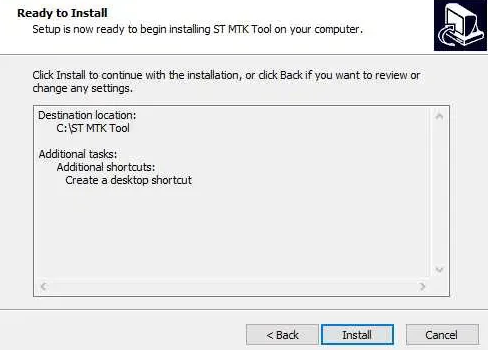
After installing ST MTK Tool on your Windows PC, follow these general steps to use it on a compatible MediaTek Android device. The exact procedure depends on the selected function and your phone model.
- Launch ST MTK Tool: Install and open the program before running it with administrator privileges if necessary.
- Install the required drivers: Ensure your PC has the appropriate MediaTek USB drivers so it can recognize your phone.
- Connect your Android device: Use a compatible USB cable and follow the tool's instructions for the device's connection mode.
- Select a function: Choose the required option, such as Format Data, NV Data Backup, or another supported servicing function.
- Follow the on-screen instructions: Verify the device information and confirm the operation only after checking its effects.
- Wait for completion: Keep the USB connection stable while the tool processes the request, then follow its instructions to disconnect or restart the phone.
My Trial Experience: During my trial, ST MTK Tool initially failed to recognize my Galaxy phone, and the unlocking process could not proceed due to connection and compatibility issues. After troubleshooting the connection and switching to Galaxy running Android 11, I finally completed the operation successfully. Overall, the tool can work on certain compatible devices, but its performance depends heavily on device support, driver configuration, and connection stability.
Part 5: What Are the Good & Bad of ST MTK Tool
Good Points of ST MTK Tool:
- Free to Use: Available versions are distributed free of charge through third-party websites.
- Multiple Functions: Offers FRP removal, data formatting, bootloader management, and NV data backup and restoration.
- No Extra Hardware Required for Some Operations: Certain functions do not require additional hardware such as an OTG cable.
- Supports Selected MTK Devices: Works with compatible MediaTek-powered Android phones, including certain models from OPPO and Xiaomi.
Bad Points of ST MTK Tool:
- Limited Compatibility: It primarily targets MediaTek devices, and success varies by model and Android version.
- Uncertain Download Safety: There is no verified official website or clearly established developer source, making authentic downloads difficult to identify.
- Low Success Rate: Some unlocking attempts may fail because of device restrictions, driver issues, or compatibility problems.
- Risk of Data Loss or Device Damage: Incorrect formatting or bootloader operations can erase personal files or make a device unusable.
- Limited Technical Support: Users may struggle to find reliable assistance if the tool fails or causes problems.
Part 6: What Offers More than ST MTK Tool [For Better FRP Bypass]
Want a more straightforward unlocking solution with a higher success rate? Android Lock Wiper offers dedicated options for FRP lock bypass and Android screen lock removal. Compared with ST MTK Tool, it provides a more accessible approach for supported devices (8,000+), without relying solely on MediaTek-specific servicing functions.
Its compatibility with various Android brands makes it worth considering, although supported models and unlocking conditions should be checked before use.
Safe Download (No ads, no bundles, no background uploads):

How to use the best ST MTK Tool alternative for Google FRP lock removal?
Step 1: Download and install the software on your computer. Once installed, select "Remove Google Lock (FRP)" and choose "Advanced Mode." Then, connect your Android device to the computer using a USB cable and click "Start." It is recommended to back up your phone beforehand to avoid any possible data loss during the FRP bypass procedure.
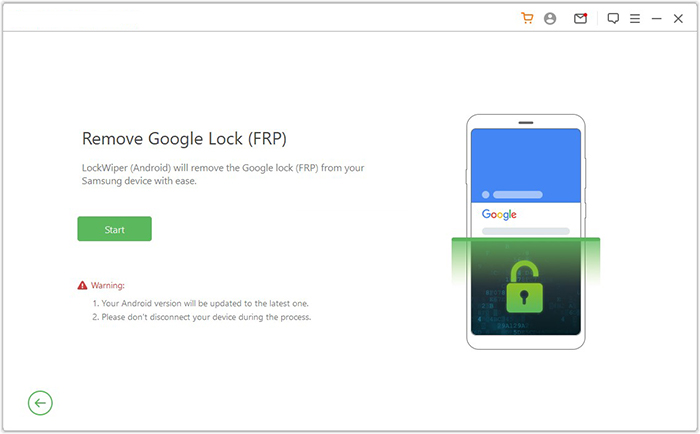
Step 2: Follow the instructions to input the required details about your device and click "Next." Adhere to the on-screen guidance to enter recovery mode on Android. On the next screen, choose the correct PDA, country, and carrier, then click "Download" to retrieve the necessary data package.
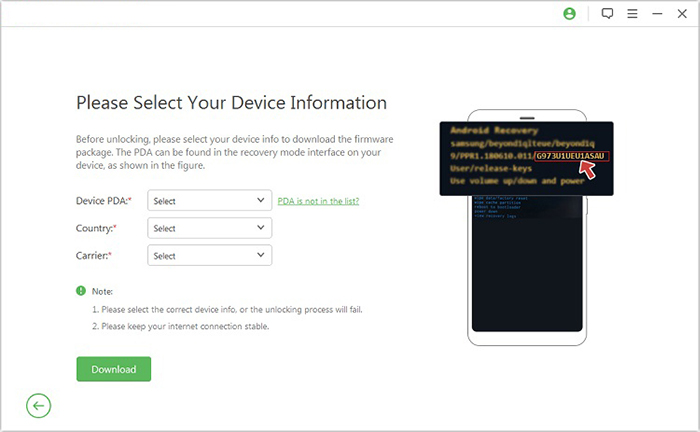
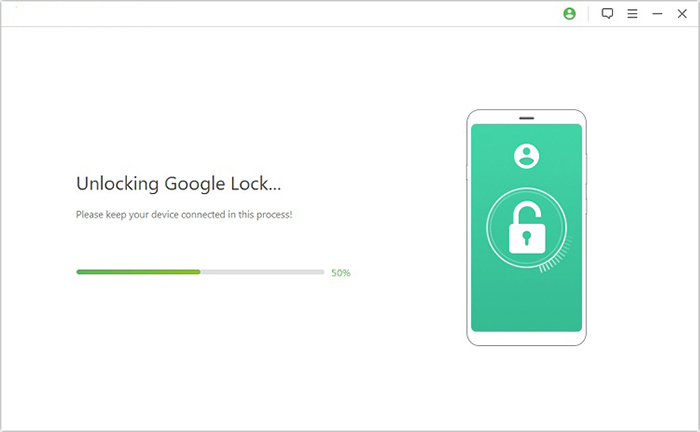
Step 3: Click "Start to Extract" and follow the on-screen prompts to put your device into Download Mode, enable USB debugging, turn on OEM unlock, and extract the firmware along with other essential tasks. Ultimately, the software will initiate the unlocking process for your phone. After a short notification, you will be able to access your device without needing to verify any Google account.
FAQs about ST MTK Tool
Q1: Is ST MTK Tool safe?
ST MTK Tool is a third-party Android servicing utility, and its safety depends on the authenticity of the download and the operations performed. Since its downloads are distributed through third-party websites, scan files before running them and avoid disabling antivirus protection to bypass security warnings.
Q2: Is ST MTK Tool free?
Yes, ST MTK Tool versions are advertised as free to download and use. However, availability may vary by version and download source, so verify the package before installing it.
Q3: How do I fix ST MTK Tool not working?
If ST MTK Tool fails to launch or recognize your phone, try these troubleshooting steps:
- Check whether your phone model and chipset are supported.
- Install the appropriate MediaTek USB drivers from a trusted source.
- Try another USB cable or port.
- Restart your computer and reconnect your phone.
- Extract the downloaded archive again and check whether any files are missing.
- Check the error message and Windows security logs to identify potential causes.
Q4: Can ST MTK Tool remove an Android screen lock?
It may work for some MediaTek (MTK) powered smartphones. Success is not guaranteed, and some operations may erase personal data.
Q5: Why is my phone not detected by ST MTK Tool?
Common causes include missing or incompatible drivers, a faulty USB cable, an unsuitable connection mode, or an unsupported chipset. Try reinstalling trusted drivers, changing the USB port, and following the connection instructions for your specific device.
Q6: Android Lock Wiper vs. ST MTK Tool: FRP Bypass Comparison - Which Is Better?
For FRP bypass, Android Lock Wiper has advantages in broader device support, simpler operation, and additional unlocking options, while ST MTK Tool is more suitable for users who specifically need a MediaTek-focused servicing tool. Here are the key aspects:
|
Aspect
|
Android Lock Wiper
|
ST MTK Tool
|
|
Compatibility
|
Supports more Android brands and models. |
Mainly works with MediaTek devices. |
|
Ease of Use
|
Offers a guided, step-by-step process. |
Requires more technical knowledge. |
|
Chipset Support
|
Not limited to MTK devices. |
Focuses mainly on MTK chipsets. |
|
Success Rate
|
Provides a more structured unlocking process. |
Results vary by device and tool version. |
|
Unlock Functions
|
Handles FRP bypass and screen lock removal. |
Mainly focuses on FRP and MTK servicing. |
Related Articles:
SIM Unlock: 4 Hot Tips to Unlock SIM Card on Android Mobile Phones
5 Tactics to Recover Formatted Data from Android Phone with/without Backup
How to Boot into Samsung Download Mode? 4 Well-tested Strategies
How to Bypass iCloud Activation Lock? 6 Ways You Can't Miss [2026]