
FRPFile FirmwareBD Review 2026: Rational Analysis & Substitute
Factory Reset Protection (FRP) secures modern Android devices, especially newer Samsung models, but it can block users who forget their account details. Many turn to online platforms like FRPFile FirmwareBD, so it is crucial to know now if the platform is safe and effective on newer Samsung/Android models before downloading any FRP bypass files or firmware.
This FRPFile FirmwareBD review provides clear insights into its functionality, risks, and compatibility with current Android security systems, helping users make informed decisions.
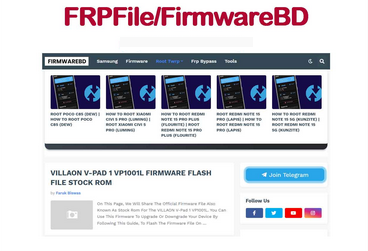
Section 1: FRPFile FirmwareBD: Overview & Key Features
What Is FRPFile FirmwareBD?
FRPFile FirmwareBD is a well-known online platform that provides FRP bypass files and Android firmware, mainly for mobile technicians and experienced users. It offers custom firmware, tools, and step-by-step guides to help bypass Google account verification after a factory reset. The site supports many major brands, regularly updates its database, and provides reliable download links with clear instructions.
FRPFile FirmwareBD: Main Characteristics
|
Feature
|
Description
|
|
Samsung FRP One-Click Tools |
Supports Android 12, 13, and 14 for quick FRP bypass on Samsung devices. |
|
Stock Firmware Files |
Provides ROMs and flash files for Samsung, Xiaomi, Vivo, Oppo, and more. |
|
Multiple Device Support |
Tools available for brands like Xiaomi, Huawei, Vivo, Oppo, and others. |
|
Tool Categories |
Organized by brand and chipset (MTK, Qualcomm, etc.) for easy navigation. |
|
Free Access |
Most files and tools are downloadable without registration. |
|
Step-by-Step Instructions |
Detailed guides and tutorials included with many tools. |
|
FRP Bypass Tools |
Includes tools like XTM ADB, MRT Tool, Dragon FRP Tool, and tested APKs. |
|
Device Unlocking Solutions |
Unlock PINs, patterns, passwords, and fingerprint locks. |
|
IMEI Repair Support |
Tools available to repair damaged IMEI and restore network connectivity. |
|
Custom Recovery & Rooting Tools |
Install custom recovery (e.g., TWRP) or root devices for more control. |
|
User-Friendly Guides |
Offers tips to avoid boot loops or bricked devices, ideal for beginners. |
|
Regular Updates |
Continuously updated with new tools, firmware, and Android version support. |
Is FRPFile FirmwareBD identical to FRPFile? No, FRPFile FirmwareBD is not exactly the same as FRPFile. FRPFile is a general term for tools and files used to bypass FRP, while FRPFile FirmwareBD refers specifically to the version hosted on the FirmwareBD platform. Essentially, FirmwareBD is one source of FRPFile files, but the files themselves may differ in compatibility and methods.
Section 2: FRPFile FirmwareBD: Safety & Pricing
Safety:
FRPFile FirmwareBD is not completely secure. Because it's a third-party platform, some downloads might be outdated, modified, or unsafe, so it's important to scan files with antivirus software. The site also has a low trust rating and displays ads, so users should be careful to avoid suspicious links or pop-ups.
Pricing:
FRPFile FirmwareBD is mostly free to use, as its FRP files, firmware, and unlocking tools generally don't require payment. However, being a third-party platform, there's still a risk of downloading outdated or unsafe files, so antivirus scanning is recommended. Users should also be cautious with ads and pop-ups while accessing the free resources.
Section 3: FRPFile FirmwareBD: How to Use
To reduce risks when using FRPFile FirmwareBD, it's important to follow proper safety and compatibility checks before downloading or running any tools. The steps above will help you protect your device and computer while avoiding common mistakes.
- Download files only from the FRPFile FirmwareBD official website, and avoid third-party mirrors or re-uploaded files from forums.
- Scan all downloaded ZIP, RAR, or EXE files with reliable antivirus software before opening or extracting them.
- Run Windows-based FRP tools inside a virtual machine or sandbox environment to protect your main system from possible malware.
- Carefully confirm that the firmware matches your exact device model, chipset, region, and Android version to prevent bricking your phone (How to unbrick an Android phone?).
- Read the included instructions and follow each step closely when flashing firmware or bypassing FRP.
- Avoid clicking on pop-ups, ads, or fake download buttons that may lead to unsafe websites.
Section 4: FRPFile FirmwareBD: Strengths & Shortcomings
Advantages:
- Offers a large collection of FRP bypass files and firmware for multiple brands like Samsung, Xiaomi, vivo, and OPPO.
- Most files and tools are free to download without registration.
- Includes step-by-step guides and tutorials for using tools safely.
- Supports multiple devices and chipsets, including MTK and Qualcomm.
- Provides tools for unlocking PINs, patterns, passwords, and repairing IMEI.
- Regularly updates its database to stay compatible with newer devices and Android versions.
Disadvantages:
- Being a third-party site, some files may be outdated, modified, or unsafe.
- Contains ads and pop-ups that can lead to unwanted downloads.
- No official support or customer service available.
- Running tools on your main system can be risky without a sandbox or virtual machine.
- Compatibility is not guaranteed for all devices or Android versions, especially newer ones.
- Using tools may void your device warranty or cause software issues.
Section 5: FAQs about FRPFile FirmwareBD
Q1. Can FRPFile FirmwareBD bypass FRP on Android 12-16 devices?
Sometimes, but not reliably. Success depends on the phone model, firmware, and security patch level. Newer Android versions have stronger FRP protection.
Q2. Does FRPFile FirmwareBD work for Xiaomi or Huawei?
For Xiaomi: Works on some models if the firmware matches. For Huawei: Usually ineffective due to stricter FRP and bootloader security.
Q3. Does FRPFile work on all Android devices?
No. Compatibility depends on the phone brand, model, chipset, and Android version. Results may vary from device to device.
Q4. Is there official technical support?
No. The site does not provide official customer service or guaranteed technical assistance.
Q5. What can firmware files from FRPFile be used for?
They can be used to fix software issues such as boot loops, system crashes, soft bricks, or to reinstall the operating system.
Q6. Will using FRPFile affect my warranty?
Yes. Flashing unofficial firmware or bypassing FRP may void your device warranty and could cause system instability.
Q7. What precautions should I take before using FRPFile?
Before using any tool, you should:
- Back up important data;
- Confirm your exact device model;
- Use antivirus protection;
- Follow instructions carefully;
- Understand the potential risks.
Section 6: What Could Be Better than FRPFile FirmwareBD
FRPFile FirmwareBD has several drawbacks, including unverified files, possible security risks, frequent ads, and unreliable compatibility with newer Android versions. As a third-party platform with relatively an outdated design, users may encounter malware threats or failed bypass attempts.
To avoid these issues, it is important to use a more dependable solution like Android Lock Wiper. This professional tool offers a safer and more reliable way to bypass FRP or screen locks on Samsung and many other Android devices with clear guidance and higher success rates.
Core Features of Android Lock Wiper:
- FRP Bypass Support - Removes Google account lock on Samsung and many other Android devices.
- High Success Rate - Regularly updated to support newer Android versions.
- Screen Lock Removal - Unlocks PIN, pattern, password, fingerprint, and face lock.
- Wide Compatibility - Works with overall brands like Samsung, Xiaomi, Huawei, Motorola, and more (No Data Loss on Samsung).
- Easy-to-Use Interface - Provides step-by-step guidance with no technical skills required.
- Data Protection Options - Allows data-safe unlocking on some supported models.
- Safer Alternative - More reliable and secure than downloading unverified tools from FRPFile FirmwareBD.
How to bypass FRP lock on Android device without FRPFile FirmwareBD via Android Lock Wiper?
- Start by downloading and installing the software on your computer.
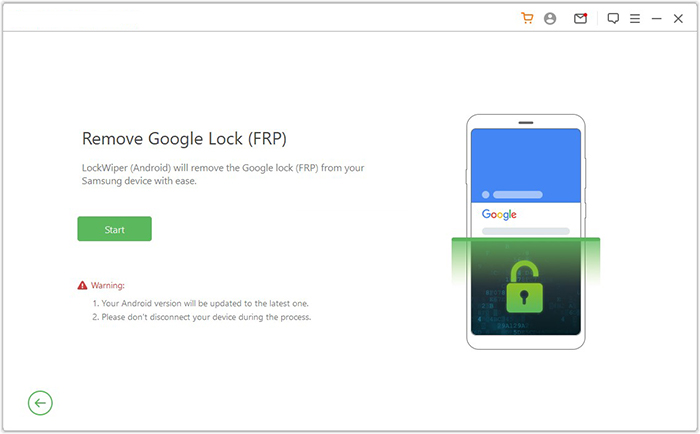
- Once the installation is complete, select "Remove Google Lock (FRP)" and opt for "Advanced Mode."
- Connect your smartphone to the computer using a USB cable, then click "Start."
- It is recommended to back up your device (if it is a non-Samsung phone) to avoid any possible data loss during the FRP bypass procedure.
- Follow the instructions to input the required details about your smartphone and click "Next."
- Adhere to the on-screen guidance to enter recovery mode on your device.
- On the next screen, choose the correct PDA, country, and carrier, then click "Download" to retrieve the necessary data package.
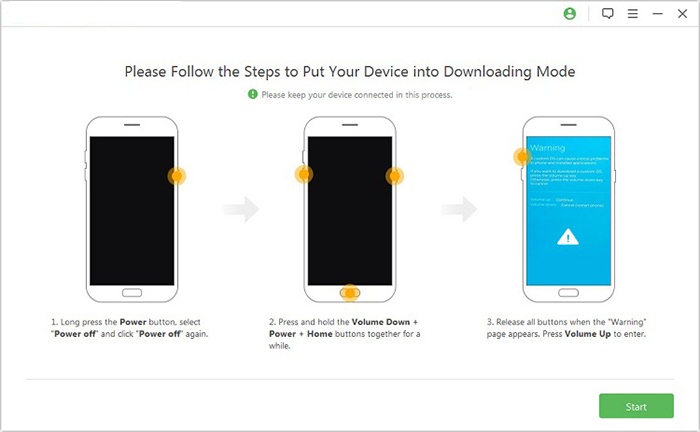
- Subsequently, click "Start to Extract," and follow the on-screen prompts to put your device into Download Mode.
- Enable USB debugging, activate OEM unlock, and extract the firmware along with other essential tasks.
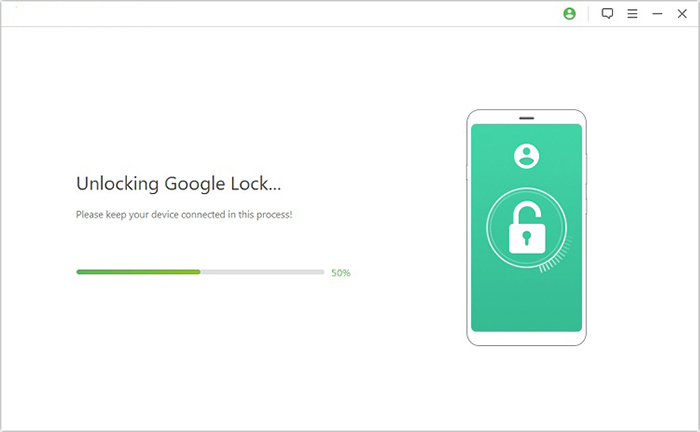
- Ultimately, the software will initiate the FRP unlocking for your smartphone.

In a Nutshell
Every locked device tells a story - sometimes of forgotten passwords, sometimes of second-hand purchases, and sometimes of simple mistakes. What truly matters is how that story ends. After exploring this FRPFile FirmwareBD review, one thing becomes clear: choosing the right unlocking solution is not just about removing a lock, but about protecting your data, your device, and your peace of mind.
Related Articles:
How to Recover Data after Factory Reset Android? 5 Ingenious Ways
How to Recover Data from Broken/Damaged Phone? 5 Little-known Ways
Universal Unlock PIN for Android without Losing Data: 6 Solutions
4 Ways to Remove Activation Lock without Previous Owner/Password
