
vnROM FRP Bypass Review: Can It Really Unlock Android Precisely?
TL;DR:
vnROM FRP Bypass offers a free, simple solution for older Android devices. However, its significant drawbacks on newer systems make a more robust alternative necessary for most users today.
For a more reliable and secure solution, consider using Android Lock Wiper, a PC-based tool that effectively removes FRP locks and screen locks on a vast range of modern devices with a high success rate. Unlike vnROM, which is often unreliable and risky on newer Android versions, this tool provides a stable, guided process that is explicitly intended for lawful device owners.
What is vnROM FRP Bypass? vnROM FRP Bypass is an Android utility designed to help users bypass Google's Factory Reset Protection (FRP) when they are locked out of their devices. It works mainly on older Android versions and is valued for its simplicity, though it carries risks such as low success rates on newer systems and potential malware from unofficial sources.
This article, titled vnROM FRP Bypass review, brings forth an in-depth analysis of the tool's strengths and weaknesses, while also exploring a safer and more reliable alternative.
- Part 1: VNROM vs. vnROM.net vs. VNROM APK
- Part 2: vnROM FRP Bypass: Overview of Different Versions
- Part 3: Is vnROM FRP Bypass Safe & Free to Use
- Part 4: How to Download & Use vnROM FRP Bypass
- Part 5: Why Is VNROM Not Working? How to Fix It
- Part 6: Why We Like or Dislike vnROM FRP Bypass
- Part 7: Best Replacement for vnROM FRP Bypass [More Compatible]
- FAQs for VNROM FRP Bypass
- Conclusion - VNROM vs. Android Lock Wiper: Which Is Better
Part 1: VNROM vs. vnROM.net vs. VNROM APK
VNROM, vnROM.net, and VNROM APK are related but distinct terms: VNROM is the general bypass method, vnROM.net is the official website hosting the tool, and VNROM APK is the actual installation file used to perform FRP bypass on Android devices. Understanding the differences helps avoid confusion and ensures you download from safe sources.
|
VNROM
|
vnROM.net
|
VNROM APK
|
|
General name for the FRP bypass method/tool.
|
Official website hosting the bypass tool and instructions. |
The actual Android Package Kit file used to install/run the bypass. |
|
Refers broadly to the technique of bypassing Google's FRP lock.
|
Provides download links, guides, and updates. |
Must be downloaded and installed on the locked device. |
|
Often mentioned in tutorials and reviews as a solution for Samsung, Huawei, Xiaomi, etc.
|
Considered the safest source to obtain the APK. |
Directly executes the bypass process once installed. |
|
Not a file itself, but the concept/tool name.
|
URL: vnROM.net (official domain). |
Risk of fake/malicious APKs if downloaded from unofficial sites. |
|
Used interchangeably with "VNROM bypass."
|
Acts as the trusted hub for VNROM resources. |
Requires enabling "Install from unknown sources" on Android. |
Part 2: vnROM FRP Bypass: Overview of Different Versions
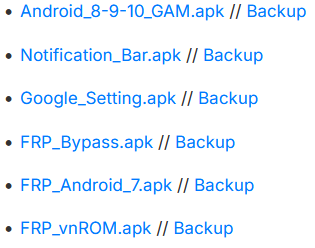
Not all vnROM FRP Bypass packages serve the same purpose. Some target specific Android versions, while others include tools for accessing hidden settings or Google Account Manager, as shown in the table below.
|
vnROM Version/APK
|
Highlights
|
Drawbacks
|
|
FRP_Bypass.apk
|
Free APK for bypassing FRP on older Android devices. |
Low success rate on Android 9 and later. |
|
FRP_vnROM.apk
|
Works well on many Android 5-8 devices. |
Patched on most newer security updates. |
|
Android_6_GAM.apk
|
Specifically made for Android 6. |
Directly executes the bypass process once installed. |
|
Not a file itself, but the concept/tool name.
|
URL: vnROM.net (official domain). |
Only supports Android 6. |
|
FRP_Android_7.apk
|
Optimized for Android 7 devices. |
Doesn't work on Android 8 or newer. |
|
Android_8-9-10_GAM.apk
|
Covers Android 8-10 with one APK. |
Compatibility varies by security patch. |
|
QuickShortcutMaker.apk
|
Opens hidden system settings on some devices. |
Blocked on many recent Android versions. |
|
Activity Launcher APK
|
Helps access hidden Android activities. |
Device-dependent and often patched. |
|
Test DPC.apk
|
Useful in some legacy FRP bypass methods. |
Rarely effective on modern devices. |
|
Latest vnROM Package (2026)
|
Includes multiple APKs and shortcut tools for different Android versions. |
Success still depends on the device model and security patch level. |
Part 3: Is vnROM FRP Bypass Safe & Free to Use
vnROM FRP Bypass is generally considered free to download and use, but it is not fully safe or reliable because it comes from third-party sources rather than official platforms like Google Play or device manufacturers.
Most security and tech reviews also note that it may expose users to malware risks, fake APK files, and compatibility issues, especially on newer Android versions where it often no longer works.
So while it is "free," its safety is not guaranteed, and its effectiveness depends heavily on the device model, Android version, and security patch level.
Part 4: How to Download & Use vnROM FRP Bypass
vnROM FRP Bypass can be downloaded for free from vnROM.net and used to bypass Google's Factory Reset Protection, but it is complex, risky, and unreliable on newer Android versions (11-16). Below is a clear step-by-step guide on how to download and use it safely.
01: Download vnROM APK
- Open browser → go to vnROM.net/bypass.
- Tap the download link for FRP_Bypass.apk.
- Save the file to your phone or a USB drive.
- Avoid third-party sites to reduce malware risk.
02: Prepare Your Device
- Go to Settings → Security → Unknown Sources.
- Enable installation from unknown sources.
- Gather an OTG cable and USB drive with the APK.
- Connect your phone to Wi-Fi.
03: Install vnROM APK
- Load the APK onto the locked device using OTG.
- Insert USB drive into phone via OTG cable.
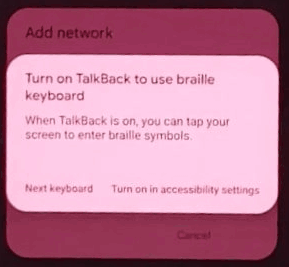
- Navigate to Downloads/Files using TalkBack trick.
- Locate and install FRP_Bypass.apk.
- Grant installation permissions if prompted.
04: Bypass Google Verification
- Open the installed vnROM app.
- Access Settings → Factory Reset.
- Perform reset to clear Google account lock.
- Reboot device and set up without old Google account.
05: Verify Success
- Confirm device no longer asks for old Google account.
- Test Wi-Fi and app installations.
Part 5: Why Is VNROM Not Working? How to Fix It
VNROM usually fails today because it relies on old Android system loopholes that Google has already patched. On newer devices, the setup wizard and security updates block APK installation, browser access, and hidden settings entry methods that VNROM depends on.
Another major reason is Android version incompatibility - it was mainly designed for Android 5-8 devices, while Android 9 and above (especially Android 12-16) block some of its techniques completely.
Common failure symptoms include:
- APK cannot be installed;
- No browser access during setup;
- OTG/USB not detected;
- FRP lock reappears after reset.
How to Fix?
- Verify Android version compatibility (older Android = higher success chance).
- Use a different APK variant matching the device system version.
- Check internet/Wi-Fi stability during setup.
- Try alternative entry methods (e.g., different setup flow or accessibility route).
- Re-download APK from a reliable source (corrupted or fake APKs often fail).
Part 6: Why We Like or Dislike vnROM FRP Bypass
Why We Like vnROM FRP Bypass
- Free to use: No subscription or license fees, making it accessible to anyone.
- Simple process: Just install the APK and follow basic steps; no advanced technical knowledge required.
- Works on older devices: Reliable on Android 5-8, especially Samsung models.
- Widely available: Hosted on vnROM.net with multiple APKs and guides.
- Offline method: Doesn't require a PC or internet connection once the APK is installed.
Why We Dislike vnROM FRP Bypass
- Low success rate: Drops sharply on Android 9+, and is almost unusable on Android 13-16.
- Security risks: APKs from unofficial sources may contain malware or spyware.
- Legal concerns: Using FRP bypass on devices you don't own is illegal.
- No official support: If the process fails or bricks your phone, there's no vendor help.
- Complex setup: Requires OTG cable, flash drive, and enabling "Unknown Sources," which can be intimidating for non-technical users.
Part 7: Best Replacement for vnROM FRP Bypass [More Compatible]
A PC-driven unlocking utility, with Android Lock Wiper included in its toolkit, is built to remove screen locks like PIN, pattern, and biometric barriers with a guided process. It also works as a practical replacement for VNROM FRP Bypass, especially on newer Android devices where APK-based methods often fail. Compared with older bypass tricks, it delivers a more steady and widely compatible way to regain access to locked phones.
Key Features of Android Lock Wiper:
- Unlocks screen locks (PIN, pattern, password, fingerprint, face ID).
- Removes Google FRP lock without needing account credentials.
- Works as a VNROM FRP Bypass alternative with better support for newer Android versions.
- Compatible with major brands like Samsung, Xiaomi, OPPO, Vivo, Huawei, and more.
- PC-based tool (Windows/Mac) with step-by-step guided process.
- No password required to regain device access.
- Supports a wide range of Android versions and thousands of devices.
- Automatically detects device model for suitable unlock method.
- More stable and reliable than APK-based bypass tools like VNROM.
- Useful for both screen lock removal and FRP bypass scenarios.
Free & Safe Download:

Step 1: Set Up and Select Mode
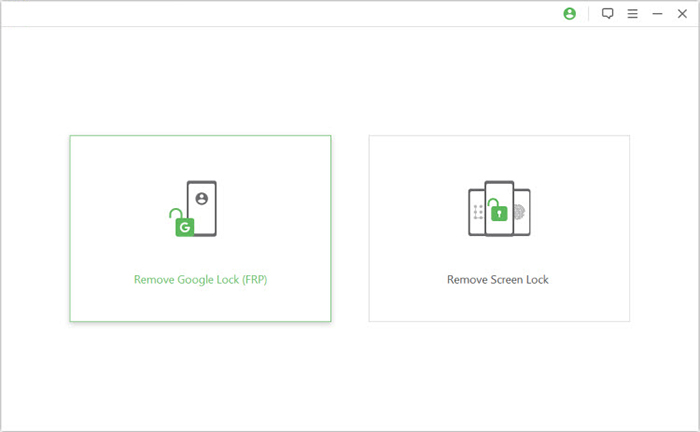
Begin by downloading and installing the software on your computer. Once installed, launch the program and select the "Remove Google Lock (FRP)" option, then choose "Advanced Mode" to proceed.
Step 2: Connect and Prepare Data
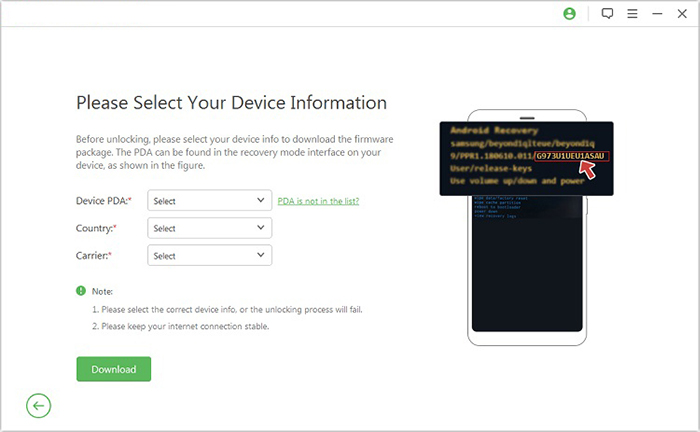
Connect your Android smartphone to the computer using a USB cable and click "Start" to begin. Follow the prompts to enter your device information, then click "Next." Adhere to the on-screen instructions to put your device into recovery mode. On the next screen, select the correct PDA, country, and carrier for your device, then click "Download" to retrieve the necessary data package.
Step 3: Extract and Unlock
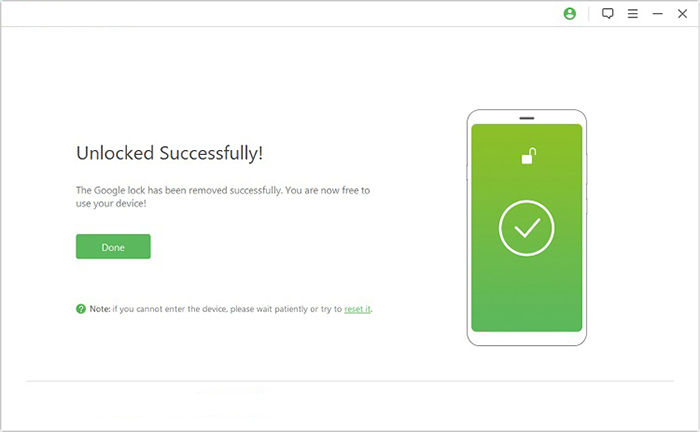
Click "Start to Extract" and follow the instructions to put your device into Download Mode, enable USB debugging, activate OEM unlock, and extract the firmware. The software will then begin unlocking your device. After a brief notification, you will be able to access your device without needing to verify any Google credentials.
FAQs for VNROM FRP Bypass
Q1. Is VNROM FRP Bypass legal?
It depends on usage. It is intended for legitimate situations like unlocking your own device. Using it on devices you do not own or are not authorized to access may violate laws or terms of service.
Q2. Can VNROM damage my phone?
VNROM itself does not physically damage hardware, but incorrect steps or unsafe APK files can cause:
- Boot loops;
- App crashes;
- System instability;
- Security vulnerabilities.
Q3. Which Android versions support VNROM FRP Bypass best?
It works best on older Android versions (5-8). On Android 9+, 10+, and especially Android 12-16, success rates drop significantly due to stronger FRP protections.
Q4. Why does VNROM ask for browser or YouTube access?
VNROM methods often rely on opening a browser or YouTube app during setup to reach hidden settings menus or install APK files. This is used as a workaround to access system settings during the setup process.
Q5. Can VNROM bypass FRP on Samsung, Xiaomi, and OPPO?
It may work differently depending on the brand. Some older Samsung devices are more compatible, while Xiaomi, OPPO, and newer models usually block the method due to stronger security patches and customized Android skins.
Q6. Do I need to enable USB debugging for VNROM FRP bypass?
No, USB debugging is not required in most VNROM APK-based methods. The process typically happens during the initial setup screen before full access to system settings is available.
Q7. Is VNROM FRP Bypass permanent?
Yes, once FRP is bypassed and the Google account setup is completed successfully, the bypass remains permanent unless the device is factory reset again, which will trigger FRP once more.
Conclusion - VNROM vs. Android Lock Wiper: Which Is Better
Android Lock Wiper is generally the better choice compared to VNROM FRP Bypass, offering broader device support, lawful use guidance, and higher success rates on modern Android versions. VNROM remains useful for older devices but lacks reliability and safety on newer systems.
|
Feature
|
VNROM FRP Bypass
|
Android Lock Wiper
|
|
Primary Function
|
Free FRP bypass tool for Google account verification |
Full Android unlocking suite: screen locks, FRP bypass, Samsung unlock without data loss |
|
Device Support
|
Works mainly on older Android versions (Android 5-10) |
Supports 6,000+ devices, including Android 15 |
|
Reliability
|
Inconsistent on modern devices; often fails on Android 11-16 |
High success rate with regular updates and professional support |
|
Data Safety
|
Risk of instability and potential malware from unofficial sources |
Safer, official software with customer support and refund policy |
|
Ease of Use
|
Simple APK installation, but requires manual steps |
Guided workflows with clear instructions, faster unlock process |
|
Legal/Consent
|
Often used informally without clear lawful-use guidance |
Explicitly intended for use with lawful owner consent |
|
Cost
|
Free |
Paid, but offers trial and professional support |
|
Best Use Case
|
Quick bypass on older, low-security devices |
Reliable unlocking for modern devices, technicians, and lawful owners |
Related Articles:
An Unbiased MobileTeamOfficial FRP Bypass APK Review [Latest Update]
RiseRom FRP Tool Review: Is It Safe to Use? Any Trusted Alternatives?
5 Tactics to Recover Formatted Data from Android Phone with/without Backup
5 Easy Ways to Recover Data from Locked Android Phone with Broken Screen
