
Full Halabtech FRP Tool V1.1.6 Review: Ultimate Guide 2026
TL;DR:
Halabtech FRP Tool is a powerful yet complex professional utility for Android FRP bypass and device repair, while Android Lock Wiper offers a more beginner-friendly alternative with simpler one-click operations. Ultimately, the choice depends on your technical expertise - Halabtech suits experienced technicians needing advanced control, whereas Android Lock Wiper is better for everyday users seeking quick and easy solutions.
Halabtech FRP Tool has become a recognized utility in the mobile servicing field, offering functions such as flashing firmware, unlocking bootloaders, and bypassing FRP lock. This Halabtech FRP Tool review explores its role in Android FRP bypass, highlighting how technicians use it to restore devices, remove restrictions, and manage account-related issues.
Note: HalabTech FRP Tool and programs like Android Lock Wiper mentioned in this article should only be used with the explicit consent of the device's rightful owner.
- Part 1: What Is Halabtech FRP Tool
- Part 2: Halabtech FRP Tool: Key Features
- Part 3: Halabtech FRP Tool: Pricing & Security
- Part 4: How to Download and Use Halabtech FRP Tool
- Part 5: Halabtech FRP Tool: Pros & Cons
- Part 6: The Most Reliable Halabtech FRP Tool Alternative
- Part 7: FAQs about Halabtech FRP Tool
- Conclusion - Halabtech FRP Tool vs Android Lock Wiper
Part 1: What Is Halabtech FRP Tool
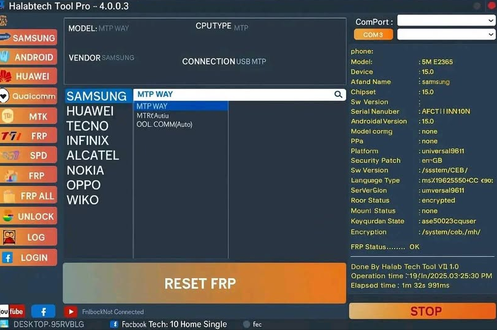
Halabtech FRP Tool is a professional Android utility designed for mobile repair tasks such as unlocking, flashing firmware, repairing IMEI, and bypassing Google's Factory Reset Protection (FRP). It supports a wide range of devices including Samsung, Huawei, OPPO, Xiaomi, and TECNO, making it popular among technicians. While powerful, it requires technical knowledge and careful handling to avoid risks like device incompatibility or bricking.
Halabtech FRP Tool supports a wide range of Android devices, with the strongest coverage for Samsung smartphones and tablets, including Galaxy A-series, M-series, S-series, Z Flip/Fold, and Tab models. It also extends compatibility to Huawei, OPPO, Xiaomi, vivo, TECNO, and devices running Qualcomm Snapdragon or MTK chipsets.
Part 2: Halabtech FRP Tool: Key Features
Here is a concise introduction to highlight the table of Halabtech FRP Tool's capabilities. The following overview organizes its main functions into a clear format. After checking it out, you can easily see how the tool supports unlocking and Android repair tasks:
|
Feature
|
Description
|
|
FRP Bypass |
Removes Google Factory Reset Protection (FRP) locks on supported devices such as Samsung, Huawei, OPPO, Xiaomi, and Tecno. |
|
Screen & Network Unlock |
Clears screen locks (PIN, password, pattern) and unlocks SIM/network restrictions for carrier flexibility. |
|
IMEI Repair |
Restores or rewrites corrupted IMEI numbers to fix connectivity and restore proper device identification. |
|
Firmware Flashing |
Enables flashing of stock ROMs in EDL, MTK, and Qualcomm modes for recovery, upgrades/downgrades, or malware removal. |
|
Rooting |
Grants administrative access for advanced customization and system-level modifications. |
|
Account Removal |
Removes linked accounts such as Mi Cloud or Samsung Accounts to regain full device control. |
|
Multi-Device Support |
Compatible with thousands of models across Samsung, Huawei, OPPO, Xiaomi, Tecno, and chipsets like MTK, Qualcomm, and Kirin. |
|
Regular Updates |
Frequently updated to expand device compatibility and improve performance. |
Part 3: Halabtech FRP Tool: Pricing & Security
Halabtech FRP Tool uses a hybrid pricing model: a yearly license costing about $50-$70 USD and a credit system for advanced operations, with credits priced around $0.15-$0.25 each. Security is ensured through official downloads from halabtech.com, frequent updates every 1-2 weeks, and license activation tied to a hardware ID, while unauthorized cracked versions pose malware risks.
Pricing Model
- Annual License: $50-$70 depending on reseller.
- Samsung FRP Bypass (MTP Mode): 0 credits (free)
- TECNO/Infinix IMEI Repair (new security): 10-15 credits ($2-$3)
- Xiaomi Auth Flash (EDL Mode): 5-8 credits ($1-$1.60)
- OPPO/realme IMEI Repair (Qualcomm): 10-20 credits ($2-$4)
- Network Unlock (various models): 20-50+ credits ($4-$10+)
Refund Policy
- Server-side errors → credits refunded automatically.
- Client-side errors (bad cable, wrong drivers) → credits not refunded.
Security
- Official Download: Only from halabtech.com or verified resellers.
- Activation: License tied to one PC via hardware ID (HWID). Resellers may allow limited HWID resets.
- System Requirements: Windows 10/11 (64-bit), Intel i3+, 4GB RAM, stable internet.
- Update Frequency: Every 1-2 weeks, adding new models, features, and security patches.
- Security Risks: Cracked versions can contain malware; antivirus may flag GSM tools during installation, so disabling temporarily may be required.
Part 4: How to Download and Use Halabtech FRP Tool
Here's a clear step-by-step guide to downloading and using Halabtech FRP Tool for bypassing FRP locks and performing device repair tasks. Follow these instructions carefully, as some steps involve technical procedures like EDL mode connections.
01: Prepare Your Computer
- Download HalabTech Tool V1.1.6 from the official website.
- Confirm compatibility with Windows 7/8/10/11.
- Install the required USB drivers for your device.
- Temporarily disable antivirus software to avoid installation issues.
02: Install and Launch Tool
- Extract the downloaded Halabtech FRP Tool package.
- Follow the on-screen instructions to install.
- Download the corresponding loader file for your phone model.
- Install Qualcomm USB Driver.
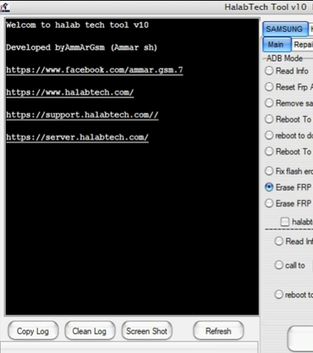
- Launch Halabtech Tool and select Qualcomm - By loader.
- Import your phone's loader file.
03: Connect Device in EDL Mode
- Power off your locked Samsung phone.
- Remove the back cover.
- Search online for the EDL Point of your phone model.
- Make the EDL Point jumper connection.
- Connect the device to your computer via USB cable.
- In Halabtech Tool, click Refresh.
04: Execute FRP Bypass
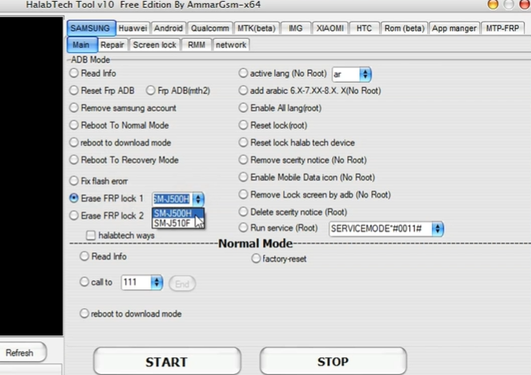
- In the tool, follow the on-screen prompts to finish the selected option on your Android device.
- Wait for the process to complete.
- Your device should now be free of the FRP lock.
Part 5: Halabtech FRP Tool: Pros & Cons
Halabtech FRP Tool is powerful and versatile, but its complex setup and risks make it more suitable for experienced mobile repair technicians than everyday users.
Pros of Halabtech FRP Tool
- Multi-purpose functionality: Handles FRP bypass, screen lock removal, IMEI repair, firmware flashing, rooting, and account removal.
- Wide device support: Compatible with Samsung, Huawei, OPPO, Xiaomi, vivo, TECNO, and chipset-based devices (MTK, Qualcomm, Kirin).
- Regular updates: Frequently updated to expand compatibility and improve performance.
- User-friendly interface: Simplified design makes navigation easier for technicians.
- Flexible usage: Supports multiple repair modes including EDL, MTP, and loader-based operations.
Cons of Halabtech FRP Tool
- Technical complexity: Requires knowledge of EDL points, loader files, and chipset-specific drivers.
- Risk of bricking: Incorrect use can permanently damage devices.
- Windows-only support: Limited to Windows 7-11, excluding macOS/Linux users.
- Antivirus conflicts: GSM tools may be flagged, requiring temporary antivirus disablement.
- Not beginner-friendly: Best suited for professional technicians rather than casual users.
Part 6: The Most Reliable Halabtech FRP Tool Alternative
Are there alternatives to HalabTech FRP Tool? Yes, there are several alternatives such as Odin (Samsung), SP Flash Tool (MediaTek), and other FRP bypass utilities. Commercial tools like Android Lock Wiper also offer guided unlocking features. The best choice depends on device type and user skill level.
Main Features of Android Lock Wiper:
> Screen Unlock: Removes PIN, pattern, password, fingerprint, and face ID.
> FRP Bypass: Clears Google account verification on Samsung, Xiaomi, Redmi, OnePlus, etc.
> Samsung Unlock: Unlocks without data loss.
> Quick Reset: Factory reset in minutes.
> Wide Support: Works with 6,000+ models.
> Multi-Lock: Handles multiple lock types.
> Easy Interface: Simple design for all users.
> Support Service: Offers user guidance.
> Legit Use: Intended for rightful owners only.

Below is how to use the best Halabtech FRP Tool alternative:
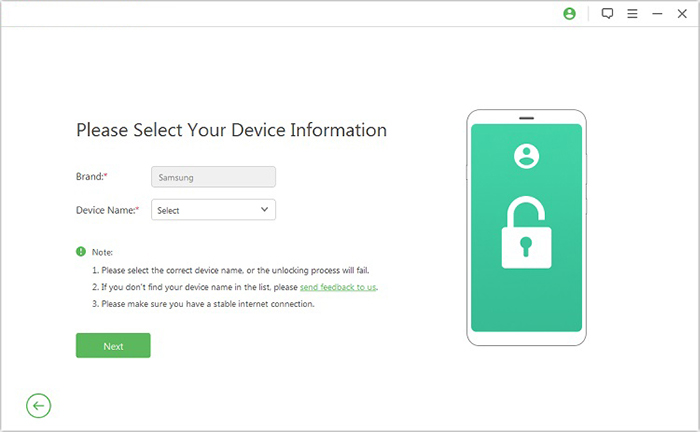
Step 1: Install the software on your computer, then open it and choose "Remove Google Lock (FRP)" followed by "Advanced Mode." Connect your Android phone using a USB cable and click "Start," then enter the required device details and proceed by clicking "Next."
Step 2: Follow the prompts to boot your phone into Recovery Mode. Select the correct PDA, country, and carrier information, then download the required data package. After that, click "Start to Extract" and follow the instructions to switch the device into Download Mode.
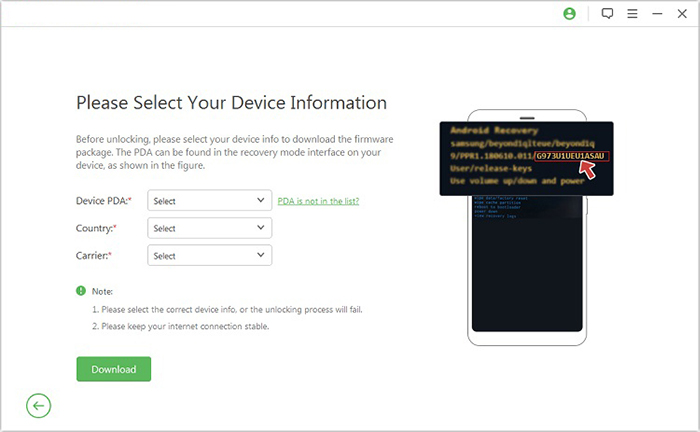
Step 3: Enable USB debugging and turn on OEM unlocking on your phone. The tool will extract firmware components and prepare the device automatically. Once everything is set, the FRP unlocking process will begin and complete automatically.
Part 7: FAQs about Halabtech FRP Tool
Q1. Can it remove FRP without USB debugging?
Yes, in many cases, it uses modes like MTP, EDL, or Test Point instead of USB debugging. This allows FRP bypass even when the phone is locked. However, success depends on the device model and security patch.
Q2. Do I need root access to use it?
Not always. Some features work without root, especially FRP removal via test point or ADB-enabled modes. However, advanced operations like system modifications may require root access.
Q3. Why is HalabTech FRP Tool not detecting my device?
This usually happens due to missing USB drivers, incorrect connection mode, or an unsupported chipset. Installing proper drivers and enabling the correct mode (EDL/MTP/Fastboot) often fixes the issue. Faulty cables can also cause detection failure.
Q4. Can HalabTech FRP Tool bypass Google account verification permanently?
It can remove FRP locks temporarily or permanently depending on the device and method used. However, a factory reset may bring the FRP lock back if the original Google account is still linked. Proper account removal is still required for a permanent solution.
Q5. Does HalabTech FRP Tool require an internet connection?
In most cases, the tool itself runs offline once installed on a Windows PC. However, downloading drivers, updates, or firmware files may require an internet connection. Some bypass methods may also use online resources.
Q6. What drivers are needed for HalabTech FRP Tool?
You typically need USB drivers for the specific chipset or brand, such as Samsung USB drivers, MTK drivers, or Qualcomm drivers. Without proper drivers, the tool may fail to detect the device. Installing ADB and Fastboot drivers is also often necessary.
Q7. Why does the tool fail during FRP bypass?
Failure can occur due to outdated software, unsupported Android security patches, or incorrect mode selection (like Fastboot vs. EDL). Faulty USB cables or unstable connections can also interrupt the process. In some cases, the device firmware may block the method entirely.
Q8. Is HalabTech FRP Tool legal to use?
Its legality depends on how it is used. It is generally intended for legitimate repair and device recovery purposes. However, bypassing FRP on a device you do not own or have permission to unlock may violate laws in some regions.
Conclusion - Halabtech FRP Tool vs Android Lock Wiper
The table below highlights how Halabtech FRP Tool and Android Lock Wiper differ in their core functions, making it easier to identify the strengths of each solution.
|
Aspect
|
Halabtech FRP Tool
|
Android Lock Wiper
|
|
FRP Bypass
|
Supports Samsung, Huawei, OPPO, Xiaomi, TECNO via loader files & EDL mode |
One-click FRP bypass for more phone brands/models without loader files |
|
Screen Lock Removal
|
Removes PIN, password, pattern, but requires technical setup |
Unlocks PIN, pattern, password, fingerprint, and face ID easily |
|
Firmware Flashing
|
Allows flashing stock ROMs in EDL/MTK/Qualcomm modes |
Also focused on flashing and quick factory reset |
|
Ease of Use
|
Complex, technician-oriented, requires drivers & EDL jumper |
Beginner-friendly, simple interface, no advanced setup |
|
Best For
|
Professional technicians with advanced knowledge |
Everyday users and technicians seeking quick solutions |
Best Halabtech FRP Tool alternative free download:
Related Articles:
TMT Qualcomm Tool V2.0 Review 2026: Not Limited to FRP Bypass
vnROM FRP Bypass Review: Can It Really Unlock Android Precisely?
How to Take a Full Backup of Android Phone? 7 Tested Methods
How to Recover Data after Factory Reset Android? 5 Ingenious Ways
