Cheetah Tool Pro Review: Is It Advisable to Rely on? [Answered]
TL;DR:
In short, Cheetah Tool Pro is a powerful yet complex professional suite best suited for technicians who need advanced repair features, but its steep learning curve and inconsistent reliability may deter casual users. For those primarily seeking a straightforward way to unlock screens or bypass FRP, Android Lock Wiper offers a safer, more beginner-friendly alternative.
NOTE: Cheetah Tool Pro and its alternative, Android Lock Wiper, are both professional unlocking tools that must be used strictly for legal purposes, such as unlocking personally owned devices or performing authorized repairs.
A Cheetah Tool Pro review is often sought by users who want to verify performance, reduce risk, and choose the right tool for Android repair or unlocking tasks before committing to it. To provide a clearer picture of its real-world capability, the following section first presents a comprehensive table summarizing its overall performance:
|
Category
|
Rating/Score
|
Summary
|
|
Screen Unlock Capability
|
★★★★☆ |
Strong support for FRP bypass and screen lock removal on many Android devices. |
|
Device Compatibility
|
★★★★☆ |
Works well with multiple brands (Samsung, Xiaomi, MediaTek devices), but not universal for all models. |
|
FRP Bypass Performance
|
★★★☆☆ |
Effective on supported firmware versions, though success rate varies by patch level. |
|
Flashing/Advanced Repair Tools
|
★★★☆☆ |
Offers professional-level functions like firmware flashing and partition operations. |
|
Ease of Use
|
★★★☆☆ |
Requires technical knowledge; not beginner-friendly. |
|
Stability & Reliability
|
★★☆☆☆ |
Generally stable, but occasional tool detection or driver issues reported. |
|
Safety & Risk Level
|
★★★☆☆ |
Incorrect use may cause bootloop or data loss. |
|
Update Frequency
|
★★★★☆ |
Updates are periodic but not always consistent. |
|
Overall User Satisfaction
|
★★★☆☆ |
Favored by technicians, less suitable for casual users. |
Next, let's have a comprehensive understanding of Cheetah Tool Pro.
- Part 1: Cheetah Tool Pro - Key Features
- Part 2: Cheetah Tool Pro - Latest Updates
- Part 3: Cheetah Tool Pro - Supported Devices
- Part 4: Cheetah Tool Pro - Pricing & Safety
- Part 5: Cheetah Tool Pro - How to Use
- Part 6: Cheetah Tool Pro - Pros & Cons
- Part 7: Cheetah Tool Pro - Best Alternative
- Cheetah Tool Pro - FAQs
Part 1: Cheetah Tool Pro - Key Features
Overview
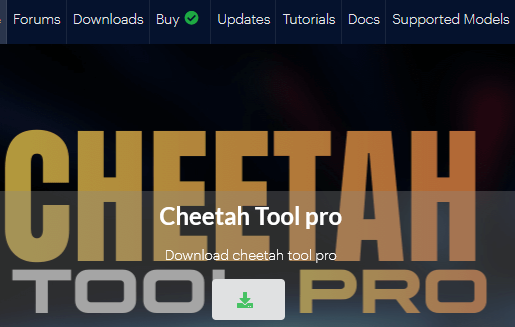
Based on trusted sources, Cheetah Tool Pro is a professional Windows-based software for repairing and servicing Android devices. Its main functions include removing FRP and screen locks, flashing firmware, and repairing IMEI numbers. The tool supports many brands like Samsung and Xiaomi and operates on a commercial, credit-based system.
Main Features:
|
Feature
|
Description
|
|
FRP Bypass |
Quickly bypass Factory Reset Protection (Google account lock) after a reset. |
|
IMEI Repair |
Fix or rewrite invalid/corrupted IMEI numbers to restore device compliance. |
|
Network Unlocking |
Remove SIM locks to allow devices to work with different carriers. |
|
Flashing & Firmware Updates |
Flash stock ROMs, install updates, and fix boot loops or software errors. |
|
Reset Screen Lock |
Reset forgotten screen locks without data loss. |
|
Read/Write QCN |
Manage Qualcomm Network Configuration files to optimize connectivity. |
|
Read/Write NVM |
Access and modify Non-Volatile Memory settings (requires root for ADB). |
|
Security Management |
Read/write device security settings for optimal protection. |
|
Fast Processing |
Operations complete faster than many competitors, boosting repair shop efficiency. |
Part 2: Cheetah Tool Pro - Latest Updates
Here's a clear snapshot of the latest Cheetah Tool Pro updates in 2026, organized into a concise table for quick reference. It highlights the version, release date, and the most important new features added across each update.
|
Version
|
Release Date
|
Highlights
|
|
V2026.04.15.176.0
|
Apr 15, 2026 |
Added Qualcomm chipset support; improved FRP reset for OPPO/realme; enhanced flashing stability. |
|
V2026.05.02.177.0
|
May 2, 2026 |
Expanded Samsung Galaxy A-series support; improved bootloader unlock; bug fixes for MediaTek devices. |
|
V2026.05.23.178.0
|
May 23, 2026 |
Mandatory device model selection; MediaTek MT6835 security; TCL/Alcatel firmware ops; rugged brand authorization (Ulefone, Doogee, Oukitel, Blackview). |
|
V2026.06.06.180.0
|
June 6, 2026 |
Samsung MediaTek V6 advanced authorization; bootloader decode/lock; expanded Samsung BIT revisions; Motorola Reset MDM. |
|
V2026.06.30.183.0
|
June 30, 2026 |
Firmware flash & network unlock; carrier relock for Galaxy S25/S24; reset MCK & rebuild security; multi-chipset support (Qualcomm, UNISOC); stability improvements. |
Part 3: Cheetah Tool Pro - Supported Devices
Cheetah Tool Pro supports a massive range of Android devices across brands like Samsung, Huawei, Xiaomi, OPPO, realme, Motorola, and many more. The tool covers over 100 brands and thousands of models. Here are 3 full lists:
Major Global Brands
- Samsung - 510+ models (Galaxy S21 → S25, Z Fold/Flip, Tab series, A series, M series, XCover rugged phones).
- Huawei - 89 models.
- Xiaomi - 150 models (Mi, Redmi, POCO, Mix Fold, Pad series).
- OPPO - 133 models (Reno, Find X, K series).
- realme - 125 models (GT Neo, C series).
- Motorola - 61 models (Moto G, Edge series).
- Nokia - 133 models.
- vivo - 68 models.
- OnePlus - 47 models (Nord, Ace, flagship series).
Mid-Tier & Regional Brands
- Alcatel/TCL - 176/103 models.
- Lenovo - 164 models.
- Meizu - 137 models.
- ZTE - 69 models (Blade, Axon, Nubia).
- TECNO - 109 models.
- itel - 71 models.
- HONOR - 25 models.
- Infinix - 25 models.
- Hisense - 24 models.
- Asus - 53 models.
- Coolpad - 43 models.
- Vodafone/T?Mobile branded phones - 30+ models.
Rugged & Niche Brands
- Blackview - 134 models.
- Ulefone - 29 models.
- Doogee - 23 models.
- Oukitel - 35 models.
- Umidigi - 22 models.
- Cubot - 19 models.
Part 4: Cheetah Tool Pro - Pricing & Safety
Before deciding whether to use Cheetah Tool Pro, it is helpful to compare its subscription plans alongside the safety considerations associated with the software. The table below summarizes the current pricing options and highlights key points about its reliability, potential risks, and recommended usage.
|
Category
|
Key Details
|
|
Is It Free? |
3-Month Plan: US$27 (includes updates for 3 months). |
|
|
6-Month Plan: US$37 (includes updates for 6 months). |
|
|
12-Month Plan: US$49 (includes one year of updates and bug fixes). |
|
|
Credits: Some operations (such as Samsung/Xiaomi IMEI-related services) require additional paid credits. Credit prices start at approximately US$0.75-0.80 each. |
|
Is It Safe? |
The official developer and several resellers describe Cheetah Tool Pro as safe when used for legitimate mobile repair tasks and recommend backing up device data before performing operations. |
|
|
Because the software can modify security-related partitions (FRP, IMEI, EFS, firmware, etc.), improper use may cause boot issues, data loss, or violate local regulations. It should only be used on devices you own or are authorized to repair. |
|
|
Download the software only from the official Cheetah Tool website or authorized resellers to reduce the risk of modified installers or malware. |
|
|
There is no widely recognized independent security certification or third-party audit for Cheetah Tool Pro. Most safety claims originate from the developer or resellers rather than independent testing. |
|
Community Feedback |
Mobile repair technicians generally regard Cheetah Tool Pro as a legitimate professional servicing tool, especially for FRP removal, firmware flashing, and IMEI-related functions, though many recommend using it alongside other repair tools because no single tool supports every device. |
Part 5: Cheetah Tool Pro - How to Use
Although the exact steps vary depending on the task (FRP removal, firmware flashing, IMEI repair, etc.), the general workflow is similar for most operations.
* Before using Cheetah Tool Pro, back up important data whenever possible. Certain operations (such as factory reset, firmware flashing, or security-related modifications) may erase user data or require paid server credits.
Here's how it works:
- Download and install Cheetah Tool Pro on your Windows PC from the official website or an authorized reseller. Install any required USB drivers (Samsung, Qualcomm, or MediaTek) during the setup process.
- Activate your license by logging into your Cheetah Tool Pro account and entering your activation code or purchased credits. Some server-based functions also require additional credits.
- Connect your Android phone to the computer using a USB cable. If necessary, boot the device into the required mode, such as Download Mode, Fastboot Mode, BROM Mode, or Diag Mode, depending on the operation you plan to perform.
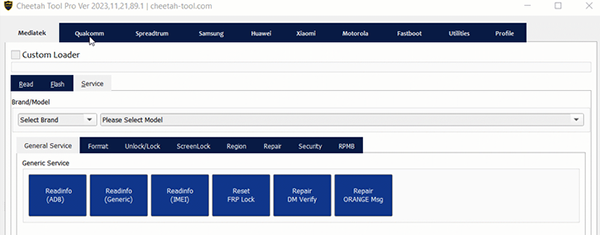
- Select the device brand and desired function. Choose the appropriate module (e.g., Samsung, Xiaomi, Qualcomm, or MediaTek), then select the repair task, such as FRP Reset, Factory Reset, Flash Firmware, Read Device Info, or Repair IMEI.
- Start the operation by clicking Start or Execute and wait for the software to complete the process. Once finished, restart the device if prompted and verify that the selected operation was successful.
Part 6: Cheetah Tool Pro - Pros & Cons
Pros:
- Wide brand support - Covers Samsung, Huawei, Xiaomi, OPPO, Realme, and Meizu.
- Advanced repair features - Handles network repairs, security bypass (FRP, MDM, Knox), and bootloop fixes.
- Fast operations - Speeds up complex tasks and supports parallel processing.
- Good value - Cost-effective compared to alternative servicing tools.
- Frequent updates - Regularly adds support for new models, chipsets, and security patches.
- Broad lock removal - Effectively removes Knox Guard, MDM, and IT Admin locks across brands.
Cons:
- Complex connections - Some functions require Test Point / BROM mode, not standard USB.
- Extra manual steps - Forces exact model selection before every operation.
- Inconsistent reliability - Can struggle with intricate tasks, sometimes needing retries.
- Name confusion - Shared name with other software makes finding support harder.
- Unreliable on complex tasks - May require multiple retries for intricate operations.
- Limited guidance - Offers minimal feedback during procedures, increasing user error risk.
Part 7: Cheetah Tool Pro - Best Alternative
As a dedicated unlocking utility, Android Lock Wiper concentrates on bypassing screen locks and FRP protection for personal devices. This solution stands apart from Cheetah Tool Pro because it forgoes the technician-grade functions like IMEI patching or system flashing. Users who mainly need to regain access to their phones can turn to this program as a viable substitute for the more complex service suite.
Key Features of Android Lock Wiper:
- Safely removes PIN, password, pattern, fingerprint, and face locks.
- Bypasses Google FRP on supported Android devices.
- Supports 6,000+ Android phones and tablets.
- Removes Samsung screen locks without data loss on selected models.
- Compatible with Android 2.3 and up (device-dependent).
- Offers a beginner-friendly, guided interface.
- No root required for most unlocking tasks.
- Includes multiple FRP removal modes.
- Automatically downloads required firmware/packages.
- Receives regular updates and technical support.
- A great alternative to Cheetah Tool Pro for screen unlocking and FRP bypass without professional servicing features.
Safe and Free Download:

User Manual:
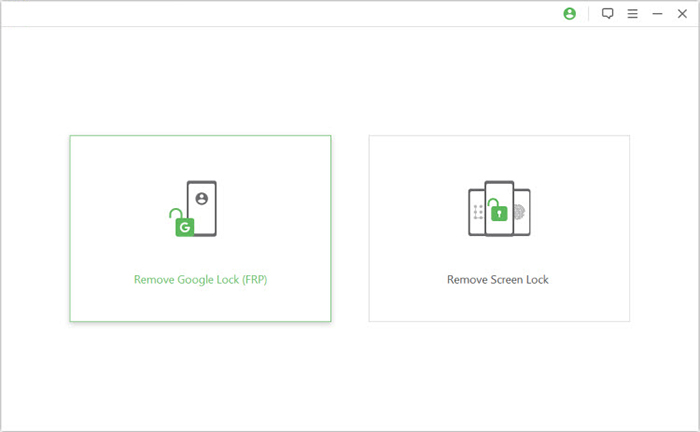
Step 1 - Setup & Launch - Download and install the software on your computer. Open it, select "Remove Google Lock (FRP)," and choose "Advanced Mode."
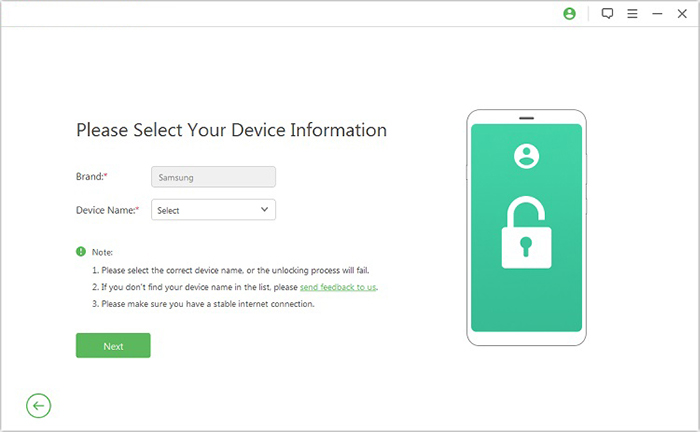
Step 2 - Connect & Configure - Connect your Android device via USB and click "Start." Follow the prompts to enter your device details, then click "Next." Proceed with the on-screen instructions to boot your phone into recovery mode.
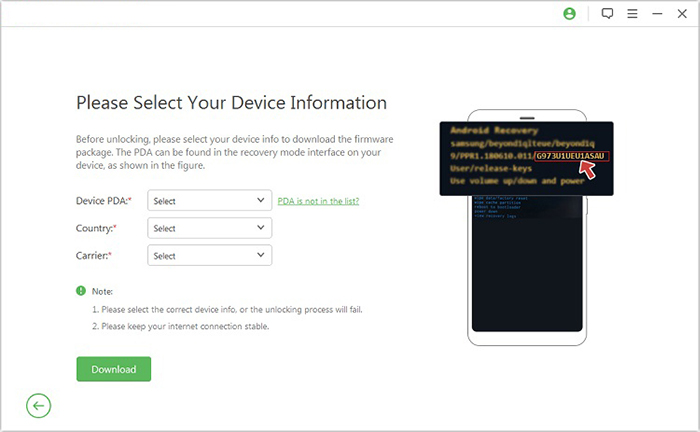
Step 3 - Download & Execute - On the next screen, select your PDA, country, and carrier, then click "Download" to get the required data package. Click "Start to Extract" and follow the instructions to enable USB debugging, activate OEM unlock, put the phone in Download Mode, extract firmware, and complete all remaining steps. The program will then begin unlocking the FRP.
Cheetah Tool Pro - FAQs
Q1. Do I need a box or dongle to use Cheetah Tool Pro?
No, it is completely software-based and does not require any additional hardware like a box or dongle.
Q2. Are credits required to use its features?
Yes, a credits-based system is used, particularly for server-dependent operations like Xiaomi and Samsung IMEI-based services.
Q3. Can Cheetah Tool Pro flash firmware?
Yes, firmware flashing is one of the software's primary features.
Q4. What chipsets are supported?
The tool supports MediaTek (MTK), Qualcomm, Unisoc (Spreadtrum), and Samsung Exynos chipsets.
Q5. What operating systems are compatible?
Cheetah Tool Pro is compatible with Windows 7, Windows 8, Windows 10, and Windows 11.
Q6. What are the minimum hardware requirements?
It requires at least an Intel or AMD Dual Core processor, 4 GB of RAM (8 GB recommended), and 1 GB of free storage space.
Q7. What kind of locks can the tool remove?
It can remove pattern locks, password locks, PIN locks, and screen security locks on supported devices.
Q8. What if Cheetah Tool Pro doesn't work?
- Check device compatibility first (very common issue).
- Update to the latest version of Cheetah Tool Pro.
- Reinstall ADB/Fastboot and USB drivers.
- Try a different USB cable or port.
- Restart both PC and phone before retrying.
- Disable conflicting software (antivirus/firewall may block tools).
- Boot phone into correct mode (Download/Fastboot/EDL if required).
In a Nutshell
In view of the three major shortcomings of Cheetah Tool Pro, Android Lock Wiper becomes a more practical alternative for many users.
- Wider device stability: More consistent performance across Android models than Cheetah Tool Pro.
- Lower risk operation: Guided steps help reduce mistakes during unlocking.
- Easier for beginners: Simple interface with clear workflow for non-technical users.
Related Articles:
vnROM FRP Bypass Review: Can It Really Unlock Android Precisely?
10 Tested Android Backup Software/Apps You Should Never Miss
How to Recover Contacts from Android Phone after Factory Reset? 4 Means
How to Fix Wrong Apple ID When Updating Apps? 12 Workable Solutions