
Infinix FRP Bypass: 5 Easy Solutions to Remove Infinix FRP
When users attempt to set up a second-hand or previously used device only to discover the device is still linked to the previous owner's Google account, it often leads to frustration. FRP is designed to secure Android phones, but it can also create challenges for people who simply want to regain access to devices they legitimately own or maintain.
That's where learning about Infinix FRP bypass becomes essential. This passage walks you through 5 effective ways to bypass Infinix FRP, helping you unlock your device safely and continue using it without unnecessary obstacles.
- Part 1: What Is Google FRP Lock on Infinix
- Part 2: What to Do Before Starting Infinix FRP Bypass
- Part 3: How to Bypass Infinix FRP without Any Requirements
- Part 4: How to Remove FRP Lock in Infinix from Settings
- Part 5: How to Eliminate Infinix FRP via Mediatek FRP Bypass Tool
- Part 6: How to Bypass FRP Lock on Infinix via Octoplus FRP Tool
- Part 7: How to Perform FRP Bypass on Infinix by Contacting Infinix Support
Part 1: What Is Google FRP Lock on Infinix
Google FRP lock on an Infinix device is a security feature designed to prevent unauthorized access after a factory reset. Once triggered, the phone requires the previously synced Google account to verify the user's identity. This mechanism helps protect personal data in case the phone is lost or reset without permission. It essentially ensures that only the rightful owner can reactivate and use the device.
Part 2: What to Do Before Starting Infinix FRP Bypass
Here is a safe, high-level list of what you should do before starting an Infinix FRP bypass (for accessing your own device only):
- Make sure you own the device and can prove ownership if needed.
- Confirm that the Infinix phone is fully charged (at least 50% battery).
- Ensure physical buttons (Power, Volume Up/Down) are working properly.
- Insert a working SIM card if the chosen method requires it.
- Connect to a stable Wi-Fi or mobile network, depending on the method needs.
- Prepare another phone if certain actions (calls/SMS) are needed.
- Have access to a USB cable and a computer if using PC-based tools.
- Restart the device to ensure it is running without temporary glitches.
- Know the Google account details originally used on the phone in case verification becomes possible.
- Back up any accessible data beforehand if you can (e.g., SD card or cloud).
- Read through your chosen method, so you understand the process before starting.
- Avoid using unknown or unsafe software to prevent data loss or device damage.
- Check the Infinix model and Android version because FRP behavior varies across versions.
- Make sure your goal is legitimate - FRP should only be bypassed for personal device recovery.
Part 3: How to Bypass Infinix FRP without Any Requirements
Many users rely on advanced software to regain access to their own devices when locked out, and Android Lock Wiper is known for offering a streamlined FRP removal experience for Infinix models. A guided interface helps people navigate the process without requiring deep technical skills.
The tool focuses on usability, making it easier for owners to recover devices they can verify as theirs. Successful completion allows the phone to be set up again with a new Google account.
Why Choose Android Lock Wiper?
> Supports FRP bypass on Infinix to restore access.
> Removes PIN, pattern, password, fingerprint, and face locks.
> Offers a simple, guided interface for easy use.
> Works with a wide range of Android devices, including Infinix Hot/Smart/S/GT/Note/Zero.
> Provides fast detection and high success rates.
> Gives clear on-screen instructions during unlocking.
> Allows setup with a new Google account after FRP removal.
> Can unlock Samsung Galaxy devices without data loss under supported modes.
> Includes multiple unlocking modes for different phone conditions.
> Supports quick processing to shorten overall unlocking time.

User Manual - Simple steps to bypass FRP lock efficiently using Android Lock Wiper:
- Start by downloading and installing the application on your computer.
- Once the installation is complete, select the option labeled "Remove Google Lock (FRP)" and choose "Advanced Mode."
- Utilize a USB cable to connect your Infinix to the computer, then click the "Start" button.
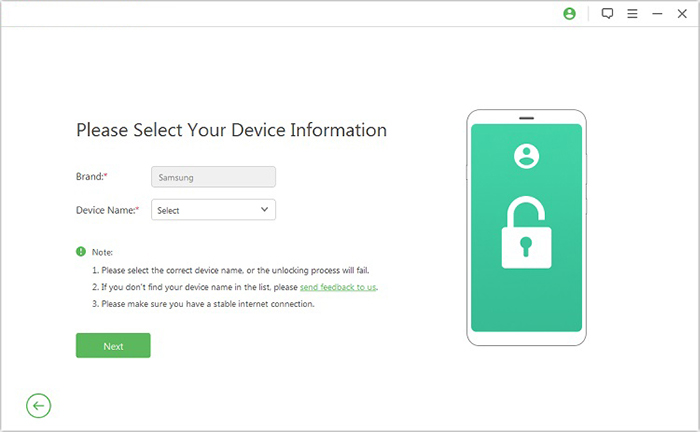
- Follow the prompts to enter your Infinix phone details and click "Next."
- Adhere to the on-screen instructions to access recovery mode on your device.
- On the subsequent screen, select the appropriate PDA, country, and carrier as directed, and then click "Download" to obtain the required data package.
- Afterward, click "Start to Extract," and follow the on-screen instructions to set your device into
- Download Mode, enable USB debugging, activate OEM unlock, and extract the firmware.
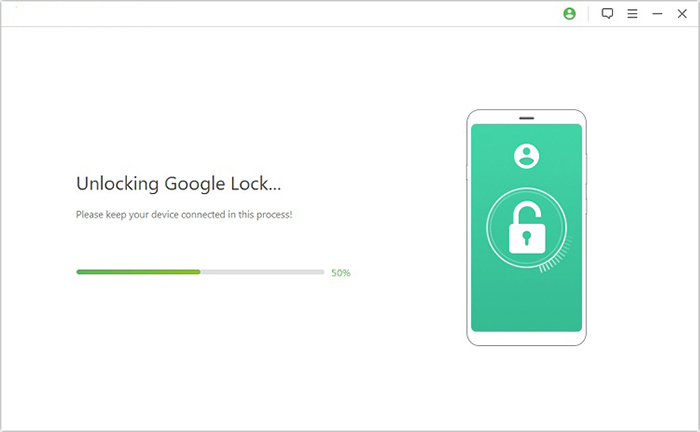
- Ultimately, the program will initiate the process of unlocking the Google lock for your Infinix device.
How do I remove my Gmail account from my Infinix phone? To remove your Gmail account from an Infinix phone, go to Settings > Accounts > Google, then select the account you want to remove. Tap Remove account and confirm your choice. The account will be deleted from the device, but you'll need the password if the phone is FRP-protected.
Part 4: How to Remove FRP Lock in Infinix from Settings
Sometimes a device can be accessed through built-in menus, and Infinix Settings can provide limited pathways when specific accessibility shortcuts are available. Certain screens allow users to reach system options that help prepare the phone for account changes.
These methods tend to work only under particular circumstances and depend heavily on the device's software version. When available, this approach gives verified owners a convenient and device-native way to clear previous account data.
User Manual:
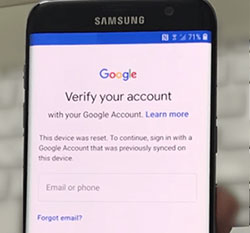
- Set up Wi-Fi on your Infinix until the Google account verification page appears.
- Tap the text box to bring up the keyboard, then press the "@" button to access the settings menu.
- Choose the Google keyboard layout, confirm it's correct, then tap the three dots in the upper-right corner.
- Select Help & Feedback, open a search dialog, and send a result from the keyboard to proceed.
- Highlight any word on the page, then tap Web Search to open a new page with Google App search results.
- In the search box at the top, type "setting" and open the System Settings icon that appears on your screen.
- Navigate to System Settings > Backup & Reset > Factory Data Reset and perform a factory reset of the device.
- After the reset, the Infinix will return to the welcome page. Reconnect to Wi-Fi and add a new Google account to complete setup.
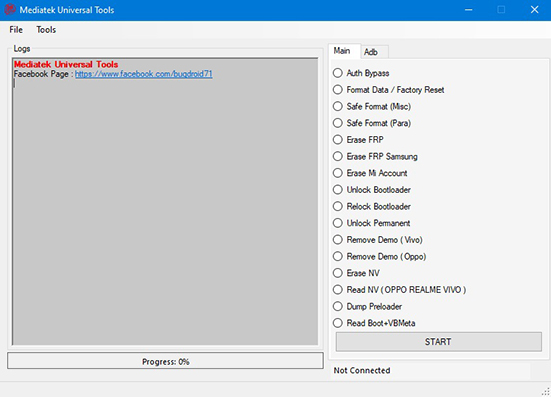
Part 5: How to Eliminate Infinix FRP via Mediatek FRP Bypass Tool
Some people prefer using PC-based utilities designed for MediaTek-powered phones, and the Mediatek FRP Bypass Tool offers such a high-level solution. These tools recognize the chipset and allow general FRP-related actions once the phone is connected properly.
Because they operate at a deeper system level, they typically require careful handling and appropriate drivers. Owners who follow on-screen prompts can complete an FRP clearance process after verifying device legitimacy.
User Manual:
- Confirm the device is your own, and you have proof of ownership before attempting any FRP recovery.
- Install the necessary MediaTek USB drivers on your computer so the device can be detected properly.
- Connect the Infinix phone to the computer using a working USB cable while it is powered off or in the required connection state.
- Launch the Mediatek FRP Bypass Tool on your computer to allow it to detect the connected device.
- Use the tool's available options to perform a general FRP unlock operation, following on-screen prompts.
- Restart the phone and complete setup using your own Google account once FRP protection is cleared.
Part 6: How to Bypass FRP Lock on Infinix via Octoplus FRP Tool
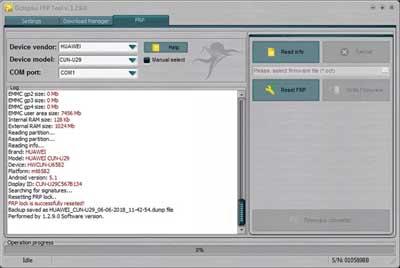
Professionals often turn to specialized repair software, and Octoplus FRP Tool is frequently used in service environments for supported Infinix models. This type of tool performs authorized FRP operations through structured menus and controlled connection modes.
Its interface is designed for technicians who work with multiple devices and need reliable system-level access. With the correct procedure, the tool helps restore the phone so it can be set up again with a valid account.
User Manual:
- Download the Octoplus FRP Tool from its official website and install it on your computer.
- Turn off your Infinix Hot/Smart/S/GT/Note/Zero and connect it to the PC using a USB cable.
- Open the Octoplus FRP Tool and choose the FRP-related function designed for authorized device recovery.
- Follow the on-screen instructions provided by the software to complete the FRP removal process on your own verified device.
Part 7: How to Perform FRP Bypass on Infinix by Contacting Infinix Support
Some situations require official support, and contacting Infinix Support provides the safest and most authorized form of FRP assistance. Service centers verify ownership before performing any unlocking, ensuring device security is maintained.
Their technicians use certified processes that comply with manufacturer guidelines. Once completed, the device is returned, ready for normal setup and future use.
User Manual:
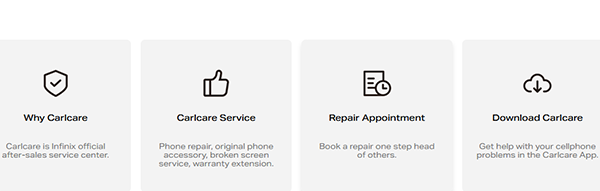
- Visit the official Infinix support page at infinixmobility.com/care/repair and choose your region or service option.
- Locate an authorized Infinix service center or online support channel and submit a repair request.
- Provide proof of purchase, the device's IMEI, and valid identification to confirm legitimate ownership.
- Bring or ship the phone to the service center, where technicians will perform an official FRP unlock using authorized tools.
- Wait for the service team to complete the process, then pick up or receive your device with the FRP lock removed securely.
Additional Tips
Bypassing FRP on an Infinix phone can be accomplished through several methods, and the five options discussed above provide practical solutions for different situations. However, it's worth noting that other methods also exist, such as the SIM Card Method and ADB Commands.
While these approaches can sometimes work, they generally come with notable downsides - the SIM Card Method is often unreliable and may not work on updated security patches, while ADB Commands require technical expertise, developer settings enabled beforehand, and a trusted computer, which most users don't have prepared.
Related Articles:
How to Export Contacts from Infinix to PC/Phone/SIM/Google, etc
5 Smart Picks to Print Out Text Messages from Infinix Phones
4 Powerful Approaches to Transfer Data from Infinix to Infinix
iCloud DNS Bypass Full Guide: Unlock iPhone/iPad Activation Lock
