
MCT MTK FRP Bypass Tool Review: Comprehensive Analysis [Latest]
When you search for an MCT MTK FRP Bypass Tool review, you may want to know whether the tool is safe, reliable, and effective before using it to remove FRP locks on MTK devices. With so many solutions available online, people also feel the need to compare it with alternative FRP bypass software to avoid risks like handshaking errors, malware-infected downloads, or limited device support.
This review aims to give you a clear, unbiased look at what the tool can and cannot do, helping you decide whether it's the right choice for your specific MTK device and situation.
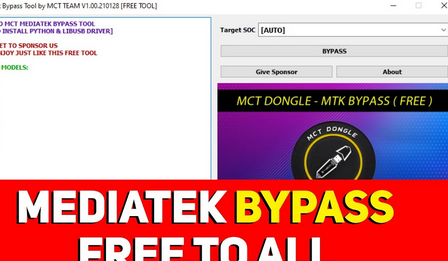
- Part 1: What Is MCT MTK FRP Bypass Tool
- Part 2: How Does MTK FRP Bypass Tool Work
- Part 3: Why Like or Dislike MCT MTK FRP Bypass Tool
- Part 4: Is MTK FRP Bypass Tool Safe & Free
- Part 5: What If MCT MTK FRP Bypass Tool Doesn't Work
- Part 6: Q&A about MCT MTK FRP Bypass Tool
- Part 7: What Could Be Better Than MTK FRP Bypass Tool
Part 1: What Is MCT MTK FRP Bypass Tool
The MCT MTK FRP Bypass Tool is a Windows-based utility created by the Mobile Care Team (MCT) to help bypass Factory Reset Protection (FRP), PIN, and other Android lock screens on many Samsung devices. It works by exploiting vulnerabilities in the FRP system, allowing users to regain access when they forget their Google account or buy a second-hand device without a proper reset.
The tool supports a wide range of Samsung phones, tablets, and wearables using MediaTek chips and provides a simple step-by-step interface. While FRP is designed for security, the MCT MTK tool offers a practical solution when that protection becomes a barrier.
|
Core Features
|
Key Details
|
|
FRP Bypass |
Removes Factory Reset Protection on Samsung and MTK-powered Android devices. |
|
Unlock Screen Locks |
Can bypass PIN, pattern, and other basic Android lock screens. |
|
Supports Multiple Devices |
Works with many Samsung phones, tablets, and wearables using MediaTek chipsets. |
|
Windows PC Compatible |
Runs on Windows only and offers an easy, step-by-step interface. |
|
Fixes Various Lock Issues |
Designed to address different device lock-related problems, especially after you forgot your Google account credentials. |
|
Lightweight Software |
Does not require high system resources, making it easy to run on most PCs. |
|
No Installation Required |
Often provided as a portable tool, allowing users to launch it directly without setup. |
Part 2: How Does MTK FRP Bypass Tool Work
Phase 1: Where to download and how to install the MTK Bypass Tool?
- Download the MTK Auth Bypass/MCT MTK Bypass Tool from a trusted source.
- Extract the downloaded ZIP or RAR file to your Windows computer.
- Install the required MediaTek USB drivers (such as VCOM or LibUSB) so your device can be properly recognized.
Phase 2: How to use MTK FRP Bypass Tool?
- Open the extracted folder and run the main executable file to launch the tool.
- Turn off your phone, then simultaneously press the Power button and the Volume up button while connecting a USB cable to your computer. This action places your device in a mode that allows it to receive commands from the MCT MTK Bypass Tool.
- Select the appropriate version for your phone and click the "Bypass" button to eliminate the FRP lock. This step guarantees that the commands issued by the tool are customized to your device's specifications.
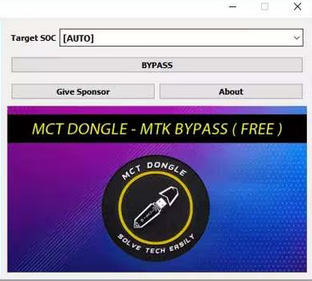
Attention: Bypassing FRP usually happens after a factory reset, meaning your data is already removed. The tool itself does not delete additional data - its purpose is simply to bypass the Google account lock. However, always proceed with caution to avoid unintended issues.
You May Also Like: iCloud DNS Bypass Full Guide: Unlock iPhone/iPad Activation Lock
Part 3: Why Like or Dislike MCT MTK FRP Bypass Tool
Why Like It?
- Can bypass FRP, PIN, and other locks on many MTK-powered Samsung and Android devices.
- Works with a wide range of models, including phones, tablets, and wearables
- Lightweight and simple, with a straightforward interface.
- Often works even when users forget their Google account details or buy a second-hand device.
Why Don't Like It?
- Downloading may require relying on third-party hosting sites, which raises safety concerns.
- Not an official tool, so results can vary and may fail on newer security patches.
- Can trigger antivirus warnings due to its system-level operations.
- Requires proper drivers and setup, which may be too technical for beginners.
- Bypassing FRP can create security risks if misused or performed on unauthorized devices.
Part 4: Is MTK FRP Bypass Tool Safe & Free
The table below explains whether the MTK FRP Bypass Tool is truly free and how safe it is to use. It highlights the key points users should know before downloading or relying on the tool for FRP removal.
|
Aspect
|
Explanation
|
|
Free to Use |
Yes, the MTK FRP Bypass Tool is completely free and does not require any subscription or activation fee. |
|
Safety |
The tool itself is safe when downloaded from trusted sources, but unofficial downloads can contain risks. |
|
Security Warnings |
Because it modifies system-level functions, it may trigger antivirus or Windows security alerts—even if it's clean. |
|
Risk Factors |
Using unknown download sites, bypassing FRP on unauthorized devices, or installing drivers from unverified sources may expose users to malware or data risks. |
|
Recommended Precaution |
Always download from reputable pages, scan the file with antivirus software, and use it only on devices you legally own. |
Part 5: What If MCT MTK FRP Bypass Tool Doesn't Work
If the MCT MTK FRP Bypass Tool doesn't work, users should first check drivers, cables, and tool versions, or try restarting their device and PC. Here are the full explanations:
- Make sure the correct MediaTek USB and VCOM drivers are properly installed on your PC.
- Try a different version of the tool or re-extract the files in case of corruption.
- Restart both your computer and device before attempting the bypass again.
- Use another USB port or cable to improve detection stability.
- Check whether your device has a new security patch that blocks the bypass method.
- Try an alternative FRP bypass tool that supports your specific model or chipset.
NOTE: If nothing works, consider using a professional unlocking service or software, as will be mentioned in Part 7, designed for guaranteed FRP removal.
Part 6: Q&A about MCT MTK FRP Bypass Tool
Q1: How to fix the MTK bypass tool handshaking error?
You can fix it by reinstalling the correct MediaTek USB and VCOM drivers, as the issue often occurs when the PC cannot properly communicate with the device. Switching to another USB cable or port and ensuring the phone is fully powered off before connecting also helps stabilize the handshake process.
Q2: Which devices are supported by this tool?
The tool supports a wide range of MediaTek-based Samsung and Android devices, including phones, tablets, and some wearables. Its compatibility covers both older and many newer MTK chipsets. However, devices with the latest security patches may require updated methods or alternative tools.
Q3: Why does my antivirus flag the tool as suspicious?
Antivirus programs often detect FRP tools as risky because they modify system-level functions and bypass security features. This does not automatically mean the file is harmful, but it requires extra caution. Always double-check the source and scan the file with trusted security software.
Q4: Why isn't the tool detecting my device?
If the tool fails to detect your phone, it's usually due to missing drivers or faulty USB cables. Try using a different cable, switching USB ports, or reinstalling the required drivers. Rebooting both your PC and device can also help establish a fresh connection.
Part 7: What Could Be Better Than MTK FRP Bypass Tool
As a solid alternative to the MCT MTK FRP Bypass Tool, Android Lock Wiper supports far more Android brands and chipsets beyond just MTK devices. It includes a clear, step-by-step interface that helps reduce handshaking errors and other common issues during FRP removal. Plus, its broader unlocking capabilities - covering screen locks, Google FRP, and various OEM restrictions - make it more versatile than typical MTK-only bypass tools.
Why Choose Android Lock Wiper?
- Fast Processing: Completes Google lock removal quickly and efficiently.
- Wide FRP Support: Works with many Android brands, not limited to MTK-based devices.
- Beginner-Friendly: Offers an automated, stepwise FRP removal process.
- High Compatibility: Supports both old devices and the latest Android systems.
- Extra Unlock Tools: Also removes various screen locks and certain OEM restrictions.
- Stable & Safe: Minimizes risks like handshaking or flashing errors.
Next, let's see how to use the best MTK FRP Bypass Tool alternative:
- Download and install the software on your computer, then open it, choose "Remove Google Lock (FRP)", and switch to Advanced Mode.
- Connect your device to the computer via USB and hit "Start" to begin the FRP removal.
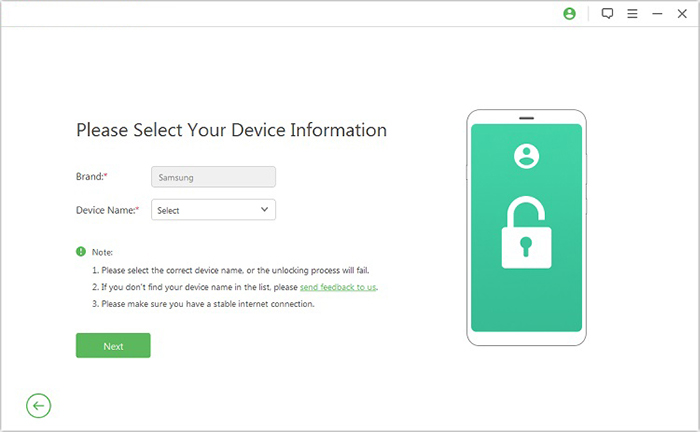
- Enter the required device details when prompted, select Next, and follow the on-screen steps to put your phone into recovery mode.
- On the following screen, select the correct PDA, country, and carrier, then press Download to get the needed data package.
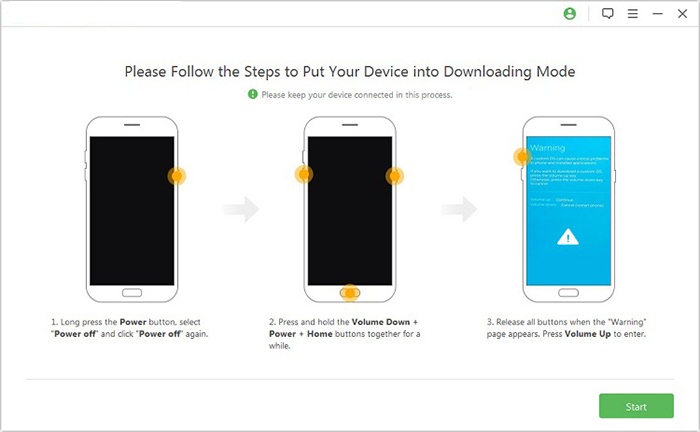
- Click "Start to Extract" and follow the instructions to enter Download Mode.
- Turn on USB debugging and OEM unlock and let the tool extract and prepare the firmware for completion.
- Finally, the software will start the unlocking process.

In Summary
And so, as the digital dust settles and the bootloader doors swing shut, one truth stands upright like a perfectly flashed firmware - Android Lock Wiper shines as the best MCT MTK FRP Bypass Tool alternative, offering broader compatibility, smoother operation, and far fewer headaches. Finally, feel free to learn a comment below if you have any queries.
Related Articles:
Is It Worth Switching from Android to iPhone? Thorough Analysis
How to Recover Contacts from Android Phone after Factory Reset? 4 Means
AddROM FRP Bypass: Can This Service Be Relied Upon? [2026 Latest]
3 Secure Ways to Erase Android Phone Permanently before Selling It
