
Can You Unlock HONOR Phones Proficiently? Try the 4 Easy Means Now
"I'm now trying to get access to a used (locked) HONOR phone (Android). What would be the legal way to do it?" -- from Reddit
Are you looking for how to unlock HONOR phone because you have forgotten your lock credentials or accidentally changed them? When this happens, the device becomes inaccessible, which can be frustrating. Whether the issue is a password, pattern, fingerprint lock, FRP lock, or carrier restriction, you surely need clear and reliable guidance. In this passage, you'll get 4 practical ways to unlock an HONOR phone without technical hassle.
Part 1: What to Do before Unlocking HONOR Phone
Prior to unlocking an HONOR phone, it's important to take several precautions to avoid data loss, account issues, or device malfunction. Here's a comprehensive guide:
- Back up vital data - contacts, messages, photos, videos, apps, and documents.
- Charge the phone - ensure at least 50-70% battery.
- Know the unlock type - bootloader unlock or screen lock removal.
- Check warranty and risks - unlocking may void warranty or disable features.
- Enable Developer Options and OEM Unlocking - tap Build Number 7 times, then enable OEM Unlocking and USB Debugging.
- Confirm account credentials - HONOR/Huawei ID and Google account login.
- Download necessary tools - HiSuite or other recommended unlocking software.
Part 2: Unlock HONOR Phone with Android Lock Wiper [No Prerequisites]
Android Lock Wiper can unlock HONOR phones without needing a password, pattern, or fingerprint. It allows users to regain access quickly and efficiently. The interface guides you step-by-step through the unlocking process. Moreover, most data can remain intact while the phone becomes fully usable again. So, what is Android Lock Wiper?
|
Core Features
|
Main Details
|
|
Unlock Screen Passwords |
Bypass PINs, patterns, passwords, fingerprints, and face locks on various HONOR devices. |
|
Bypass Google FRP Lock |
Remove Google account verification on devices without needing the previous credentials. |
|
Supports Multiple Devices |
Compatible with a wide range of Android phones and tablets, including Honor Magic, Number, X, Play, V, Note, and View series |
|
No Technical Skills Needed |
User-friendly interface allows easy unlocking without rooting or advanced knowledge. |
|
Fast Unlocking |
Unlock devices quickly, usually within a few minutes. |
|
Data Protection Options |
Can unlock certain devices without erasing all data (depends on device model). |
|
Safe and Secure |
Reduces the risks of bricking the device when following the guided steps. |
So, how can I unlock my HONOR phone with Android Lock Wiper?
- First, download and install Android Lock Wiper on your computer.
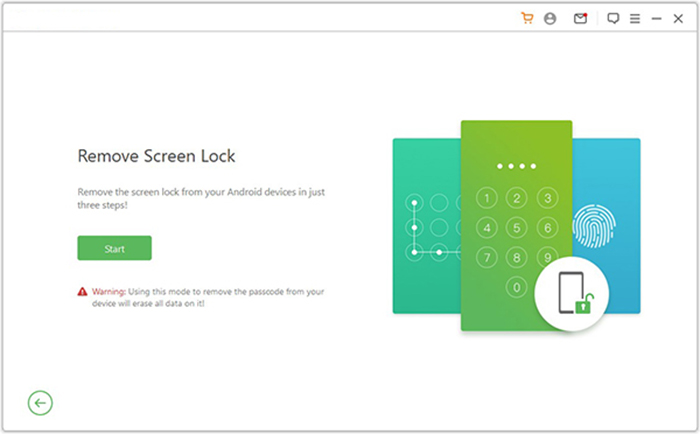
- For brands like HONOR, select "Remove Screen Lock" and click "Start."(Unlocking non-Samsung devices may erase existing data. It's strongly recommended to back up anything important before continuing.)
- Connect your HONOR phone to the computer with a USB cable.
- The program will detect your device automatically and display its details.
- Make sure the information shown is correct.
- If anything is inaccurate, adjust it manually, then click "Start to Unlock."
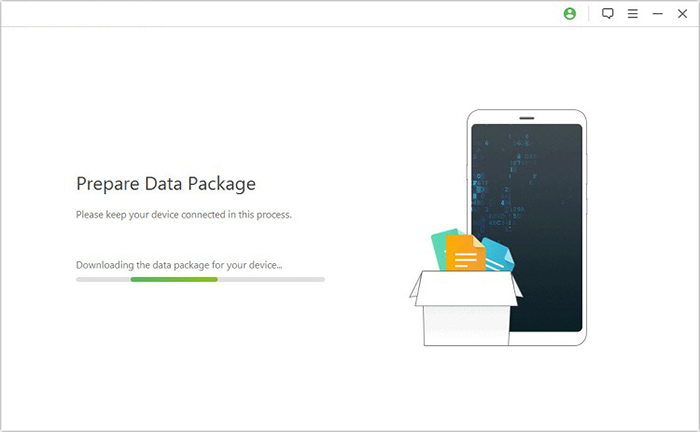
- The software will begin downloading the required data package and install it onto HONOR.
- Once complete, simply follow the on-screen steps to reset the phone.
- The unlocking process will now begin. Keep your device connected until the procedure finishes.

Part 3: Factory Reset a Locked HONOR Phone via IMEI Code
Using the IMEI code provides a network unlock method for HONOR phones. A unique code generated from the phone's IMEI enables SIM cards from other carriers to work. No complex software installation or rooting is required. Entering the code successfully removes carrier restrictions almost instantly.
How-to Guide:
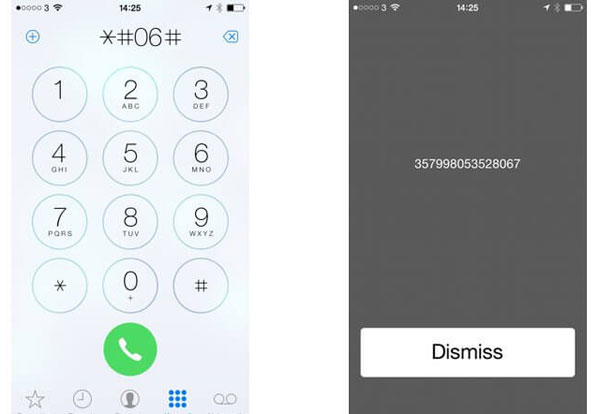
- Find your IMEI - dial #06# on your HONOR phone, note the number, and turn off the device.
- Visit SIM-UNLOCK.NET - select your exact HONOR model from the list.
- Enter IMEI and order unlock code - input your IMEI number and click "Make an Order."
- Insert foreign SIM and enter code - put a different network SIM in the phone and enter the unlock code (try the alternative code if the first fails).
Does IMEI unlocking void the warranty? It depends on your region and the service provider. Official unlocks usually do not affect the warranty, but third-party services may carry some risk. What's more, in most countries, requesting a network unlock via IMEI is legal, as long as the device is not reported stolen or lost.
You May Also Like: [100% Success] How to Unlock Phone Free with IMEI Number
Part 4: Remove Screen Lock in HONOR Using Google Find Hub
Previously known as Google Find My Device, Google Find Hub offers a remote solution for removing screen locks on HONOR devices. Erasing the phone through the Google portal also ensures that it can be tracked if lost. Once the process is completed, the screen lock is removed automatically. The device can then be set up as new without entering the old password.
How-to Guide:
- Go to Google Find Hub - visit https://www.google.com/android/find/people on a computer or another device.
- Sign in with your Google account - use the same account linked to your HONOR phone.
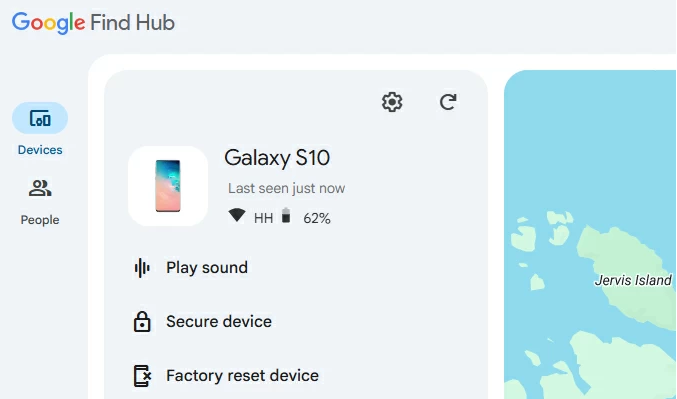
- Select your HONOR device - make sure it's online and visible on the device list.
- Choose "Factory Reset Device" - this will remove all data, including the screen lock.
- Confirm and wait - follow prompts to erase; after completion, the phone will be unlocked and reset.
Considerations: 1. The HONOR phone must be linked to a Google account, and you need to sign in with the same account on the Google Find Hub portal. 2. The phone must be online and connected to the internet to receive the erase command from Google Find Hub. 3. After erasing, the phone may still require the original Google account login due to Factory Reset Protection (FRP).
Part 5: Unlock an HONOR Phone If Forgot the Password by Hard Reset
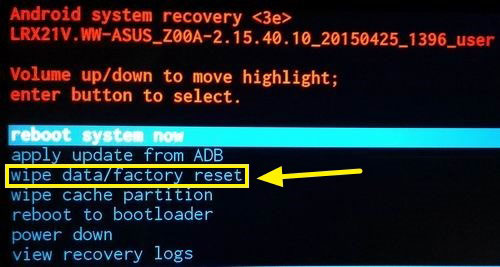
A hard reset can serve as a last-resort method to unlock a locked HONOR phone. Recovery mode enables a complete wipe of all user data and settings. After rebooting, the phone becomes accessible again without the previous password. This approach is effective even if other unlocking methods fail.
How-to Guide:
- Power off the phone - make sure the device is completely turned off.
- Enter Recovery Mode - press and hold Volume Up + Power buttons simultaneously until the HONOR logo appears, then release.
- Navigate to wipe data/factory reset - use the volume buttons to scroll and the power button to select.
- Confirm the reset - select Yes to delete all user data, including the forgotten password.
- Reboot the phone - choose Reboot System Now; your HONOR phone will start unlocked.
Summary
So here we are - four unlocking paths explored, like four doors in a digital escape room. Some doors are simple, some are technical, and some ask for patience… or pure luck.
But among them, Android Lock Wiper is like the door with a friendly doorman who simply smiles and says, "No worries, I've got this." And that's exactly why it's better than the rest - because sometimes technology should feel helpful, not like a puzzle you never asked to solve.
Related Articles:
4 Stress-relief Methods to Transfer Data from HONOR to HONOR
6 Tested Methods to Recover Deleted Files from HONOR Phones
5 Easy & Quick Ways to Transfer Photos from HONOR to Mac [2025]
How to Enable Developer Options and USB Debugging on Huawei/Honor Phones?
