
6 HiSuite Alternatives You Wish You Could Have Known Earlier
"Hi, I recently got a Pura 90 and I've already made a backup of the P50 in Hisuite but obviously I cannot find them now." -- from Reddit
Many Android users find HiSuite limited or inconvenient for managing their phone data. Common frustrations include compatibility issues with certain Android devices, a complicated or unintuitive interface, frequent bugs or crashes, slow performance, and a lack of advanced features.
For those looking to overcome these challenges, exploring a reliable HiSuite alternative can make all the difference. This article will introduce the top 6 replacements for HiSuite designed to make Android/Huawei data management a breeze.
Play the video below for a visual breakdown of this topic.
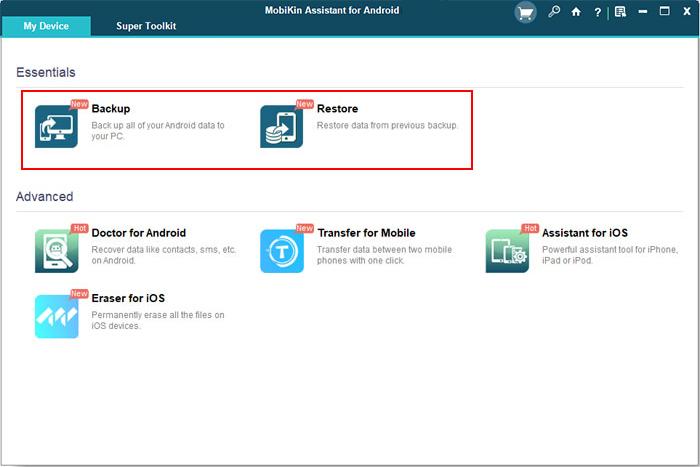
Top 1: Best HiSuite Alternative - MobiKin Assistant for Android
Managing your phone's data on a computer is much easier than on a small screen. Among the best HiSuite alternatives, MobiKin Assistant for Android (Win and Mac) stands out for being user-friendly, ad-free (even in the free version), and offering a consistent, non-disruptive interface.
It also provides quick, reliable after-sales support. For an excellent Huawei file management experience, try MobiKin Assistant - it's popular with millions of downloads and offers a free trial. What makes it so special?
Main Features of MobiKin Assistant for Android:
* Enable the transfer of data between Huawei devices and PC/Mac.
* With just one click, back up and restore Huawei smartphones and tablets.
* Compatible with Android contacts, text messages, call logs, music, videos, photos, applications, and documents.
* Capture screenshots and oversee the installation and uninstallation of applications directly from the PC.
* Manage Android SMS, contacts, call logs, and media files directly on your computer.
* Supports almost all Android/Huawei devices (Android 16 supported).
* Provides flexible connection options and is safe to use.


Follow the steps below to manage your device files using MobiKin Assistant for Android:
After installation, launch the software and connect your Huawei device to the computer. Then, follow the simple prompts to recognize the phone.
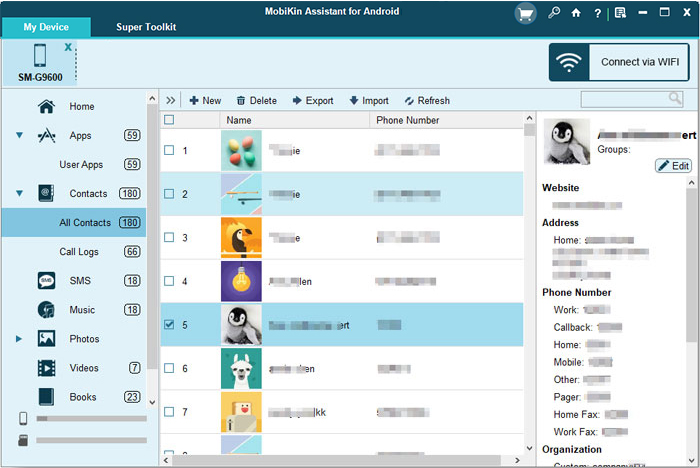
Option 1. Organize non-media content
To manage non-media content effectively, select the checkboxes for "Contacts", "Call logs", or "SMS" and utilize the "New", "Delete", "Export", "Import", or "Edit" buttons accordingly.
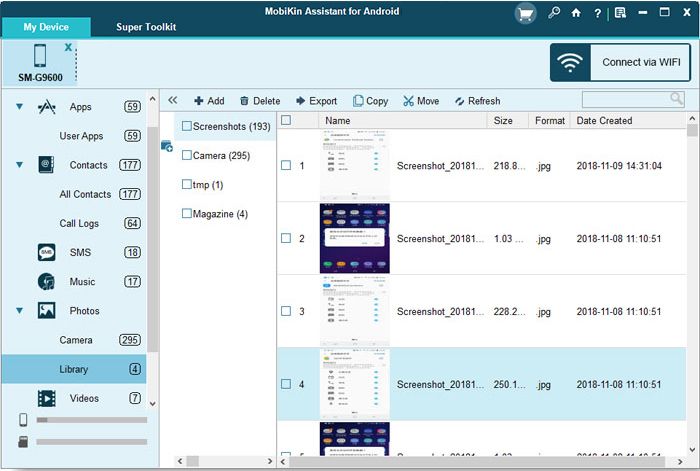
Option 2. Manage media content
To manage media content, choose any data types such as "Photos", "Videos", "Music", and others from the left menu, and handle the items as needed by selecting "Add", "Delete", "Export", "Copy", or "Move".
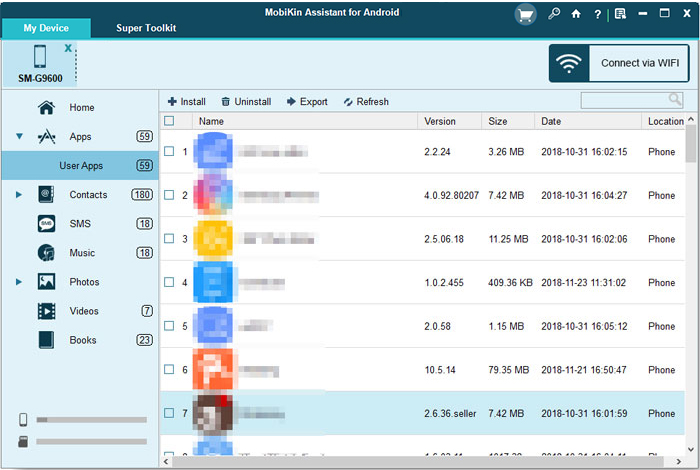
Option 3. Manipulate Huawei apps
You can install, uninstall, or export Huawei applications on your computer by choosing the options "Install", "Uninstall", or "Export".
Option 4. Bulk backup & restore
For a comprehensive approach to backing up and restoring Huawei devices, navigate to the "Super Toolkit" section and adhere to the straightforward instructions provided to successfully complete the backup or restoration process.
Video Guide:
You Might Also Enjoy: Huawei HiSuite Not Connecting? Key Reasons & 6 Proven Solutions
Top 2: MyPhoneExplorer
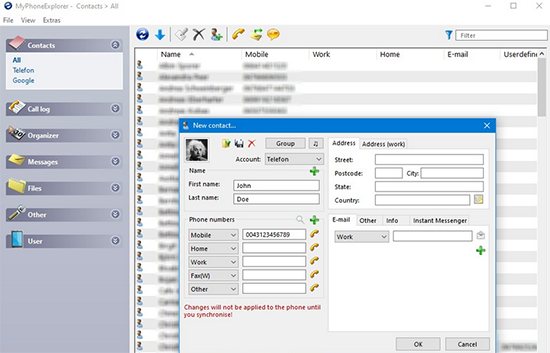
MyPhoneExplorer is a popular and lightweight desktop application designed primarily for managing Huawei phones via USB, Wi-Fi, or Bluetooth. It provides a wide range of features, including SMS management, contact synchronization, file browsing, call logs, backup/restore, and calendar syncing.
Where MyPhoneExplorer Outperforms HiSuite:
- Wider Compatibility: Supports many Android brands, not just Huawei.
- Flexible Connections: Works via USB, Wi-Fi, or Bluetooth.
- Faster & Lightweight: Runs smoother with minimal system load.
- Better SMS/Call Management: Offers more control over messages and logs.
- No Bloat or Cloud Ties: Works offline without requiring account logins.
You Might Also Need: 5 Most Viable Huawei Safe Folder Recovery Solutions [Ultimate Guide]
Top 3: SyncMate
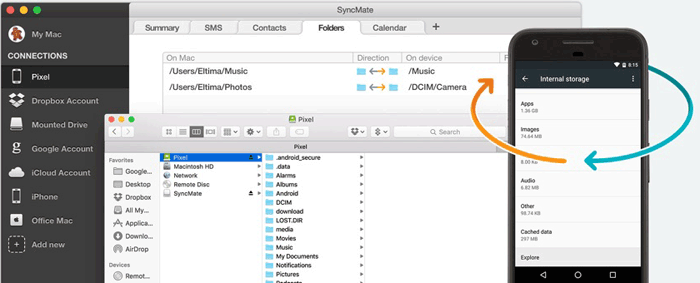
SyncMate is a versatile macOS tool that allows seamless data synchronization between Macs and Huawei devices. It supports syncing contacts, calendars, media files, SMS, and more in both directions. Unlike HiSuite, which is Windows-only and Huawei-specific, SyncMate is built specifically for macOS users and works with various Android brands. It also supports syncing with cloud services like Google and iCloud.
Where SyncMate Outperforms HiSuite:
- Mac Compatibility: Unlike HiSuite (Windows-only), SyncMate is built for Mac, making it ideal for macOS users.
- Two-Way Sync: Offers real-time, bidirectional syncing of contacts, calendars, and files - HiSuite primarily handles backups.
- Multiple Sync Sources: SyncMate syncs with Google, iCloud, MTP devices, and mounted drives, while HiSuite is limited to Huawei devices and services.
- More Control: It provides customizable sync settings for different data types, which HiSuite lacks.
Top 4: Pushbullet
Pushbullet is a cross-device syncing tool that enables users to send notifications, links, files, and messages between Android devices and computers in real time. It can serve as a lightweight alternative to Huawei HiSuite by offering quick notification mirroring and basic file transfer without requiring a wired connection or deep system access.
While it lacks the full backup and device management depth of HiSuite, it is useful for users who prioritize speed and convenience over advanced control features.
Where Pushbullet Outperforms HiSuite:
- Instant notifications: Pushbullet mirrors SMS and app alerts faster than Huawei HiSuite.
- Simple cross-platform use: Works easily on Android, PC, Mac, and browsers.
- Quick sharing: Better for fast links and small file transfers than full device management.
Top 5: DoubleTwist
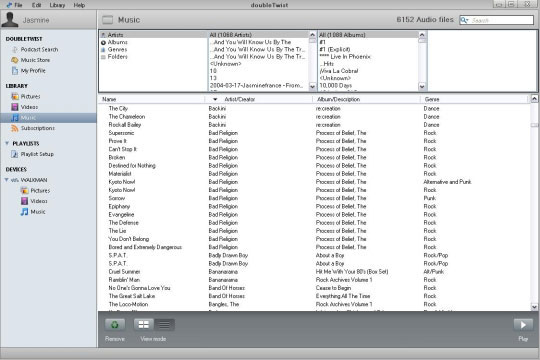
doubleTwist is a media management tool that lets users sync music, playlists, photos, and videos between Android devices and computers with a simple interface. It can act as a good alternative to Huawei HiSuite for users who mainly care about media transfer and iTunes-style music syncing rather than full device control.
HiSuite offers deeper system backup and management features, yet, doubleTwist stands out for its ease of use and strong focus on multimedia organization.
Where DoubleTwist Outperforms HiSuite:
- Better media sync: doubleTwist handles music and playlists more smoothly than Huawei HiSuite.
- Easier music management: Simple playlist creation and syncing.
- Media-focused: Built specifically for music and video transfer, not full device control.
You May Also Like: 5 Tested Ways to Factory/Hard Reset Honor Phone Securely
Top 6: KDE Connect
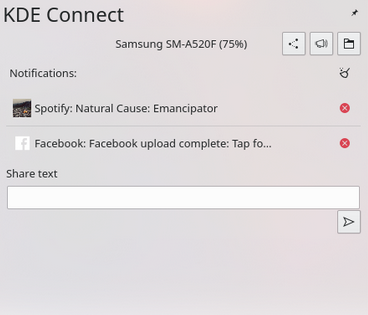
KDE Connect is a powerful, open-source tool that acts as an excellent alternative to HiSuite by enabling seamless file transfers, remote browsing, and notification syncing between your phone and computer over a local WiFi connection without the need for USB cables.
As a HiSuite replacement, KDE Connect stands out due to its cross-platform compatibility (supporting Windows, macOS, Linux, and Android) and advanced features like a shared clipboard, remote input, and even remote media control. So, for anyone seeking a free and more versatile way to connect their devices across different operating systems, KDE Connect is a superior, open-source solution.
Where KDE Connect Outperforms HiSuite:
- Fully wireless - works over Wi-Fi; no USB cable needed.
- Cross-platform - supports Android, iOS, Windows, macOS, and Linux.
- Vendor-neutral - works with any phone brand, not just Huawei.
- Shared clipboard - copy/paste text seamlessly between devices.
- Remote input - use your phone as a touchpad/mouse for your PC.
- Media control - remotely play/pause/skip music or videos on your PC.
- Find my phone - ring your phone from your computer.
- Virtual filesystem - browse your phone's storage directly from your PC's file manager.
In a Nutshell
Choosing the right HiSuite alternative can significantly improve your data management experience by offering smoother performance, better compatibility, and more user-friendly features. Finally, a useful tip here - always try free trials of these tools before committing, so you can ensure the software matches your device and workflow perfectly.
Related Articles:
Top 9 Options to Unlock Huawei Phone without Resetting/Password
Huawei Contacts Recovery: 5 Options to Restore Lost Contacts on Huawei
How to Transfer Text Messages from Samsung to Huawei in 4 Simple Ways
How to Transfer Data from Huawei to Huawei? 7 Clever Tactics
How to Fix Huawei USB File Transfer Not Working in 9 Quick Ways?
