
4 Easy & Safe Ways to Retrieve Deleted Text Messages on IQOO
"I was clearing out old messages on my IQOO 13 and accidentally deleted a conversation I actually really need now." -- from community.handyrecovery.com
Accidentally deleting important text messages on your iQOO phone can be stressful, especially when they contain critical personal or professional information. Fortunately, there are multiple ways to restore these messages, whether through a backup or specialized recovery tools.
In this post, we offer four effective methods to retrieve deleted text messages on iQOO: using a Google Account backup, leveraging the All Deleted Messages Recovery app, contacting your mobile carrier, and employing MobiKin Doctor for Android.
- Part 1: Retrieve Deleted Text Messages on IQOO without Backup
- Part 2: See Deleted Messages in IQOO Phone with Google Account
- Part 3: Recover Accidentally Deleted Texts on IQOO via All Deleted Messages Recovery
- Part 4: Recover Permanently Deleted SMS on IQOO by Contacting Mobile Carrier
- FAQs about Retrieving Deleted Text Messages on IQOO
Part 1: Retrieve Deleted Text Messages on IQOO without Backup
Recovering lost messages can be simple and efficient with MobiKin Doctor for Android (Win or Mac), a professional recovery tool. It allows users to scan the iQOO's internal storage and SD card to locate deleted text messages without a prior backup.
The software also provides a preview of messages before recovery, giving full control over what gets restored. Fast scanning options and selective recovery make it a reliable choice for retrieving important texts safely.
Why Select MobiKin Doctor for Android?
> Recover SMS Without Backup - Retrieves deleted text messages from iQOO phones even if no prior backup exists.
> Multiple Data Types Supported - Recovers SMS, contacts, call logs, photos, videos, audio, music, documents, etc.
> Internal Storage & SD Card Scan - Scans both phone memory and SD cards for deleted data.
> Preview Before Recovery - Lets you view messages and files before restoring them.
> Selective Recovery - Choose specific texts or files instead of recovering everything.
> Quick Scan & Deep Scan - Offers fast scanning and deeper analysis for better recovery results.
> Wide Android Compatibility - Works with various Android/iQOO devices, including iQOO 13-9, Z9-Z5, Neo (9S-6), U (U5e-U3), Legend (12-5), etc.
> Safe Read-Only Process - Scans data without modifying or damaging existing phone content.


How to recover lost text messages from an IQOO phone via MobiKin Doctor for Android?
- Upon launching the program, there is no need to press any buttons on the device.
- It will automatically recognize the phone connected to the computer.
- If your IQOO phone has been rooted and USB debugging is enabled, the program will perform a thorough scan of your Android's internal memory, displaying all lost and existing messages within the application.
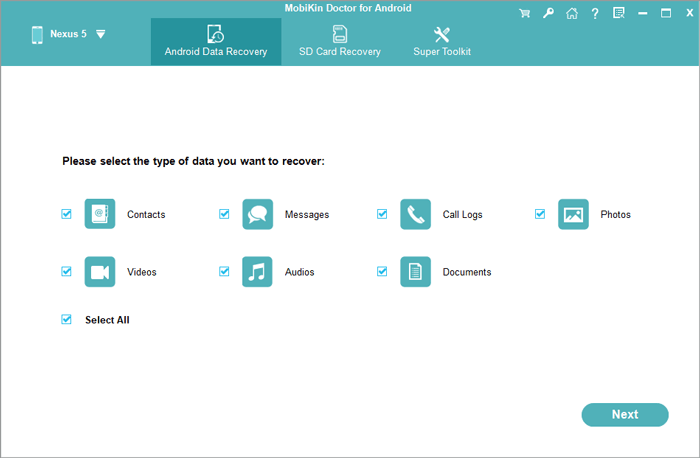
- Subsequently, you will have the option to select the files you wish to recover (in this case, it pertains to "Messages").
- Then, click on "Next" and choose a scan mode for either a quick or deep scan.
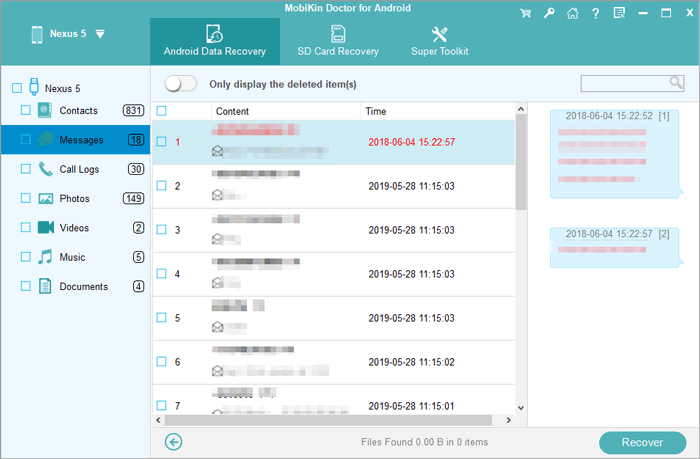
- Review the retrieved text messages on your IQOO and identify the ones you wish to restore.
- Finally, click the "Recover" button and select a destination to save the recovered SMS files locally.
Video Guide:
You Might Also Like: 4 Ways to Transfer Text Messages from IQOO to IQOO 13/12/11/10/9/8/7
Part 2: See Deleted Messages in IQOO Phone with Google Account
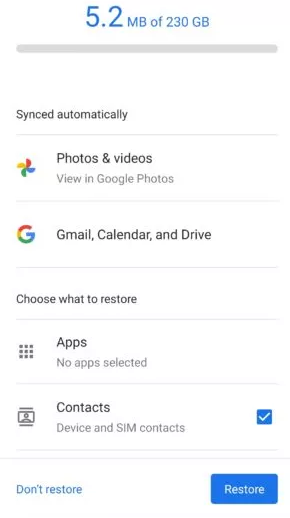
When relying on a Google Account, deleted SMS can be restored if a backup was created beforehand. By signing into the same account during device setup, users can recover messages along with other backed-up data. This method is straightforward but requires prior backup, making timing crucial for successful restoration. It is ideal for those who regularly enable Google backup and want a simple, built-in recovery solution.
How to Retrieve?
- Open the Settings app on your iQOO phone and go to System or System & Updates.
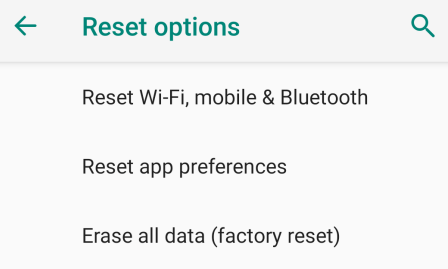
- Tap Reset or Reset options, then choose Factory data reset or Erase all data.
- Enter your PIN, pattern, or password when prompted.
- Select Reset phone or Erase everything and wait for the device to reset and restart.
- On the Welcome screen, tap Let's Go and choose Copy your data (connect to Wi-Fi if required).
- Select Backup from the cloud and sign in to your Google Account.
- Choose the backup you want to restore from.
- Make sure SMS & MMS messages are selected, then tap Restore.
- Follow the on-screen instructions and wait for the restoration process to finish.
Part 3: Recover Accidentally Deleted Texts on IQOO via All Deleted Messages Recovery
Some users prefer apps like All Deleted Messages Recovery, which monitor the device and notification history to restore lost texts. The app can retrieve recently deleted messages by scanning cached data and notifications on the iQOO phone. While it is free and accessible, the recovery may be limited to messages that were recently deleted. It works best for quick, casual recovery but lacks the depth of professional tools.
How to Retrieve?
- Open Google Play Store on your iQOO phone and install All Deleted Messages Recovery.
- Launch the app and grant required permissions such as storage access and notification access.
- Allow the app to scan your device for deleted text messages and cached message data.
- Wait for the scanning process to complete and review the list of recoverable messages.
- Select the accidentally deleted texts you want to recover.
- Tap Restore or Recover and follow the on-screen instructions.
- Check your Messages app or the app's recovery folder to confirm the texts have been restored.
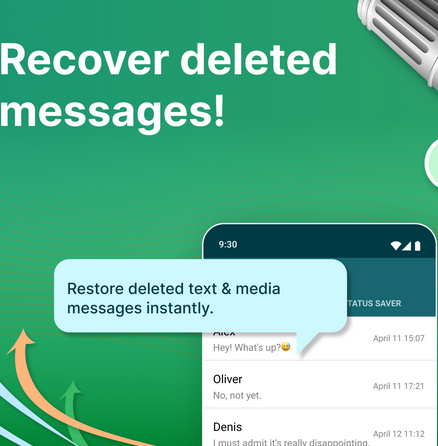
NOTE: The app works by scanning cached data and notification history to locate recently deleted messages. Messages that were deleted a long time ago or have already been overwritten by new data may not be recoverable.
Part 4: Recover Permanently Deleted SMS on IQOO by Contacting Mobile Carrier
In certain cases, contacting the mobile carrier can help recover deleted messages, especially when they are recent and stored on the provider's servers. Customers must provide account details and follow the carrier's verification process to request message retrieval.
The success of this method varies depending on the carrier's retention policies and privacy regulations. It can be useful for official or legal purposes but is often slower and less flexible than software-based solutions.
How to Retrieve?
- Contact your mobile carrier's customer service (by phone or at a service center) and explain that you want to retrieve deleted SMS messages.
- Provide required account details, such as your phone number, account holder name, and valid ID for identity verification.
- Tell the carrier the approximate date, time, and sender/receiver number of the deleted messages.
- Ask about the carrier's SMS data-retention policy and whether message content or only records are stored.
- Submit a formal data retrieval request if required (some carriers may ask for written forms or legal documents).
- Complete all identity and privacy verification steps requested by the carrier.
- Wait for the carrier to process your request, which may take several days or longer.
- Receive the result, usually as printed records or a PDF, if the carrier approves and the data is still available.
Most carriers retain SMS content for a short period, usually a few days to a few weeks. Older messages may no longer be recoverable due to privacy and storage policies. Moreover, some carriers may provide the service for free, but others could charge a processing or service fee, especially if official forms or documentation are required.
FAQs about Retrieving Deleted Text Messages on IQOO
Q1. Does iQOO have a built-in recycle bin for SMS?
No. iQOO (based on Funtouch OS/OriginOS) does not provide a recycle bin or trash folder for SMS messages. Once deleted, messages are removed from the Messages app immediately.
Q2. How soon should I try to recover deleted messages?
As soon as possible. The longer you use your iQOO phone after deletion, the higher the chance that new data will overwrite the deleted messages, making recovery impossible.
Q3. Can notification history help retrieve deleted SMS?
Yes. If notification history was enabled or a message-logging app was installed before deletion, you may be able to view message content that was previously shown in notifications.
Q4. How can I prevent losing text messages again on iQOO?
To avoid future loss:
- Enable Google backup.
- Use an SMS backup app regularly.
- Export important conversations.
- Avoid deleting messages until backups are confirmed.
Final Words
Among the four methods, MobiKin Doctor for Android is exceptional as the most reliable and versatile. Unlike Google backups, it does not require prior saving, unlike carrier requests, it is faster and more practical, and unlike free apps, it provides deep scanning, selective recovery, and preview options.
For anyone who wants to retrieve deleted text messages on iQOO quickly, safely, and completely, MobiKin offers the most professional and user-friendly solution.
Related Articles:
How to Recover Deleted Photos from IQOO Internal Storage? 5 Tactics
5 Tried-and-true Methods to Unlock IQOO Phone without Effort
Top 6 Best IQOO Sync Managers for Safe Backup/Transfer/Management
How to Recover Data from Broken/Damaged Phone? 5 Little-known Ways
