
Syncios Data Transfer Review: Will It Work as Promised? [Hot]
Many mobile users are constantly looking for a reliable solution to move or sync data between smartphones and tablets, especially when switching devices or upgrading to a new phone. A tool - Syncios Data Transfer that promises smooth, cross-platform data transfer can save hours of frustration and ensure that valuable contacts, messages, photos, and files remain intact.
This Syncios Data Transfer review will explore the software's features, performance, and overall usability, helping you decide whether it lives up to its reputation as a go-to solution for mobile data management.
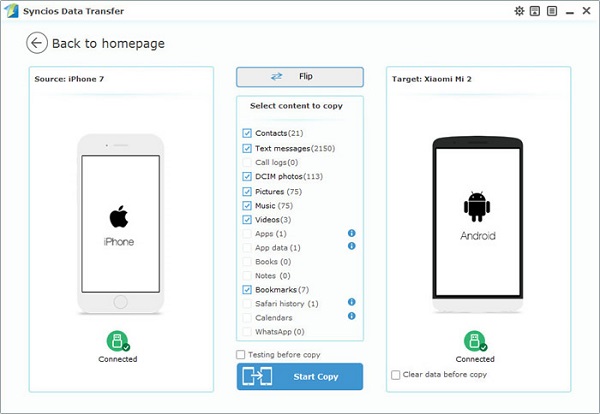
Part 1: What Is Syncios Data Transfer
Syncios Data Transfer is a cross-platform phone transfer tool designed to move data between iOS and Android devices with ease. It supports transferring WhatsApp, contacts, messages, photos, videos, music, and app data, even when switching between different operating systems. In addition, it allows users to back up and restore mobile data on a computer to prevent data loss.
Part 2: Syncios Data Transfer: Pricing & Review Ratings
To help you quickly understand the cost and real-world performance of Syncios Data Transfer, the table below summarizes its pricing plans alongside key review ratings. This overview makes it easier to judge whether the tool offers good value and reliability for your data transfer needs:
|
Category
|
Details
|
|
Pricing - 1-Year License |
$29.95 for 1 PC (annual subscription) |
|
Pricing - Lifetime License |
$39.95 for 1 PC (one-time payment) |
|
Pricing - Family License |
$55.95 lifetime license for up to 5 PCs |
|
Overall Review Rating |
4.6/5 |
|
Ease of Use Rating |
4.5/5 |
|
Transfer Effectiveness Rating |
4.4/5 |
|
Trustpilot User Rating |
4.2/5 |
|
Sitejabber User Rating |
3.8/5 |
|
Quality & Stability |
Generally stable with broad iOS and Android compatibility |
|
Value for Money |
Considered cost-effective for cross-platform data transfer |
Part 3: Syncios Data Transfer: Safety & Availability
Safety:
Syncios Data Transfer is generally considered safe to use, as it transfers data directly between devices through a computer without uploading personal information to cloud servers. When installed from the official source and kept updated, it does not contain malware and follows standard data-handling practices to protect user privacy.
Availability:
Syncios Data Transfer is available for both Windows and macOS and supports most Android and iOS devices. A free trial version is offered, allowing users to test basic transfer features before deciding to purchase a license.
How to Use Syncios Data Transfer?
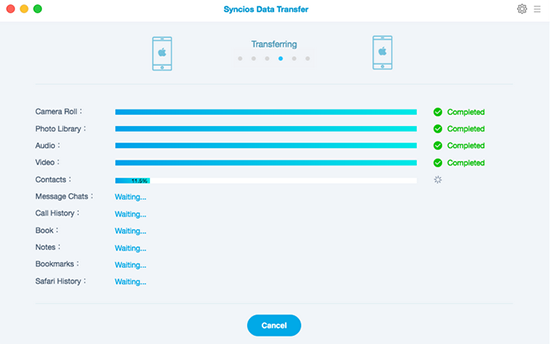
- Install and launch the software on your computer.
- Connect both phones (source and target) to the computer using USB cables and wait for them to be detected.
- Choose the data types you want to transfer, such as contacts, messages, photos, or videos.
- Start the transfer and keep both devices connected until the process is complete.
Part 4: FAQs for Syncios Data Transfer
Q1. Can Syncios transfer all types of data?
Syncios can transfer multiple data types, including contacts, text messages, call logs, photos, videos, music, notes, calendars, apps (where supported), and other media files. However, some app data or system files may not be transferable due to operating system restrictions. It's ideal for moving the majority of your personal content without the need for cloud services.
Q2. Do I need to enable any settings on my phone?
Yes. On Android devices, USB debugging must be enabled to allow the software to access data. On iOS devices, you may need to trust the computer when prompted on your device screen. Following these steps ensures that your devices are correctly recognized and that the transfer can be completed without interruption.
Q3. Can I back up my phone with Syncios?
Yes. Syncios includes backup and restore features that allow you to save your device data to your computer. You can back up selected data types or the entire device. Later, you can restore the data to the same device or a different one, which is especially useful when upgrading to a new phone or switching platforms.
Q4. What operating systems does the software run on?
Syncios Data Transfer is compatible with both Windows and macOS. It works with most recent versions of these operating systems, including Windows 10/11 and macOS Monterey or later. Users should ensure their computer meets the minimum requirements for smooth operation.
Q5. How long does a transfer take?
The duration of a transfer depends on several factors, including the amount of data, the types of files being transferred, the connection speed of the USB cables, and the devices' performance. Large transfers, such as many high-resolution videos and photos, can take longer, while smaller data types like contacts and messages usually complete quickly.
Q6. What if my devices are not recognized?
If a device isn't recognized, first check that you're using a high-quality USB cable and that the device is properly connected. For Android, ensure USB debugging is enabled and that the proper drivers are installed. For iOS, make sure you have trusted the computer on your device screen. Restarting the devices or the software often resolves recognition issues.
Part 5: Syncios Data Transfer: Pros & Cons
The Good:
- Easy to Use: Intuitive interface that's beginner-friendly.
- Cross-Platform Support: Works between Android and iOS devices.
- Wide Data Types: Transfers contacts, messages, photos, videos, music, and more.
- Fast Transfer Speed: Efficient performance for most data types.
- Backup & Restore: Can back up device data to computer and restore later.
- Free Trial Available: Lets you test basic features before buying.
The Bad:
- Paid Software: Full functionality requires a license.
- Limited Free Version: Trial has restrictions on what you can transfer.
- Occasional Compatibility Issues: Some devices or OS versions might require extra steps (like USB debugging)
- User Reviews Vary: Some users report occasional stability issues or crashes.
Part 6: Syncios Data Transfer - Best Replacement
For users looking for a reliable option to move data between devices, MobiKin Transfer for Mobile (Windows/Mac) serves as a strong alternative to Syncios Data Transfer. It allows seamless transfer of contacts, messages, photos, and more across both Android and iOS platforms.
With fast transfer speeds and an easy-to-navigate interface, switching or backing up devices becomes straightforward. Its compatibility with a wide range of smartphones makes it a versatile choice for anyone seeking efficient and hassle-free data management.
|
Advantage
|
Details
|
|
Faster Transfer Speed |
MobiKin often completes large data transfers more quickly, reducing waiting time. |
|
Wider Device Compatibility |
Supports more Android and iOS models, including newer and less common devices. |
|
Selective Transfer |
Allows users to choose specific files or data types to transfer, offering more control. |
|
Simpler Interface |
Designed for beginners with an intuitive layout, making navigation easier. |
|
Stable Performance |
Less prone to interruptions or crashes during data transfers. |
|
One-Click Transfer |
Supports single-click phone-to-phone transfer for quick and efficient operation. |
How to use the best SynciOS Data Transfer alternative - MobiKin Transfer for Mobile?
- Install and launch MobiKin Transfer for Mobile on your computer.
- Link both smartphones to your computer using USB cables.
- Click Trust or follow the on-screen instructions to establish a virtual connection with your device. (If the popup is not visible?)
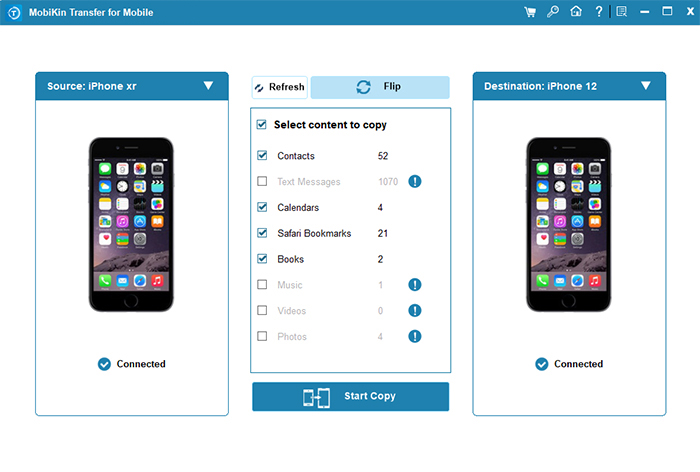
- Once connected, designate the old cell phone as the "Source" device and the new one as the "Destination" device.
- Data will be transferred from the source to the destination.
- You have the option to click "Flip" to change their positions, if necessary.
- All available categories will be displayed in the center of the screen.
- Select the categories you wish to transfer and click on "Start Copy" to begin.


Video Guide:
In the End
While Syncios Data Transfer offers a solid foundation for moving and backing up data, some users may find themselves wishing for faster speeds, more selective transfer options, and broader device compatibility.
That's where MobiKin Transfer for Mobile quietly steps in, handling your files with the ease of a well-practiced librarian who knows exactly which book goes where - swift, precise, and stress-free - turning the often tedious chore of data migration into a surprisingly pleasant experience.
Related Articles:
Syncios Review - A Complete Review of Syncios Data Transfer & Manager
Syncios Location Changer Review: Does It Deliver on Its Claims?
Top 7 Best FonePaw WhatsApp Transfer Alternatives [Must-read]
Syncios iOS Data Recovery Review: Recover Lost iOS Files with Ease
